
1. Introduktion og overview
Welcome to the NIMO 17.3 AI-Laptop Copilot+ PC user manual. This guide provides essential information for setting up, operating, maintaining, and troubleshooting your new laptop. Designed for high performance and productivity, your NIMO laptop is equipped with advanced features to enhance your daily tasks, creative work, and entertainment.
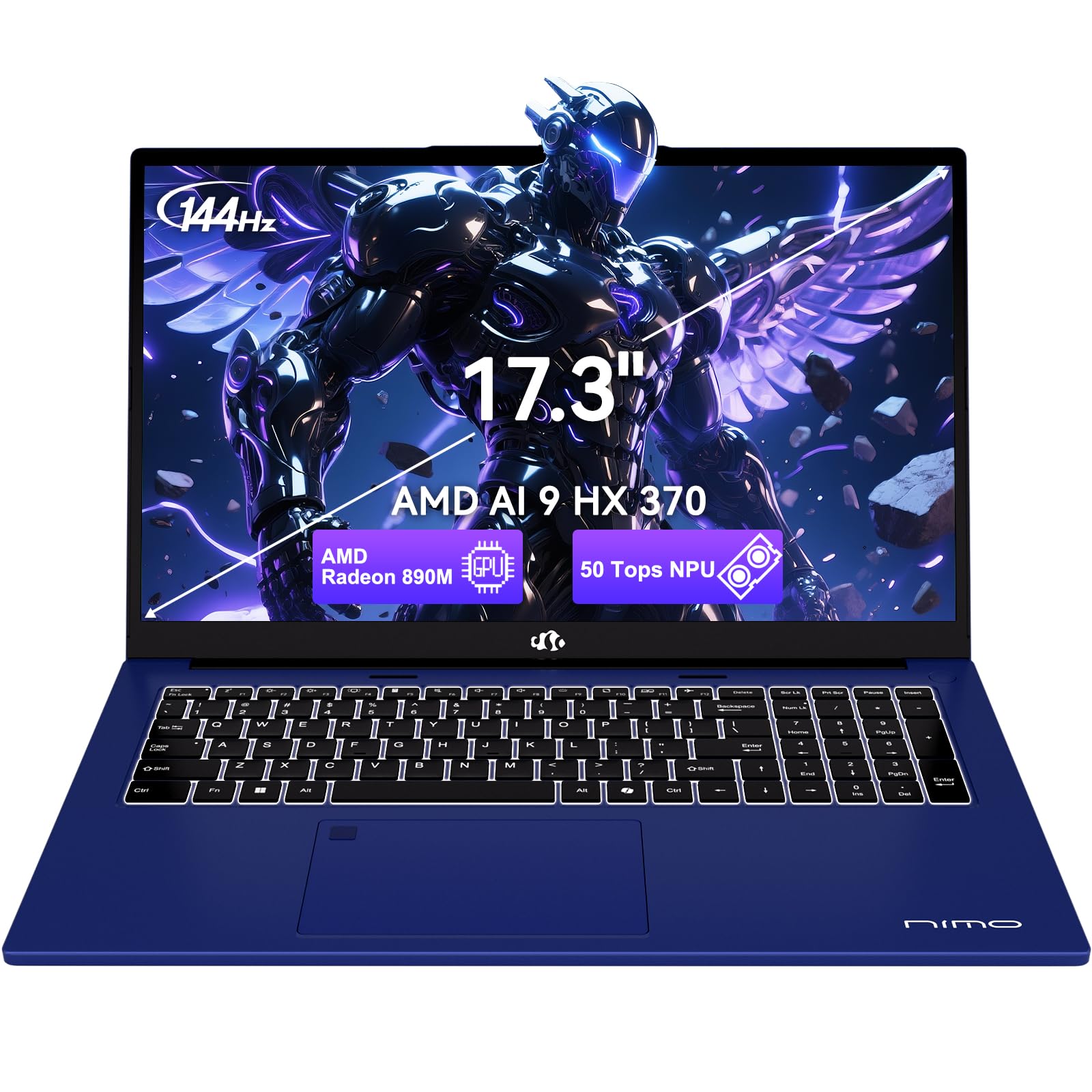
Figure 1.1: NIMO 17.3 AI-Laptop Copilot+ PC
Nøglefunktioner:
- AI Ryzen Performance: Powered by AMD Ryzen AI 9 HX 370 with Radeon 890M graphics for AI-accelerated performance.
- Spacious 17.3-Inch Display: Tilbud ample workspace with a 144Hz refresh rate for smooth visuals.
- Langvarig batterilevetid: Equipped with a 75Wh high-capacity battery for extended use.
- 100W GaN hurtigopladning: Quick and efficient recharging via USB-C PD.
- Advanced USB-C 4.0 Connectivity: Supports 40Gbps data transfer, 8K external displays, and eGPU docking.
- Comfortable Backlit Keyboard: Ensures accurate typing in various lighting conditions.
- Fast Fingerprint Unlock: Secure and instant access to your system.
- Fuldt numerisk tastatur: Ideal for data entry and productivity tasks.

Figure 1.2: AMD Ryzen AI 9 HX 370 Processor Capabilities

Figure 1.3: AI Power for Real Life with 50 TOPS NPU

Figure 1.4: Radeon 890M Integrated Graphics Performance
Produkt overview Video:
Video 1.1: NIMO 17.3 AI370 Laptop Overview. This video provides a quick visual introduction to the NIMO AI-Laptop's design and key features.
2. Opsætning
2.1 Udpakning og første inspektion
Carefully remove all items from the packaging. The box should contain:
- 1 x NIMO 17.3" AI-bærbar computer
- 1 x Type-C 100W PD hurtigoplader
- 1 x Brugermanual (dette dokument)
- Windows 11 Home pre-installed
Inspect the laptop and accessories for any signs of damage. If any items are missing or damaged, please contact NIMO customer support immediately.
2.2 Tænding og første opladning
- Connect the Type-C 100W PD Fast Charger to the USB-C 4.0 port on your laptop and to a power outlet.
- Lad den bærbare computer oplade i mindst 30 minutter før første brug, eller indtil batteriindikatoren viser tilstrækkelig opladning.
- Open the laptop lid. The system should power on automatically. If not, press the power button located on the top right of the keyboard.
- Følg instruktionerne på skærmen for at fuldføre installationsprocessen for Windows 11 Home. Dette inkluderer valg af region og sprog, oprettelse af forbindelse til et Wi-Fi-netværk og oprettelse af en brugerkonto.

Figure 2.1: Connecting the 100W PD Fast Charger

Figur 2.2: Hurtigopladningsfunktion
3. Operating Your NIMO AI-Laptop
3.1 Tastatur og touchpad
The NIMO AI-Laptop features a full-size backlit keyboard with a dedicated numeric keypad for enhanced productivity. The multi-touch precision touchpad allows for intuitive navigation and gestures.
- Baggrundsbelyst tastatur: Trykke Fn + F10 (or the key with the keyboard backlight icon) to cycle through backlight brightness levels.
- Numerisk tastatur: Use the dedicated numeric keypad for quick data entry. Ensure Num Lock is enabled.
- Præcisions-touchpad: Supports multi-finger gestures for scrolling, zooming, and switching applications. Refer to Windows settings for customization.
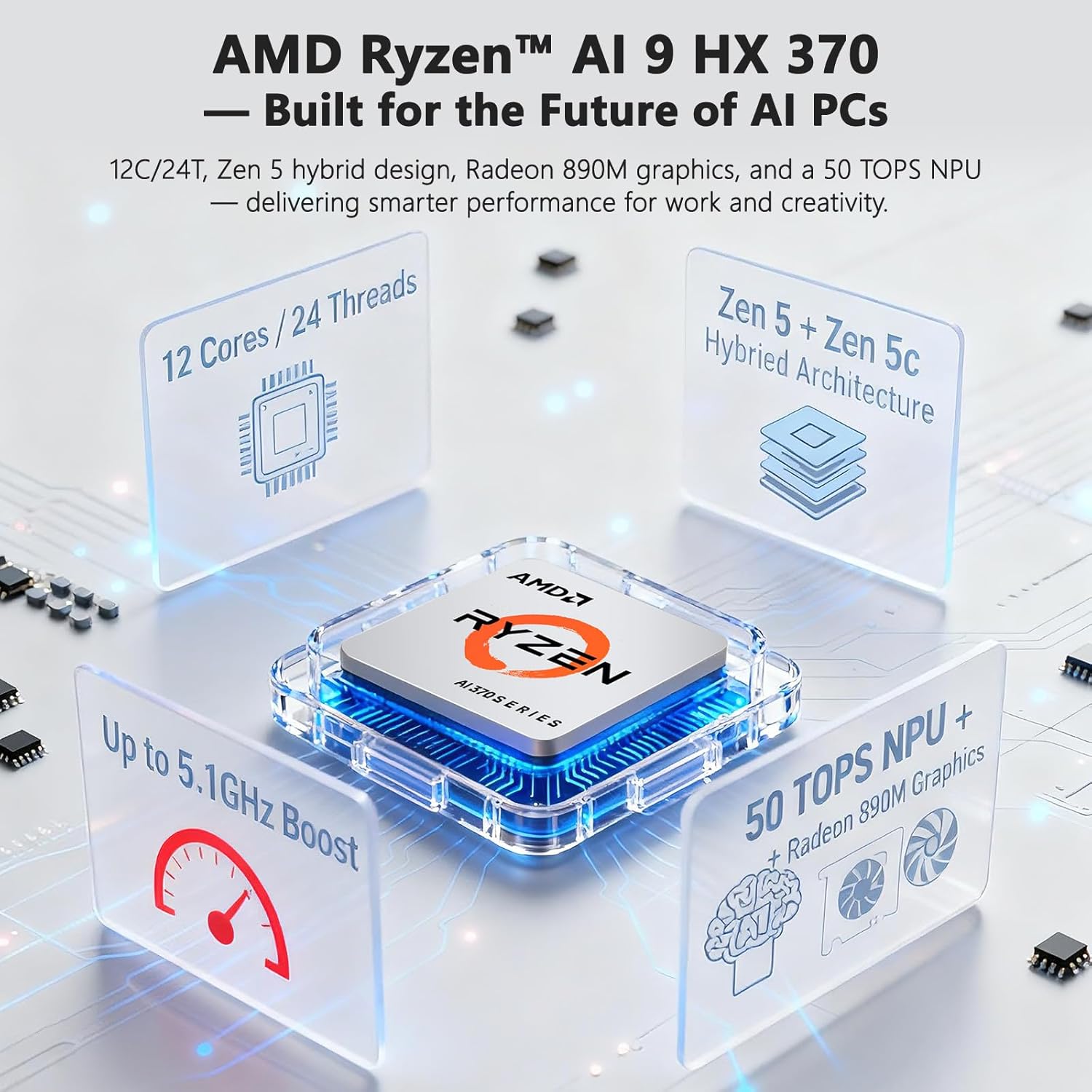
Figure 3.1: Backlit Keyboard and Touchpad

Figure 3.2: Fingerprint Unlock and Backlit Keyboard
3.2 Skærmfunktioner
Your NIMO AI-Laptop features a 17.3-inch Full HD (1920x1080) display with a 144Hz refresh rate, providing a smooth and immersive visual experience.
- Høj opdateringshastighed: The 144Hz refresh rate reduces motion blur and provides a more fluid experience, especially beneficial for gaming and fast-paced content.
- Skærmstørrelse: The large 17.3-inch display offers ample screen real estate for multitasking, creative applications, and immersive viewing.

Figure 3.3: 17.3-inch Display for Work and Creation

Figure 3.4: 144Hz Refresh Rate Visual Difference
3.3 AI Features with Copilot+
Your NIMO AI-Laptop is a Copilot+ PC, leveraging the AMD Ryzen AI 9 HX 370's Neural Processing Unit (NPU) for enhanced AI capabilities directly on your device. This enables features such as:
- Real-Time Notes & Translation: Copilot+ can record, summarize, and translate content as you work.
- AI-Powered Creation: Accelerate creative processes with intelligent image, video, and text tools.
- Smart Recall: Instantly find any file, webpage, or chat you've seen before.
- Enhanced Video Calls: Features like background blur, auto framing, and noise reduction for clearer communication.
Video 3.1: NIMO 17.3" AI Laptop AI Features. This video demonstrates the AI capabilities of the laptop, including Copilot+ functionalities.
3.4 Porte og tilslutningsmuligheder
The NIMO AI-Laptop offers comprehensive connectivity options:
- USB-C 4.0: Supports 40Gbps data transfer, 100W Power Delivery, and 8K external displays.
- HDMI: Til tilslutning af eksterne skærme eller projektorer.
- USB 3.2 og USB 2.0: For connecting various peripherals.
- SD-kortplads: For easy transfer of photos and files.
- Hovedtelefonkombinationsstik: Til lydindgang/udgang.
- Kensington Lock Slot: For fysisk sikkerhed.
- Trådløs forbindelse: Wi-Fi 6E and Bluetooth for network and device connections.

Figur 3.5: Side View med havne

Figure 3.6: Comprehensive Multi-Port Design
3.5 Privatlivsfunktioner
The laptop includes a built-in privacy camera switch, allowing you to physically disable the 2.0MP webkameraet, når det ikke er i brug, hvilket sikrer dit privatliv.

Figure 3.7: Privacy-Focused Camera Convenience
4. Vedligeholdelse
4.1 Pleje af batterier
- Udsæt ikke batteriet for overdreven varme eller ild.
- Avoid completely draining the battery regularly. It is recommended to keep the charge between 20% and 80% for optimal battery longevity.
- Use only the provided 100W USB-C PD GaN charger or a compatible charger to prevent damage.
4.2 Rengøring af din bærbare computer
- Brug en blød, fnugfri klud dampskylles med vand eller en skærmrens for at rengøre skærmen.
- Brug en blød, tør klud til tastaturet og kabinettet. En dåse med trykluft kan bruges til at fjerne støv mellem tasterne.
- Undgå at bruge skrappe kemikalier, slibemidler eller opløsningsmidler.
4.3 Softwareopdateringer
Regularly check for and install Windows updates and driver updates to ensure optimal performance, security, and compatibility. You can typically find driver updates on the NIMO official support webwebsted.
5. Fejlfinding
This section covers common issues you might encounter with your NIMO AI-Laptop. For more detailed troubleshooting or issues not listed here, please refer to the NIMO support webwebsted eller kontakt kundeservice.
| Problem | Mulig løsning |
|---|---|
| Den bærbare computer tænder ikke. | Ensure the charger is properly connected and the power outlet is working. Try holding the power button for 15-20 seconds to perform a hard reset. |
| Batteriet oplades ikke. | Verify charger connection. Try a different power outlet. Ensure the charger is the original NIMO 100W PD charger. |
| Problemer med Wi-Fi-forbindelse. | Restart your router and laptop. Check Wi-Fi drivers in Device Manager. Ensure Wi-Fi is enabled in Windows settings. |
| Langsom ydeevne. | Close unnecessary applications. Check for background processes. Ensure Windows and drivers are up to date. Run a disk cleanup. |
| Tastaturets baggrundsbelysning virker ikke | Press Fn + F10 (or the key with the keyboard backlight icon) to adjust brightness. |
6. Specifikationer
Detailed technical specifications for your NIMO 17.3 AI-Laptop Copilot+ PC:
| Feature | Detalje |
|---|---|
| Mærke | NIMO |
| Modelnavn | 16GB DDR5 RAM|1TB SSD |
| Skærmstørrelse | 17.3 tommer |
| Farve | Himmelblå |
| Harddisk størrelse | 1024 GB |
| CPU model | Ryzen 9 (AMD Ryzen AI 9 HX 370) |
| Installeret RAM-hukommelsesstørrelse | 16 GB DDR5 |
| Operativsystem | Windows 11 Home |
| Grafik coprocessor | AMD Radeon 890M |
| Harddisk beskrivelse | SSD (PCIe 4.0) |
| Varens vægt | 4.6 pund |
| Batterilevetid (gennemsnitlig) | 12 timer |
| Batteriets energiindhold | 75 wattimer |
| Skærmopløsning | 1920 x 1080 pixels (Fuld HD) |
| Opdateringshastighed | 144 Hz |
| Trådløs forbindelse | Wi-Fi 6E, Bluetooth |
| Samlet USB-porte | 5 (including USB-C 4.0) |
| HDMI porte | 1 |
| Webcam | 2 MP frontkamera |
7. Garanti og support
7.1 Garantioplysninger
Your NIMO AI-Laptop comes with a 2-års garanti from NIMO Direct Inc. This warranty covers manufacturing defects and ensures peace of mind for your purchase.
Additionally, NIMO offers a 90-Day Free Return policy from the date of purchase. Please refer to the terms and conditions on the NIMO official webwebstedet for alle detaljer.

Figure 7.1: NIMO 2-Year Support
7.2 Kundesupport
For any product-related questions, technical assistance, or warranty claims, please contact NIMO customer support:
- Officiel Webwebsted: Visit the NIMO official webwebsted med ofte stillede spørgsmål, driverdownloads og supportressourcer.
- E-mail support: service@nimopc.com
- Telefonsupport: Contact details may be available on the official webwebsted eller produktemballage.
NIMO is committed to providing professional and high-quality customer service to ensure your satisfaction.

Figure 7.2: Professional Customer Assistance