
Indledning
This manual provides detailed instructions for the MOZC Bluetooth Headset 530-2. Please read this guide carefully to understand the product's features, setup, operation, and maintenance. Proper use will ensure optimal performance and extend the lifespan of your device.
Officiel produktvideopræsentationasing the MOZC Bluetooth Headset 530-2.
Sikkerhedsoplysninger
Vigtige forholdsregler
- Do not expose the headset or charging case to extreme temperatures, direct sunlight, or high humidity.
- Undgå at tabe eller udsætte enheden for kraftige stød.
- Hold enheden utilgængeligt for børn og kæledyr.
- Forsøg ikke selv at skille ad, ændre eller reparere enheden. Dette kan ugyldiggøre garantien og forårsage skade.
- Use only the provided USB-C charging cable and charging case to prevent damage and ensure safety.
- Undgå at lytte ved høje lydstyrker i længere perioder for at forhindre høreskader.
Pakkens indhold
Bekræft, at alle nedenstående varer er inkluderet i din pakke:
- MOZC Bluetooth Headset (1)
- Opladningsetui (1)
- USB-C opladningskabel (1)
- Ear Tips (2 pairs - different sizes for optimal fit)
- Brugervejledning (dette dokument)

The MOZC Bluetooth Headset and its portable charging case, as typically found in the product packaging.
Produkt overview
Komponenter og kontroller
- Multifunktionsknap (MFB): Located on the main body of the headset, used for power, call management, and music control.
- Lydstyrkeknapper (+/-): Adjacent to the MFB, used to adjust volume and navigate tracks.
- USB-C opladningsport: Located at the end of the headset for direct charging.
- LED-indikator: A small light on the headset that displays power, pairing, and charging status.
- Mikrofon: Unidirectional with Environmental Noise Cancellation (ENC) for clear voice pickup.
- Adjustable Earhook: Designed to rotate 180° vertically and 360° horizontally, allowing comfortable wear on either the left or right ear.
- Højttaler: In-ear design for secure and comfortable fit.

The MOZC Bluetooth Headset featuring its ergonomic design and adjustable earhook.
Opsætning
1. Opladning af headsettet
Before first use, fully charge the headset and its charging case.
Opladning med opladningsetui:
- Place the headset securely into the charging case.
- Connect the provided USB-C cable to the charging case's port and the other end to a compatible USB power source (e.g., wall adapter, computer USB port).
- LED-displayet på opladningsetuiet viser den aktuelle batteriprocent.tage, der angiver opladningsstatus.
- The headset's indicator light will glow red while charging and turn off once fully charged.

The MOZC Bluetooth Headset charging within its case, with the digital display showing battery level.
Direct Charging the Headset:
- Connect the USB-C cable directly to the charging port on the headset.
- Connect the other end of the USB-C cable to a compatible USB power source.
- The headset's indicator light will glow red while charging and turn off once fully charged.

Et nærbillede view of the MOZC Bluetooth Headset's USB-C charging port, with the cable connected for direct charging.
2. Parring med din enhed
- Sørg for, at headsettet er fuldt opladet og slukket.
- Tryk og hold på Multifunktionsknap (MFB) for approximately 3 seconds until the LED indicator flashes blue and red alternately. This indicates the headset is in pairing mode.
- On your smartphone or Bluetooth-enabled device, go to the Bluetooth settings menu.
- Søg efter available devices. You should see "YYK-530" or "MOZC 530-2" in the list.
- Select the device name to connect. Once successfully paired, the headset's LED indicator will flash blue slowly.
- Hvis du bliver bedt om en adgangskode, skal du indtaste "0000".

A smartphone screen displaying the Bluetooth settings, with the MOZC headset (YYK-530) shown as connected.
Drift
Grundlæggende funktioner
- Tænd: Tryk og hold MFB nede i 3 sekunder.
- Sluk: Tryk og hold MFB nede i 5 sekunder.
- Besvar/afslut opkald: Single press the MFB during an incoming or active call.
- Afvis opkald: Long press the MFB for 2 seconds during an incoming call.
- Afspil/sæt musik på pause: Single press the MFB during music playback.
- Lydstyrke op/ned: Tryk på knapperne '+' eller '-' for at justere lydstyrken.
- Næste / forrige nummer: Long press the '+' button for the next track, long press the '-' button for the previous track.
- Aktivér stemmeassistent (Siri/Google Assistant): Dobbelttryk på MFB.
- Slå mikrofon fra: Double press the volume down button during an active call.
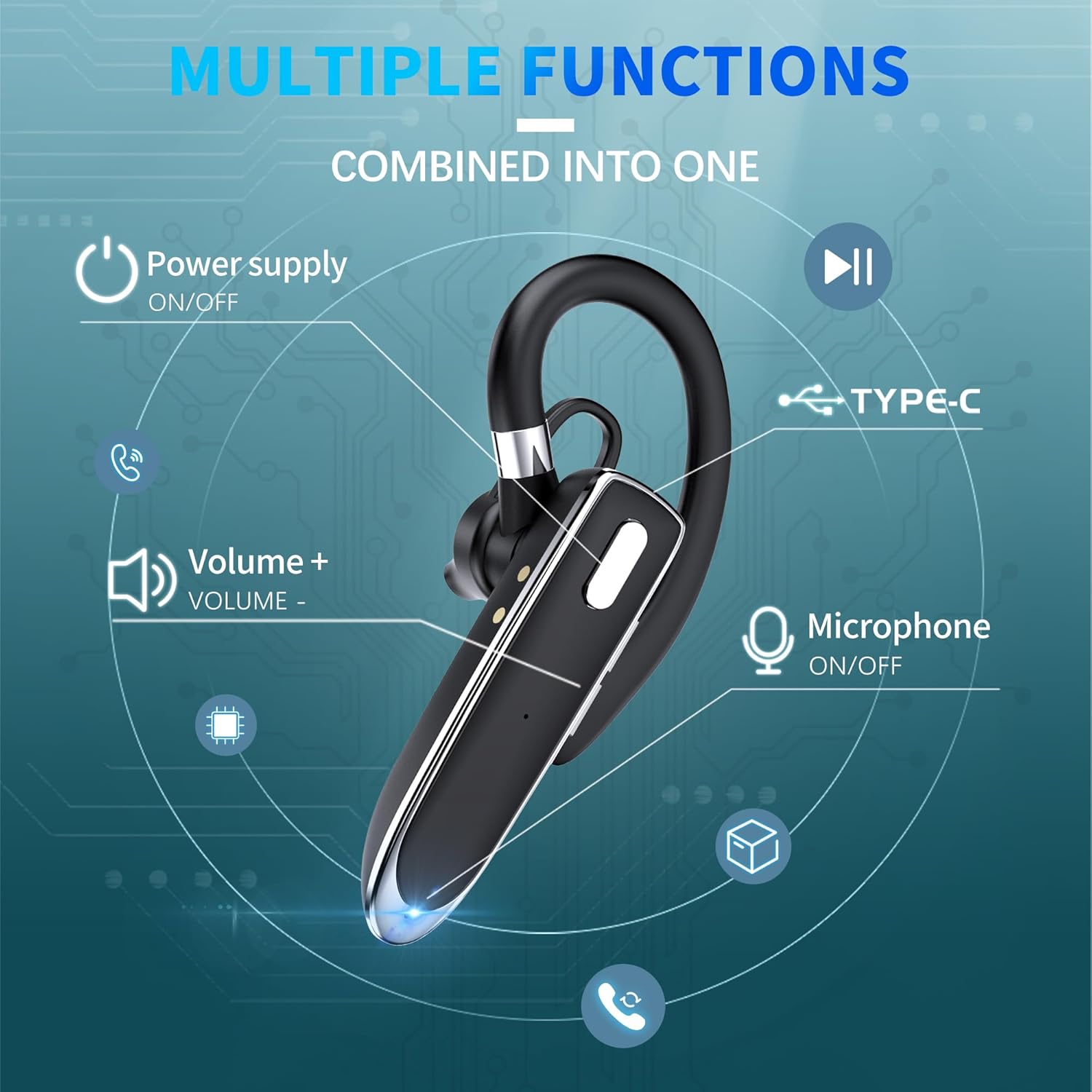
A visual guide to the multi-function buttons and their corresponding actions on the MOZC Bluetooth Headset.
Dobbelt enhedsforbindelse
The MOZC Bluetooth Headset supports simultaneous connection to two Bluetooth devices, such as two smartphones or a smartphone and a laptop. This allows for seamless switching between calls and media.
- Pair the headset with the first device following the standard pairing instructions.
- Once connected, temporarily disable Bluetooth on the first device.
- Put the headset back into pairing mode (LED flashes blue and red).
- Par headsettet med den anden enhed.
- After successful pairing with the second device, re-enable Bluetooth on the first device. The headset should automatically connect to both devices.

The MOZC Bluetooth Headset demonstrating its ability to connect to multiple devices like a laptop, tablet, and smartphone.
Opretholdelse
Rengøring og pleje
- Regularly wipe the headset and charging case with a soft, dry, lint-free cloth.
- Brug ikke slibende rengøringsmidler, opløsningsmidler eller stærke kemikalier, da disse kan beskadige enheden.
- Ensure the charging ports and earpiece are clean and free of dust or debris to maintain optimal performance.
Vandmodstand
The MOZC Bluetooth Headset is designed with a waterproof rating, making it resistant to sweat and light splashes. This makes it suitable for use during workouts or in light rain.
Vigtig: The headset is not designed for submersion in water. Do not use it while swimming, showering, or expose it to strong jets of water. Water damage is not covered under warranty.
Fejlfinding
Fælles problemer og løsninger
| Spørgsmål | Løsning |
|---|---|
| Kan ikke parres med enheden | Ensure the headset is in pairing mode (LED flashing blue/red). Turn off and on Bluetooth on your device. Restart both the headset and your device. |
| Ingen lyd eller lav lydstyrke | Check the volume levels on both your connected device and the headset. Ensure the headset is properly connected to your device. |
| Intermittent connection or disconnections | Ensure your device is within the Bluetooth range (up to 15 meters) of the headset. Avoid physical obstacles between the headset and your device. |
| Headsettet oplader ikke | Verify that the USB-C cable and power source are working correctly. Ensure the headset is correctly placed in the charging case or the cable is securely connected to the headset's charging port. |
| Mikrofon virker ikke | Ensure the microphone is not muted (double-press volume down during a call). Check your device's settings to ensure the headset is selected as the microphone input. |
Nulstilling af headsettet
If you encounter persistent issues that cannot be resolved with the above solutions, you may need to reset the headset. Please refer to the detailed instructions in the included paper manual for the specific reset procedure for your model.
Specifikationer
Tekniske detaljer
- Modelnavn: 530-2
- Forbindelse teknologi: Trådløs
- Trådløs kommunikationsteknologi: Bluetooth 6.1
- Bluetooth Range: 15 meter
- Battery Life (Headset): 12 timer
- Opladningsæskekapacitet: 800mAh
- Samlet spilletid (med etui): Op til 100 timer
- Opladningstid: 1.5 timer
- Kontroltype: Button Control (Push Button)
- Støjkontrol: Miljømæssig støjreduktion (ENC)
- Vandmodstandsniveau: Vandtæt
- Materiale: Acrylonitril Butadien Styren (ABS), Plast
- Varens vægt: 13 gram (0.459 ounce)
- Øreplacering: In Ear
- Særlige funktioner: Fast Charging, Lightweight, Noise Cancellation, Voice Assistant Support
- Kompatible enheder: Cellphones, Laptops, Tablets, Telephones (compatible with almost all Bluetooth devices)
Garanti og support
Garantioplysninger
MOZC products typically come with a standard manufacturer's warranty. For specific details regarding your product's warranty period, coverage, and terms, please refer to the warranty card included in your product packaging. You may also visit the official MOZC webwebsted for de mest opdaterede garantioplysninger.
Kundesupport
Should you require any assistance, technical support, or have questions regarding your MOZC Bluetooth Headset 530-2, please do not hesitate to contact our customer service team. Contact information can typically be found on the product packaging, the official MOZC webwebstedet eller i den medfølgende dokumentation.