
Indledning
Thank you for choosing the uaue T70-AI Smartwatch. This device is designed to enhance your daily life with advanced features including AI assistance, comprehensive health monitoring, and smart communication capabilities. This manual provides essential information for setting up, operating, and maintaining your smartwatch.
Hvad er der i æsken
- uaue T70-AI Smartwatch
- Opladningskabel (magnetisk)
- Brugermanual
Opsætning
1. Første opladning
Oplad dit smartwatch helt før første brug. Tilslut det magnetiske opladningskabel til opladningspunkterne på bagsiden af uret, og sæt USB-enden i en strømadapter (medfølger ikke) eller en computers USB-port. En fuld opladning tager typisk cirka 2 timer.

Image: The smartwatch displaying its charging status and battery life information.
2. Appinstallation og parring
To unlock all features, download and install the "Glory Fit" application on your smartphone. The app is compatible with both Android and iOS operating systems.
- Scan the QR code in the manual or on the watch screen (if available) or search for "Glory Fit" in your phone's app store.
- Open the "Glory Fit" app and create an account or log in.
- Follow the in-app instructions to pair your smartwatch via Bluetooth. Ensure Bluetooth is enabled on your phone.
- For AI functions and Bluetooth calls, ensure the watch is connected to the "Glory Fit" app and that the app is running in the background on your phone.
Betjening af smartwatchet
Grundlæggende navigation
- Berøringsskærm: Stryg til venstre, højre, op eller ned for at navigere gennem menuer og funktioner. Tryk for at vælge.
- Side knap: Typically used to return to the home screen or activate/deactivate the display.
Tilpasning af urskiver
The smartwatch features a 1.91-inch HD TFT color display. You can personalize your watch face:
- Pre-installed Faces: Swipe on the home screen to change watch faces.
- "Glory Fit" App: Access over 100 watch faces through the app.
- Brugerdefinerede ansigter: Upload dine egne fotos via appen for at oprette personlige urskiver.
- AI Watch Faces: Describe your preferences to the AI, and it will generate unique watch face designs.

Billede: Eksamples of AI-generated and customized watch faces on the smartwatch display.
Sundhedssporing
The smartwatch provides 24/7 health monitoring with advanced sensors and optimized algorithms.
- Heart Rate Monitoring: Sporer din puls kontinuerligt hele dagen.
- Søvnovervågning: Analyserer dine søvnmønstre, herunder dyb søvn, let søvn og vågentidspunkter.
- SpO2-overvågning: Måler dit iltniveau i blodet.
- Skridttæller: Counts your steps, distance, and estimated calories burned.
- Sporing af menstruationscyklus: Supports tracking for female health.
AI Health Analysis Reports
Through the "Glory Fit" app, the smartwatch generates exclusive health reports and recommendations based on your collected health data, utilizing AI analysis.

Image: The smartwatch interface showing various health metrics and the AI health analysis feature.
AI funktioner
ChatGPT AI Assistant
The smartwatch integrates a ChatGPT AI assistant. When connected to your phone and paired with the "Glory Fit" app, you can:
- Ask questions and receive instant advice.
- Translate languages.
- Access emotional support and health guidance.
Note: The AI function requires a continuous Bluetooth connection to the "Glory Fit" app running on your phone.

Image: The smartwatch demonstrating its ChatGPT AI assistant functionality.
Sportstilstande og aktivitetssporing
The smartwatch offers over 110 sports modes for both indoor and outdoor activities, including walking, running, cycling, rope skipping, basketball, football, and more.
- Accurately records training data such as steps, heart rate, calories burned, and distance.
- Provides all-day activity tracking to monitor your fitness progress.

Image: The smartwatch interface showing sports mode tracking and activity data.
Smart Notifications and Calls
Bluetooth-opkald
Equipped with a high-quality microphone and speaker, the smartwatch allows you to:
- Make, answer, or reject calls directly from your wrist.
- Synchronize contacts and view opkaldslister.
Information Reminders
The activity tracker synchronizes SMS and application notifications (e.g., WhatsApp, Twitter, Facebook, Instagram). Notifications will display on the watch when the "Glory Fit" app is active and configured to receive messages.
Image: The smartwatch displaying Bluetooth call features and smart notifications from social media and messaging applications.
Andre smarte funktioner
The smartwatch includes various other useful functions to simplify your daily life:
- Vejrudsigter: Få vejropdateringer i realtid.
- Musik kontrol: Styr musikafspilning på din smartphone.
- Kamerastyring: Fjernbetjen din telefons kamera.
- Vækkeur: Indstil alarmer for påmindelser.
- Stopur og timer: Vigtige værktøjer til timing af aktiviteter.
- AI Agents: Additional AI-powered utilities.
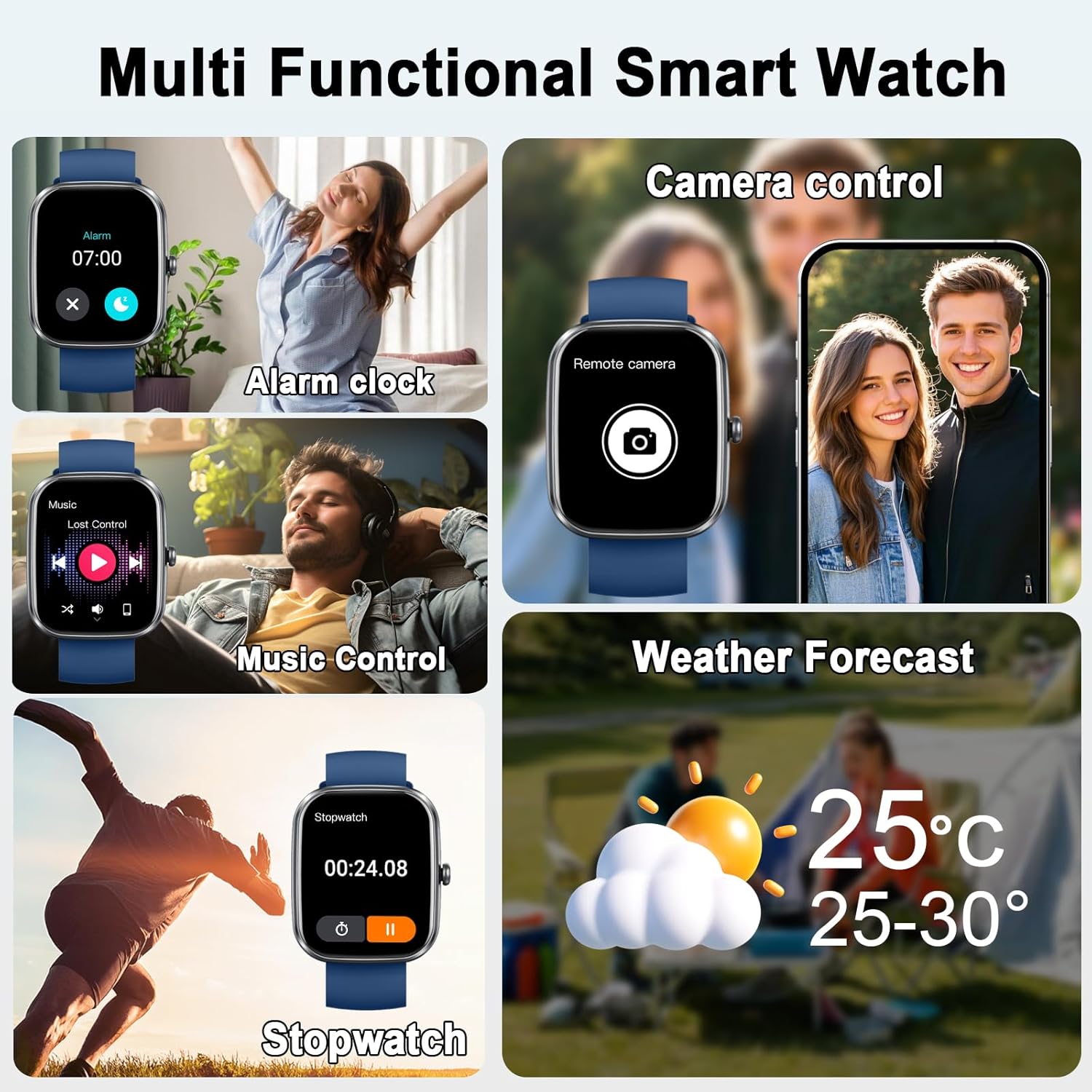
Image: The smartwatch demonstrating its multi-functional capabilities including alarm, music, camera, weather, and stopwatch.
Batterilevetid og opladning
The smartwatch features a magnetic charging design and a 400 mAh Lithium-polymer battery.
- Opladningstid: Cirka 2 timer for en fuld opladning.
- Gennemsnitlig forbrug: Op til 7 dage.
- Standby tid: Op til 30 dage.
Billede: Smartwatch-showetasing its long battery life and charging specifications.
Vandtæthed (IP68)
The smartwatch has an IP68 water resistance rating, meaning it is protected against dust and can withstand immersion in water up to 1.5 meters for up to 30 minutes.
- Suitable for daily use, including exposure to rain, splashes, and sweat during sports activities.
- Vigtig bemærkning: It is not recommended to wear the watch during showering or swimming, as hot water, steam, or prolonged immersion may compromise the seal.
Image: Visual representation of the smartwatch's IP68 water resistance against rain, splashes, and sweat.
Opretholdelse
- Rensning: Tør uret og remmen regelmæssigt af med en blød, tør klud. Brug om nødvendigt en let tør klud.amp klud og tør grundigt.
- Undgå kemikalier: Brug ikke skrappe kemikalier, rengøringsmidler eller stærke vaskemidler, da disse kan beskadige urets finish og forseglinger.
- Opladningskontakter: Hold de magnetiske opladningskontakter rene og tørre for at sikre effektiv opladning.
- Opbevaring: Opbevar uret et køligt og tørt sted, når det ikke er i brug.
Fejlfinding
- Uret tænder ikke:
Sørg for, at uret er fuldt opladet. Tilslut det til opladeren i mindst 30 minutter.
- Kan ikke parres med telefon:
1. Sørg for, at Bluetooth er aktiveret på din telefon, og at uret kan ses.
2. Make sure the "Glory Fit" app is installed and running.
3. Try restarting both your phone and the smartwatch.
4. If previously paired, remove the watch from your phone's Bluetooth device list and try pairing again.
- Ikke modtaget meddelelse:
1. Check if the "Glory Fit" app has notification permissions enabled on your phone.
2. Ensure the app is running in the background and the watch is connected via Bluetooth.
3. Verify notification settings within the "Glory Fit" app.
- AI-funktioner virker ikke:
Ensure the smartwatch is actively connected to the "Glory Fit" app via Bluetooth and the app is running on your phone.
- Unøjagtige sundhedsdata:
Sørg for, at uret sidder tæt på dit håndled, ikke for stramt eller for løst. Hold sensorområdet rent.
Specifikationer
| Mærke | uaue |
| Modelnummer | T70-AI |
| Skærmstørrelse | 1.91 tommer |
| Operativsystem | Android/iOS-kompatibel |
| Forbindelse | Bluetooth |
| Særlige funktioner | AI Health Analysis, Bluetooth Calling, ChatGPT, 24/7 Heart Rate, Sleep Monitor, Smart Notifications, Activity Tracking, Pedometer, 110+ Sports Modes, Alarm, Stopwatch, Timer, Music Control, Remote Camera, Weather Forecasts, Female Health, Magnetic Charging, AI Agent |
| Batterikapacitet | 400 mAh (lithium-polymer) |
| Vandmodstand | IP68 |
| Hukommelseslagringskapacitet | 1 GB |
Garanti og support
Specific warranty information may vary by region and retailer. Please refer to your purchase documentation or contact your retailer for details regarding warranty coverage.
For technical support or further assistance, please refer to the "Glory Fit" app's help section or visit the official uaue webwebsted (hvis tilgængeligt).