
1. Introduktion
Thank you for choosing the Amico 24 Inch Industrial Oscillating Wall Mount Fan. This manual provides essential information for the safe and efficient installation, operation, and maintenance of your fan. Please read these instructions thoroughly before use and retain them for future reference.
This high-velocity industrial fan is designed for optimal air circulation in various demanding environments such as metal shops, warehouses, garages, and greenhouses. It features a durable DC motor, 8 adjustable speeds, 90° electric oscillation, and a 30° manual vertical tilt, all controllable via remote or wired control.
2. Opsætningsvejledning
2.1 Udpakning og inspektion
Carefully remove all components from the packaging. Inspect for any damage that may have occurred during transit. Ensure all parts listed in the packing list are present. If any parts are missing or damaged, do not proceed with installation; contact customer support immediately.
2.2 Ventilator Dimensioner
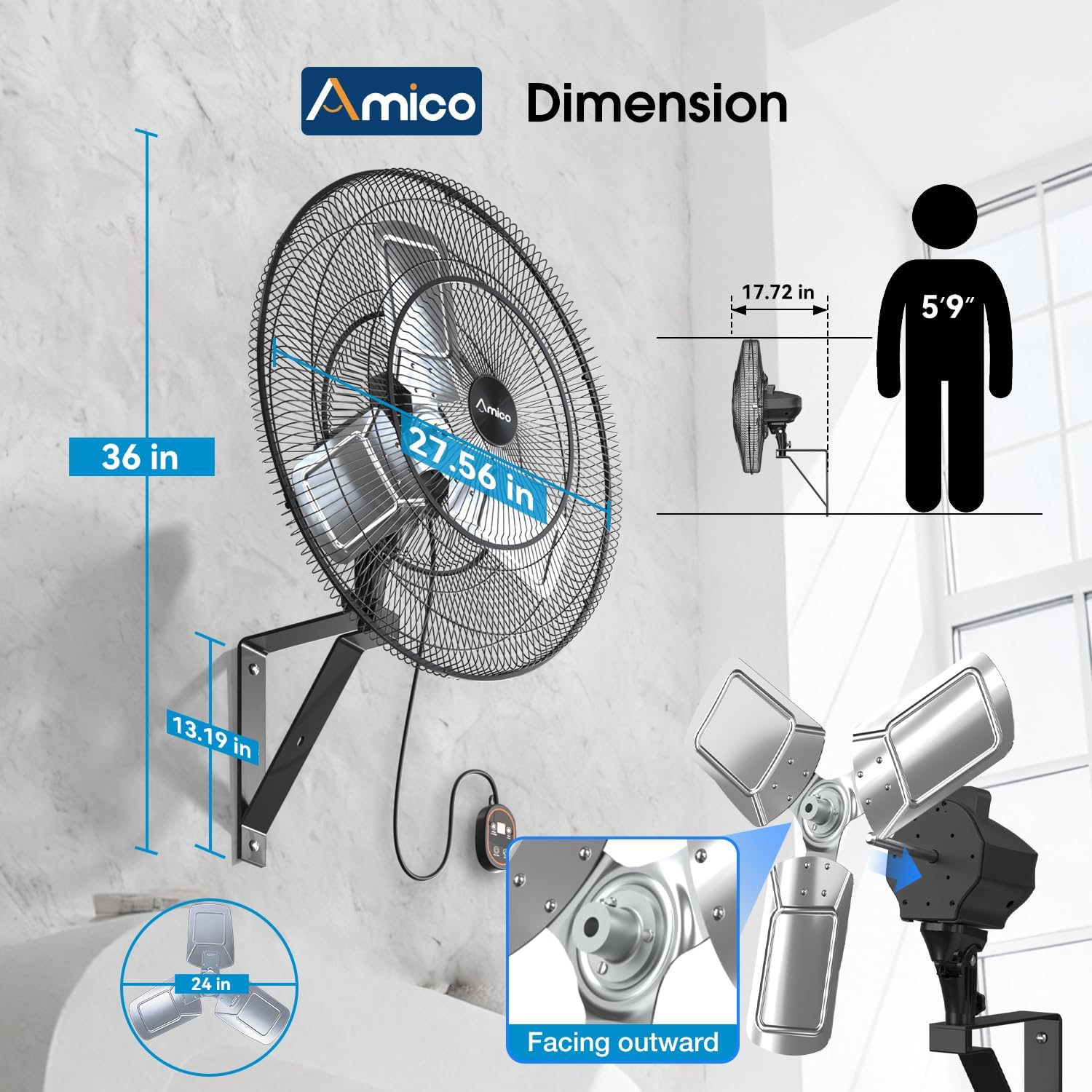
Understanding the fan's dimensions is crucial for proper placement and installation. The fan measures approximately 36.02 inches (D) x 27.56 inches (W) x 27.56 inches (H).
2.3 Montering
The fan requires some assembly before mounting. Follow these steps:
- Attach the Rear Guard: Secure the rear guard to the motor housing.
- Secure the Blades: Mount the fan blades onto the motor shaft. Vigtig: Ensure the bumped center of the blades is facing the front cover for correct airflow.
- Install the Front Guard: Attach the front guard and fasten it securely.
- Mount Fan Assembly to Bracket: Connect the assembled fan unit to the wall mounting bracket.

2.4 Montering af ventilatoren
The fan is designed for wall mounting. Mounting hardware is included. Most users can complete installation in approximately 30 minutes. Ensure the mounting surface is sturdy enough to support the fan's weight and vibrations during operation.
For detailed visual instructions on installation and operation, please refer to the official seller videos below:
Video: Amico Wall Mount Fan with Remote Control. This video demonstrates the fan's features and basic operation, including remote control functions.
Video: Amico Industrial Wall Mount Fan with Remote Control. This video provides a more comprehensive overview of the industrial fan, including installation tips and advanced features.
3. Betjeningsvejledning
3.1 Tænd/sluk
Connect the fan to a suitable power outlet. Use the remote control or the wired control panel to turn the fan ON or OFF.
3.2 Kontrolmuligheder
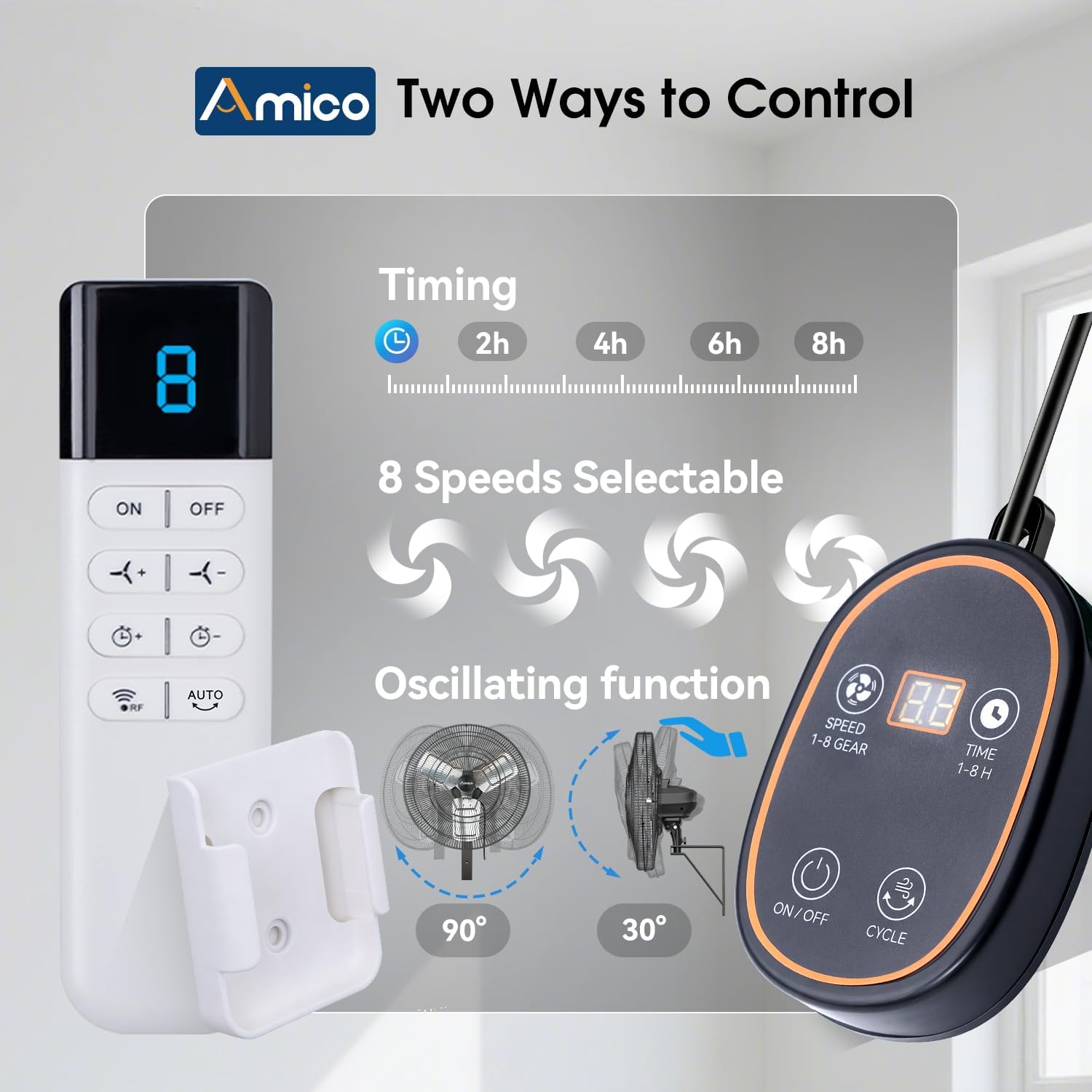
Your Amico fan offers two convenient ways to control its functions:
- Fjernbetjening: Allows you to adjust settings from a distance.
- Wired Control Panel: Provides direct access to all functions on the fan unit.
3.3 hastighedsindstillinger
The fan features 8 adjustable speed levels. Use the speed buttons on the remote or wired control to increase or decrease the airflow intensity. The DC motor provides efficient and powerful air movement up to 8,690 CFM.
3.4 Oscillationsfunktion
Activate the 90° electric oscillation feature to distribute airflow evenly across a wider area. This is particularly useful for larger spaces like workshops or patios.
3.5 Justerbar hældning
The fan head can be manually adjusted up or down by 30° to direct airflow precisely where needed. No tools are required for this adjustment.

3.6 Timer funktion
Set the fan to operate for a specific duration using the timer function. Available timer settings typically include 2, 4, 6, or 8 hours. This feature helps conserve energy and provides convenience.

4. Vedligeholdelse
4.1 Rengøring
Regular cleaning ensures optimal performance and longevity of your fan. The fan is rated IPX4 waterproof, meaning it can withstand splashing water. This makes cleaning easier, especially for outdoor or industrial use.
- Afbryd strømmen: Tag altid stikket ud af ventilatoren før rengøring.
- Udvendig rengøring: Brug en blød, damp cloth to wipe down the exterior surfaces. For stubborn dirt, a mild detergent can be used.
- Rengøring af knive: The aluminum blades are designed for easy cleaning. You may use a damp cloth or a gentle spray of water (due to IPX4 rating) to remove dust and debris. Ensure the fan is completely dry before reconnecting power.
- Rengøring af gitter: Use a vacuum cleaner with a brush attachment or a damp cloth to clean the front and rear grilles.

5. Fejlfinding
If you encounter issues with your Amico wall mount fan, refer to the following common problems and solutions:
| Problem | Mulig årsag | Løsning |
|---|---|---|
| Ventilatoren tænder ikke | No power supply; Power cord not securely plugged in; Remote control batteries depleted; Wired control panel malfunction. | Check power outlet and connections. Replace remote control batteries. If wired control is faulty, contact support. |
| Fan not holding desired tilt position | Tilt adjustment mechanism loose or faulty. | Ensure the manual tilt mechanism is tightened. If the issue persists, contact customer support. |
| Wired remote control not functioning | Cable connection issue; Internal malfunction. | Check the cable connection to the fan. If the unit is still unresponsive, contact customer support. |
| Utilstrækkelig luftbevægelse | Fan blades installed backward; Speed setting too low; Obstruction in front or behind the fan. | Verify blade orientation (bumped center facing front). Increase speed setting. Clear any obstructions. |
| Fan is noisy during oscillation | Loose components; Motor issue; Obstruction. | Check for any loose screws or parts. Ensure no cables or objects are interfering with the oscillation mechanism. If noise persists, contact support. |
If the problem persists after attempting these solutions, please contact Amico customer support for further assistance.
6. Produktspecifikationer
| Feature | Detalje |
|---|---|
| Mærke | Amico |
| Modelnavn | DLT-F600E120C |
| Størrelse | 24 tommer |
| Farve | Sort |
| Produktmål (D x B x H) | 36.02 cm x 27.56 cm x 27.56 cm |
| Strømkilde | DC |
| Motortype | DC børsteløs |
| Antal hastigheder | 8 |
| Luftmængde kapacitet | 8690 CFM |
| Wattage | 115 watt |
| Voltage | 120 volt |
| Støjniveau | 55 dB |
| Særlige funktioner | Adjustable Tilt, Oscillating, Remote Controlled, Timer, Waterproof (IPX4) |
| Controller type | Remote Control, Wired Control |
| Monteringstype | Vægmontering |
| Materiale | Metal |
| Antal blade | 3 |
| Indendørs/Udendørs brug | Indendørs, Udendørs |
| Certificering | ETL |
7. Garanti og support
7.1 Garantioplysninger
Your Amico 24 Inch Industrial Oscillating Wall Mount Fan comes with a 2 års producentgaranti. Denne garanti dækker fejl i materialer og udførelse ved normal brug.
7.2 Kundesupport
Amico is committed to customer satisfaction. We provide:
- 24-Month Worry-Free Support: For any issues or questions regarding your product.
- 24-timers teknisk support: Our technical team is available around the clock to assist you with installation, operation, or troubleshooting.
For assistance, please refer to the contact information provided with your product packaging or visit the official Amico webwebsted.