
Ulanzi MT-44B
Ulanzi MT-44B 2-in-1 Smartphone and Camera Tripod User Manual
Indledning
The Ulanzi MT-44B is a versatile 2-in-1 device designed to function as both a smartphone/camera tripod and a selfie stick. It features an innovative automatic leg deployment system, a 7-stage extendable pole, a 360-degree rotating ball head, and a detachable Bluetooth remote control. This manual provides instructions for safe and effective use of your MT-44B.
Sikkerhedsoplysninger
- Do not exceed the maximum load capacity of the tripod.
- Ensure all locking mechanisms are securely fastened before use to prevent equipment damage.
- Avoid using the tripod in strong winds or unstable environments to prevent tipping.
- Hold enheden væk fra vand og ekstreme temperaturer.
- When collapsing the legs, be cautious to avoid pinching fingers.
Pakkens indhold
- Ulanzi MT-44B Tripod/Selfie Stick
- Bluetooth fjernbetjening
- Brugermanual
Produkt overview
The Ulanzi MT-44B features a main extendable pole, a ball head with a 1/4-inch screw, an integrated 2-in-1 smartphone clip, and four automatically deploying legs. A detachable Bluetooth remote control is housed within the handle.

Image: The 2-in-1 smartphone clip and 1/4-inch screw mount for attaching various devices.
Opsætning
1. Udfoldning af stativbenene
Place the tripod base gently on a flat surface. The innovative touch-to-open design allows the four legs to automatically deploy upon contact with the ground. This eliminates the need for manual unfolding and prevents finger pinching.
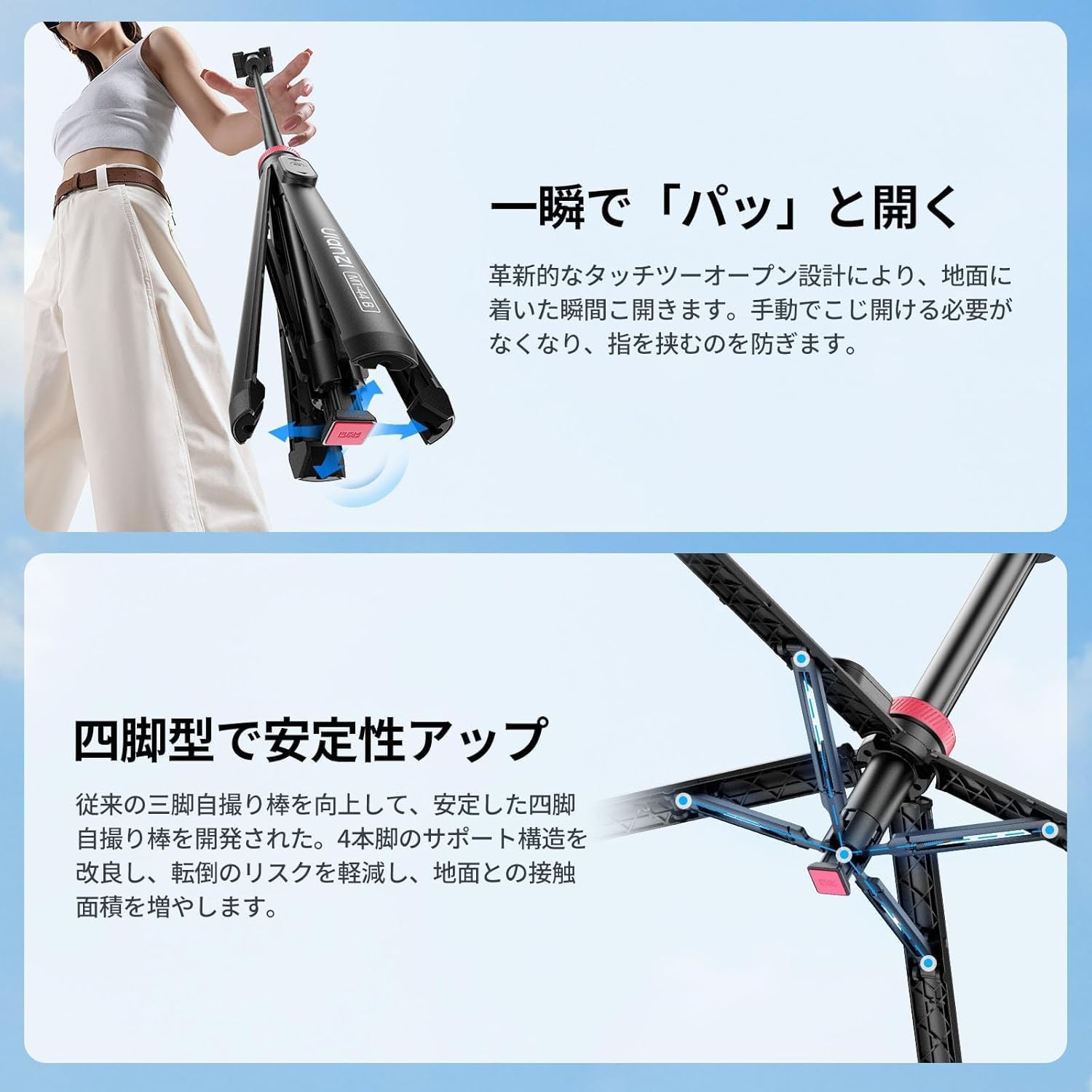
Image: Automatic leg deployment mechanism for quick setup.
2. Tilslutning af din enhed
- Til smartphones: Pull up the integrated 2-in-1 smartphone clip to secure your phone. The clip can hold your smartphone horizontally or vertically by rotating it 90 to 270 degrees.
- For Cameras/Other Devices: If using a camera or other device with a 1/4-inch screw mount, ensure the smartphone clip is folded down. Screw your device onto the 1/4-inch screw located on the ball head.
3. Parring af Bluetooth-fjernbetjeningen
The remote control is located in the handle. Gently push it down to detach. Turn on the remote control. On your smartphone, enable Bluetooth and search for "Ulanzi MT-44B" to pair. Once paired, you can use the remote to trigger your device's shutter from up to 10 meters away.

Image: Detachable remote control for convenient wireless shooting.
Betjeningsvejledning
1. Justering af højden
The MT-44B features a 7-stage extendable pole. To extend, simply pull the pole upwards to your desired height, from 34cm to 150cm. To retract, push the pole downwards until it is fully collapsed.

Image: The tripod extended, demonstrating its 7-stage højdejustering.
2. Adjusting Angle (Ball Head)
The integrated ball head allows for 360-degree rotation and 90-degree vertical shooting. Loosen the knob on the side of the ball head to adjust the angle. Tighten the knob to secure the device in place.

Image: Ball head adjustment for flexible shooting angles.
3. Brug som selfiestang
When the legs are collapsed, the MT-44B functions as a handheld selfie stick. Extend the pole to your desired length and use the Bluetooth remote control for convenient photo or video capture.
4. Dual Camera Shooting
The 2-in-1 design allows for simultaneous use of a smartphone and a camera. Mount your camera on the 1/4-inch screw and attach your smartphone to the integrated clip. This setup is ideal for vlogging or monitoring your camera feed.

Image: Dual camera setup for simultaneous smartphone and camera use.
5. Using the Cold Shoe Mount
The MT-44B includes a cold shoe mount, allowing you to attach accessories such as microphones or LED fill lights to enhance your shooting experience.
Opretholdelse
- Clean the tripod regularly with a soft, dry cloth. Do not use harsh chemicals or abrasive materials.
- Ensure the tripod is fully collapsed and dry before storing.
- Opbevares på et køligt, tørt sted væk fra direkte sollys.
- Check screws and connections periodically for tightness.
Fejlfinding
Remote Control Not Connecting
- Ensure the remote control is charged or has a working battery.
- Sørg for, at Bluetooth er aktiveret på din smartphone.
- Unpair and re-pair the remote control in your smartphone's Bluetooth settings.
- Sørg for, at fjernbetjeningen er inden for en rækkevidde på 10 meter.
Tripod Instability
- Ensure the tripod legs are fully deployed and on a flat, stable surface.
- Do not overload the tripod; check the weight of your device against the tripod's capacity.
- When extended to maximum height, stability may be reduced, especially with heavier devices. Consider using it at a lower height for optimal stability.
Specifikationer
| Mærke | Ulanzi |
| Model | MT-44B |
| Farve | Pink (Note: Product images may show a black/red variant) |
| Funktioner | Fjernbetjening |
| Materiale | Plast |
| Maksimal højde | 150 cm |
| Minimum højde | 34 cm |
| Foldet størrelse | 34 cm |
| Vægt | 415 g |
| Type stativhoved | Kuglehoved |
| Oprindelse | Kina |

Image: The MT-44B in its compact, folded state, highlighting its portability.
Garanti og support
Garanti
Dette produkt leveres med 12 måneders garanti fra købsdatoen, der dækker fabrikationsfejl. Gem venligst din købsbevis til garantikrav.
Støtte
For technical assistance, troubleshooting, or warranty inquiries, please contact Ulanzi customer support through their official webwebstedet eller forhandleren, hvor produktet blev købt.
Ask a question about this manual
Ask about setup, troubleshooting, compatibility, parts, safety, or missing instructions. Manuals+ will review the question and use this page’s manual context to help answer it.