
1. Introduktion
Tak for købetasing the ULTIMEA Aura A60 U2621 7.1ch Dolby Atmos Soundbar System. This manual provides essential information for setting up, operating, and maintaining your new sound system. Please read this manual thoroughly before use to ensure proper functionality and to maximize your audio experience.

Figure 1.1: Immersive audio experience with the ULTIMEA Aura A60 system.
2. Sikkerhedsoplysninger
To reduce the risk of electric shock, fire, or damage to your device, please observe the following safety precautions:
- Udsæt ikke dette apparat for regn eller fugt.
- Anbring ikke genstande fyldt med væske, såsom vaser, på apparatet.
- Sørg for tilstrækkelig ventilation. Bloker ikke ventilationsåbninger.
- Må ikke installeres i nærheden af varmekilder såsom radiatorer, varmeapparater, komfurer eller andre apparater (inklusive ampløftere), der producerer varme.
- Beskyt netledningen mod at blive trådt på eller klemt, især ved stik, stikkontakter og det sted, hvor de kommer ud af apparatet.
- Brug kun tilbehør/tilbehør specificeret af producenten.
- Træk stikket ud af dette apparat under tordenvejr, eller når det ikke skal bruges i længere perioder.
- Overlad al service til kvalificeret servicepersonale.
3. Pakkens indhold
Kontroller venligst, at alle varer er til stede og i god stand:
- ULTIMEA Aura A60 Soundbar
- Wireless Subwoofer (4-inch, BassMX Technology)
- 4 x Surround Speakers (2 front, 2 rear)
- Fjernbetjening
- HDMI kabel
- Strømadapter/kabler
- Brugervejledning (dette dokument)
4. Produktet er slutview
The ULTIMEA Aura A60 U2621 is a 7.1ch Dolby Atmos soundbar system designed to deliver an immersive home theater audio experience. It features a main soundbar unit, a powerful wireless subwoofer with BassMX technology, and four surround speakers.
4.1 Main Soundbar Unit
The main soundbar unit houses 3 main channels for clear dialogue and primary audio. It serves as the central hub for all audio connections.

Figure 4.1: Main soundbar unit with front surround speakers.
4.2 trådløs subwoofer
The dedicated 4-inch wireless subwoofer incorporates BassMX technology to enhance low frequencies, providing deep and resonant bass for a more impactful audio experience.

Figure 4.2: Wireless subwoofer with BassMX technology.
4.3 surroundhøjttalere
The system includes four surround speakers: two front and two rear. The rear speakers connect wirelessly to the soundbar, minimizing cable clutter and allowing flexible placement to create an expansive acoustic space.

Figure 4.3: Diagram of 7.1ch sound distribution.
4.4 Input/output porte
The soundbar features multiple input options for versatile connectivity:
- HDMI eARC: For high-quality audio transmission and seamless TV integration.
- Optisk: Digital lydindgang.
- AUX: Analog lydindgang.
- USB: Til medieafspilning.
- Bluetooth: Trådløs lydstreaming.

Figure 4.4: Rear panel connections, including HDMI eARC.
5. Opsætning
5.1 Fysisk placering
Optimal placering af dine lydsystemkomponenter er afgørende for den bedste lydoplevelse.
- Soundbar: Place the soundbar centrally below your television. Ensure it is not obstructed.
- subwoofer: Position the wireless subwoofer on the floor near the soundbar. Experiment with placement to find the best bass response for your room.
- Front surroundhøjttalere: Place the two wired front surround speakers to the left and right of your TV, ideally at ear level when seated.
- Bagerste surroundhøjttalere: Position the two wireless rear surround speakers behind your primary listening position, to the left and right. These speakers will automatically connect wirelessly to the soundbar once powered on.

Figure 5.1: Recommended speaker placement for Dolby Atmos.
5.2 Forbindelser
Følg disse trin for at tilslutte dit soundbar-system:
- Strømtilslutning: Connect the power cables to the soundbar, subwoofer, and surround speakers, then plug them into a power outlet.
- HDMI eARC (anbefales): Connect one end of the provided HDMI cable to the HDMI eARC port on your soundbar and the other end to the HDMI eARC/ARC port on your TV. This connection supports Dolby Atmos and allows for TV remote control of the soundbar.
- Optisk forbindelse (alternativ): If your TV does not have an HDMI eARC/ARC port, connect an optical cable (not included) from your TV's optical output to the OPTICAL input on the soundbar.
- AUX Connection (Alternative): For analog audio sources, connect a 3.5mm AUX cable (not included) from your device's audio output to the AUX input on the soundbar.
- USB-forbindelse: Insert a USB drive into the USB port on the soundbar for direct media playback.
- Bluetooth-parring: To connect a Bluetooth device, select the Bluetooth input on the soundbar. On your device, search for 'ULTIMEA Aura A60' and pair.
6. Betjeningsvejledning
6.1 Tænd/sluk
Tryk på tænd/sluk-knappen på soundbaren eller fjernbetjeningen for at tænde eller slukke systemet.
6.2 Indgangsvalg
Use the 'Input' button on the remote control or the soundbar to cycle through available input sources: HDMI eARC, Optical, AUX, USB, and Bluetooth.

Figure 6.1: Remote control for easy operation.
6.3 Lydstyrkekontrol
Adjust the master volume using the 'Volume Up' and 'Volume Down' buttons on the remote control or the soundbar. You can also adjust subwoofer and surround speaker levels independently.
6.4 Sound Modes and EQ Presets
The Aura A60 offers various sound modes and EQ presets to optimize audio for different content and preferences.
- Dedicated Modes: Select from 6 specialized modes: Movie, Music, Voice, Sports, Game, and Night.
- EQ-forudindstillinger: Access 121 professional EQ presets for genres like Bass, Pop, Classical, and Rock via the ULTIMEA app.

Figure 6.2: 121 preset EQ matrix for customized audio.
6.5 App kontrol
Download the ULTIMEA app to your smartphone for advanced control and customization options, including a 10-band EQ and access to all EQ presets.
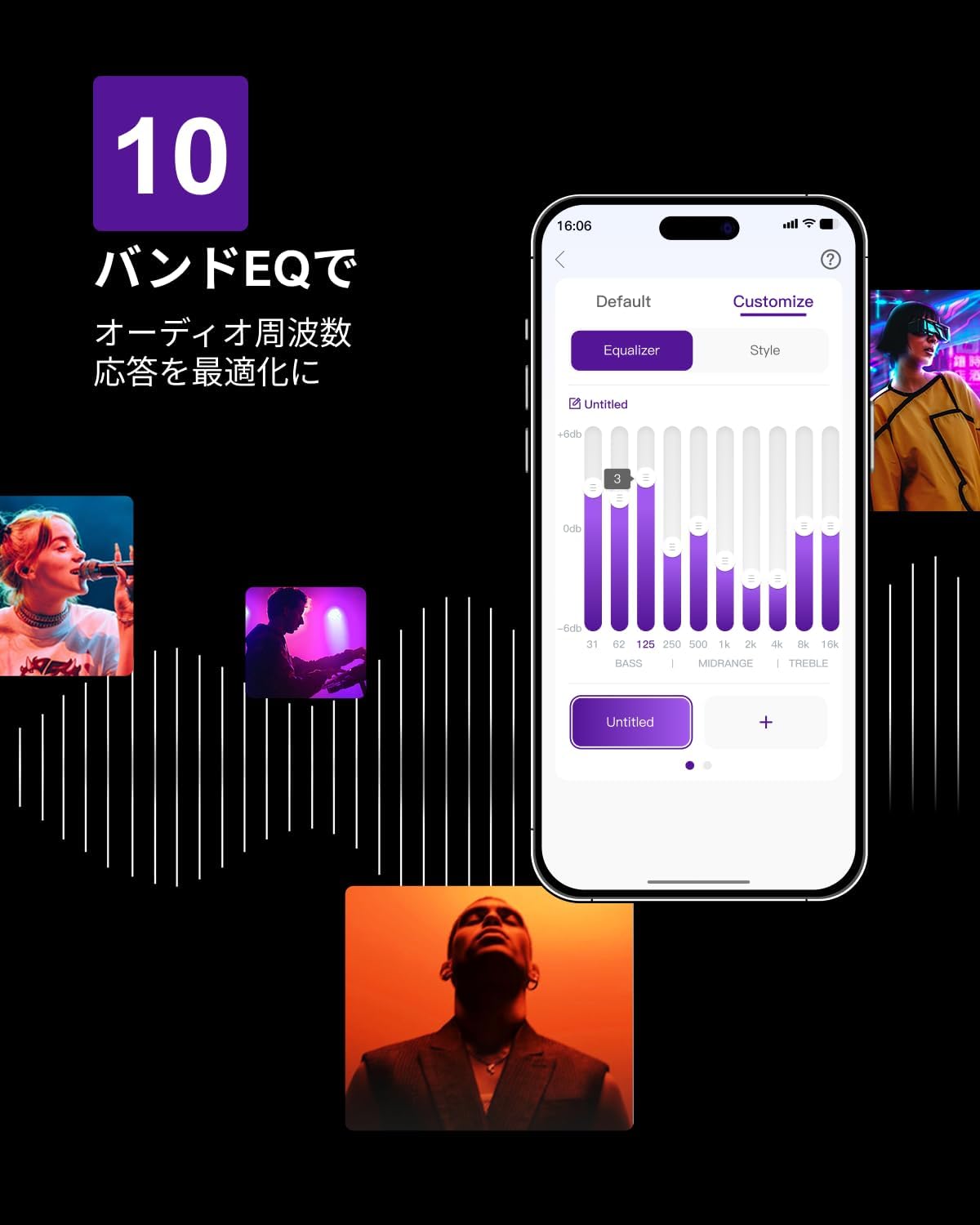
Figure 6.3: ULTIMEA mobile application interface.
7. Vedligeholdelse
To ensure the longevity and optimal performance of your ULTIMEA Aura A60 soundbar system, follow these simple maintenance guidelines:
- Rensning: Use a soft, dry cloth to wipe the surfaces of the soundbar, subwoofer, and speakers. Do not use liquid cleaners or abrasive materials, as they may damage the finish.
- Ventilation: Sørg for, at alle ventilationsåbninger forbliver frie og uhindrede for at forhindre overophedning.
- Opbevaring: Hvis systemet opbevares i en længere periode, skal det afbrydes fra strømmen og opbevares et køligt, tørt sted væk fra direkte sollys og ekstreme temperaturer.
8. Fejlfinding
Hvis du støder på problemer med dit soundbar-system, kan du se følgende almindelige problemer og løsninger:
| Problem | Mulig årsag | Løsning |
|---|---|---|
| Ingen lyd fra soundbaren. | Forkert input valgt, lydstyrke for lav, kabler ikke tilsluttet korrekt. | Verify the correct input source. Increase volume. Check all cable connections (HDMI, Optical, AUX). Ensure the soundbar is powered on. |
| No sound from subwoofer/surround speakers. | Subwoofer/speakers not paired or powered on, volume too low. | Ensure subwoofer and surround speakers are powered on. They should automatically pair. If not, refer to the pairing instructions in the full manual (if available) or contact support. Increase their individual volume levels. |
| Forvrænget eller dårlig lydkvalitet. | Incorrect audio settings, poor source quality, interference. | Adjust EQ settings or try different sound modes. Ensure the audio source is high quality. Check for nearby electronic devices causing interference. |
| Problemer med Bluetooth-forbindelse. | Device out of range, not in pairing mode, interference. | Ensure the soundbar is in Bluetooth pairing mode. Move your device closer to the soundbar. Disconnect and re-pair the device. |
If the problem persists after trying these solutions, please contact ULTIMEA customer support.
9. Specifikationer
| Feature | Detalje |
|---|---|
| Mærke | ULTIMAT |
| Modelnavn | Aura A60 |
| Modelnummer | U2621 |
| Højttaler type | Soundbar with 7.1ch Surround Sound |
| Lydteknologi | Dolby Atmos, BassMX Technology |
| Forbindelse | HDMI eARC, Bluetooth, Optical, AUX, USB |
| Subwoofer | 4-inch Wired Subwoofer (integrated BassMX) |
| Surround højtalere | 4 (2 wired front, 2 wireless rear) |
| Kontrollere | Remote Control, ULTIMEA App |
| Farve | Sort |
| Mål (D x B x H) | 9 cm x 40 cm x 7 cm (Soundbar, approximate) |
| Oprindelsesland | Kina |
10. Garanti og support
ULTIMEA is committed to providing high-quality products and customer satisfaction. Your Aura A60 U2621 soundbar system comes with comprehensive support.
10.1 Garantioplysninger
Specific warranty details may vary by region. Please refer to the warranty card included with your product or visit the official ULTIMEA webwebstedet for de mest opdaterede garantivilkår.
10.2 Kundesupport
For any questions, technical assistance, or troubleshooting not covered in this manual, please contact our dedicated support team:
- 365-Day Support: Our expert staff is available year-round to assist you.
- Live chat: Instant responses are available via live chat on our webwebsted.
- Returnerer: We offer a 30-day return policy with free shipping for your peace of mind.

365-Day Expert Support

Instant Live Chat

30-dages gratis retur
For yderligere hjælp, besøg venligst ULTIMEA Brand Store.