
1. Introduktion
The KONNWEI MAXOBD OBD2 Scanner is a professional diagnostic tool designed to read and clear diagnostic trouble codes (DTCs) from your vehicle's engine control unit (ECU). It provides access to various vehicle systems, allowing users to monitor live data, perform I/M readiness tests, and retrieve vehicle information. This manual provides detailed instructions for the proper use and maintenance of your MAXOBD scanner.
2. Sikkerhedsoplysninger
Before operating the MAXOBD OBD2 Scanner, please read and understand all safety messages and instructions in this manual. Failure to do so may result in personal injury or damage to the vehicle or the scanner.
- Udfør altid biltest i et sikkert miljø.
- Bær øjenbeskyttelse, der opfylder ANSI-standarder.
- Hold tøj, hår, hænder, værktøj, testudstyr osv. væk fra alle bevægelige eller varme motordele.
- Betjen køretøjet i et godt ventileret arbejdsområde; udstødningsgasser er giftige.
- Sæt gearkassen i PARK (for automatgear) eller NEUTRAL (for manuel gearkasse), og sørg for, at parkeringsbremsen er aktiveret.
- Hav en brandslukker, der er egnet til benzin-/elektriske brande, i nærheden.
- Tilslut eller frakobl ikke noget testudstyr, mens tændingen er slået til, eller motoren kører.
3. Produktet er slutview
The MAXOBD scanner features a clear display and intuitive button layout for easy navigation and operation. It connects directly to your vehicle's OBD-II port to retrieve diagnostic information.
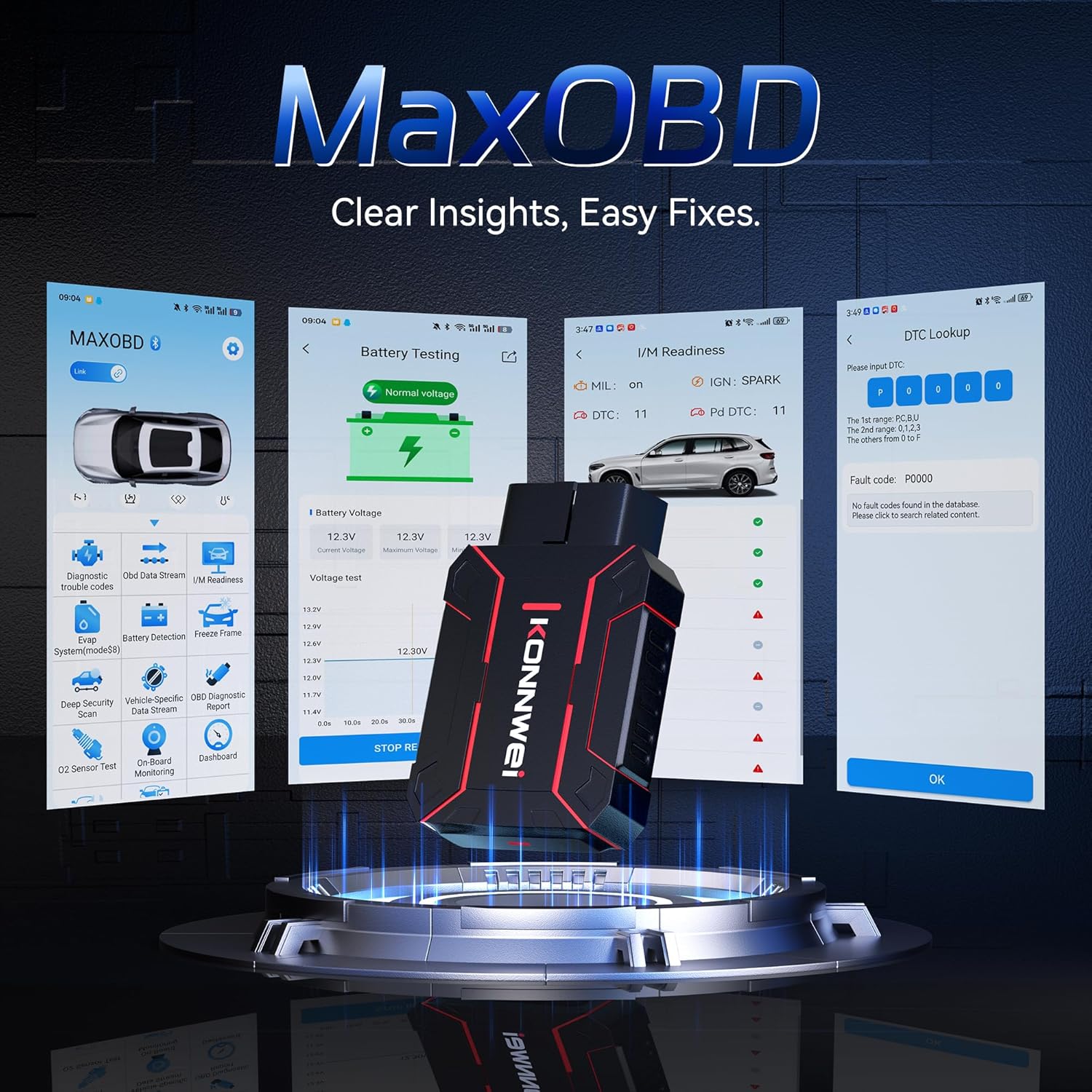
Image: The KONNWEI MAXOBD OBD2 Scanner device, illustrating its physical form and various diagnostic screen interfaces such as battery testing, I/M readiness, and DTC lookup.
Nøglekomponenter:
- OBD-II-stik: Connects to the vehicle's Data Link Connector (DLC).
- LCD-skærm: Viser testresultater og menupunkter.
- Navigationsknapper: Bruges til at rulle gennem menuer og vælge muligheder.
- Enter/Exit Buttons: Confirm selections or return to previous screens.
4. Opsætning
Follow these steps to set up your MAXOBD OBD2 Scanner:
- Find køretøjets OBD-II-port: Det 16-benede datalinkstik (DLC) er normalt placeret under instrumentbrættet i førersiden af køretøjet. Se den nøjagtige placering i bilens servicehåndbog, hvis du ikke kan finde det.
- Tilslut scanneren: Plug the MAXOBD scanner's OBD-II connector firmly into the vehicle's DLC. Ensure a secure connection.
- Tænd: Once connected, the scanner will automatically power on. If it does not, turn the vehicle's ignition to the 'ON' position (engine off).
5. Betjeningsvejledning
The MAXOBD scanner offers various diagnostic functions. Use the navigation buttons to move through menus and the Enter button to select options.

Image: A visual representation of a vehicle highlighting various systems (Engine, ABS, SAS, SRS, DPF, TPMS) that the MAXOBD scanner can perform a full system scan on.
Hovedmenu funktioner:
- Læs koder: Retrieves Diagnostic Trouble Codes (DTCs) from the vehicle's ECU. These codes indicate specific issues detected by the vehicle's onboard diagnostic system.
- Slet koder: Clears all DTCs from the vehicle's ECU and turns off the Malfunction Indicator Lamp (MIL). Sørg for, at det underliggende problem er løst, før du sletter koder.
- I/M parathed: Kontrollerer status for emissionsrelaterede overvågningssystemer for at afgøre, om de er klar til en emissionstest.
- Datastrøm: Displays real-time operational parameters from the vehicle's sensors and components. This can include engine RPM, vehicle speed, oxygen sensor readings, and more.
- Frysestativ: Captures a snapshot of sensor data at the moment a DTC was set. This data can help identify the conditions under which a fault occurred.
- O2-sensortest: Retrieves O2 sensor monitoring test results for the most recently completed tests from the vehicle's onboard computer.
- Test af indbygget skærm: Henter resultater for emissionsrelaterede drivlinjekomponenter og -systemer, der ikke overvåges kontinuerligt.
- Test af fordampningssystem: Starter en lækagetest for køretøjets fordampningsemissionskontrolsystem.
- Køretøjsoplysninger: Viser køretøjets identifikationsnummer (VIN), kalibrerings-ID (CALID) og kalibreringsverifikationsnummer (CVN).
Performing a Diagnostic Scan:
- Connect the scanner to the vehicle's DLC and turn the ignition to 'ON'.
- From the main menu, select 'Read Codes' and press Enter.
- The scanner will communicate with the vehicle and display any detected DTCs.
- Use the navigation buttons to scroll through the codes and their descriptions.
- To clear codes, return to the main menu, select 'Erase Codes', and confirm.
6. Vedligeholdelse
Proper maintenance ensures the longevity and reliable operation of your MAXOBD scanner.
- Rensning: Brug en blød, damp klud til at rengøre scannerens yderside. Brug ikke slibende rengøringsmidler eller opløsningsmidler.
- Opbevaring: Store the scanner in a dry, clean environment away from extreme temperatures and direct sunlight. Keep it in its original packaging or a protective case when not in use.
- Softwareopdateringer: Tjek regelmæssigt den officielle KONNWEI-konto website for available software updates to ensure your scanner has the latest vehicle compatibility and features. Follow the instructions provided on the website for updating the device.
7. Fejlfinding
If you encounter issues with your MAXOBD scanner, refer to the following common problems and solutions:
| Problem | Mulig årsag | Løsning |
|---|---|---|
| Scanneren tænder ikke. | Loose connection; vehicle ignition off; faulty OBD-II port. | Ensure the scanner is securely plugged into the DLC. Turn vehicle ignition to 'ON'. Test on another vehicle if possible. |
| Meddelelsen "Linkfejl" eller "Kommunikationsfejl". | Loose connection; vehicle not OBD-II compliant; ignition off; communication protocol issue. | Verify connection. Ensure vehicle is OBD-II compliant (most vehicles 1996 and newer). Turn ignition to 'ON'. Try a different vehicle if available. |
| Skærmen er tom eller frosset. | Softwarefejl; strømafbrydelse. | Disconnect and reconnect the scanner. If the issue persists, contact customer support. |
If the problem persists after attempting these solutions, please contact KONNWEI customer support for further assistance.
8. Specifikationer
- Mærke: KONNWEI
- Model: maxobdTM
- Strømkilde: Batteridrevet (via OBD-II-port)
- Operativsystem: Linux
- Skærmstørrelse: 2.8 tommer
- Biltilpasningstype: Universal Fit (for OBD-II compliant vehicles)
- Pakkedimensioner: 10.04 x 7.28 x 2.76 tommer
9. Garanti og support
KONNWEI products are designed for reliability and performance. For warranty information, please refer to the documentation included with your purchase or visit the official KONNWEI website. For technical support, troubleshooting assistance, or any other inquiries, please contact KONNWEI customer service through their official channels.
KONNWEI Official Webwebsted: Visit the KONNWEI Store on Amazon