
Indledning
Thank you for choosing the MACAP MI40 Luxe On-Demand Espresso Grinder. This manual provides essential information for the safe and efficient operation, maintenance, and care of your new grinder. Please read all instructions carefully before use and retain this manual for future reference.

The MACAP MI40 Luxe On-Demand Espresso Grinder, featuring a sleek black finish and integrated touchscreen display.
Sikkerhedsoplysninger
Følg altid grundlæggende sikkerhedsforanstaltninger, når du bruger elektriske apparater, for at mindske risikoen for brand, elektrisk stød og personskade.
- Læs alle instruktioner, før du bruger kværnen.
- Nedsænk ikke kværnen, ledningen eller stikket i vand eller andre væsker.
- Tag stikket ud af stikkontakten, når den ikke er i brug, før du samler eller adskiller dele, og før du rengør den.
- Undgå kontakt med bevægelige dele.
- Betjen ikke noget apparat med en beskadiget ledning eller stik, eller efter at apparatet ikke fungerer korrekt eller er blevet beskadiget på nogen måde. Kontakt kundesupport for at få hjælp.
- Brug af tilbehør, der ikke anbefales eller sælges af producenten, kan forårsage brand, elektrisk stød eller personskade.
- Må ikke bruges udendørs.
- Lad ikke ledningen hænge ud over kanten af et bord eller bord, eller rør ved varme overflader.
- Sørg for, at beholderlåget er sikkert på plads, før du bruger det.
- Only grind whole roasted coffee beans. Do not grind other substances such as nuts, spices, or instant coffee.
Opsætning
1. Udpakning
- Fjern forsigtigt alle komponenter fra emballagen.
- Inspect the grinder for any signs of damage. If damaged, do not operate and contact your retailer.
- Fjern alle beskyttelsesfilm og emballagematerialer.
2. Komponentidentifikation
Familiarize yourself with the main parts of your MI40 Luxe grinder:
- Beholder: Holder hele kaffebønner.
- Beholderlåg: Dækker beholderen.
- Justeringsknap for maling: Located below the hopper, used to set grind fineness.
- Touchscreen display: For programming and selecting dosing options.
- Dosing Spout: Where ground coffee is dispensed.
- Portafilterholder: Støtter portafilteret under kværning.
- Afbryderen: Located on the side of the grinder.
3. Indledende samling
- Installer tragten: Place the hopper onto the grinder body, ensuring it seats correctly. Rotate it slightly until it locks into position.
- Install the Hopper Lid: Place the lid securely on top of the hopper.
4. Placering
Placer kværnen på en stabil, flad og tør overflade. Sørg for tilstrækkelig ventilation omkring enheden.
5. Strømtilslutning
Sæt netledningen i en jordet stikkontakt. Sørg for, at lydstyrken er korrekt.tage matches the specifications listed on the grinder's rating label.
Betjeningsvejledning
1. Fyldning af tragten
Lift the hopper lid and pour whole roasted coffee beans into the hopper. Do not overfill. Replace the lid securely.
2. Grind Adjustment (Nice Grind Control Dial)
The MI40 Luxe features a stepless grind adjustment dial for precise control. To adjust the grind fineness:
- Turn the grinder ON using the power switch.
- Rotate the grind adjustment dial. Turning it clockwise results in a finer grind, and counter-clockwise results in a coarser grind.
- For espresso, start with a fine setting and adjust incrementally based on extraction time and taste. It is recommended to adjust the grind while the burrs are running to prevent jamming.

Detaljeret view of the Nice Grind Control Dial for precise grind fineness adjustment.
3. Touchscreen Dosing
The touchscreen allows for programmable dosing for single and double shots.
- Tænd: Ensure the grinder is powered on. The touchscreen will illuminate.
- Select Dose: On the main screen, you will see icons for single and double shot doses. Tap the desired dose icon.
- Adjust Dose Time (if needed): To program the dose time, press and hold the desired dose icon until it enters programming mode. Use the '+' and '-' buttons on the screen to adjust the grinding time in seconds. Tap the icon again to save.
- Place Portafilter: Position your portafilter securely in the portafilter holder beneath the dosing spout.
- Start slibning: Tap the selected dose icon once to start grinding. The grinder will automatically stop after the programmed time.
- Manuel slibning: Some models may offer a manual grind option, typically by pressing a dedicated button or holding a dose icon briefly. Refer to the on-screen prompts.
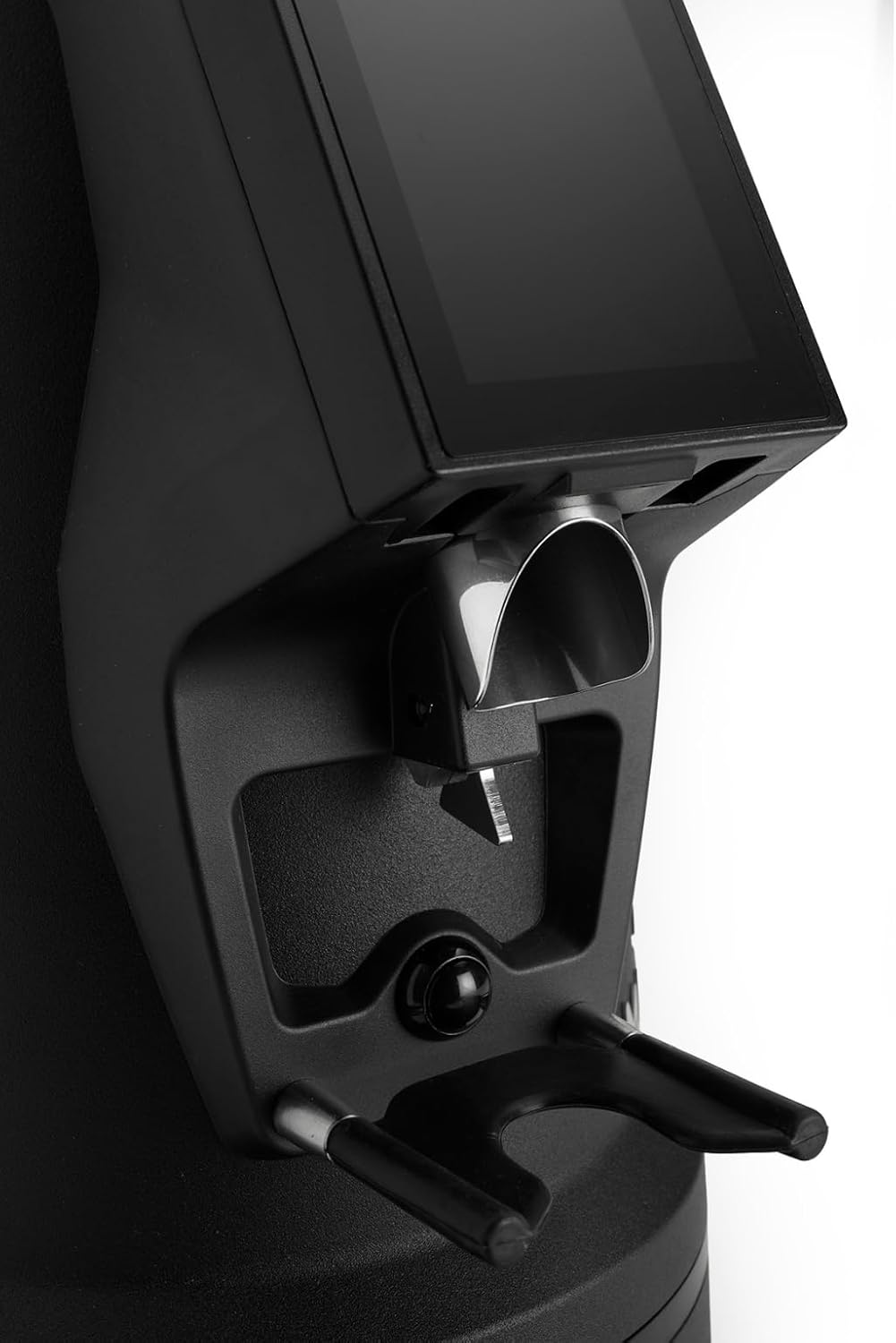
The dosing spout and portafilter holder, designed for efficient and clean coffee dispensing.
Opretholdelse
Regular cleaning and maintenance ensure optimal performance and longevity of your grinder.
1. Daglig rengøring
- Beholder: Empty any remaining beans and wipe the inside of the hopper with a dry cloth.
- Dosing Spout: Use a brush or vacuum cleaner to remove any residual coffee grounds from the dosing spout and portafilter holder area.
- Ydre: Tør kværnen udvendigt af med adamp klud. Brug ikke slibende rengøringsmidler, og nedsænk ikke enheden i vand.
2. Burrs Cleaning (Weekly/Bi-weekly)
To maintain grind consistency, the burrs should be cleaned regularly.
- Tag stikket ud af kværnen: Always disconnect the power before cleaning the burrs.
- Fjern tragt: Empty the hopper and remove it from the grinder body.
- Adgangsfræsere: Depending on the model, you may need to unscrew the top burr carrier. Refer to the specific instructions for your MI40 Luxe model.
- Rengør kværne: Use a stiff brush or a vacuum cleaner to remove all coffee grounds from both the stationary and rotating burrs. Do not use water.
- Saml igen: Carefully reassemble the burr carrier and hopper, ensuring all parts are securely in place.
3. Almen pleje
- Opbevar kværnen på et køligt, tørt sted.
- Avoid exposing the grinder to direct sunlight or extreme temperatures.
Fejlfinding
Hvis du støder på problemer med din kværn, kan du se følgende almindelige problemer og løsninger:
| Problem | Mulig årsag | Løsning |
|---|---|---|
| Kværnen tænder ikke | No power, power switch off, or safety interlock not engaged. | Check power cord connection, ensure power switch is ON, verify hopper is correctly seated. |
| No coffee grinding / Grinder jams | Beans not feeding, burrs clogged, or grind setting too fine. | Ensure hopper has beans. Unplug, remove hopper, clean burrs. Adjust to a coarser setting. |
| Inkonsekvent slibning | Kværnene er snavsede eller slidte. | Clean burrs thoroughly. If problem persists, burrs may need replacement. |
| Kværnen er støjende | Foreign object in burrs or loose components. | Unplug and inspect burrs for foreign objects. Ensure all parts are securely fastened. |
If the problem persists after attempting these solutions, please contact MACAP customer support or your retailer.
Specifikationer
| Feature | Detalje |
|---|---|
| Model | MI40 Luxe |
| Mærke | Macap |
| Burr-type | Flade kværne |
| Burr størrelse | 65 mm |
| Slibejustering | Stepless (Nice Grind Control Dial) |
| Dosering | Touchscreen Programmable On-Demand |
| Beholderkapacitet | 2.6 lbs (ca. 1.2 kg) |
| Materiale | Rustfrit stål |
| Varens vægt | 19.6 pund (ca. 8.9 kg) |
| Dimensioner (L x B x H) | 12" x 7.6" x 22" (ca. 30.5 cm x 19.3 cm x 55.9 cm) |
| Motor | High-Torque |
Garanti & Support
Your MACAP MI40 Luxe Grinder is covered by a manufacturer's warranty. For specific warranty terms and conditions, please refer to the warranty card included with your product or visit the official Macap website. For technical support, spare parts, or service inquiries, please contact your authorized Macap dealer or the customer support team.
Kontaktoplysninger:
- Refer to your purchase documentation for retailer contact details.
- Visit the official Macap website for global support information.