
1. Produktet er slutview
The BN-LINK WiFi Smart Plug (Model CP-J31WT) allows you to control your home appliances remotely, set schedules, and use voice commands for a smarter, more convenient lifestyle. This compact plug is designed for ease of use and integrates seamlessly with popular smart home platforms.

Image: BN-LINK WiFi Smart Plug overview with icons for WiFi, timer, app control, voice control, remote operation, and group control.
Nøglefunktioner:
- Fjernbetjening: Turn appliances ON/OFF from anywhere using your smartphone.
- Stemmestyring: Kompatibel med Alexa og Google Home for håndfri betjening.
- Timer funktion: Schedule appliances to turn ON/OFF automatically, saving energy and preventing overcharging.
- Kompakt design: Small size ensures it doesn't block adjacent outlets.
- Sikkerhedsfunktioner: Equipped with high-temperature flame-retardant material, overload protection, electric shock prevention, and anti-tracking design.

Image: Diagram highlighting the smart plug's features: LED indicator, ON/OFF button, WiFi connection, timer function, remote operation, and voice control.
2. Sikkerhedsoplysninger
Læs og forstå alle sikkerhedsinstruktioner, før du bruger dette produkt. Manglende overholdelse af disse instruktioner kan resultere i elektrisk stød, brand eller alvorlig personskade.
- Enheden må ikke skilles ad eller modificeres.
- Må ikke anvendes i våde omgivelser eller i nærheden af vand.
- Sørg for, at stikket er sat helt ind i stikkontakten.
- Overskrid ikke den maksimale belastningsværdi på 15A / 1500W.
- Opbevares utilgængeligt for børn.
- Tag stikket ud af stikkontakten før rengøring.
- Dette produkt er kun designet til indendørs brug.
Indbyggede sikkerhedsfunktioner:
- High-Temperature Flame-Retardant Material: Reduces fire risk.
- Overbelastningsbeskyttelse: Afbryder automatisk strømmen for at forhindre skader fra for høj strøm.
- Electric Shock Prevention Design: Enhanced safety against accidental contact.
- Anti-Tracking Design: Prevents dust accumulation and potential short circuits.
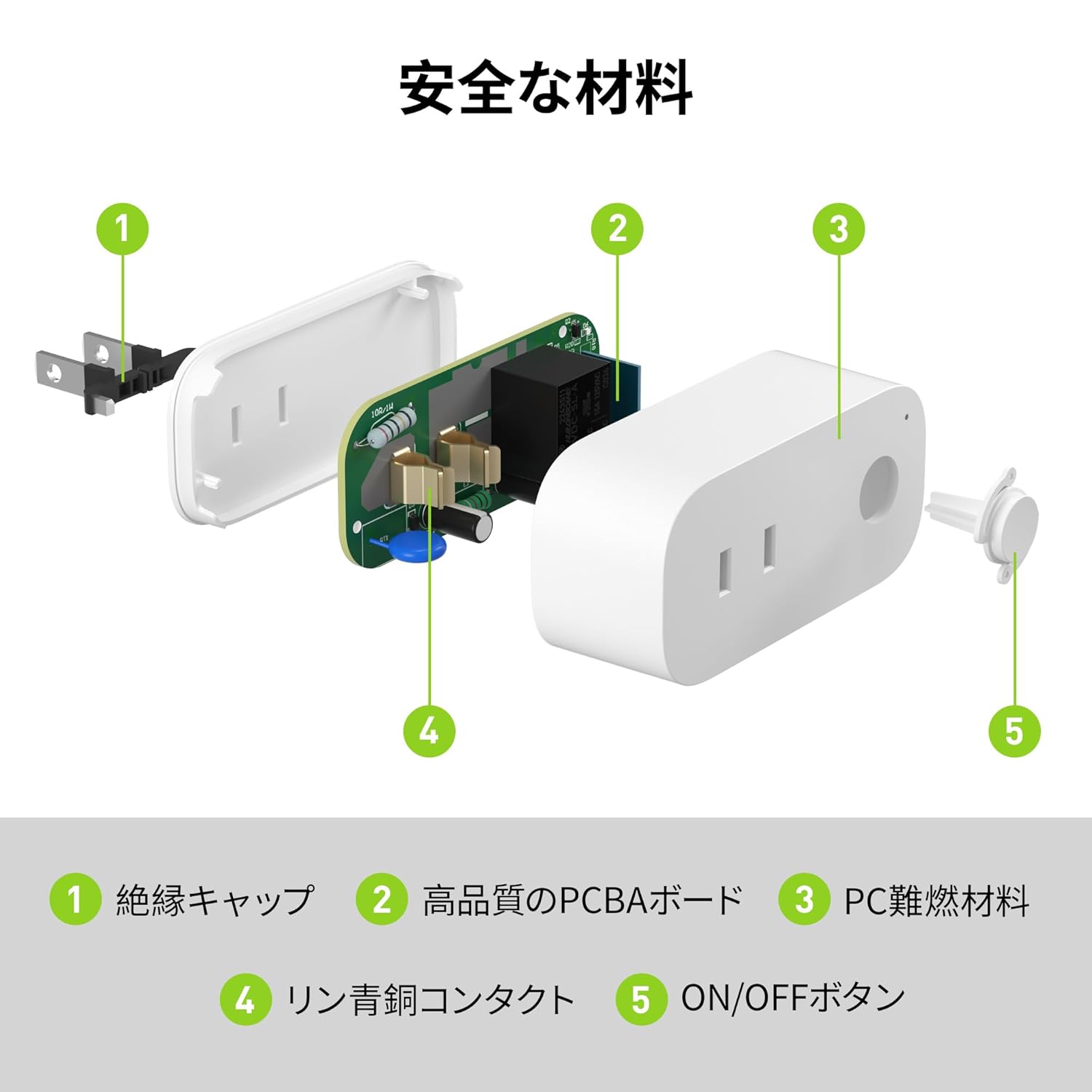
Image: Internal components of the smart plug, highlighting safety features such as the insulation cap, high-quality PCBA board, PC flame-retardant material, phosphor bronze contacts, and the ON/OFF button.
3. Opsætningsvejledning
3.1. Indledende opsætning
- Unpack the BN-LINK Smart Plug from its packaging.
- Plug the smart plug into a standard wall outlet.
- Observe the indicator light on the plug. It should start blinking. If it does not blink, press and hold the ON/OFF button for approximately 5 seconds until it starts blinking rapidly.
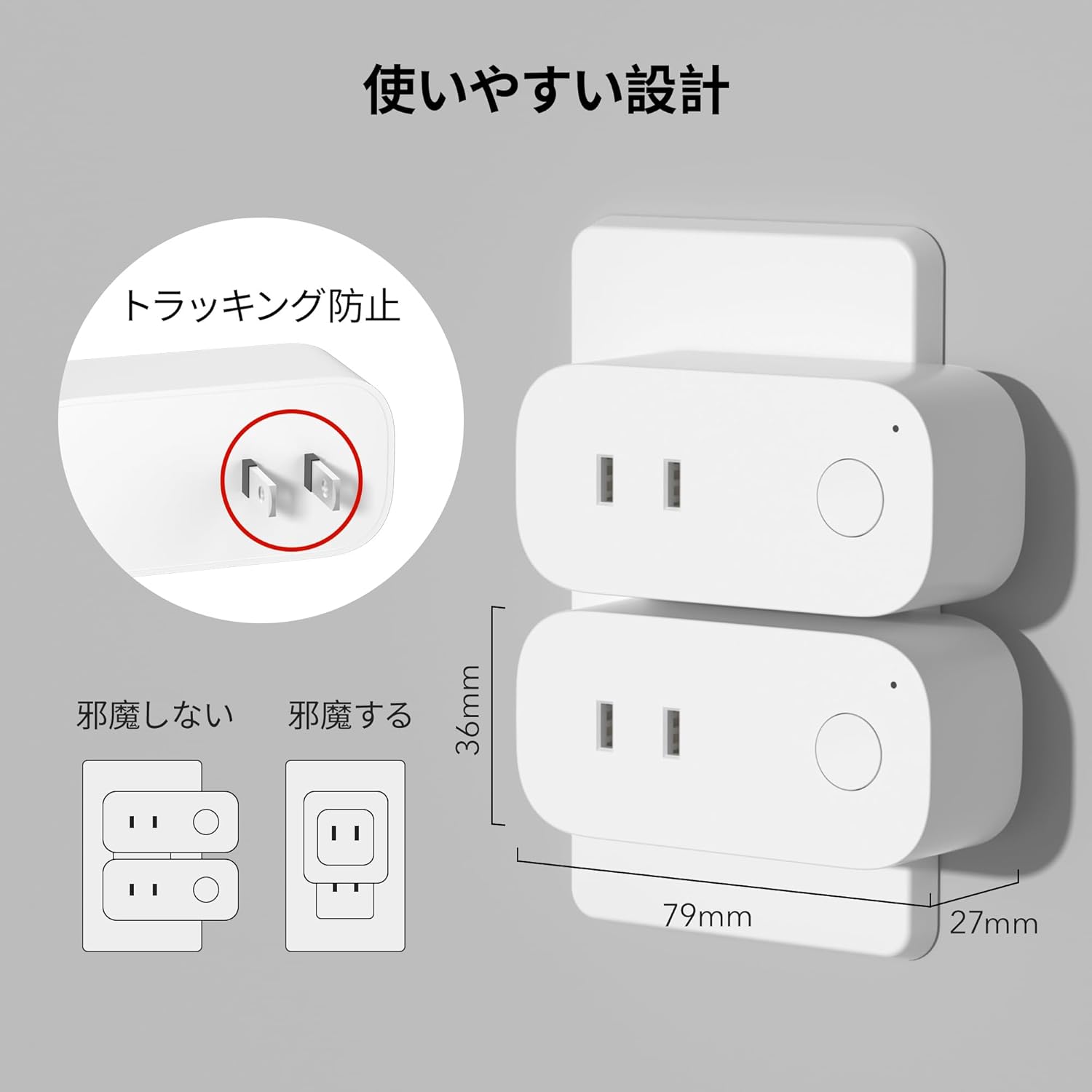
Image: The compact design of the smart plug, illustrating how it fits into an outlet without obstructing the adjacent one. Dimensions are also shown.
3.2. Appinstallation og Wi-Fi-forbindelse
To utilize all smart features, you need to install the BN-LINK app and connect the plug to your 2.4GHz Wi-Fi network. This device only supports 2.4GHz Wi-Fi.
- Download the "BN-LINK" app from your smartphone's app store (Google Play Store for Android or Apple App Store for iOS).
- Åbn appen og opret en konto eller log ind, hvis du allerede har en.
- Tryk på ikonet "+" eller "Tilføj enhed" for at starte parringsprocessen.
- Vælg "Smart stik" fra enhedslisten.
- Follow the on-screen instructions to connect the smart plug to your 2.4GHz Wi-Fi network. Ensure your phone is also connected to the 2.4GHz network during setup.
- Once connected, you can rename your smart plug for easy identification (e.g., "Living Room Lamp", "Kaffemaskine").
Video: This video demonstrates the process of connecting the smart plug to the BN-LINK app and your Wi-Fi network, including resetting the device and confirming indicator light status.
Video: This video provides a step-by-step guide on setting up the ePlugBT and connecting it to Wi-Fi, which is similar to the BN-LINK Smart Plug setup process.
4. Betjeningsvejledning
4.1. Fjernbetjening via app
Once connected to Wi-Fi, you can control your appliances from anywhere with an internet connection.
- Open the BN-LINK app.
- Tap on the device name you wish to control.
- Use the ON/OFF toggle button within the app to switch your appliance on or off.

Image: Remote operation of the smart plug via the BN-LINK app on a smartphone. The image shows the app's ON/OFF control for a device connected to the smart plug, with a WiFi router in the background.

Image: A user controlling a smart plug remotely with their smartphone in a modern kitchen environment.
4.2. Stemmekontrol
Integrate your smart plug with Amazon Alexa or Google Home for convenient voice commands.
- Ensure your smart plug is successfully connected to the BN-LINK app and your Wi-Fi network.
- Åbn Alexa- eller Google Home-appen.
- Follow the app's instructions to add a new device or skill, searching for "BN-LINK" or "Smart Plug."
- Når den er forbundet, kan du bruge stemmekommandoer som f.eks.:
- "Alexa, tænd for [enhedsnavn]."
- "Hej Google, sluk [enhedsnavn]."

Image: A user in a living room controlling a lamp connected to a smart plug using voice commands with an Alexa device. The image also indicates Google Home compatibility.

Image: A smart plug connected to an outlet, being controlled by a Google Home device. A person is shown in bed, illustrating hands-free operation.
4.3. Timerfunktion og planlægning
Set custom schedules to automate your appliances and manage energy consumption.
- In the BN-LINK app, select your smart plug.
- Naviger til afsnittet "Timer" eller "Planlæg".
- Set specific ON/OFF times for your appliances. You can create daily, weekly, or one-time schedules.
- Use the countdown timer for temporary automation, such as turning off a charger after a set period to prevent overcharging.

Image: The BN-LINK app displaying timer and scheduling features. Examples show a coffee maker turning on at 7:15 AM and a lamp turning off at 10:00 PM, demonstrating automated control.

Image: A smart plug connected to a microwave, with the app interface showing a timer set to turn the device ON at 7:00.
5. Vedligeholdelse
To ensure optimal performance and longevity of your BN-LINK Smart Plug, follow these maintenance guidelines:
- Rensning: Tag smartstikket ud af stikkontakten før rengøring. Brug en tør, blød klud til at tørre overfladen af. Brug ikke flydende rengøringsmidler eller spray.
- Opbevaring: If not in use for an extended period, unplug the device and store it in a cool, dry place away from direct sunlight and moisture.
- Inspektion: Periodically check the plug and outlet for any signs of damage, wear, or overheating. If any issues are found, discontinue use and contact customer support.
6. Fejlfinding
If you encounter issues with your BN-LINK Smart Plug, refer to the following common problems and solutions:
| Problem | Mulig årsag | Løsning |
|---|---|---|
| Enheden kan ikke oprette forbindelse til Wi-Fi. | Incorrect Wi-Fi password, 5GHz Wi-Fi network, weak signal, or device not in pairing mode. |
|
| Fjernbetjening virker ikke. | No internet connection on phone or smart plug, or app issue. |
|
| Stemmestyringen svarer ikke. | Incorrect device name, smart assistant not linked, or internet connection issue. |
|
| Stikket reagerer ikke. | Power outage, device malfunction, or firmware issue. |
|
7. Specifikationer
| Feature | Detalje |
|---|---|
| Mærke | BN-LINK |
| Modelnummer | CP-J31WT |
| Varens vægt | 70 g |
| Pakkedimensioner | 8.2 x 4.7 x 4.3 cm |
| Størrelse | 1 stk |
| Switch Type | 1-vejs |
| Inkluderede komponenter | Smart Plug body, Instruction Manual |
| Brugte batterier | Ingen |
| Driftstilstand | TÆND SLUK |
| Nuværende vurdering | 15 Amps |
| Operation Voltage | 100 volt |
| Connector Type | Plug-in |
| Materiale | Plast |
| Kredsløbstype | 1-vejs |
8. Garanti og support
BN-LINK products are designed for quality and reliability. For warranty information and customer support, please refer to the contact details provided in the product packaging or visit the official BN-LINK webwebsted.
For further assistance, you may also contact the seller directly through the Amazon platform.
Online ressourcer:
- Official BN-LINK Webwebsted: www.bn-link.com (Bemærk venligst: Dette er en pladsholder URL(erstat med faktisk, hvis tilgængelig)
- Amazon produktside: Amazon.co.jp Product Page