
1. Produktet er slutview
The Gosasa 6016 is a versatile unisex digital-analog sports watch designed for active lifestyles. It combines the classic appearance of analog hands with the practical features of a digital display. This watch is equipped with multiple functions including an alarm, stopwatch, countdown timer, and dual time display, making it suitable for various activities and daily wear.
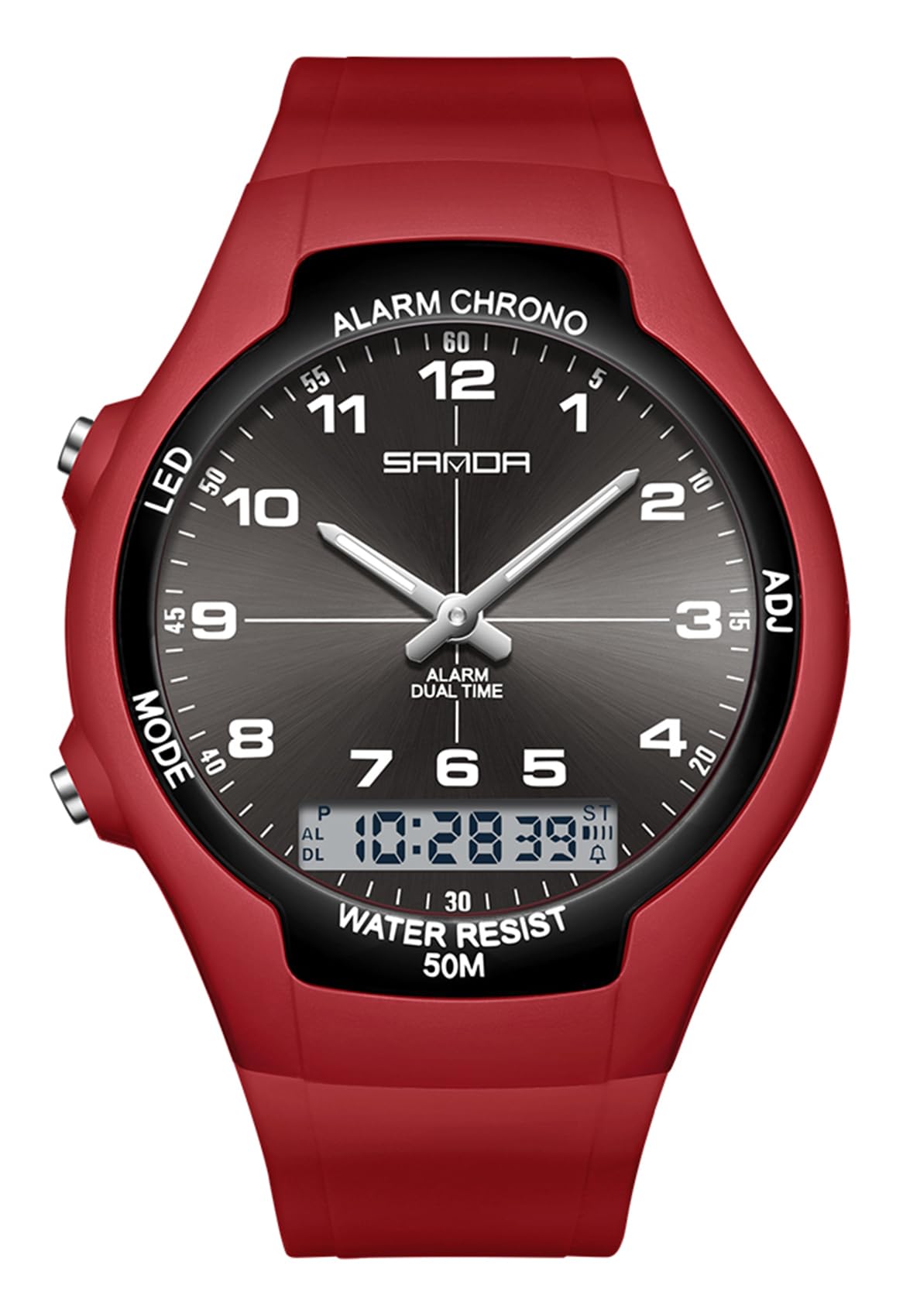
Image 1.1: The Gosasa 6016 Unisex Digital Analog Sports Watch in Red. This image displays the watch's face, showing both analog hands and a digital display, along with the four control buttons.
Nøglefunktioner:
- Dobbelt skærm: Analog og digital tidsvisning.
- Multifunktion: Alarm, Hourly Chime, Stopwatch, Countdown Timer, Week/Date Display, 12/24-Hour Format.
- Vandtæthed: 50 meters (5 ATM) suitable for hand washing, rain, and cold showers.
- Luminous Hands & LED Backlight: For synlighed i svagt lys.
- Komfortabelt design: Lightweight ABS case with a durable TPU band.
2. Knapfunktioner
The Gosasa 6016 watch features four control buttons located on the sides of the watch case. Understanding their functions is essential for operating the watch.

Image 2.1: Close-up of the watch face, highlighting the digital display and the positions of the control buttons.
- LED Button (Top Left): Activates the LED backlight for the digital display.
- MODE-knap (nederst til venstre): Cycles through different modes: Time Display, Alarm, Stopwatch, Countdown Timer, Dual Time.
- CHRONO/ALARM Button (Top Right): Used to start/stop the stopwatch, set the alarm, and adjust values in setting modes.
- ADJ-knap (nederst til højre): Used to enter and exit setting modes, and to select items for adjustment.
3. Setup and Time Adjustment
3.1 Indstilling af digital tid og dato
- I normal tidsvisningstilstand skal du trykke på MODE button repeatedly until the digital time display starts flashing, indicating it's in setting mode.
- Tryk på ADJ button to cycle through the settings: seconds, hour, minute, month, date, day of the week, 12/24-hour format.
- Brug CHRONO/ALARM knappen for at øge den blinkende værdi. Hold knappen nede for hurtigt at øge værdien.
- Når alle ønskede indstillinger er justeret, skal du trykke på ADJ knappen igen for at forlade indstillingstilstanden.
3.2 Adjusting Analog Hands
The analog hands on the Gosasa 6016 watch are synchronized with the digital time. To adjust the analog hands, you must first set the digital time accurately. The analog hands will automatically adjust to match the digital time after the digital time is set and confirmed.
4. Driftsfunktioner
4.1 Alarmfunktion
- Fra normal tidsvisning, tryk på MODE button until "AL" (Alarm) appears on the digital display.
- Tryk på ADJ button to make the alarm hour setting flash.
- Brug CHRONO/ALARM knappen for at indstille den ønskede alarmtime.
- Trykke ADJ again to select the alarm minute setting, then use CHRONO/ALARM for at indstille minutterne.
- Trykke ADJ for at bekræfte og afslutte alarmindstillingen.
- For at aktivere/deaktivere alarmen skal du i alarmtilstand trykke på CHRONO/ALARM knappen. Et alarmikon vil vises/forsvinde for at angive dets status.
4.2 Stopursfunktion
- Fra normal tidsvisning, tryk på MODE button until "ST" (Stopwatch) appears.
- Tryk på CHRONO/ALARM knappen for at starte stopuret.
- Trykke CHRONO/ALARM igen for at sætte stopuret på pause.
- Tryk på for at genoptage CHRONO/ALARM.
- For at nulstille stopuret, mens det er på pause, skal du trykke på ADJ knap.
- Trykke MODE for at afslutte stopurstilstand.
4.3 Nedtællingstimer
Specific instructions for the countdown timer are not detailed in the product description. Typically, this function is accessed via the MODE button and set using the ADJ and CHRONO/ALARM buttons similar to the alarm or stopwatch. Refer to the watch's on-screen prompts if available.
4.4 LED-baggrundsbelysning
Tryk på LED button (top left) to illuminate the digital display for a few seconds, providing visibility in dark environments.

Image 4.1: The Gosasa 6016 watch displaying its green LED backlight, enhancing readability in low-light conditions.
4.5 Water Resistance (50M / 5 ATM)
This watch is designed to withstand water pressure up to 50 meters (5 ATM). This means it is suitable for:
- Daily use, such as hand washing.
- Eksponering for regn.
- Cold showers.
- Svømning i lavt vand.
Vigtig: Uret er ikke recommended for hot water activities (e.g., hot showers, saunas) or diving, as extreme temperature changes or high-pressure water jets can compromise the water seals.
5. Vedligeholdelse og pleje
Proper care will ensure the longevity and optimal performance of your Gosasa 6016 watch.
- Regelmæssig rengøring: Wipe the watch regularly with a soft, lint-free cloth to remove dirt, dust, and oils. This prevents build-up that can damage the surface over time.
- Undgå barske kemikalier: Keep your watch away from strong chemicals, perfumes, lotions, and cleaning agents. These substances can damage the watch's materials, particularly the TPU band and the case finish.
- Ekstreme temperaturer: Undgå at udsætte uret for ekstreme temperaturer, både varme og kolde, i længere perioder.
- Udskiftning af batteri: When the digital display dims or functions become erratic, it may be time to replace the battery. It is recommended to have battery replacement performed by a qualified watch technician to ensure proper sealing and water resistance.
6. Fejlfinding
If you encounter issues with your Gosasa 6016 watch, refer to the following common troubleshooting steps:
- Det digitale display er blankt eller svagt:
- Kontroller, om batteriet skal udskiftes.
- Ensure the watch has not been exposed to extreme cold, which can temporarily affect LCD performance.
- Knapperne reagerer ikke:
- Sørg for, at uret ikke er i låst tilstand (hvis relevant, men ikke specificeret for denne model).
- Try pressing the buttons firmly.
- If the watch was recently submerged, ensure it is dry.
- Tidspunktet er unøjagtigt:
- Re-adjust the digital time following the instructions in Section 3.1.
- If the issue persists, the battery may be low, affecting timekeeping accuracy.
- Vand inde i uret:
- Stop straks med at bruge uret.
- Contact customer support or a professional watch repair service. Do not attempt to open the watch yourself.
Ved vedvarende problemer, der ikke er dækket her, henvises til afsnittet Garanti og support for kontaktoplysninger.
7. Specifikationer
| Feature | Specifikation |
|---|---|
| Modelnummer | 6016 |
| Bevægelsestype | Kvarts |
| Display Type | Analog and Digital (Dual Display) |
| Etui materiale | Acrylonitril Butadien Styren (ABS) |
| Båndmateriale | Termoplastisk polyurethan (TPU) |
| Krystal materiale | Akryl |
| Vandmodstandsdybde | 50 meter (5 ATM) |
| Æske diameter | 38 mm / 1.5 tommer |
| Sags tykkelse | 11 mm / 0.43 tommer |
| Båndbredde | 18-22 mm / 0.71-0.87 tommer |
| Urlængde | 265 mm / 10.43 tommer |
| Varens vægt | 38 gram / 1.34 ounce |
| Yderligere funktioner | Alarm, Stopwatch, Countdown Timer, Week/Date Display, 12/24 Hour Format, Luminous Hands, LED Backlight |
8. Garanti og support
Gosasa is committed to customer satisfaction. If you have any questions or require assistance with your watch, please refer to the following:
- Returpolitik: You may return the watch and its original packaging in undamaged condition within 30 days of purchase, without needing to provide a reason.
- Teknisk support: For questions regarding watch adjustment, functions, or any other operational queries, please contact the seller directly through the platform where the purchase was made.
- Kundeoplevelse: We strive to ensure a happy customer experience and highly value your feedback.
9. Produktvideo
Watch this official product video for a visual guide on the Gosasa Unisex Digital Analog Sports Watch.
Video 9.1: An official product video demonstrating the features and design of the Gosasa Unisex Digital Analog Sports Watch. This video provides a visual overview of the watch's functionality and aesthetic.