
1. Introduktion
Thank you for choosing the NBD S210 Digital Camera. This camera is designed to capture high-quality photos and videos, featuring a 64MP sensor, 5K video recording, 16X optical zoom, and a versatile 3-inch 180° rotatable IPS screen. This manual provides detailed instructions for setup, operation, maintenance, and troubleshooting to ensure you get the most out of your device.
Please read this manual thoroughly before using the camera and keep it for future reference.
2. Sikkerhedsoplysninger
To prevent damage to the product or injury to yourself or others, please read the following safety precautions completely before using this equipment.
- Do not disassemble or modify the camera. Unauthorized modifications can lead to electric shock or malfunction.
- Keep the camera away from water and moisture. Exposure to water can cause electric shock or fire.
- Avoid exposing the camera to direct sunlight for extended periods or to extremely high temperatures. This can damage internal components.
- Use only NBD-approved batteries and accessories. Using incompatible items may cause fire, explosion, or injury.
- Opbevares utilgængeligt for børn. Små dele kan udgøre en kvælningsfare.
- Håndter kameraet forsigtigt. Undgå at tabe det eller udsætte det for hårde stød.
3. Pakkens indhold
Bekræft, at alle nedenstående varer er inkluderet i din pakke. Hvis der mangler eller er beskadigede varer, bedes du kontakte din forhandler.
- NBD S210 Digital Camera Body
- Rechargeable Lithium-ion Batteries (x2)
- 32 GB hukommelseskort
- USB kabel
- Lens Cap
- Kamerarem
- Brugermanual
- Cleaning Kit (as per product title)
- Portable Tripod (as per feature bullets)
- Anti-wind Microphone (as per feature bullets)
- Removable Lens Hood (as per feature bullets)
4. Kamera overview
Familiarize yourself with the main components of your NBD S210 camera.
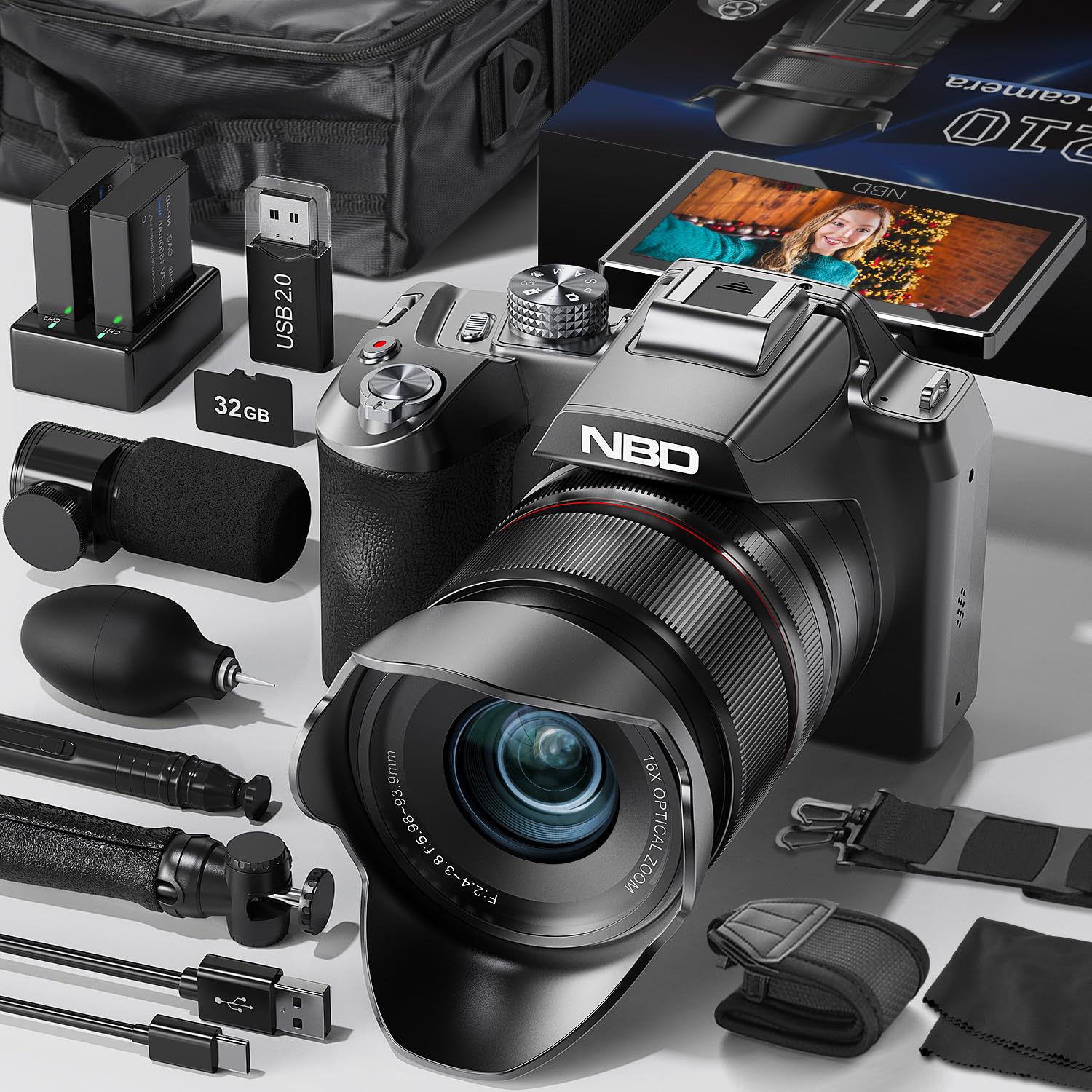
Billede 4.1: Front view of the NBD S210 Digital Camera. This image shows the camera body, lens, and the articulated screen in an open position, highlighting its compact design and key photographic components.
4.1 Foran View
- Linse: Captures images and videos. Features 16X optical zoom and 58mm diameter.
- Indbygget flash: Giver ekstra belysning under forhold med svagt lys.
- Autofokusassistent Lamp: Hjælper kameraet med at fokusere i mørke omgivelser.
- Mikrofon: Records audio for videos.
4.2 bag View
- 3-inch IPS 180° Rotatable Screen: For framing shots, reviewbilleder og navigere i menuer.
- Viewfinder (Electronic): For præcis indramning.
- Kontrolknapper: Power, Shutter, Mode Dial, Navigation, Menu, Playback, Delete.
4.3 Top/Side View
- Udløserknap: Tryk halvt ned for at fokusere, helt ned for at optage.
- Funktionsvælger: Select shooting modes (Auto, Program, Shutter Priority, Aperture Priority, Manual, Night, Macro, Filter, Video, Slow Motion, Time-lapse, Burst, Timer, Loop Recording).
- USB-port: Til opladning og dataoverførsel.
- HDMI-port: Til tilslutning til eksterne skærme.
- Stativmontering: Standard 1/4-inch thread for tripod attachment.
5. Opsætning
5.1 Batteriinstallation
- Find batteridækslet i bunden af kameraet.
- Skub låsen for at åbne dækslet.
- Insert the two Lithium-ion batteries according to the polarity indicators (+/-) inside the compartment.
- Luk batteridækslet, og skub låsen for at fastgøre det.
5.2 Installation af hukommelseskort
The camera supports memory cards up to 256GB. A 32GB card is included.
- Åbn dækslet til hukommelseskortpladsen, som normalt er placeret på siden eller undersiden af kameraet.
- Insert the memory card with the metal contacts facing the correct direction (refer to the diagram inside the slot). Push until it clicks into place.
- Luk dækslet til hukommelseskortet.
- Note: Format the memory card before first use via the camera's menu to ensure optimal performance.
5.3 Opladning af batteriet
- Slut kameraet til en strømkilde ved hjælp af det medfølgende USB-kabel.
- Opladningsindikatorlampen lyser. Den slukker eller skifter farve, når opladningen er færdig.
5.4 Tænd/sluk
Tryk på tænd/sluk-knappen og hold den nede for at tænde eller slukke kameraet.
6. Betjening af kameraet
6.1 Grundlæggende fotografering
- Vælg en tilstand: Rotate the Mode Dial to choose your desired shooting mode (e.g., Auto, Program, Shutter Priority, Aperture Priority, Manual).
- Indram dit billede: Use the 3-inch IPS screen or the electronic viewfinder to compose your image. Adjust the screen's angle as needed.
- Fokus: Press the Shutter button halfway down. The camera will automatically focus.
- Fange: Press the Shutter button fully down to take the picture.
6.2 Videooptagelse
- Rotate the Mode Dial to the Video mode.
- Tryk på udløserknappen for at starte optagelsen. Tryk igen for at stoppe.
- Video resolutions include 5K, 4K, 2K, 1080P, and 720P, with frame rates of 30FPS, 60FPS, and 90FPS (for slow motion).
- The camera records video in MP4 format.
6.3 Zoomfunktion
Use the zoom lever around the shutter button to adjust the 16X optical zoom. Zoom in to magnify distant subjects or zoom out for wider shots.
6.4 Wi-Fi-forbindelse
- Enable Wi-Fi in the camera's menu settings.
- Download the dedicated NBD camera app on your smartphone or tablet.
- Tilslut din mobilenhed til kameraets Wi-Fi-netværk.
- Use the app to control the camera remotely and transfer photos/videos.
- Note: The camera connects to your phone via Wi-Fi but does not connect directly to the internet.
6.5 Specielle optagelsestilstande
- Nattilstand: Enhances low-light performance with ISO 6400 support.
- Makrotilstand: For close-up photography (0.5m minimum focus distance).
- Tidsforskydning: Captures a sequence of images over time to create a sped-up video.
- Slowmotion: Records video at 90fps for smooth slow-motion playback.
- Burst-tilstand: Tager flere billeder i hurtig rækkefølge.
- Timer: Indstiller en forsinkelse før der tages et billede.
- Loop-optagelse: Continuously records video, overwriting the oldest files når hukommelseskortet er fuldt.
- Filtre: Apply various creative filters (warm tones, negative, black and white).
7. Vedligeholdelse
7.1 Rengøring af kameraet
- Kamerahus: Brug en blød, tør klud til at tørre kamerahuset af. Ved genstridigt snavs, tør letampkluden med vand og tør derefter tør.
- Linse: Use a lens brush or a blower to remove dust. For smudges, use a specialized lens cleaning solution and a microfiber cloth from the included cleaning kit. Avoid touching the lens surface with your fingers.
- Skærm: Gently wipe the screen with a soft, lint-free cloth. Do not use alcohol or harsh chemicals.
7.2 Opbevaring
When not in use for extended periods, store the camera in a cool, dry place, away from direct sunlight and extreme temperatures. Remove the batteries if storing for several months to prevent leakage.
8. Fejlfinding
| Problem | Mulig årsag | Løsning |
|---|---|---|
| Kameraet tænder ikke. | Batteriet er dødt eller isat forkert. | Oplad batteriet, eller sæt det korrekt i igen. |
| Kan ikke tage billeder. | Hukommelseskortet er fuldt, låst eller ikke isat. | Insert/unlock/replace memory card. Delete unnecessary files. |
| Billeder er slørede. | Lens is dirty, camera shake, or incorrect focus. | Clean the lens. Use a tripod. Ensure proper focus before shooting. |
| Wi-Fi-forbindelsen mislykkes. | Incorrect password, camera Wi-Fi not enabled, or app issue. | Check Wi-Fi settings on camera and phone. Restart both devices. Reinstall app. |
| Videooptagelsen stopper uventet. | Hukommelseskortets hastighed er for langsom, eller kortet er fuldt. | Use a high-speed memory card (Class 10 or higher). Free up space. |
9. Specifikationer
| Mærke | NBD |
| Modelnavn | NBD-S210-BK-EU |
| Effective Capture Resolution | 64 megapixel |
| Sensor Technology | CMOS (1/2.8 inch) |
| Optisk zoom | 16x |
| Maksimal brændvidde | 85 millimeter |
| Minimum brændvidde | 35 millimeter |
| Blændefunktioner | F2.57-F3.85 |
| Videooptagelsesopløsning | 5K/4K/2K/1080P/720P |
| Billedhastighed | 30FPS/60FPS/90FPS |
| Videoformat | MP4 |
| Billedformat | JPEG (Basic, Fine, Normal) |
| Display Type | OLED Articulated (3 inch, 360x640 Pixels) |
| Forbindelsesteknologi | HDMI, USB, Wi-Fi |
| Batteritype | Lithium-ion (x2 included) |
| Understøttelse af hukommelseskort | Up to 256 GB (32 GB included, Class 10) |
| Lukkerhastighed | 1/2000 to 1 Second |
| Særlige funktioner | Auto Mode, P, S, A, M, Night Mode, Macro, Filter, Video, Slow Motion, Time-lapse, Burst, Timer, Photo, Loop Recording, Autofocus, Integrated Flash, Self-timer. |
| Dimensioner (P x L x H) | 13P x 12.6L x 16H centimeter |
10. Garanti og support
10.1 Livstidsgaranti
NBD offers a lifetime warranty for this digital camera, ensuring peace of mind during its use. This warranty covers manufacturing defects and ensures the quality of our products.
10.2 Kundesupport
For technical assistance, troubleshooting, or warranty claims, please contact NBD customer support. Refer to the contact information provided on our official webwebstedet eller din købsdokumentation.
You can also visit the NBD brand store for more information and support resources: NBD Brand Store


