
1. Introduktion
Thank you for choosing the GEEKOM GT1 Mega Mini PC. This manual provides essential information for setting up, operating, maintaining, and troubleshooting your device. Please read it carefully before use and keep it for future reference.
The GEEKOM GT1 Mega is a high-performance mini PC equipped with the Intel Core Ultra 9 185H processor, Intel AI Boost (dedicated NPU), and integrated Intel Arc graphics. It is designed for demanding tasks such as AI applications, advanced multitasking, 4K video editing, photo retouching, virtualization, and professional software.
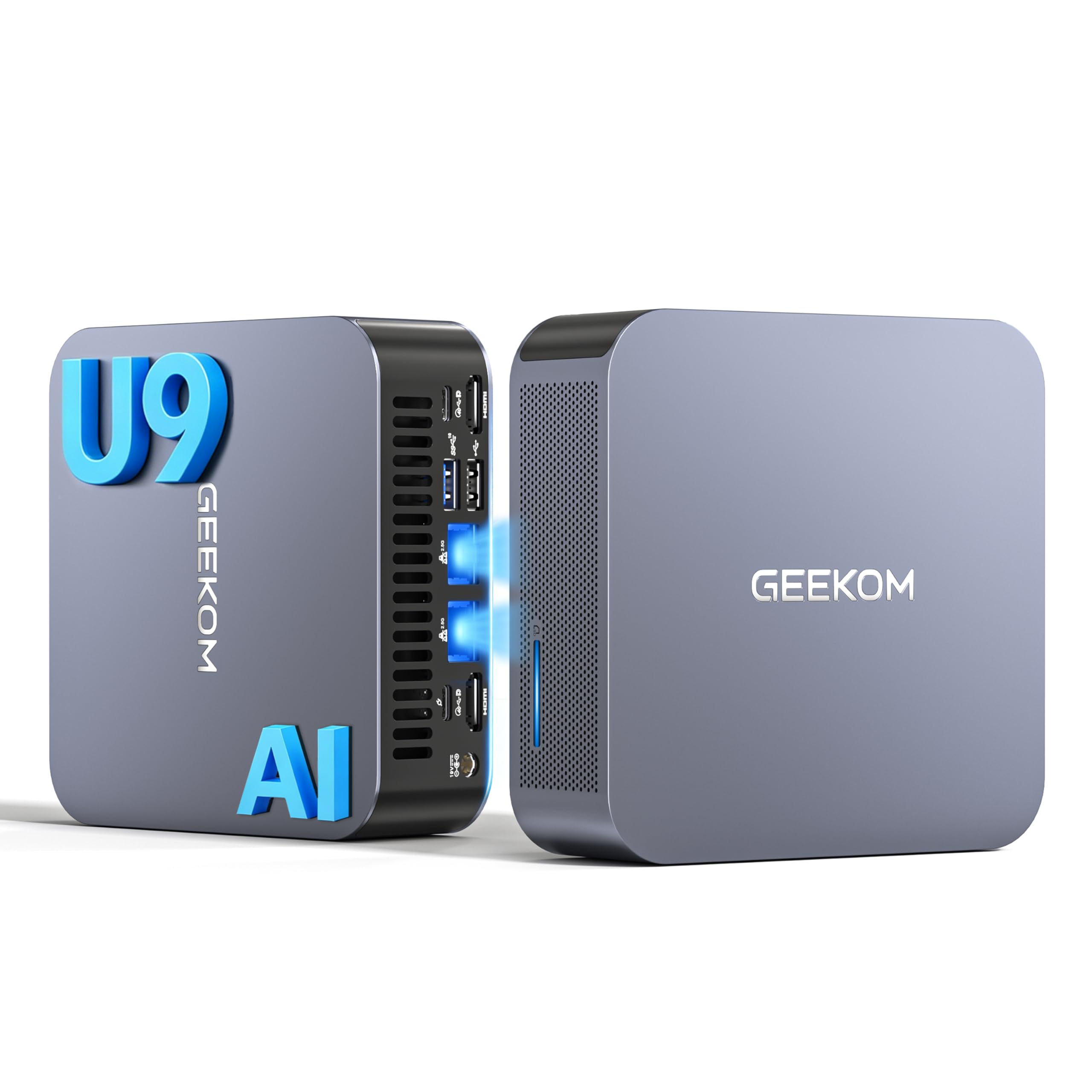
Billede 1.1: Forside view of the GEEKOM GT1 Mega Mini PC.
2. Sikkerhedsoplysninger
Overhold følgende sikkerhedsretningslinjer for at forhindre skader på din enhed eller personskade på dig selv:
- Brug kun den strømadapter, der følger med enheden.
- Udsæt ikke enheden for vand, fugt eller ekstreme temperaturer.
- Undgå at placere enheden i direkte sollys eller i nærheden af varmekilder.
- Sørg for ordentlig ventilation; bloker ikke ventilationsåbninger.
- Forsøg ikke at åbne eller reparere enheden selv. Kontakt kvalificeret personale for service.
- Hold enheden væk fra stærke magnetiske felter.
3. Pakkens indhold
Bekræft at alle varer er til stede i din pakke:
- 1 x GEEKOM GT1 Mega Mini PC
- 1 x VESA-beslag med skruer
- 1 x strømadapter
- 1 x HDMI kabel
- 1 x brugermanual
- 1 x takkekort

Image 3.1: Contents included in the GEEKOM GT1 Mega Mini PC package.
4. Produktet er slutview
4.1. Front and Rear Ports
The GEEKOM GT1 Mega Mini PC offers a comprehensive set of ports for versatile connectivity:

Image 4.1: Diagram illustrating the front and rear ports of the GEEKOM GT1 Mega Mini PC.
- Forreste porte:
- 4 x USB 3.2 Gen2 Type-A (one with Always On power)
- 1 x 3.5 mm hovedtelefonstik
- 1 x Power knap
- Bageste porte:
- 2 x USB4 (40 Gbps, eGPU compatible, one with power delivery)
- 2 x HDMI 2.0
- 2 x RJ45 2.5Gbps Ethernet Ports
- 1 x USB 3.2 Gen2 Type-A
- 1 x USB 2.0 Type-A
- 1 x DC indgang
- 1 x SD-kortlæser
- 1 x Kensington Lock Slot
4.2. Nøglefunktioner
- Processor: Intel Core Ultra 9 185H (16 Cores, 22 Threads, up to 5.1 GHz) with Intel AI Boost (NPU).
- Grafik: Integrated Intel Arc Graphics.
- Hukommelse: 16GB DDR5 5600MHz dual-channel RAM (upgradable up to 128GB).
- Opbevaring: 1TB NVMe PCIe Gen4 SSD (expandable up to 4TB).
- Netværk: Dual 2.5G Ethernet, WiFi 7, Bluetooth 5.4.
- Display Support: Up to four 4K displays or one 8K display via USB4 and HDMI.
- Køling: IceBlast 2.0 advanced cooling system with dual copper heat pipes and high-efficiency fan.
- Chassis: Premium metallic chassis, 0.78 L volume, withstands pressure up to 200 kg.
5. Opsætning
5.1. Første tilslutning
- Tilslut skærm: Connect your monitor(s) to the Mini PC using the HDMI or USB4 ports. The GT1 Mega supports up to four 4K displays or one 8K display.
- Tilslut ydre enheder: Tilslut dit tastatur, din mus og andre USB-enheder til de tilgængelige USB-porte.
- Tilslut netværk: For wired internet, connect an Ethernet cable to one of the 2.5G RJ45 ports. For wireless, ensure your WiFi network is available during initial setup.
- Tilslut strøm: Tilslut strømadapteren til DC-indgangsporten på mini-pc'en, og sæt derefter adapteren i en stikkontakt.
5.2. Første opstart
- Tryk på tænd/sluk-knappen på forsiden af Mini PC'en.
- The device will boot into Windows 11 Pro. Follow the on-screen instructions to complete the initial Windows setup, including language, region, network connection, and user account creation.
- Når Windows er konfigureret, anbefales det at søge efter og installere tilgængelige systemopdateringer.

Billede 5.1: Eks.ample of a multi-monitor setup with the GEEKOM GT1 Mega Mini PC.
6. Betjeningsvejledning
6.1. Tænd/sluk
- Tænd: Tryk én gang på tænd/sluk-knappen.
- Luk ned: Klik på Start-knappen i Windows, og vælg derefter Strøm > Luk ned.
- Genstart: Klik på Start-knappen i Windows, og vælg derefter Tænd/sluk > Genstart.
- Sove: Klik på Start-knappen i Windows, og vælg derefter Strøm > Slumretilstand.
6.2. Netværksforbindelse
- Kabelbaseret (Ethernet): Connect an Ethernet cable to one of the two 2.5G RJ45 ports. The system will automatically detect the connection.
- Trådløs (Wi-Fi 7): I Windows skal du klikke på netværksikonet på proceslinjen, vælge dit Wi-Fi-netværk, indtaste adgangskoden og oprette forbindelse.
- Bluetooth 5.4: To pair Bluetooth devices, go to Windows Settings > Bluetooth & devices, turn on Bluetooth, and select 'Add device'.
6.3. Skærmkonfiguration
The Mini PC supports multiple displays. To configure them:
- Højreklik på skrivebordet og vælg 'Skærmindstillinger'.
- Windows will detect connected displays. You can arrange them, change resolution, and set display modes (Extend, Duplicate, Second screen only).
7. Vedligeholdelse
7.1. Rensning
- Rengør regelmæssigt ydersiden af Mini PC'en med en blød, tør klud.
- Use compressed air to gently clear dust from the ventilation openings to maintain optimal cooling performance.
- Brug ikke flydende rengøringsmidler eller slibende materialer.
7.2. Systemopdateringer
Keep your Windows operating system and drivers updated to ensure optimal performance and security:
- Go to Windows Settings > Windows Update to check for and install system updates.
- Besøg GEEKOM-officielle hjemmeside website for the latest driver updates for your GT1 Mega.
7.3. Hardwareopgraderinger
The GEEKOM GT1 Mega allows for memory and storage upgrades:
- VÆDDER: The device supports up to 128GB of DDR5 SODIMM memory.
- SSD: The 1TB NVMe PCIe Gen4 SSD can be expanded up to 4TB. An additional M.2 2242 SATA SSD slot is available for up to 2TB.
For detailed instructions on how to perform hardware upgrades, please refer to the comprehensive guide on the GEEKOM support website or consult a professional technician.

Image 7.1: Illustration of the GEEKOM GT1 Mega's upgradable DDR5 memory and SSD storage.

Billede 7.2: Eksploderet view of the GEEKOM GT1 Mega, highlighting the IceBlast 2.0 cooling system components.
8. Fejlfinding
If you encounter issues with your GEEKOM GT1 Mega, refer to the following common solutions:
| Problem | Mulig årsag | Løsning |
|---|---|---|
| Ingen strøm | Strømadapter ikke tilsluttet, defekt stikkontakt | Ensure power adapter is securely connected to both the PC and a working power outlet. Try a different outlet. |
| Intet display | Monitor not connected, incorrect input source, faulty cable | Check HDMI/USB4 cable connections. Ensure monitor is on and set to the correct input source. Try a different cable or monitor. |
| No internet (Wi-Fi) | Wi-Fi disabled, incorrect password, router issue | Tjek Wi-Fi-indstillingerne i Windows. Bekræft Wi-Fi-adgangskoden. Genstart din router. |
| No internet (Ethernet) | Ethernet cable disconnected, network driver issue | Ensure Ethernet cable is securely connected. Check network adapter status in Device Manager. Update network drivers. |
| System slow/unresponsive | Too many applications running, overheating, outdated drivers | Close unnecessary applications. Ensure proper ventilation. Update drivers and Windows. |
If the problem persists, please contact GEEKOM customer support for further assistance.
9. Specifikationer
Detailed technical specifications for the GEEKOM GT1 Mega Mini PC:
| Feature | Specifikation |
|---|---|
| Mærke | GEEKOM |
| Modelnavn | GT1 Mega |
| Operativsystem | Windows 11 Pro |
| CPU model | Intel Core Ultra 9-185H |
| CPU hastighed | 5.1 GHz (maks. turbofrekvens) |
| Grafik | Integreret Intel Arc-grafik |
| VÆDDER | 16 GB DDR5 (5600MHz, expandable to 128 GB) |
| Opbevaring | 1 TB NVMe PCIe Gen4 SSD (expandable to 4 TB) |
| Harddiskteknologi | SSD |
| Forbindelse | 2x 2.5G Ethernet, Wi-Fi 7, Bluetooth 5.4 |
| USB-porte | 2x USB4 (40Gbps), 5x USB 3.2 Gen2 Type-A, 1x USB 2.0 Type-A |
| Video output | 2x HDMI 2.0, 2x USB4 (DisplayPort 1.4) |
| Maksimal skærmopløsning | 8K (via USB4), 4K (via HDMI) |
| Lydudgang | 3.5mm Audio Jack |
| Kortlæser | SD-kortlæser |
| Strømforsyning | Type C/EF – 2 pins (European/Hybrid FR-DE plug) |
| Certificeringer | CE, FCC, RoHS |

Image 9.1: GEEKOM GT1 Mega Mini PC certifications including CB, ROHS, FCC ID, EPR, CEC, UKCA, UL4200A.
10. Garanti og support
The GEEKOM GT1 Mega Mini PC comes with a 3-year manufacturer's warranty and professional technical support.
10.1. Garantioplysninger
Your device is covered by a 3-year warranty from the date of purchase, ensuring peace of mind against manufacturing defects. Please retain your proof of purchase for warranty claims.
10.2. Teknisk support
For any technical issues or support inquiries, please use one of the following methods:
- Contact Seller on Amazon: Log in to your Amazon account, navigate to 'Your Orders', and click 'Get Help' for assistance.
- E-mail support: Send an email to the GEEKOM support team at pan.he@geekom.tw. Our team will respond as soon as possible.