
1. Introduktion
This manual provides comprehensive instructions for the assembly, operation, and maintenance of your OMOTON GH04 Aluminum Alloy Long Arm Tablet and Phone Stand. Please read this manual carefully before use to ensure proper installation and optimal performance of the product. Keep this manual for future reference.
2. Hvad er der i æsken
Kontroller, at alle komponenter er til stede, før monteringen påbegyndes:
- Aluminum Tablet Holder (Main Arm Assembly)
- Plastic Tablet Clamp
- Magnetic Phone Head

Figur 2.1: Produktkomponenter og dimensioner.
3. Opsætningsvejledning
Follow these steps to assemble and install your OMOTON GH04 stand:
3.1. Attaching the C-Clamp Grundlag
- Identify a suitable surface for mounting, such as a desk, headboard, or table. The C-clamp can accommodate surfaces up to 2.55 inches (approximately 6.5 cm) thick.
- Placer C-clamp base onto the edge of your chosen surface.
- Tighten the screw mechanism on the C-clamp until it is firmly secured to the surface. Ensure the clamp is stable and does not wobble. The base features rubber padding to protect your furniture from scratches.
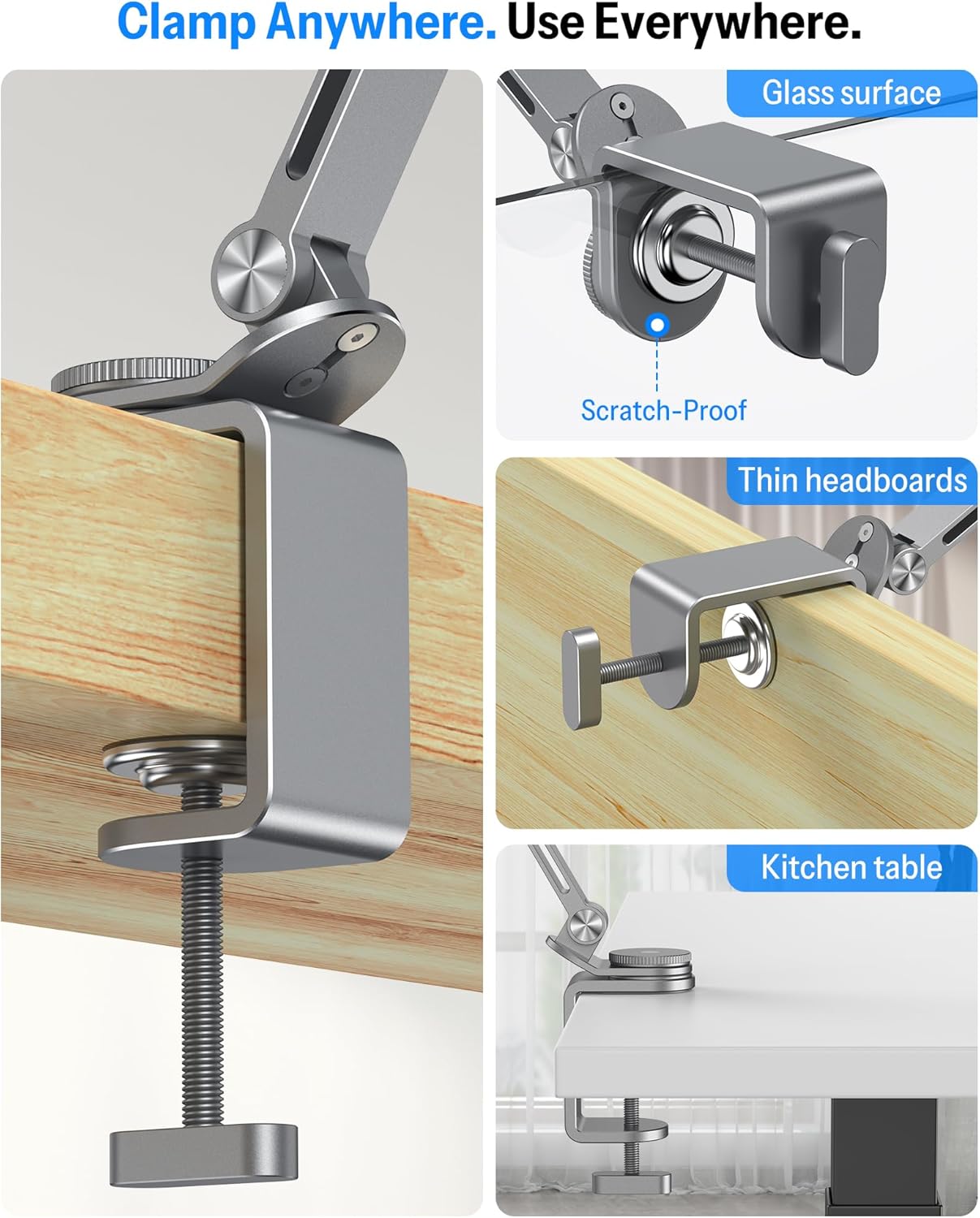
Figur 3.1: C-clamp base installation on various surfaces.
3.2. Attaching the Arm Assembly
- Insert the main arm assembly into the designated slot on the C-clamp grundlag.
- Rotate the tension control knob on the base to secure the arm. Adjust the tightness to allow for smooth rotation while maintaining stability.
3.3. Attaching the Device Holder (Magnetic Head or Tablet Clamp)
The OMOTON GH04 stand offers two options for holding your device:
- For Magnetic Phone Head: Attach the magnetic phone head to the end of the arm. This is suitable for phones with built-in magnetic capabilities (e.g., iPhone 12-17 series) or other phones/cases with an included metal ring.
- For Plastic Tablet Clamp: Attach the plastic tablet clamp to the end of the arm. This clamp is designed for tablets and larger phones ranging from 4 to 13 inches.

Figure 3.2: Magnetic phone head and plastic tablet clamp muligheder.
Video 3.1: Demonstration of attaching and using the OMOTON Magnetic Phone Tablet Holder for Bedside Desk.
4. Betjeningsvejledning
Once assembled, the OMOTON GH04 stand offers flexible positioning for your device.
4.1. Tilslutning af din enhed
- For Magnetic Head: Simply bring your compatible phone close to the magnetic head. The strong magnets will securely attach the device.
- For Tablet Clamp: Gently pull apart the adjustable grips of the plastic clamp and insert your tablet or phone. Release the grips to secure the device. Ensure the device is centered and held firmly.
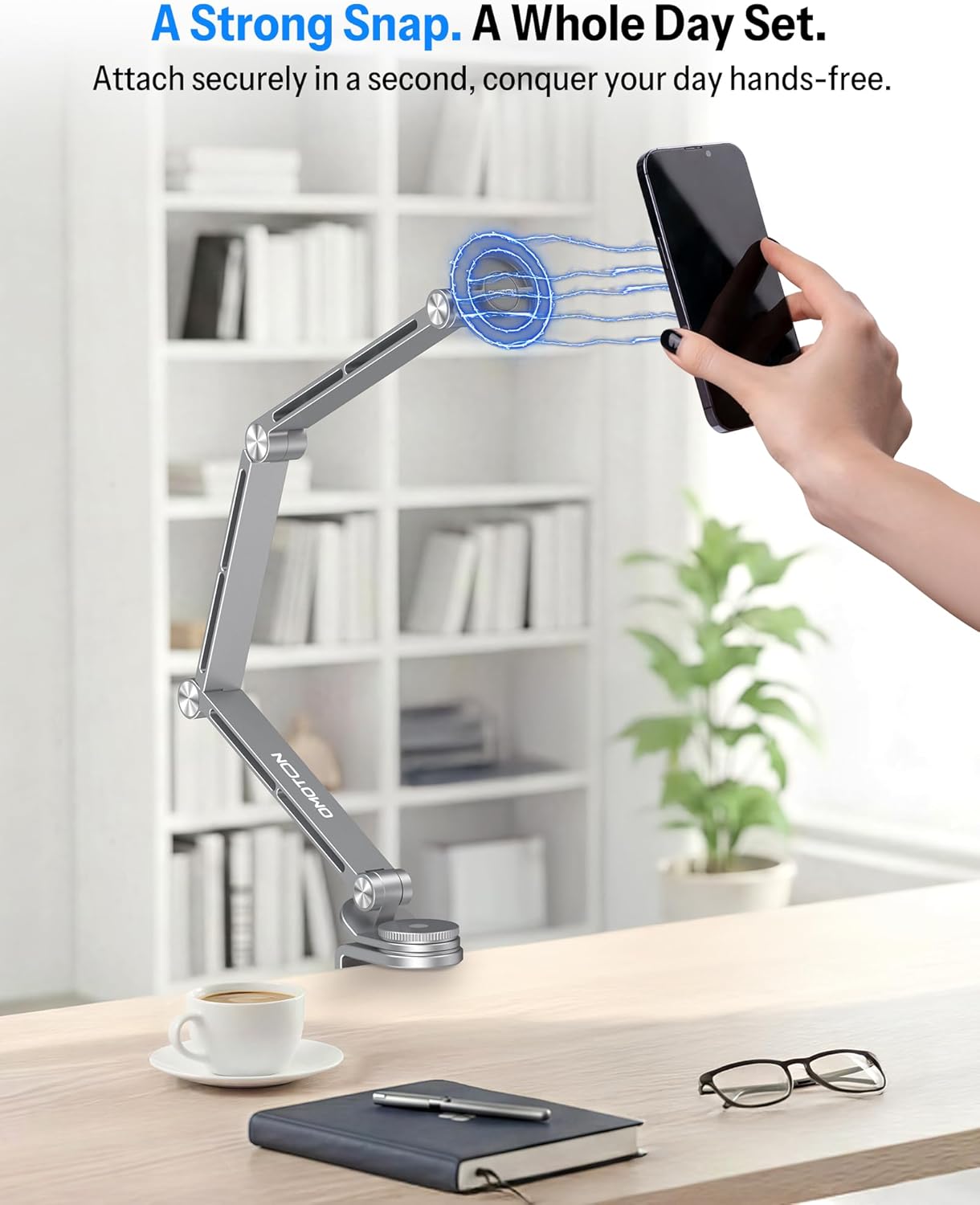
Figure 4.1: Magnetic attachment of a smartphone to the stand.
4.2. Adjusting the Arm and Viewi vinkel
The stand features multiple flexible rotating shafts and a 360-degree rotating base for precise positioning:
- Armjustering: The multi-joint aluminum alloy arm can be extended, retracted, and angled to achieve your desired height and distance. The joints are designed to be stiff to prevent sagging, providing stable placement.
- Device Rotation: The device holder can rotate 360 degrees, allowing you to switch between portrait and landscape orientations.
- Grundrotation: The base also rotates 360 degrees, providing flexibility to swing the entire arm assembly out of the way when not in use or to share your screen.
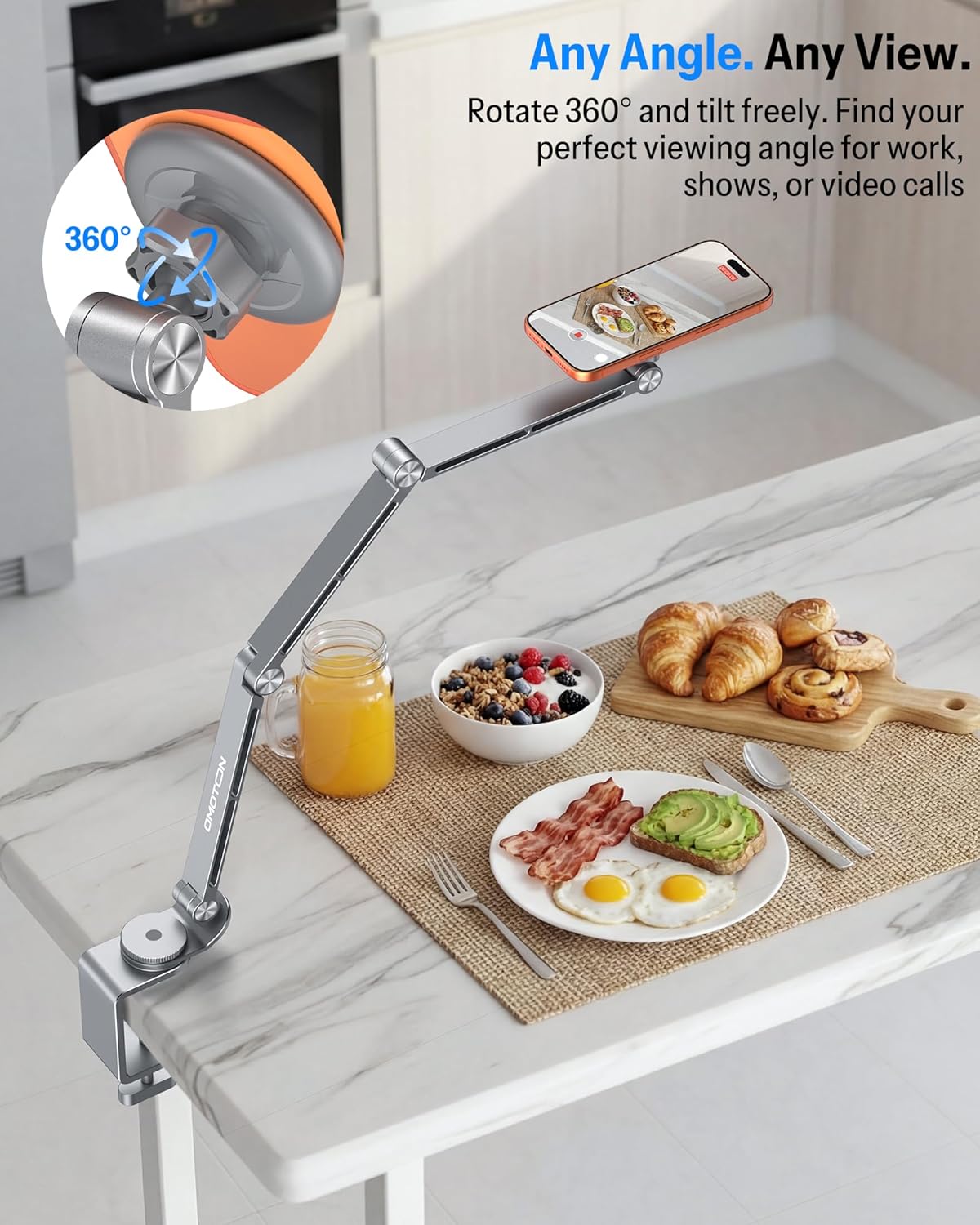
Figure 4.2: Flexible arm and 360-degree rotation for optimal viewing.

Figur 4.3: Eksamples of the stand in various use cases.
Video 4.1: Demonstration of the OMOTON Aluminum Alloy Lazy Tablet Stand for Desk in use.
5. Vedligeholdelse
To ensure the longevity and proper functioning of your OMOTON GH04 stand, follow these simple maintenance guidelines:
- Rensning: Wipe the aluminum alloy surfaces with a soft, dry cloth. For stubborn marks, a slightly damp en klud kan bruges, efterfulgt af øjeblikkelig tørring. Undgå slibende rengøringsmidler eller opløsningsmidler.
- Led: The joints are designed to be stiff for stability. Do not attempt to lubricate them unless specifically instructed by OMOTON support, as this may affect their holding strength.
- Opbevaring: When not in use for extended periods, store the stand in a clean, dry environment.
6. Fejlfinding
If you encounter any issues with your OMOTON GH04 stand, refer to the following common problems and solutions:
| Problem | Mulig årsag | Løsning |
|---|---|---|
| Stativet føles ustabilt eller vakler. | C-clamp not tightened sufficiently; surface too thin or uneven. | Sørg for C-clamp is securely tightened to a stable surface. Verify the surface thickness is within the 2.55-inch limit. |
| Arm joints are too stiff to adjust. | Joints are designed for firm hold; initial stiffness is normal. | Apply firm, steady pressure when adjusting the arm. The stiffness ensures the arm holds its position. Avoid excessive force. |
| Device is not securely held by the clamp/magnetic head. | Device size incompatible; magnetic ring not applied (for non-magnetic phones). | Ensure your device (4-13 inches) is correctly placed in the tablet clamp. For magnetic attachment, confirm your phone has built-in magnetic capabilities or that a metal ring is properly affixed to your phone/case. |
| Stand does not fit behind a headboard. | Design of the C-clamp and arm orientation may not suit narrow gaps. | The stand's design may not be ideal for very narrow spaces between a wall and a headboard due to the tightening knob and arm pivot. Consider mounting on a nightstand or desk instead. |
If the problem persists after attempting these solutions, please contact OMOTON customer support for further assistance.
7. Specifikationer
| Feature | Detalje |
|---|---|
| Mærke | OMOTON |
| Modelnummer | GH04 |
| Farve | Grå |
| Formfaktor | Long Arm Tablet Holder |
| Kompatible enheder | 4.7 - 13 inch tablets and phones (e.g., iPad Pro 11/12.9/13, iPad Air 5/6, iPad mini 6/5/4/3, iPhone 17/16/15/14/13/12 series, Kindle, Surface Pro) |
| Monteringstype | Tabletop (C-clamp) |
| Max Clamp Tykkelse | 2.55 tommer (ca. 6.5 cm) |
| Særlige funktioner | 360 Degree Rotation, Adjustable Arm, Magnetic Phone Head, Plastic Tablet Clamp |
| Materiale | Aluminiumslegering |
8. Garantioplysninger
The OMOTON GH04 Tablet and Phone Stand comes with a 180 dages garanti from the date of purchase. This warranty covers manufacturing defects and issues arising from normal use. It does not cover damage caused by misuse, accidents, unauthorized modifications, or improper installation.
Gem venligst dit købsbevis for garantikrav.
9. Kundesupport
For any product-related questions, technical assistance, or warranty claims, please contact OMOTON customer support through the retailer's platform or the official OMOTON website. Our support team is available to help you and ensure a satisfactory experience.


