
1. Introduktion
The Reflexion HIF2082DAB is a versatile retro-style music system designed to combine nostalgic aesthetics with modern audio technology. This unit integrates a turntable, CD player, DAB+/FM radio, USB playback and recording capabilities, and Bluetooth 5.3 connectivity. It is equipped with external speakers to deliver clear and powerful sound, making it a comprehensive audio solution for various environments.
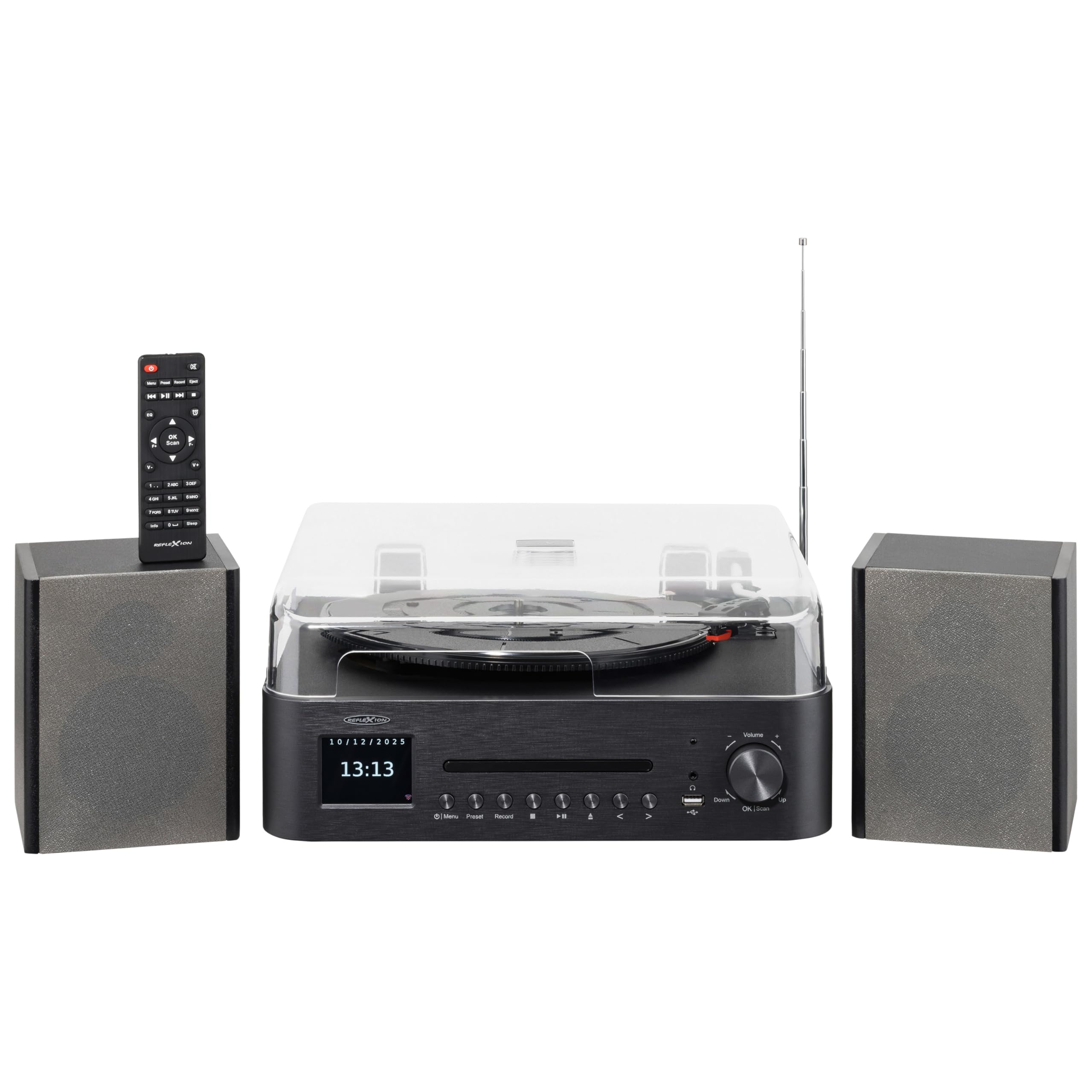
Image 1.1: The Reflexion HIF2082DAB Retro Turntable with included external speakers.
2. Sikkerhedsinstruktioner
- Læs alle instruktioner omhyggeligt, før du betjener enheden.
- Gem manualen til fremtidig reference.
- Udsæt ikke enheden for regn eller fugt for at forhindre brand eller elektrisk stød.
- Sørg for ordentlig ventilation; bloker ikke ventilationsåbninger.
- Placer enheden på en stabil, flad overflade.
- Brug kun tilbehør/tilbehør specificeret af producenten.
- Tag stikket ud af enheden under tordenvejr, eller når den ikke skal bruges i længere perioder.
- Overlad al service til kvalificeret servicepersonale.
3. Pakkens indhold
Kontroller venligst, at alle nedenstående varer er inkluderet i din pakke:
- 1 x Reflexion HIF2082DAB Main Unit
- 2 x Stereo Speakers
- 1 x strømkabel
- 1 x Remote Control (2 AAA batteries not included)
- 1 x brugsanvisning

Image 3.1: Included remote control and power cable.
4. Produktet er slutview
4.1 Frontpanel og betjeningselementer
The front panel features the main display, control buttons for various functions, and the CD tray. The volume knob and USB port are also located here for easy access.
4.2 Top Panel (Turntable)
The top panel houses the semi-automatic turntable, including the platter, tonearm, and stylus. A protective dust cover is also provided.

Billede 4.1: Nærbillede view of the turntable with auto-stop and tonearm return features highlighted.
4.3 Bagpaneltilslutninger
The rear panel includes connections for the external speakers, Line Out for connecting to an external amplifier, and Aux In for connecting external audio sources.

Image 4.2: Rear panel showing speaker terminals, Line Out, Aux In, and power input.
5. Opsætning
5.1 Udpakning og placering
- Fjern forsigtigt alle komponenter fra emballagen.
- Place the main unit and speakers on a stable, level surface, ensuring adequate ventilation around the unit.
- Hold enheden væk fra direkte sollys, varmekilder og fugt.
5.2 Tilslutning af højttalerne
- Connect the included stereo speakers to the speaker terminals on the rear of the main unit. Ensure correct polarity (red to red, black to black).
5.3 Strømtilslutning
- Insert the power cable into the AC input on the rear of the unit.
- Plug the other end of the power cable into a suitable wall outlet (AC 100-240V).
5.4 Indledende opsætning
- Upon first power-on, the unit may prompt you to select a language and set the time/date. Follow the on-screen instructions using the navigation buttons and OK/Scan button.
6. Betjeningsvejledning
6.1 Betjening af pladespiller
- Valg af hastighed: Choose the appropriate speed (33, 45, or 78 RPM) using the speed selector switch.
- Afspilning af en plade: Place a record on the platter. Remove the stylus protector. Gently lift the tonearm using the cueing lever and position it over the desired track. Lower the tonearm slowly onto the record.
- Auto-stop funktion: The turntable features an auto-stop function that automatically stops the platter when a record finishes playing. The tonearm will also return to its rest position.
6.2 CD-afspiller
- Tryk på CD-tilstandsknappen.
- Press the Eject button to open the CD tray. Place a CD (audio CD or MP3 CD) with the label side up.
- Press Eject again to close the tray. Playback will begin automatically.
- Use the Skip/Search buttons to navigate tracks and Play/Pause for playback control.
6.3 DAB+/FM-radio
- Press the DAB+ or FM mode button.
- Automatisk scanning: For DAB+, the unit will automatically scan for available stations. For FM, press and hold the OK/Scan button to perform an auto scan.
- Manuel indstilling: Use the navigation buttons to manually tune to a frequency.
- Presets: Save your favorite stations by pressing and holding the Preset button, then selecting a preset number. Recall saved stations by pressing the Preset button and selecting the desired number.
6.4 Bluetooth-forbindelse
- Press the Bluetooth mode button. The display will show "Pairing" or similar.
- Aktiver Bluetooth på din mobile enhed (smartphone, tablet osv.).
- Søg efter "Reflexion HIF2082DAB" in your device's Bluetooth list and select it to pair.
- Once paired, you can stream audio from your device to the HIF2082DAB.
6.5 USB-afspilning og -optagelse
- USB-afspilning: Insert a USB flash drive (up to 32GB, FAT format) containing MP3 files into the USB port. Press the USB mode button. The unit will automatically detect and play MP3 files.
- USB Recording (from Vinyl): While playing a vinyl record, press the Record button. The unit will begin recording the audio directly to the connected USB drive as an MP3 file. Press Record again to stop.
6.6 Alarm og sleeptimer
- Alarm: The unit features two adjustable alarms. Access the alarm settings through the menu to set wake-up times and desired audio sources (e.g., radio, CD).
- Sleep timer: Set the sleep timer (up to 90 minutes) to automatically turn off the unit after a specified duration. This is useful for falling asleep to music.
7. Vedligeholdelse
7.1 Rengøring af enheden
- Tør enheden af med en blød, tør klud. Brug ikke slibende rengøringsmidler eller opløsningsmidler.
- For the dust cover, use a soft, slightly damp klud, tør derefter grundigt.
7.2 Pleje af pennen
- Regularly clean the stylus using a soft brush, brushing gently from back to front.
- Replace the stylus when sound quality deteriorates or after approximately 300-500 hours of use to prevent damage to your records.
8. Fejlfinding
| Problem | Mulig årsag | Løsning |
|---|---|---|
| Ingen strøm | Strømkabel ikke tilsluttet; stikkontakt defekt | Sørg for, at strømkablet er korrekt tilsluttet; prøv en anden stikkontakt |
| Ingen lyd | Volume too low; Speakers not connected; Incorrect input mode | Increase volume; Check speaker connections; Select correct source mode |
| Pladespiller drejer ikke | Speed selector incorrect; Auto-stop engaged | Check speed setting; Ensure tonearm is over the record |
| Dårlig radiomodtagelse | Antennen er ikke trukket ud; Svagt signal | Fully extend the telescopic antenna; Reposition the unit for better reception |
| Bluetooth-parring mislykkes | Enhed for langt væk; Bluetooth er ikke aktiveret på enheden; Enhed ikke i parringstilstand | Move device closer; Enable Bluetooth; Ensure unit is in pairing mode |
9. Specifikationer
- Mærke: Reflexion
- Model: HIF2082DAB
- Farve: Sort
- Dimensioner (L x B x H): 32.9 x 37.1 x 16 cm (12.95 x 14.61 x 6.3 tommer)
- Produktvægt: 6.5 kilo (14.33 lbs)
- Bluetooth teknologi: Ja
- Antal højttalere: 2 (External Stereo Speakers)
- Max Speaker Power: 2 x 160 W (Peak Power)
- Pladespiller hastigheder: 33, 45, 78 RPM
- Vise: 2.8" farve-TFT-skærm
- USB-kompatibilitet: Up to 32GB, FAT format (for MP3 playback and recording)
- Radio: DAB+, FM
- Yderligere funktioner: CD Player (MP3/Audiobook compatible), USB Recording, Remote Control, Dual Alarms, Sleep Timer, Auto-Stop with Tonearm Return, Line Out, Aux In.
10. Garanti og support
For warranty information and customer support, please refer to the warranty card included in your package or contact your local Reflexion dealer or service center. Keep your proof of purchase for any warranty claims.
For further assistance, you may also visit the official Reflexion website or consult the contact information provided in the original product documentation.