
TECKNET TK-HS023
TECKNET TK-HS023 V5.4 Bluetooth Trucker Headset
Brugermanual
1. Introduktion
This manual provides detailed instructions for the proper use, setup, and maintenance of your TECKNET TK-HS023 V5.4 Bluetooth Trucker Headset. Please read this manual thoroughly before using the product to ensure optimal performance and longevity.
Pakkens indhold
- TECKNET TK-HS023 Bluetooth Headset
- USB opladningskabel
- Brugermanual
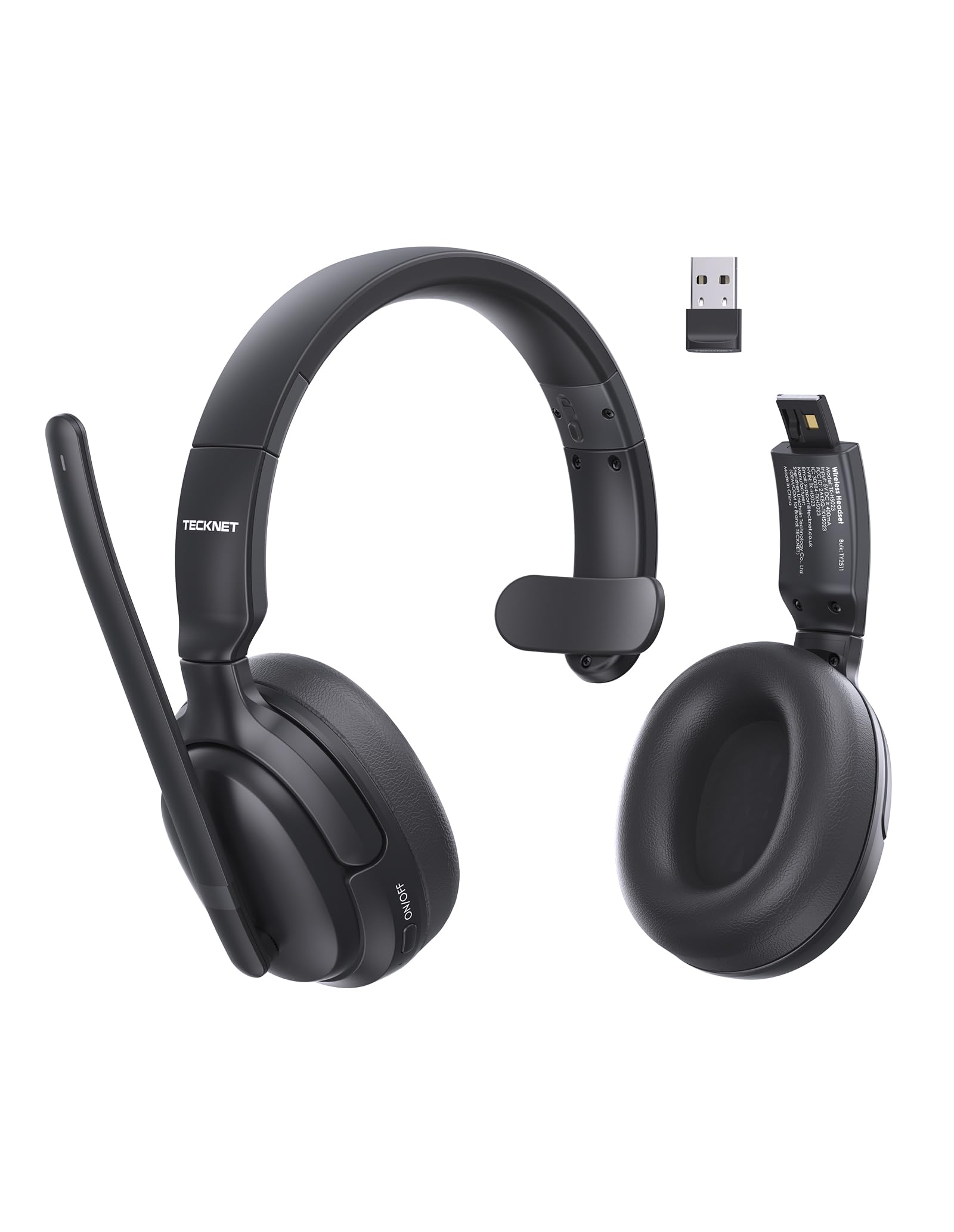
Image 1.1: TECKNET TK-HS023 Bluetooth Trucker Headset. This image displays the headset with its adjustable headband and microphone boom.
2. Produktfunktioner
- AI støjreducerende mikrofon: Designed to filter out background noise, ensuring clear voice transmission in noisy environments.
- Single-Ear Design: Allows users to remain aware of their surroundings while using the headset.
- Dual-Device Seamless Connectivity: Connects to two Bluetooth devices simultaneously, enabling easy switching between calls and audio.
- Langtidsholdbart batteri: Provides extended usage time on a single charge.
- Stable Bluetooth V5.4 Connection: Offers reliable wireless connectivity with a range of up to 15 meters.
- Easy Call & Audio Controls: Intuitive buttons for managing calls, adjusting volume, and controlling media playback.
- Justerbart pandebånd: Sikrer en behagelig pasform til forskellige hovedstørrelser.
3. Opsætning
3.1 Opladning af headsettet
Before initial use, fully charge the headset. A full charge takes approximately 2 hours and provides up to 65 hours of battery life.
- Tilslut den lille ende af USB-opladerkablet til opladningsporten på headsettet.
- Connect the large end of the USB charging cable to a USB power source (e.g., computer USB port, wall adapter).
- The LED indicator on the headset will show the charging status. It typically turns red during charging and blue or off when fully charged.
3.2 Bluetooth -parring
To connect your headset to a device via Bluetooth:
- Sørg for, at headsettet er fuldt opladet.
- Power on the headset by pressing and holding the Multi-Function Button (MFB) until the LED indicator flashes blue and red alternately, indicating pairing mode.
- Aktiver Bluetooth på din enhed (smartphone, tablet, bærbar computer), og søg efter tilgængelige enheder.
- Select "TECKNET TK-HS023" from the list of found devices.
- Once connected, the LED indicator on the headset will flash blue slowly or turn solid blue.
Tilslutning til to enheder: After pairing with the first device, disable Bluetooth on the first device, then put the headset back into pairing mode to connect to a second device. Once the second device is paired, re-enable Bluetooth on the first device. The headset should automatically connect to both devices, allowing seamless switching.
4. Betjeningsvejledning
4.1 Headset-kontroller
- Multifunktionsknap (MFB): Power on/off, Play/Pause, Answer/End Call, Reject Call, Redial.
- Lydstyrke op (+): Øg lydstyrken, Næste nummer (langt tryk).
- Skrue ned for lyden (-): Skru ned for lydstyrken, Forrige nummer (langt tryk).
- Mute-knap: Mute/unmute microphone during a call.
4.2 Opkaldshåndtering
- Besvar opkald: Tryk én gang på MFB.
- Afslut opkald: Tryk én gang på MFB-knappen under et opkald.
- Afvis opkald: Tryk og hold MFB nede i 2 sekunder.
- Genopkald sidste nummer: Dobbelttryk på MFB-knappen, når du ikke er i gang med et opkald.
- Slå mikrofon fra: Tryk på knappen Lydløs under et opkald. Tryk igen for at slå lyden til.
4.3 Lydafspilning
- Afspil/pause: Tryk én gang på MFB.
- Næste nummer: Tryk længe på knappen Lydstyrke op (+).
- Forrige nummer: Tryk længe på lydstyrke ned-knappen (-).
4.4 AI Noise Cancelling Microphone
The integrated AI Noise Cancelling Microphone actively reduces ambient noise, such as engine sounds or office chatter, to ensure your voice is transmitted clearly to the other party during calls. Position the microphone boom approximately 1-2 inches from your mouth for best performance.
5. Vedligeholdelse
5.1 Rengøring
- Tør headsettet af med en blød, tør eller let fugtig kludamp klæde.
- Brug ikke skrappe kemikalier, rengøringsopløsningsmidler eller stærke rengøringsmidler.
- Undgå at fugt kommer ind i åbninger.
5.2 Opbevaring
- Opbevar headsettet et køligt og tørt sted væk fra ekstreme temperaturer.
- Undgå langvarig udsættelse for direkte sollys eller fugt.
6. Fejlfinding
Fælles problemer og løsninger
- Headsettet tænder ikke: Sørg for, at headsettet er fuldt opladet.
- Kan ikke parres med enhed:
- Sørg for, at headsettet er i parringstilstand (LED'en blinker blåt og rødt).
- Sørg for, at Bluetooth er aktiveret på din enhed.
- Flyt headsettet tættere på din enhed.
- Genstart både headsettet og din enhed.
- Ingen lyd eller dårlig lydkvalitet:
- Kontroller lydstyrkeniveauerne på både headsettet og din tilsluttede enhed.
- Ensure the headset is within the 15-meter Bluetooth range.
- Disconnect and reconnect the headset to your device.
- Tjek for interferens fra andre trådløse enheder.
- Mikrofonen virker ikke:
- Sørg for, at mikrofonen ikke er slået fra.
- Tjek mikrofonindstillingerne på din tilsluttede enhed.
7. Specifikationer
| Feature | Specifikation |
|---|---|
| Mærke | TECNET |
| Modelnavn | TK-HS023 |
| Forbindelsesteknologi | Trådløs (Bluetooth V5.4) |
| Bluetooth rækkevidde | Op til 15 meter |
| Øreplacering | Over Ear (Single-ear design) |
| Mikrofon | AI støjreduktion |
| Batteriopladningstid | Cirka 2 timer |
| Batteriets gennemsnitlige levetid | Op til 65 timer |
| Kompatible enheder | Mobiltelefoner, stationære computere, bærbare computere, tablets |
| Yderligere funktioner | Adjustable Headband, Volume Control, Dual-Device Connectivity |
| Farve | Sort |
8. Garanti og support
8.1 Garantioplysninger
The TECKNET TK-HS023 Bluetooth Trucker Headset comes with a 3 års garanti fra købsdatoen. Denne garanti dækker fabrikationsfejl og sikrer, at produktet er fri for materiale- og fabrikationsfejl ved normal brug.
The warranty does not cover damage caused by misuse, accident, unauthorized modification, or external causes such as drops or liquid damage.
8.2 Kundesupport
For technical support, warranty claims, or any questions regarding your TECKNET TK-HS023 headset, please refer to the contact information provided on the TECKNET official website or your purchase documentation. Please have your model number (TK-HS023) and proof of purchase ready when contacting support.
Ask a question about this manual
Ask about setup, troubleshooting, compatibility, parts, safety, or missing instructions. Manuals+ will review the question and use this page’s manual context to help answer it.