
1. Introduktion
This manual provides comprehensive instructions for the Ivation Replacement Remote Control, model JID0TPT01. This remote is specifically designed to operate various Ivation Large Digital LED Timer Clocks. Please read this manual thoroughly to ensure proper setup and operation of your remote control.
2. Produktkompatibilitet
This replacement remote control is compatible exclusively with the following Ivation Large Digital LED Timer Clock models. It is not a universal remote and will not function with other devices.
- JID0124TBLU, JID0124TRED, JID0124TWHT
- JID0136TBLU, JID0136TRED, JID0136TWHT
- JID0148TRED, JID0148TBLU, JID0148TWHT
- JID0160TRED, JID0160TBLU, JID0160TWHT
- JID0172TBLU, JID0172TRED, JID0172TWHT
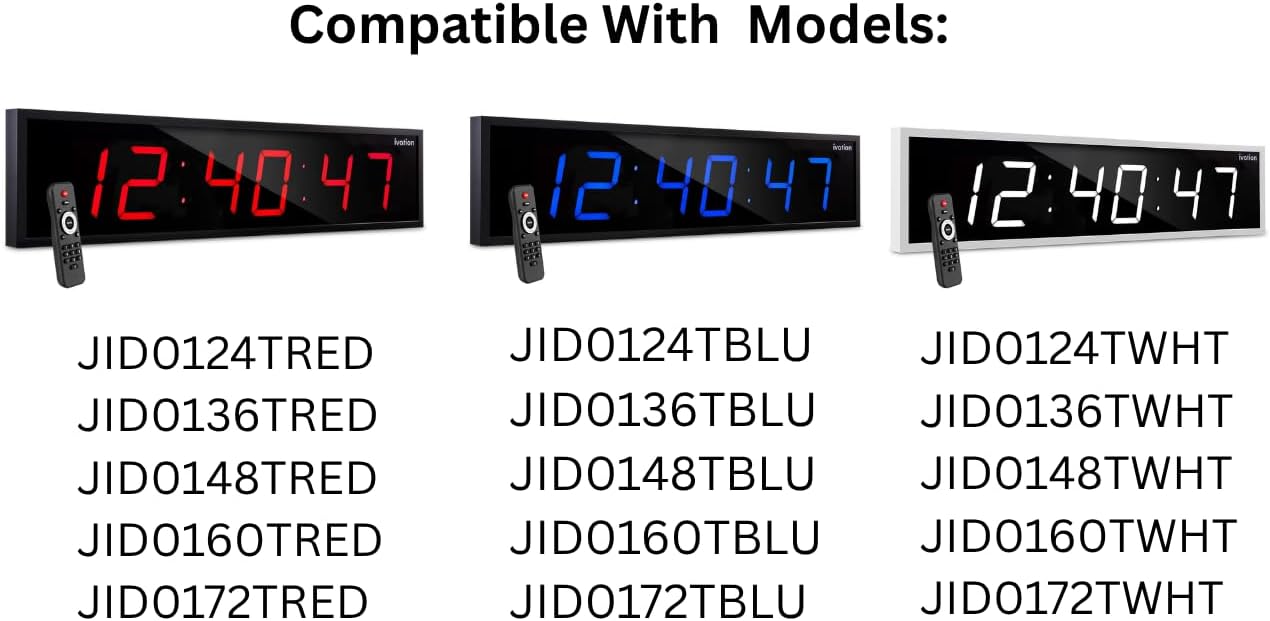
This image illustrates the various Ivation Large Digital LED Timer Clock models that are compatible with this replacement remote control. The clocks are shown in red, blue, and white display colors, each paired with the remote. Below the clocks, a comprehensive list of compatible model numbers is provided for reference.
3. Opsætning
3.1 Batteriinstallation
- Find batterirummet på bagsiden af fjernbetjeningen.
- Skub batterirummets dæksel op.
- Isæt to (2) AAA alkaliske batterier, og sørg for at polerne (+ og -) vender korrekt som angivet i batterirummet.
- Luk batterirummets dæksel forsvarligt.
Note: Udskift altid begge batterier på samme tid. Bland ikke gamle og nye batterier eller forskellige typer batterier. Fjern batterierne, hvis fjernbetjeningen ikke skal bruges i længere tid.
4. Betjeningsvejledning
The Ivation replacement remote control features a straightforward button layout for easy operation of your compatible Ivation Large Digital LED Timer Clock. Refer to the diagram below for button identification and functions.

This image provides a clear, labeled diagram of the Ivation replacement remote control. Each button is identified with its name and a brief description of its function, such as 'Clock' for showing time, 'Display' for cycling through time, date, and temperature, 'Mute' for toggling alert sounds, 'Brightness' for adjusting display intensity, 'Timer Functions' for stopwatch, countdown, or alarms, 'F/C' for temperature unit toggle, 'AM/PM 12/24' for time format, and the 'Number Pad' for manual settings.
4.1 Knapfunktioner
- Ur: Displays the current time on the clock.
- Vise: Cycles through different display modes, such as time, date, and temperature.
- Stum: Toggles alert sounds (e.g., alarm beeps) on or off.
- Lysstyrke: Cycles through 6 different brightness levels for the clock display.
- Alarm: Accesses alarm settings. Press to set or activate alarms.
- Start/Stop: Initiates or pauses stopwatch and countdown timer functions.
- Tæl ned: Aktiverer nedtællingstimerfunktionen.
- Set/Enter: Confirms selections or enters settings within menus.
- F/C: Skifter temperaturvisningen mellem Fahrenheit og Celsius.
- AM/PM 12/24: Cycles the time display between 12-hour (AM/PM) and 24-hour formats.
- Nummertastatur (0-9): Used to manually input numbers for setting time, date, alarms, or timer durations.
5. Fejlfinding
Hvis du oplever problemer med din fjernbetjening, kan du bruge følgende almindelige løsninger:
- Fjernbetjeningen svarer ikke:
- Ensure the remote has fresh AAA alkaline batteries installed correctly.
- Check for any obstructions between the remote and the clock's infrared receiver.
- Sørg for, at du er inden for fjernbetjeningens effektive rækkevidde (typisk op til 20 meter).
- Knapper virker ikke:
- Tryk knapperne godt ned.
- Clean the remote's surface if there is any debris that might be obstructing button presses.
- Intermitterende drift:
- Udskift batterierne med nye.
- Avoid strong light sources (like direct sunlight) that might interfere with the infrared signal.
If problems persist after attempting these solutions, please contact Ivation customer support.
6. Specifikationer
| Modelnavn | JID0TPT01 |
| Mærke | Ivation |
| Forbindelsesteknologi | Infrarød |
| Kompatible enheder | Ivation Large Digital LED Timer Clocks (listed in Section 2) |
| Knap Antal | 3 (referring to main function buttons, not including number pad) |
| Controller type | Knap kontrol |
| Batteritype | Alkaline AAA (x2) |
| Farve | Sort |
7. Garanti og support
For warranty information and customer support, please refer to the documentation provided with your original Ivation Large Digital LED Timer Clock or visit the official Ivation webwebsted. Gem din købskvittering for garantikrav.