
1. Introduktion
The IK Multimedia TONEX Plug is a portable AI-powered headphone amplifier designed for guitar and bass players. It provides access to a vast library of tone models, functions as a USB-C audio interface, and supports Bluetooth audio streaming for practice and recording. This manual provides essential information for setting up, operating, and maintaining your TONEX Plug.

Image: The TONEX Plug connected to a guitar, ready for use with headphones.
2. Vigtige sikkerhedsoplysninger
- Læs denne vejledning grundigt før brug.
- Gem denne vejledning til fremtidig reference.
- Udsæt ikke enheden for vand eller fugt.
- Undgå ekstreme temperaturer og direkte sollys.
- Brug kun specificerede vedhæftede filer/tilbehør.
- Forsøg ikke at skille enheden ad eller ændre den. Overlad al service til kvalificeret personale.
- Prolonged listening at high volume levels can cause permanent hearing damage. Always set the volume to a comfortable level.
3. Pakkens indhold
Bekræft at alle varer er til stede i din pakke:
- TONEX Plug Amplivligere
- USB-C ladekabel

Image: The TONEX Plug and its included USB-C charging cable.
4. Opsætning
4.1 Opladning af enheden
Before first use, fully charge your TONEX Plug. Connect the included USB-C cable to the USB-C port on the device and the other end to a compatible USB power adapter (not included) or a computer's USB port. The LED indicator will show charging status.

Image: The TONEX Plug connected to a smartphone via USB-C, demonstrating its charging and audio interface capabilities.
4.2 Tilslutning til dit instrument
The TONEX Plug features a flexible 1/4-inch jack. Plug this directly into the output jack of your electric guitar or bass. The flexible design allows it to fit various instrument body shapes.

Image: The TONEX Plug inserted into the output jack of an electric guitar, with headphones connected for silent practice.
4.3 Tilslutning af hovedtelefoner
Plug your headphones into the 3.5mm headphone output jack located on the side of the TONEX Plug. Ensure the volume is set to a low level before putting on headphones.
5. Betjeningsvejledning
5.1 Tænd/sluk
Tryk og hold på MAGT button for a few seconds to turn the device on or off. The LED indicators will illuminate upon power-on.
5.2 Justering af lydstyrke
Brug LYDSTYRKE + og VOLUME - buttons on the side of the device to adjust the headphone output level.
5.3 Navigating Presets and Tuner
The TONEX Plug allows you to store and recall up to 30 user presets across 10 color-coded banks. Use the FORUDINDSTILLING buttons to cycle through your saved tones. Press the TUNER button to activate the built-in chromatic LED tuner for accurate instrument tuning.
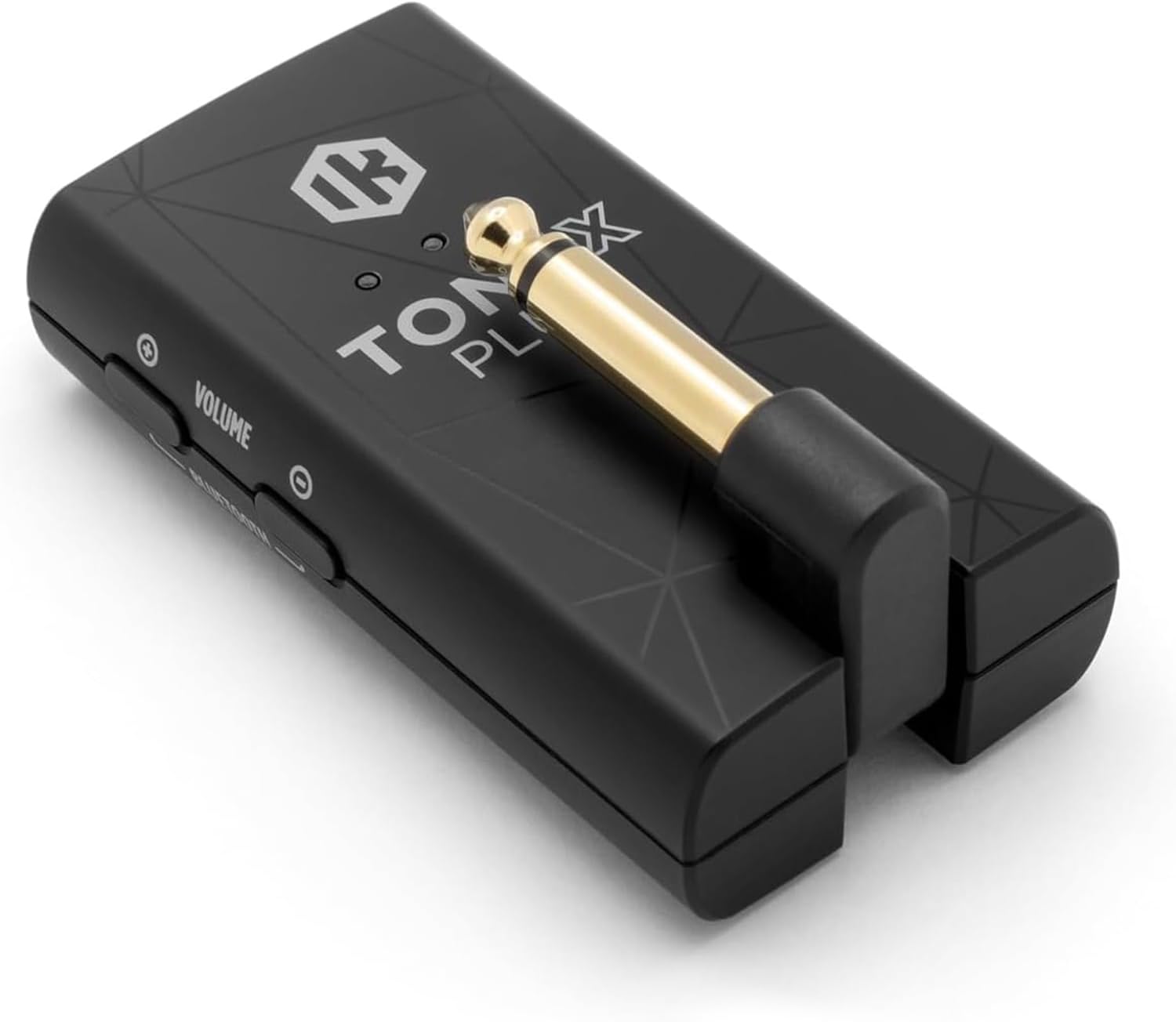
Billede: Detaljeret view of the TONEX Plug's controls, including Power, Preset, Tuner, Volume, and Bluetooth buttons.
5.4 Bluetooth Streaming and TONEX Control App
The TONEX Plug supports Bluetooth audio streaming, allowing you to play along with music from your mobile device. It also connects wirelessly to the TONEX Control App (iOS/Android) for advanced tone management.
- Aktiver Bluetooth på din mobilenhed.
- Tryk og hold på BLUETOOTH button on the TONEX Plug to enter pairing mode.
- Select "TONEX Plug" from your device's Bluetooth settings.
- Open the TONEX Control App to browse ToneNET, load new sounds, edit presets, and access a full signal chain with six essential effects (noise gate, compressor, delay, modulation, reverb) and comprehensive EQ controls.
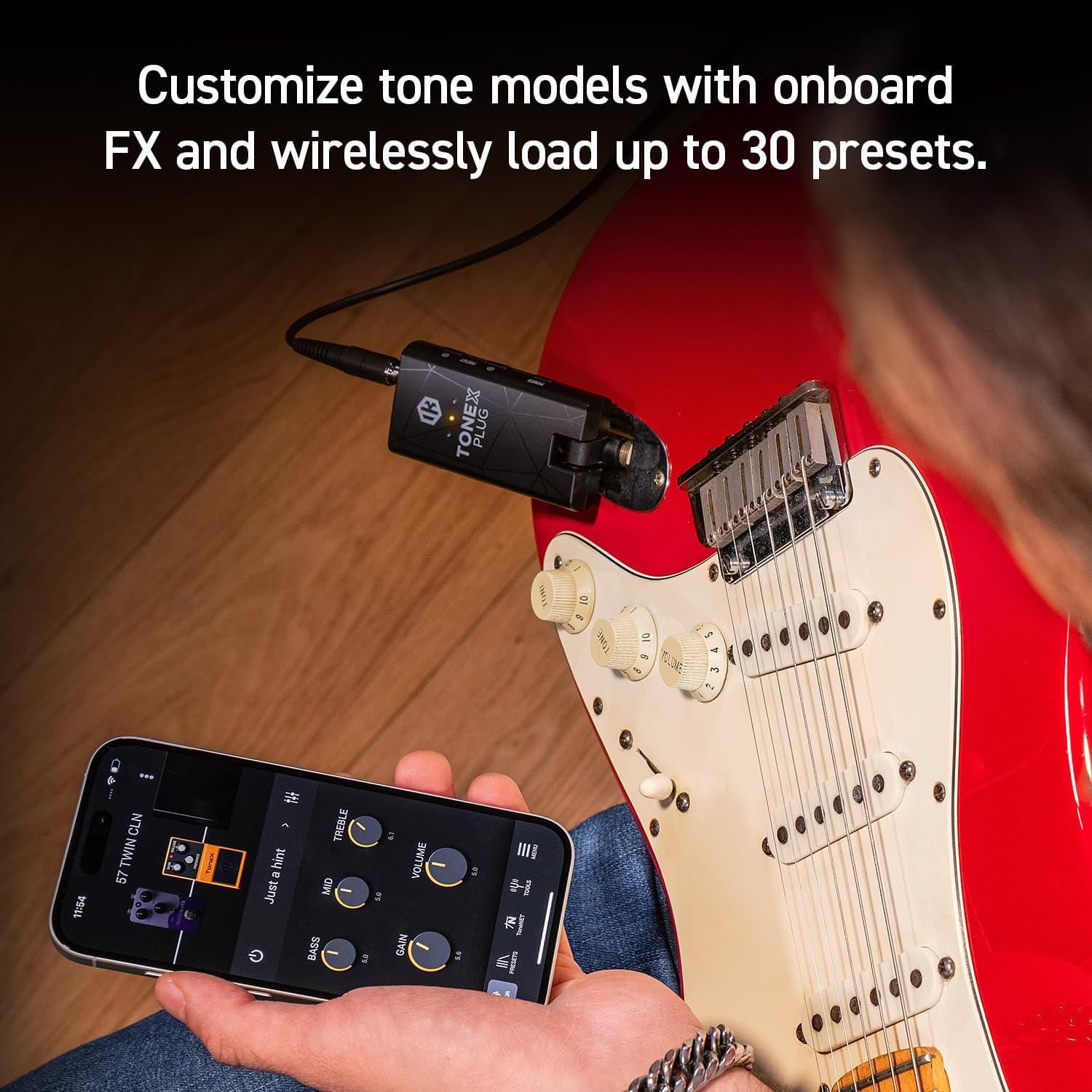
Image: The TONEX Control App interface on a smartphone, demonstrating real-time tone customization while connected to the TONEX Plug.
5.5 USB-C Audio Interface Functionality
The TONEX Plug can function as a premium USB-C audio interface. Connect the device to your computer or mobile device using the USB-C cable to record high-fidelity digital audio directly. This allows you to use the TONEX Plug's tone models and effects within your digital audio workstation (DAW).
5.6 Produkt overview Video
Video: Et officielt produkt overståetview of the IK Multimedia TONEX Plug, demonstrating its features and connectivity.
6. Vedligeholdelse
- Rensning: Use a soft, dry cloth to clean the exterior of the TONEX Plug. Do not use abrasive cleaners or solvents.
- Batteripleje: The internal rechargeable battery provides up to 6 hours of continuous playtime. For optimal battery life, avoid fully discharging the unit frequently and store it in a cool, dry place when not in use for extended periods.
- Opbevaring: Store the device in a protective case or pouch (if applicable) to prevent damage from dust or impacts.
7. Fejlfinding
| Problem | Mulig årsag | Løsning |
|---|---|---|
| Ingen lyd fra hovedtelefoner. | Volume too low, headphones not fully plugged in, TONEX Plug not powered on, instrument not connected. | Increase volume, ensure headphones are securely connected, power on the device, check instrument connection. |
| Kan ikke oprette forbindelse via Bluetooth. | TONEX Plug not in pairing mode, Bluetooth off on mobile device, interference. | Ensure TONEX Plug is in pairing mode (hold Bluetooth button), enable Bluetooth on your device, try pairing in a different location. |
| Device not recognized as audio interface. | Incorrect USB-C cable, driver issues (for computer), device not powered on. | Use the provided USB-C cable, ensure device is powered on, check your computer's audio settings or install necessary drivers from IK Multimedia's webwebsted. |
| Kort batterilevetid. | Batteriet er ikke fuldt opladet, gammelt batteri. | Ensure full charge before use. Battery performance may degrade over time. |
If you encounter issues not listed here, please refer to the official IK Multimedia support resources.
8. Specifikationer
- Model: TONEX Plug
- Mærke: IK Multimedia
- Varens vægt: 2.89 ounce
- Produktdimensioner: 0.79" D x 1.57" B x 2.95" H
- Output Channel Quantity: 1
- Batterilevetid: Op til 6 timer (genopladelig)
- Forbindelse: 1/4" instrument input, 3.5mm headphone output, USB-C (charging/audio interface), Bluetooth
- Tone Models: Access to 40,000+ AI Machine Modeling Tone Models
- Effekter: Noise gate, compressor, delay, modulation, reverb, EQ
9. Garanti og support
The IK Multimedia TONEX Plug comes with a manufacturer's warranty. For detailed warranty information, product registration, and technical support, please visit the official IK Multimedia webwebstedet eller kontakt deres kundeservice. Gem din købsbevis til garantikrav.
Officiel Webwebsted: www.ikmultimedia.com