
1. Introduktion
Welcome to the user manual for your MAGIC-REFINER X68 HE Wired Magnetic Keyboard. This manual provides essential information for setting up, operating, maintaining, and troubleshooting your new device. Please read it thoroughly to ensure optimal performance and longevity of your keyboard.
The MAGIC-REFINER X68 HE is a high-performance 68-key TKL (Tenkeyless) keyboard designed for precision and speed, featuring Hall Effect magnetic switches, adjustable actuation, and dynamic RGB backlighting.
2. Produktet er slutview
The MAGIC-REFINER X68 HE keyboard integrates advanced features for a superior typing and gaming experience. Key highlights include:
- Compact UK QWERTY Layout: A 68-key TKL design that retains essential keys while minimizing desk footprint, featuring an authentic UK layout.
- 0.01mm RT Sensitivity: Adjustable actuation points from 0.1mm to 3.4mm in 0.01mm increments for precise control and zero dead zone.
- Ultra-Fast Hall Effect Magnetic Switches: Delivers an 8000Hz polling rate and 128,000-point scan frequency for ultra-low latency of 0.125ms.
- Web Tilpasning af driver: Intuitive software for key remapping, advanced macros, and RGB lighting personalization.
- Dynamic Keystroke Features: Supports Snap Tap for faster direction changes, Rapid Trigger for fluid movements and instant resets, and Dynamic Keystroke for analog input and up to 4 actions per keypress.
- Dynamisk RGB-baggrundsbelysning: South-facing RGB with customizable effects and colors via the driver software.
- Hot-swap-kontakter: Supports North-Pole-Down magnetic switches for easy replacement and customization.

Figure 2.1: The MAGIC-REFINER X68 HE Wired Magnetic Keyboard, showcasing dens kompakte design og RGB-belysning.

Figur 2.2: Overview of the X68 HE highlighting its mechanical magnetic switches, essential for esports players.

Figur 2.3: Detaljeret view of the Rapid Trigger Hall Effect Magnetic Switch, showing linear switch type, 40±5gf operation force, 100M click lifespan, 0.1-3.4mm actuation point, and zero dead zone.
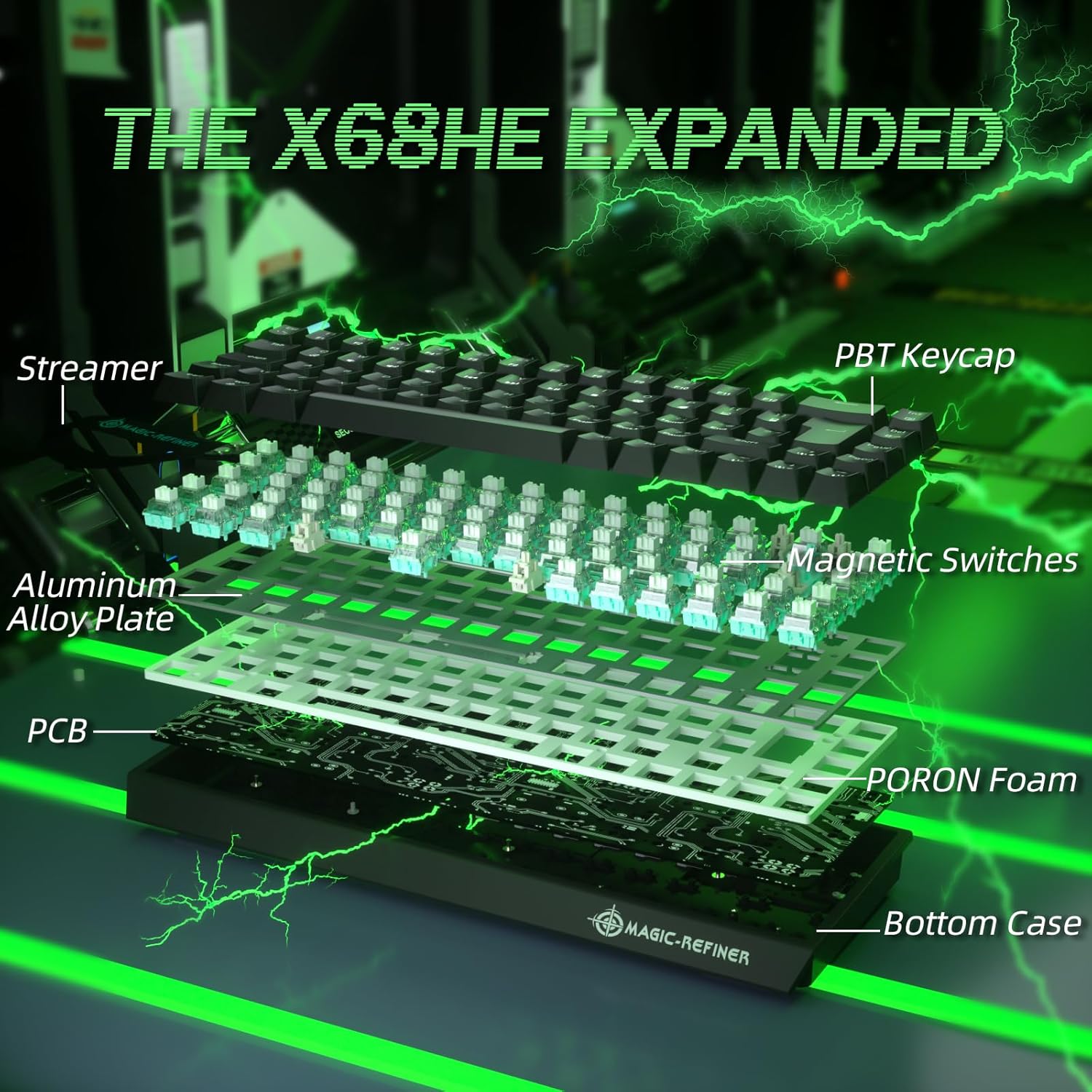
Figure 2.4: Exploded diagram illustrating the internal components of the X68 HE, including PBT keycaps, streamer, aluminum alloy plate, magnetic switches, PCB, and PORON foam.
3. Opsætningsvejledning
- Pak tastaturet ud: Tag forsigtigt tastaturet og dets tilbehør ud af emballagen.
- Tilslut til pc: Connect the provided USB-C cable to the keyboard's USB-C port and the other end to an available USB port on your computer. The keyboard is plug-and-play.
- Driverinstallation (valgfrit men anbefalet): For full customization, including key remapping, advanced macros, and RGB lighting effects, download and install the dedicated Web Driver. The link for the driver is typically provided on the manufacturer's official webwebsted eller i produktemballagen.
- Placering: Position the keyboard comfortably on your desk. You may adjust the keyboard's angle using the integrated risers on the underside.

Figure 3.1: The compact UK layout of the X68 HE keyboard, showing its dimensions (12.80in width, 4.53in depth, 1.57in height).
4. Betjeningsvejledning
4.1 Grundlæggende tastaturfunktioner
The X68 HE keyboard operates as a standard QWERTY keyboard. Due to its compact 68-key layout, some functions are accessed via the Function (Fn) key combinations.
- Fn + F1-F12: Access multimedia controls and system functions as indicated by the icons on the keycaps.
- Fn + Piletaster: May control backlight brightness or speed, depending on the specific model and driver settings.
- Fn + DEL: Switch RGB colors.
- Fn + INS: Switch RGB light modes.
4.2 Advanced Gaming Features
- Hurtig udløser: This feature allows keys to reset instantly upon release, enabling faster repeated inputs and more fluid movements in games. The actuation point is dynamically adjusted, meaning a key press registers as soon as it passes the set actuation point, and deactivates as soon as it rises above it, without needing to return to the full reset position.
- Snap-tap: Designed for quick direction changes, Snap Tap optimizes the response for rapid key presses and releases, crucial for competitive gaming.
- Dynamisk tastetryk (DKS): This feature allows for analog input, enabling up to four different actions to be assigned to a single keypress based on the depth of the press. This can be configured via the Web Chauffør.

Figure 4.1: Visual comparison demonstrating the 0.04mm RT accuracy of the X68 HE's rapid trigger mechanism compared to a regular switch, showing faster reset and activation points.

Figure 4.2: Illustration of the keyboard's 8000Hz polling rate, ultra-low latency of 0.125ms, and high scan rate of 128K, indicating up to 8 times faster performance.
5. Tilpasning
The MAGIC-REFINER X68 HE keyboard offers extensive customization options through its dedicated Web Driversoftware.
- Justerbart aktiveringspunkt: Fine-tune the actuation point of each key from 0.1mm to 3.4mm in 0.01mm increments to match your preferred typing or gaming style. This allows for extreme sensitivity or a more deliberate press.
- Nøgleomlægning og makroer: Reassign key functions and create complex macros for enhanced productivity or in-game advantages.
- RGB-belysningstilpasning: Personalize the south-facing RGB backlighting with a wide array of colors, effects, and brightness levels. The software provides granular control over lighting zones and patterns.
- Avancerede teknologier: The driver supports technologies like SOCD (Simultaneous Opposite Cardinal Directions), TGL (Toggle), DKS (Dynamic Keystroke), MPT (Multi-Press Tap), and MT (Mod Tap) for advanced control.
For driver download and detailed instructions on customization, please visit the official MAGIC-REFINER website or refer to the link provided in your product documentation.
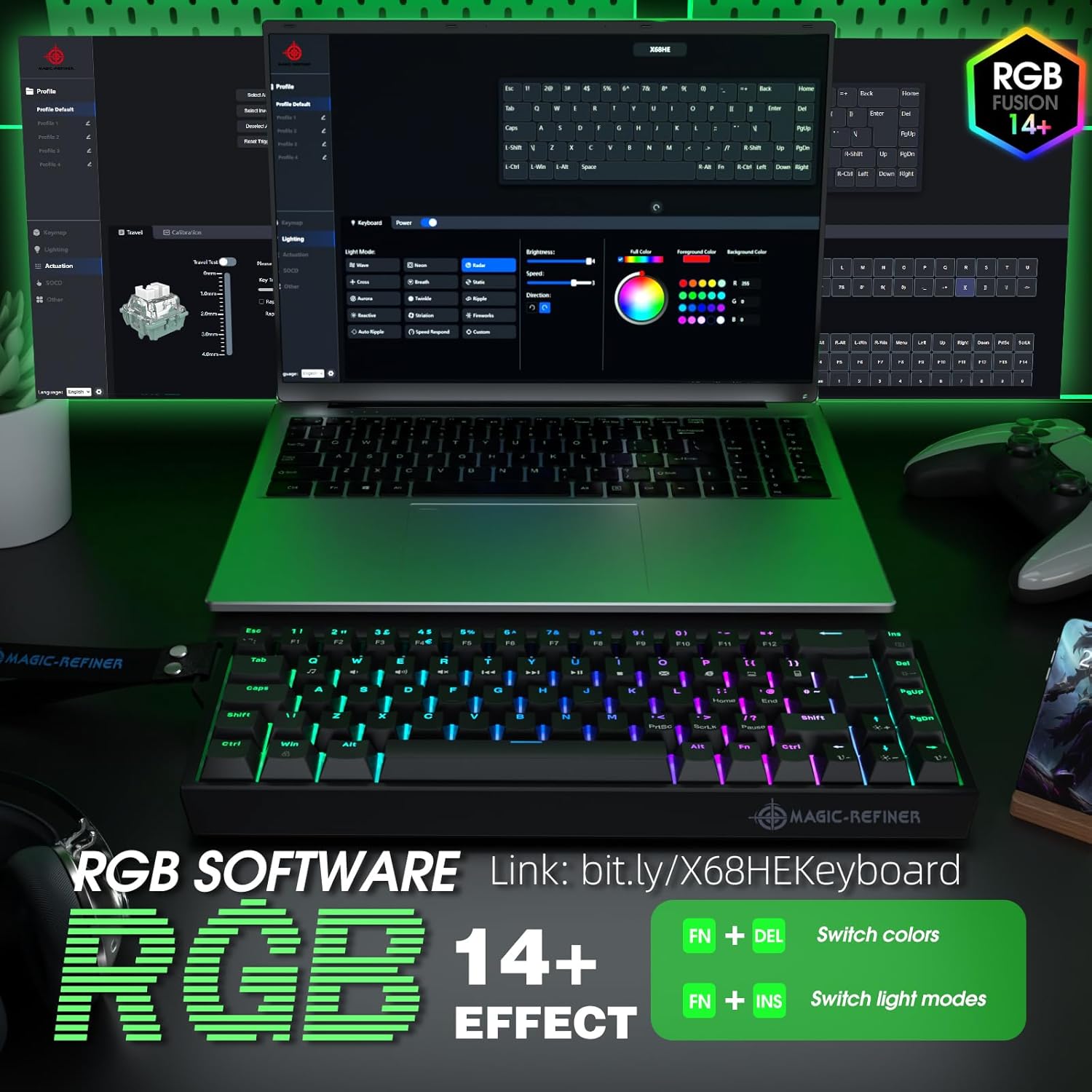
Figure 5.1: Screenshot of the RGB software interface, demonstrating options for profile management, lighting modes, brightness, color selection, and key assignments. Also shows quick RGB controls: Fn + DEL for color, Fn + INS for light modes.
6. Vedligeholdelse
6.1 Rengøring
- Generel rengøring: Brug en blød, fnugfri klud lidt damprengøres med vand eller en mild rengøringsopløsning for at tørre tastaturets overflade af. Undgå for meget fugt.
- Fjernelse af støv: Brug trykluft til at fjerne støv og snavs mellem tasterne.
- Dyb rengøring: For thorough cleaning, keycaps can be carefully removed using a keycap puller. Clean the keycaps separately and wipe the switch stems. Ensure all parts are completely dry before reassembling.
6.2 Hot-swap-kontakter
The X68 HE features hot-swappable North-Pole-Down magnetic switches, allowing you to easily replace individual switches without soldering. This is useful for customizing the feel of specific keys or replacing a faulty switch.
- Fjern tastehætte: Use a keycap puller to gently remove the keycap from the desired switch.
- Fjern kontakt: Brug en afbrydertrækker til forsigtigt at gribe fat i de øverste og nederste klips på afbryderen og trække den lige op.
- Indsæt ny kontakt: Align the pins of the new switch with the holes on the PCB. Press the switch firmly until it clicks into place. Ensure it is seated correctly and not bent.
- Udskift tastehætte: Tryk tastaturhætten på den nye kontaktstamme.
Always handle switches and keycaps with care to avoid damage.

Figure 6.1: The X68 HE keyboard demonstrating its hot-swappable feature, allowing for easy removal and replacement of individual magnetic switches.
7. Fejlfinding
- Tastaturet reagerer ikke:
- Sørg for, at USB-C-kablet er korrekt tilsluttet til både tastaturet og computeren.
- Prøv at tilslutte tastaturet til en anden USB-port på din computer.
- Test tastaturet på en anden computer for at udelukke systemspecifikke problemer.
- Genstart din computer.
- RGB-belysning virker ikke/forkert:
- Sørg for, at tastaturet er korrekt tilsluttet.
- Use Fn + DEL and Fn + INS combinations to cycle through colors and modes.
- Tjek Web Driver software for lighting settings and ensure they are correctly configured.
- Geninstaller Web Driver software if issues persist.
- Nøgler registreres ikke eller dobbelttastes:
- Clean the affected key and switch area for any debris.
- If the switch is hot-swappable, try removing and reinserting the switch. If the problem continues, replace the switch with a spare one.
- Check the actuation settings in the Web Driver software; a very low actuation point might cause unintended triggers.
8. Specifikationer
| Mærke | MAGI-RAFFINER |
| Model | X68 HE |
| Forbindelsesteknologi | Kablet (USB-C) |
| Tastaturlayout | UK QWERTY (68-key TKL) |
| Switch Type | Hall Effect Magnetic Switches (Hot-swappable) |
| Aktiveringspunkt | Justerbar fra 0.1 mm til 3.4 mm (i intervaller af 0.01 mm) |
| Afstemningsfrekvens | 8000 Hz |
| Latency | 0.125 ms |
| Baggrundsbelysning | Dynamic RGB (South-facing) |
| Kompatible enheder | PC |
| Farve | Sort |
| Strømkilde | USB |
| Særlige funktioner | Rapid Trigger, Snap Tap, Dynamic Keystroke, Web Tilpasning af føreren |
9. Garanti og support
9.1 Garantioplysninger
The MAGIC-REFINER X68 HE keyboard comes with a manufacturer's warranty of 6 måneder fra købsdatoen. Denne garanti dækker defekter i materialer og udførelse ved normal brug. Den dækker ikke skader forårsaget af misbrug, ulykker, uautoriserede ændringer eller normal slitage.
Gem venligst dit købsbevis for garantikrav.
9.2 Kundesupport
For technical assistance, warranty claims, or any questions regarding your MAGIC-REFINER X68 HE keyboard, please contact the seller or manufacturer's customer support. Refer to the contact information provided with your product packaging or on the official MAGIC-REFINER webwebsted.
When contacting support, please have your product model (X68 HE) and proof of purchase readily available.