
1. Opsætning
1.1 Udpakning og pakkeindhold
Carefully remove all items from the packaging. Ensure all components are present before proceeding with installation.
- Roku Select Series 55" 4K TV
- Stands and screws
- Fjernbetjening
- Brugermanual

Figure 1: Contents of the Roku Select Series 55-inch TV package.
1.2 Fysisk installation
The Roku Select Series TV can be installed using the included stands for table mounting or by using a compatible VESA wall mount (200 x 100 mm, sold separately).
Installation af bordmontering:
- Placer tv-skærmen med nedad på en blød, ren overflade for at forhindre ridser.
- Fastgør de to TV-stativer til de dertil beregnede huller i bunden af TV'et med de medfølgende skruer. Sørg for, at de er ordentligt fastgjort.
- Løft forsigtigt tv'et op, og placer det på en stabil, plan overflade.
Vægmontering:
For wall mounting, refer to the instructions provided with your VESA 200 x 100 mm compatible wall mount kit. Ensure the wall can support the weight of the television (approximately 20.1 pounds without stand).

Figure 2: TV dimensions and package contents overview.
1.3 Tilslutning af eksterne enheder
The TV features multiple ports for connecting external devices. Refer to the back panel diagram for port locations.

Figure 3: Rear panel connections including HDMI, USB, and network ports.
- HDMI-porte (3 i alt): Connect gaming consoles, Blu-ray players, soundbars, or other HDMI-enabled devices.
- USB Port (1 total): Tilslut USB-lagerenheder til medieafspilning.
- Ethernet (LAN) port: Til en kablet internetforbindelse.
- Antenne-/kabelindgang: Tilslut en antenne til trådløse udsendelser eller en kabel-tv-forbindelse.
- Optical (S/PDIF) Output: Til digital lydudgang til et lydsystem.
1.4 Første opstart og netværksforbindelse
- Tilslut netledningen til TV'et og en stikkontakt.
- Tryk på tænd/sluk-knappen på fjernbetjeningen for at tænde for tv'et.
- Follow the on-screen instructions to complete the initial setup, including language selection (English, Spanish, French, Portuguese are supported).
- Select your preferred network connection:
- Wi-Fi: Vælg dit Wi-Fi-netværk fra listen, og indtast adgangskoden.
- Ethernet: If an Ethernet cable is connected, the TV will automatically attempt to establish a wired connection.
- The TV will guide you through linking to a Roku account, which is necessary to access streaming channels and features.
2. Betjeningsvejledning
2.1 Fjernbetjeningsfunktioner
The included voice remote provides intuitive control over your TV. It operates via Bluetooth, eliminating the need for direct line-of-sight.

Figure 4: Roku Voice Remote layout and key functions.
- Power knap: Tænder eller slukker for tv'et.
- Directional Pad (OK button in center): Navigerer i menuer og vælger elementer.
- Lydstyrke op/ned: Justerer TV-lydstyrken.
- Mute-knap: Slår lyden fra eller til på tv'et.
- Stemmeknap: Activates voice search and control.
- Øjeblikkelig genafspilning: Springer et par sekunder tilbage i videoafspilning.
- Live TV-knap: Accesses the live TV channel guide.
- Hurtigstartsknapper: Dedicated buttons for popular streaming apps (e.g., Netflix, Disney+, Apple TV, Prime Video). These can be customized for your favorite apps.
- Finder af mistet fjernbetjening: If the remote is misplaced, use the Roku mobile app to activate an audible alert from the remote.
2.2 Home Screen Navigation and Streaming
The Roku home screen provides quick access to all your streaming channels, inputs, and settings.
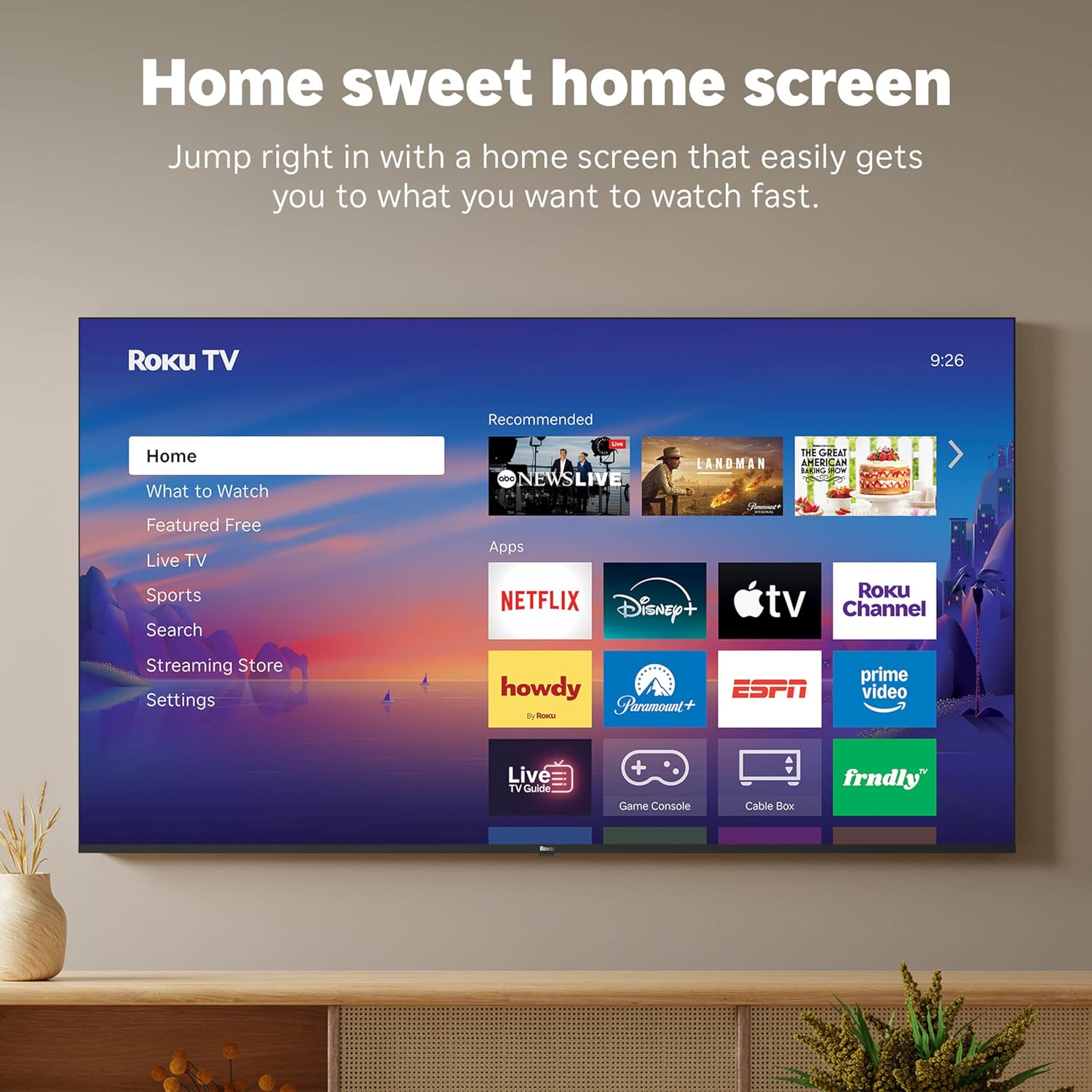
Figur 5: Roku TV-startskærmens brugerflade.
- Use the directional pad on your remote to navigate through the menu options on the left side of the screen (Home, What to Watch, Live TV, Sports, Search, Streaming Store, Settings).
- Select an app icon from the main grid to launch your desired streaming service.
- The TV's fast Wi-Fi and optimized app launch ensure quick access to entertainment.
2.3 Billed- og lydindstillinger
The Roku Select Series TV offers advanced picture and sound technologies for an enhanced viewoplevelse.
- 4K QLED-skærm: Provides sharp 4K resolution and accurate colors.
- HDR10-understøttelse: Enhances contrast and color depth for compatible content.
- Roku Smart Picture: Automatically optimizes incoming TV signals and selects the appropriate picture mode for content.
- Dolby Audio: Delivers clear speech and enhanced sound quality through the integrated 2.1 channel speakers (20 Watts maximum output power).
- Bluetooth Headphone Mode: Connect Bluetooth headphones for private listening without disturbing others.
2.4 Stemmestyring og Smart Home-integration
Control your TV and integrate it into your smart home ecosystem.

Figure 6: Roku TV's smart home compatibility.
- Roku Voice: Use the voice button on your remote to search for content, launch apps, or control playback.
- Smart Assistant-kompatibilitet: The TV is compatible with Siri, Alexa, and Google Assistant for voice control through external smart devices.
- Apple AirPlay: Share videos, photos, music, and more from your Apple devices directly to your TV.
2.5 Live TV Access
Access live television channels directly from the home screen.

Figure 7: Live TV channel guide interface.
- Connect an antenna to the TV's Antenna/Cable input.
- Use the 'Live TV' option on the home screen or the dedicated button on the remote to access the channel guide.
- The TV supports ATSC tuner type for digital broadcasts.
3. Vedligeholdelse
3.1 Rengøring af tv'et
- Tag altid stikket ud af tv'et inden rengøring.
- Brug en blød, tør og fnugfri klud til forsigtigt at tørre skærmen og kabinettet af.
- For genstridige mærker, gnid letampRengør kluden med vand eller et mildt, ikke-slibende skærmrensemiddel. Spray ikke rengøringsmiddel direkte på skærmen.
- Undgå at bruge skrappe kemikalier, slibende svampe eller opløsningsmidler, da de kan beskadige tv'ets overflade.
3.2 Softwareopdateringer
The Roku TV receives automatic software updates to provide new features and improvements. Ensure your TV is connected to the internet to receive these updates.
4. Fejlfinding
If you encounter issues with your Roku TV, consider the following basic troubleshooting steps:
- Ingen strøm: Sørg for, at netledningen er korrekt tilsluttet både tv'et og en fungerende stikkontakt. Prøv en anden stikkontakt.
- Intet billede/lyd: Verify that the correct input source is selected. Check all cable connections (HDMI, antenna, etc.) for looseness.
- Fjernbetjeningen reagerer ikke: Replace the AAA batteries in the remote control. Ensure there are no obstructions between the remote and the TV (though Bluetooth reduces this issue). Re-pair the remote if necessary (refer to Roku support documentation).
- Problemer med netværksforbindelse: Gå til Indstillinger > Netværk > Kontroller forbindelse to diagnose network problems. Restart your router and modem.
- App Not Loading/Crashing: Try restarting the app. If the issue persists, remove the app and reinstall it from the Streaming Store.
- Dårlig billedkvalitet: Check your internet speed for streaming content. For broadcast TV, adjust your antenna. Ensure the TV's picture settings are appropriate for the content being viewudg.
For more detailed troubleshooting or persistent issues, visit the Roku support website or consult the full User Manual PDF available online.
5. Specifikationer
| Feature | Detalje |
|---|---|
| Modelnavn | Roku 55" Select Series 4K |
| Modelnummer | 55R5D5 |
| Skærmstørrelse | 55 tommer |
| Displayteknologi | 4K UHD, LED, QLED |
| Opløsning | 4K (3840 x 2160) |
| Opdateringshastighed | 60 Hz |
| HDR-format understøttet | HDR10, HDR10+, HLG |
| Picture Quality Enhancement | 4K, Roku Smart Picture |
| Lydudgangseffekt | 20 watt |
| Integrated Surround Sound | Dolby Audio |
| Forbindelsesteknologi | Bluetooth, Ethernet, USB C, Wi-Fi |
| HDMI porte | 3 |
| USB-porte | 1 |
| Operativsystem | Roku OS |
| Stemmekontrol | Roku Voice, Siri, Alexa, Google Assistant |
| Skærmspejling | AirPlay 2, Miracast |
| Produktmål (D x B x H) | 12.7" D x 48.3" B x 30.5" H |
| Varens vægt | 20.5 pund |
| VESA-monteringsstandard | 200 x 100 mm |
| Strømforbrug | 160 watt |
| UPC | 829610009322 |
6. Garanti og support
6.1 Begrænset garanti
Roku warrants the hardware of this device against defects in materials and workmanship under normal use for a period of et (1) år from the date of purchase (“Warranty Period”), provided it is used in accordance with the provided documentation.
If Roku determines that the device’s hardware is defective during the Warranty Period, Roku’s sole obligation, and your exclusive remedy, will be to either repair or replace the unit with either a new or rebuilt device, at its option.
Important information about warranty returns and replacements is available on the Roku support site.
6.2 Product Returns
You may return a device for any reason, subject to the terms of the applicable return policy:
- Within thirty (30) days from the date of purchase from Roku.
- Within the applicable return period if purchased from an authorized reseller or distributor.
Additional details regarding product returns can be found on the Roku support site.
6.3 Yderligere support
For further assistance, including detailed guides and FAQs, please refer to the official Roku support website. A downloadable PDF version of the User Manual is also available for reference: Brugervejledning (PDF).