
1. Introduktion
Thank you for choosing the Aigostar 15W LED Smart Downlight. This manual provides essential information for the safe installation, operation, and maintenance of your new smart lighting product. Please read these instructions carefully before installation and retain them for future reference.
2. Sikkerhedsoplysninger
- Sørg for, at strømforsyningen er afbrudt før installation, vedligeholdelse eller rengøring.
- Installationen skal udføres af en kvalificeret elektriker eller en kompetent person.
- Modificer ikke produktet på nogen måde.
- This product is designed for indoor use in dry locations, unless otherwise specified (IP44 splash-proof).
- Holdes væk fra børn.
- Do not stare directly into the LED light source when it is illuminated.
3. Produktfunktioner
- Bluetooth Mesh-teknologi: Supports communication between multiple devices for stable and fast connections (up to 200 Mesh devices).
- Direct Alexa Compatibility: Control via Amazon Echo (2nd generation or later) or Alexa APP without a separate gateway or AIGOSMART app download.
- 16 Million Colors & Dimmable White: Offers 16 million RGB colors and adjustable white light from 2700K (warm white) to 6500K (cool white). Brightness is adjustable from 1% to 100%.
- Fjernbetjening inkluderet: Provides an alternative control method for convenience.
- Nem installation: Designed for 220-240V connection, no transformer needed. Spring mechanism for direct ceiling mounting.
- Timing Function & Group Control: Manage on/off times and group multiple lights for synchronized control via the Aigosmart app.
- IP44-klassificeret: Splash-proof compensation for versatile placement.
4. Installationsvejledning
4.1 Før installation
- Verify that the power supply is turned off at the main circuit breaker.
- Ensure the ceiling material is suitable for recessed lighting installation.
- Confirm the ceiling cutout dimensions are within the specified range.
4.2 Installationstrin
- Cut a circular hole in the ceiling with a diameter between 150mm and 160mm.
- Connect the downlight's wires to your household electrical wiring (220-240V). Ensure correct polarity.
- Push the spring clips on the sides of the downlight upwards.
- Insert the downlight into the prepared ceiling hole. The spring clips will secure the light in place.
- Gendan strømmen til kredsløbet.
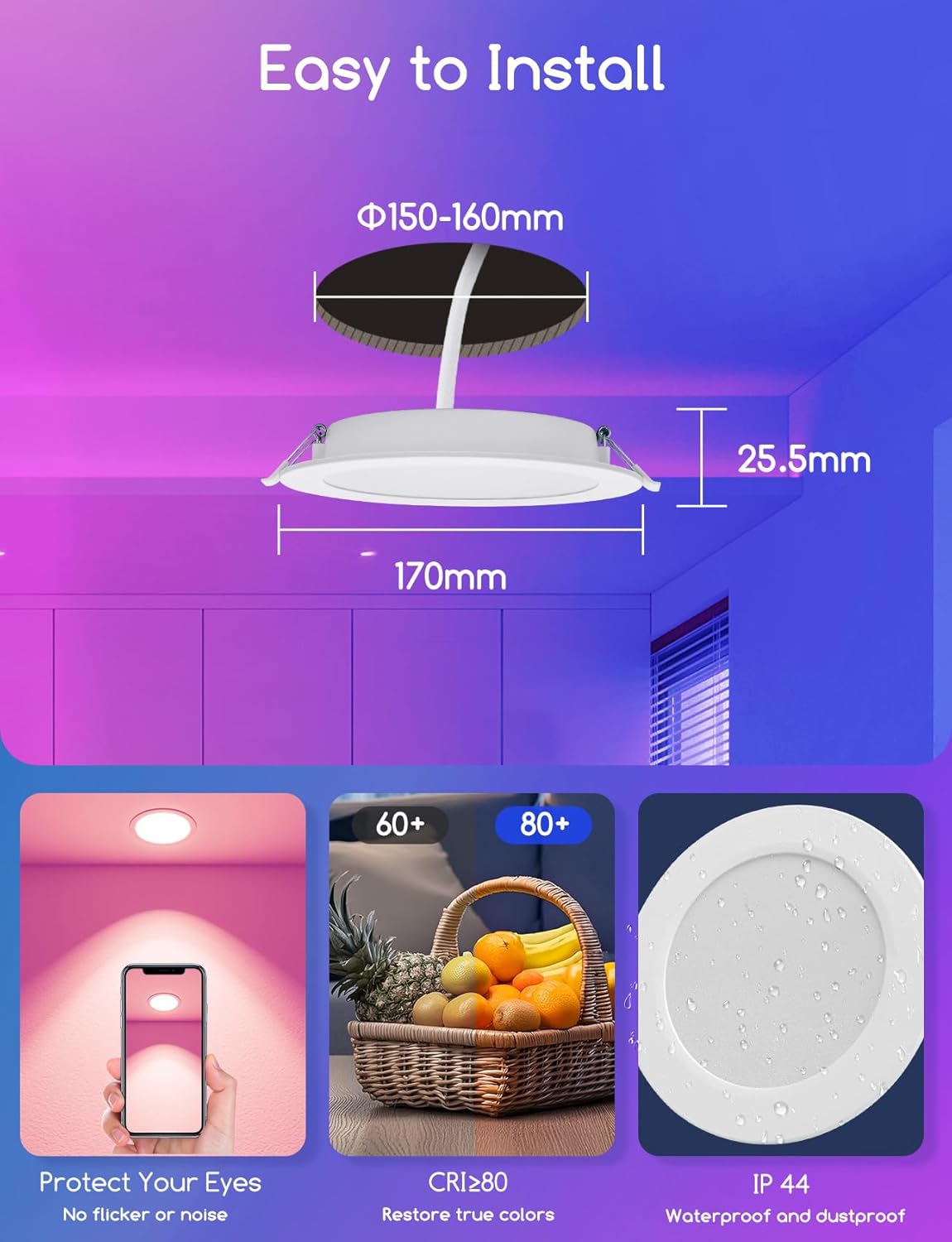
Image: Installation dimensions. Ceiling cutout: Φ150-160mm, Insertion depth: 25.5mm.
5. Operating Your Smart Downlight
5.1 Bluetooth Mesh Network
The downlight utilizes Bluetooth Mesh technology, allowing devices to send signals to each other. This enables quick connection of up to 200 Mesh devices simultaneously using your smartphone.

Image: Bluetooth Mesh Network connectivity.
5.2 Stemmestyring med Alexa
You can directly connect and control your Aigostar smart downlights with Amazon Echo (2nd generation or later) or the Alexa app. No additional gateway or AIGOSMART app download is required for basic Alexa voice control.
- Ensure your Alexa Echo device is connected to the same network as your downlights.
- Discover new devices through the Alexa app or by saying, "Alexa, discover devices."
- Når du har fundet den, kan du bruge stemmekommandoer som f.eks.:
- "Alexa, tænd lyset i stuen."
- "Alexa, set the brightness to 50%."
- "Alexa, skift køkkenlyset til blåt."

Image: Voice control functionality with Alexa.
5.3 Betjening af fjernbetjening
The included remote control provides convenient access to basic functions without needing a smartphone or voice assistant.
- TIL/FRA: Tænd eller sluk lysene.
- Farvetemperatur: Adjust between 2700K, 3200K, 4000K, 6500K.
- RGB-farver: Select specific red, green, blue, yellow, cyan, magenta colors.
- Lysstyrke: Juster lysstyrkeniveauer.
- Scene Modes (S1-S4): Activate pre-set lighting scenes.

Image: Remote control for the smart downlight.
5.4 Aigosmart App Control (Optional)
For advanced features like timing functions and group control, download and use the Aigosmart app.
- Timing funktion: Set schedules for your lights to turn on or off automatically.
- Gruppekontrol: Create groups of lights to control multiple downlights simultaneously, managing color and brightness across different rooms.

Image: Group control functionality via the Aigosmart app.
5.5 Adjusting Color and Brightness
The downlight offers extensive customization for your lighting environment.
- 16 millioner farver: Choose from a vast spectrum of colors to suit any mood or occasion.
- Lysstyrke: Adjust the light intensity from 1% (dim) to 100% (full brightness).
- Farvetemperatur: Select white light from 2700K (warm, cozy light) to 6500K (cool, bright light).
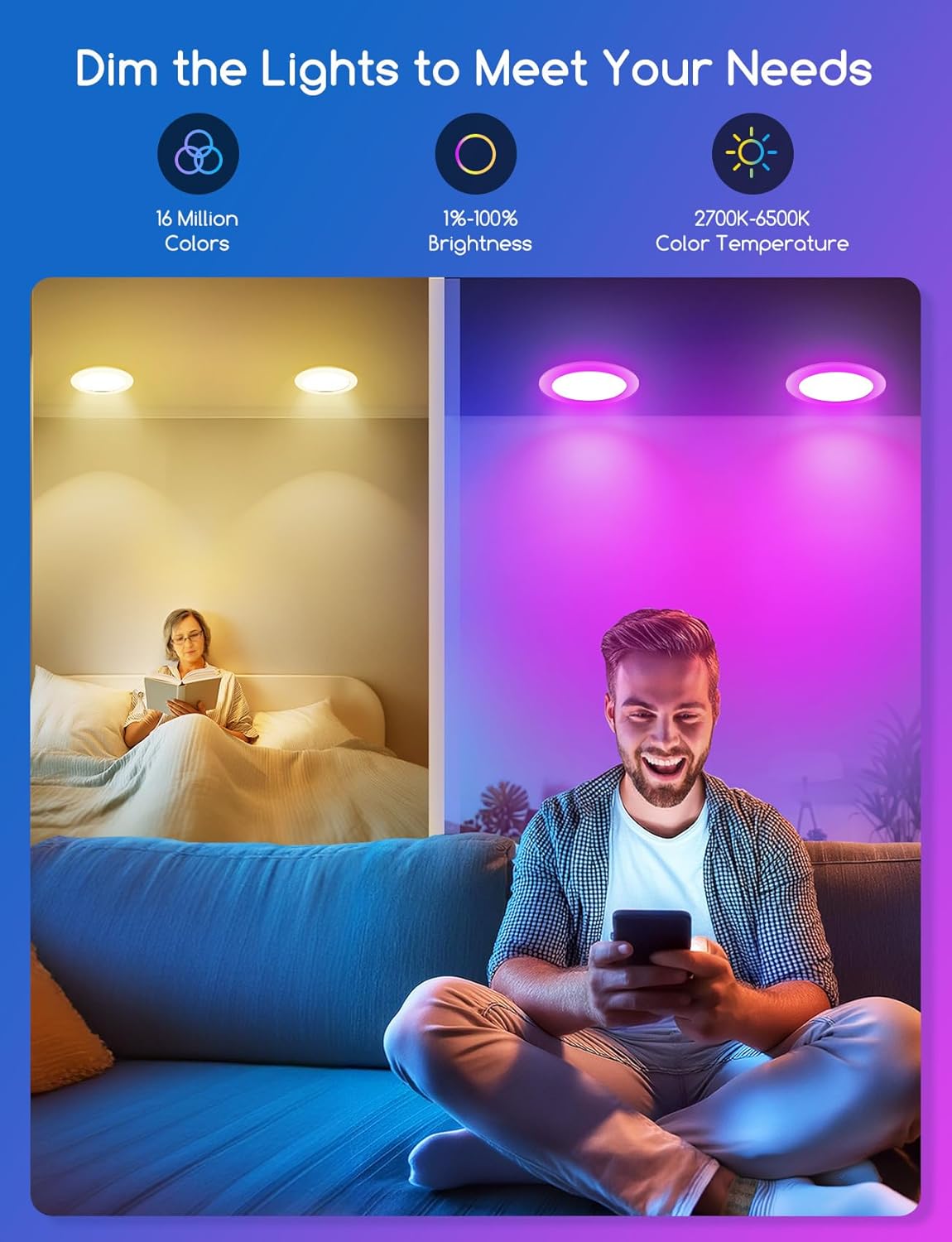
Image: Dimmable and color temperature adjustment options.
6. Vedligeholdelse
- Sørg for, at strømmen er slukket før rengøring.
- Wipe the downlight with a soft, dry cloth. Do not use abrasive cleaners or solvents.
- Nedsænk ikke produktet i vand eller anden væske.
- Kontroller regelmæssigt for løse forbindelser eller skader.
7. Fejlfinding
| Problem | Mulig årsag | Løsning |
|---|---|---|
| Lyset tændes ikke. | No power supply; Loose wiring; Faulty light. | Check circuit breaker; Verify wiring connections; Contact customer support if light is faulty. |
| Cannot connect to Alexa/App. | Bluetooth disabled; Out of range; Incorrect pairing process; Alexa Echo generation not supported. | Ensure Bluetooth is enabled on your device; Move closer to the light; Follow pairing instructions carefully; Ensure you have Alexa Echo 2nd generation or later. |
| Lights are unsynced in a group. | Temporary network interference; App synchronization issue. | Restart the Aigosmart app; Power cycle the affected lights; Re-create the group in the app. |
| Fjernbetjening virker ikke. | Battery depleted; Out of range; Obstruction. | Replace remote control battery; Move closer to the light; Remove any obstructions between remote and light. |
8. Produktspecifikationer
| Specifikation | Værdi |
|---|---|
| Mærke | Aigostar |
| Modelnummer | B0FXHGT9X3 |
| Wattage | 15W |
| Lysstyrke | 1430 Lumen |
| Voltage | 230 volt (AC) |
| Farvetemperatur | 2700K-6500K (Dæmpbar) |
| RGB farver | 16 mio |
| Produktdimensioner | 170 mm x 170 mm x 25.5 mm (6.69" L x 6.69" B x 1.02" H) |
| Loftsudskæring | Φ150-160 mm |
| Indføringsdybde | 25.5 mm |
| IP-vurdering | IP44 |
| CRI | ≥ 80 |
| Lyskildetype | LED |

Image: Energy Efficiency Label (Class F).
For detaljerede produktoplysninger henvises til den officielle EU EPREL-database: https://eprel.ec.europa.eu/qr/1956636
9. Garanti og kundesupport
Aigostar products are designed and manufactured to the highest quality standards. For warranty information, technical support, or any inquiries regarding your product, please visit the official Aigostar webhjemmeside eller kontakt deres kundeservice direkte.
You can find more information about Aigostar products and support on their Amazon store page: Aigostar-butik