
Termisk Master P3
Brugermanual til Thermal Master P3 termisk kamera
Model: P3
1. Introduktion
Thermal Master P3 er et alsidigt termisk kamera designet til en bred vifte af anvendelser, herunder printkortinspektion, industriel vedligeholdelse og boliginspektioner. Denne kompakte enhed kan tilsluttes direkte til din iOS- eller Android-smartphone og omdannes til et kraftfuldt termisk analyseværktøj. Med et 8 mm manuelt makroobjektiv, 512x384 X³IR-opløsning og et bredt temperaturdetektionsområde giver P3 præcise og detaljerede termiske indsigter. Denne manual vil guide dig gennem opsætning, betjening og vedligeholdelse af din Thermal Master P3.

Figur 1: Thermal Master P3 termisk kamera
2. Pakkens indhold
Kontroller venligst, at alle nedenstående varer er inkluderet i din pakke:
- Thermal Master P3 Termisk Kamera ×1
- EVA-etui ×1
- 50 cm bredt kabel ×1
- USB C til Lightning-adapter ×1
- Brugervejledning (dette dokument)
- Garantikort
- Hurtig startvejledning

Figur 2: Thermal Master P3-pakkens indhold
3. Opsætning og tilslutning
3.1 Appinstallation
Thermal Master P3 kræver Temp Master applikationen til at fungere. Download appen fra din enheds respektive appbutik:
- For iOS-enheder: Søg efter 'Temp Master' i Apple App Store.
- For Android-enheder: Søg efter 'Temp Master' i Google Play Butik.
Bemærk: For Android-enheder skal du sørge for, at 'OTG' (On-The-Go) er aktiveret i telefonens indstillinger, hvis appen ikke reagerer ved forbindelse. På de fleste telefoner er OTG aktiveret som standard.

Figur 3: Download af Temp Master-appen
3.2 Tilslutning af P3
Thermal Master P3 er designet til bred kompatibilitet:
- Til Android og nyere iPhones (iPhone 15/16-serien): Tilslut P3 direkte til din enheds indbyggede Type-C-port.
- For andre iOS-enheder (iPhone 14/13/12/11/XR/X/8-serien): Brug den medfølgende Lightning-adapter til at forbinde P3 til din enhed.
- For Windows-enheder eller inspektion af trange rum: Brug det 19-tommer forlængerkabel til fleksibel tilslutning.

Figur 4: Enhedskompatibilitet og tilslutningsmetoder
4. Betjening af din Thermal Master P3
4.1 Grundlæggende betjening
P3 fungerer via plug-and-play og trækker strøm direkte fra din tilsluttede enhed. Der kræves intet internt batteri eller opladning. Du skal blot tilslutte enheden, åbne Temp Master-appen, og starte din termiske analyse.
Det 8 mm manuelle fokusobjektiv giver dig mulighed for at justere fokus for klare termiske billeder, fra makroinspektioner af små komponenter til scanning i mellemdistance på op til 80 meter.

Figur 5: Manuel fokusering og rækkeviddefunktioner
4.2 Termografiske funktioner
Opløsning og følsomhed
P3 bruger RazorX- og X³-billeddannelsesalgoritmer til at opnå en opløsning på 512x384 fra en 256x192-sensor. Dens højfølsomme kerne registrerer temperaturvariationer så små som 0.035 °C, hvilket muliggør detektering af strømlækager på 1 mA.
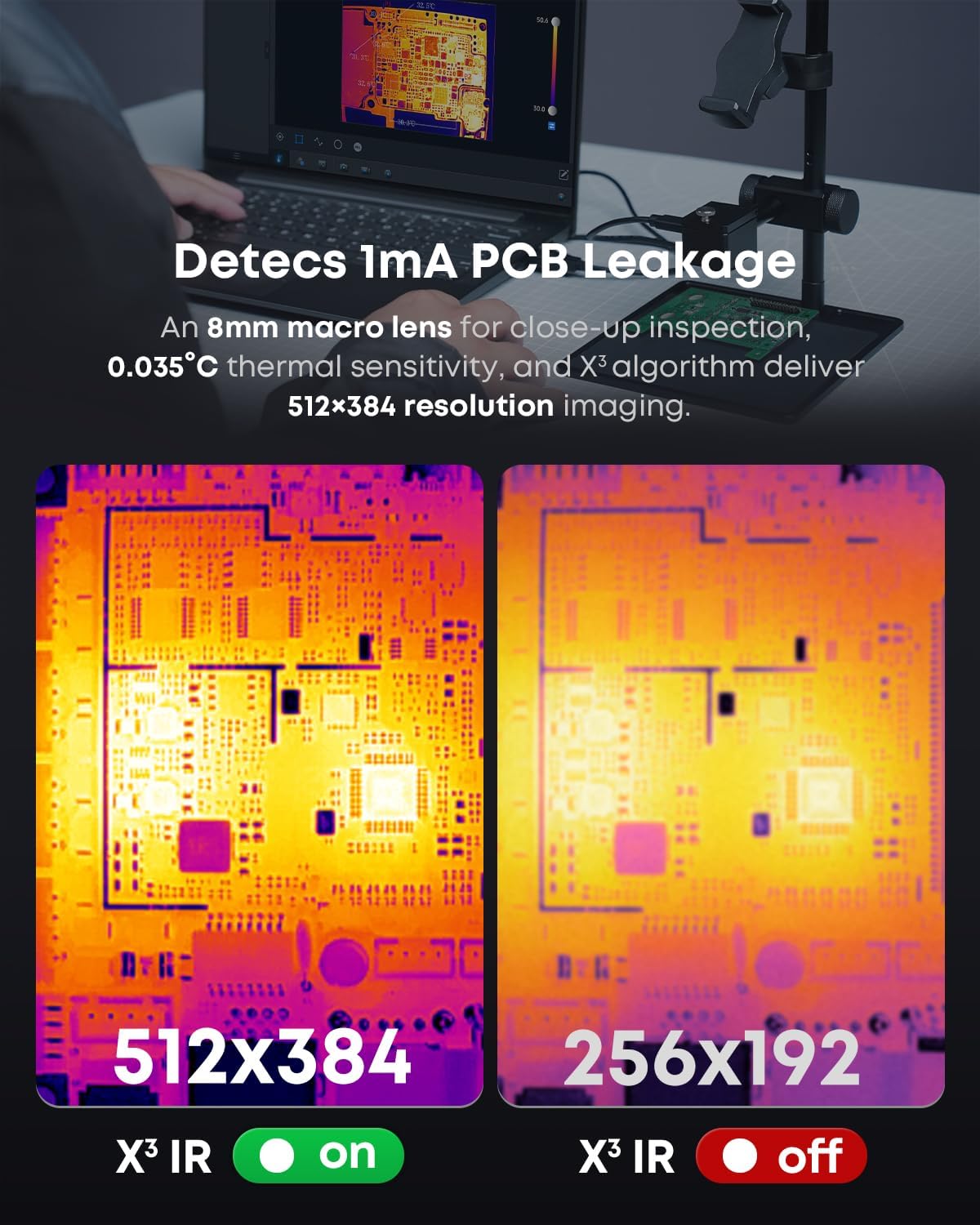
Figur 6: Sammenligning af X³IR-opløsning
Temperaturmåling
P3 tilbyder et temperaturdetektionsområde på -20°C til 600°C med en nøjagtighed på ±2°C ved hjælp af IQ+ Precision Temp Measurement. Appen tilbyder forskellige måletilstande, herunder punkter, linjer og områder, hvilket giver mulighed for detaljeret analyse. Du kan også finjustere målingerne ved at justere miljøfaktorer som emissivitet, omgivelsestemperatur og måleafstand.

Figur 7: Præcisionstemperaturmåling
Visuel tilpasning
Temp Master-appen tilbyder 12 professionelle farvepaletter til tydelig visualisering af temperaturfordelingen. Isotherm-funktionen hjælper dig med hurtigt at identificere specifikke temperaturområder for hurtig diagnosticering.

Figur 8: Indstillinger for 12-farvepaletten
Zoom og opdateringshastighed
Drag fordel af 15x digital zoom for at få fjerne mål tydeligt frem viewEn opdateringshastighed på 25 Hz sikrer jævn termisk billeddannelse i realtid.
Avancerede funktioner
Temp Master-appen indeholder intelligente funktioner såsom alarmer for høj/lav temperatur, billede-i-billede-tilstand og automatisk temperaturmåling. Den understøtter også en 3D-termisk View, hvilket hjælper med at omdanne hotspots til præcise steder til målrettede reparationer.

Figur 9: 3D-termisk View
4.3 Dataanalyse og rapportering
Temp Master-appen tilbyder gratis professionelle dataanalyseværktøjer. Du kan hurtigt analysere optagne fotos og videoer og generere detaljerede rapporter på få minutter. Dette inkluderer 2D- og 3D-redigeringsfunktioner og pc-kompatibilitet til omfattende analyse.

Figur 10: Gratis professionel dataanalyse
Video 1: Brugervejledning til Thermal Master P3 - Denne video giver en visuel gennemgang af Thermal Master P3's funktioner og app-grænseflade og demonstrerer dens brugervenlighed og forskellige funktioner.
Video 2: Thermal Master P3, PCB Master - Denne video viser Thermal Master P3's muligheder specifikt til PCB-inspektion og fremhæver dens præcision og anvendelighed til at identificere små strømlækager og termiske anomalier på printkort.
5. Pleje og vedligeholdelse
For at sikre din Thermal Master P3's levetid og optimale ydeevne skal du følge disse vedligeholdelsesretningslinjer:
- Rensning: Tør forsigtigt linsen og enhedens kabinet af med en blød, tør og fnugfri klud. Undgå at bruge slibende rengøringsmidler eller opløsningsmidler.
- Opbevaring: Opbevar P3 i det medfølgende EVA-etui, når den ikke er i brug, for at beskytte den mod støv, fugt og fysisk skade.
- Håndtering: Håndter enheden forsigtigt. Undgå at tabe den eller udsætte den for ekstreme temperaturer eller fugtighed.

Figur 11: Bygget til at holde - Holdbarhedstest
6. Fejlfinding
Her er nogle almindelige problemer og deres løsninger:
- Q1: Hvorfor svarer Temp Master-appen ikke, når den er tilsluttet?
A: a) Bekræft, at 'OTG' er aktiveret i din telefons indstillinger. På de fleste telefoner er OTG aktiveret som standard og klar til brug. b) Installer Temp Master-appen, og giv alle nødvendige tilladelser. c) Genopret forbindelse til din vare. Hvis problemerne fortsætter, skal du kontakte vores eftersalgsteam. - Q2: Hvad skal jeg gøre, hvis skærmen er sløret?
A: Opdater billederne ved at trykke på lukkerikonet. - Q3: Kan kameraet registrere objekter under vand, uden for vinduer?
A: Nej. Termografi registrerer varme på overfladen, som blokeres eller reflekteres af vand, glas og tekstiler. - Q4: Hvorfor hører jeg altid en 'klik'-lyd?
A: Dette er lukkerlyden fra termokameraet for at bevare billedskarpheden. Du kan midlertidigt deaktivere den ved at følge følgende: Indstilling → Billedindstilling → Automatisk lukker.

Figur 12: Almindelige spørgsmål om fejlfinding
7. Tekniske specifikationer
| Feature | Specifikation |
|---|---|
| Model | P3 |
| Fabrikant | Termisk mester |
| Opløsning | 512×384 X³IR (fra 256×192 sensor) |
| Termisk følsomhed (NETD) | 0.035°C (35mk) |
| Temperaturområde | -4°F til 1112°F (-20°C til 600°C) |
| Nøjagtighed | ±3.6°F (±2%) |
| Linse | 8 mm makro- og manuel fokuslinse |
| Felt af View | 40°x30° |
| Digital Zoom | 15x |
| Opdateringshastighed | 25 Hz |
| Kompatibilitet | iOS (via Type-C eller Lightning-adapter), Android (via Type-C), Windows (via forlængerkabel) |
| Strømforbrug | 0.32 W (5-8 timers brug fra enheden) |
| Varens vægt | 10.5 ounce |
| Pakkedimensioner | 5.91 x 4.33 x 2.13 tommer |
8. Garanti og support
Thermal Master er forpligtet til at levere pålidelige produkter og fremragende kundeservice:
- Gratis returnering: Nyd 30 dages gratis returnering.
- Udskiftning: Problemfri udskiftning ved kvalitetsproblemer inden for 2 år.
- Service og support: Drag fordel af livstidsservice og professionel teknisk support.
For yderligere assistance eller forespørgsler, se venligst kontaktoplysningerne på dit garantikort eller besøg den officielle Thermal Master webwebsted.

Figur 13: Pålidelighed og service af termisk master
Relaterede dokumenter - P3
 |
Opsætning, betjening og aflæsninger af P3-målere Omfattende guide til opsætning og betjening af P3-måleren, med detaljerede oplysninger om dens forskellige tilstande, aflæsninger og tilslutningsledninger til overvågning af bilers ydeevne. |
 |
P3 Gauge Setup and Operation Manual Comprehensive guide to installing, configuring, and using the P3 Gauge for vehicle performance monitoring, including modes, features, and advanced settings. |
 |
Thermal Master P1 Troubleshooting Guide and FAQ Find answers to common questions and troubleshooting steps for the Thermal Master P1 thermal camera, including connectivity, image quality, and accuracy issues. |
 |
Thermal Master P1 Thermal Camera User Guide and Download Information Concise guide for the Thermal Master P1 thermal camera, including setup, software download instructions for iOS, Android, and PC, and packing list details. Learn how to get started with your P1 thermal imager. |
 |
Thermal Master P3 Quick Start Guide: Thermal Imager for iOS & Android Quick start guide for the Thermal Master P3, a Type-C port thermal imager compatible with iOS and Android devices. Learn about product overview, setup, specifications, software functions, FAQs, and warranty. |
 |
Thermal Master P-seriens hurtige brugervejledning Kortfattet vejledning til brug af Thermal Master P-seriens termiske kameraer, der dækker sikkerhed, opsætning, funktioner, specifikationer og fejlfinding. |
Ask a question about this manual
Ask about setup, troubleshooting, compatibility, parts, safety, or missing instructions. Manuals+ will review the question and use this page’s manual context to help answer it.