
Indledning
Welcome to the MOVA MeowgicPod LR10 Prime Smart Litter Box. This device is designed to provide a clean and comfortable environment for your cat while simplifying litter maintenance for you. Featuring automatic self-cleaning, advanced odor control, and smart monitoring capabilities, the MeowgicPod LR10 Prime offers a convenient solution for modern pet care. Please read this manual thoroughly before setup and operation to ensure proper use and optimal performance.
Produktegenskaber
- Spacious and Comfortable Design: The semi-open dome structure and large spherical basin (110L total capacity) accommodate natural cat postures, allowing ample space for turning, digging, and covering waste. Its compact footprint (0.3 m²) integrates seamlessly into modern interiors.
- 15-Day Hands-Free Cleaning: Enjoy up to 15 days of automatic self-cleaning, eliminating daily scooping and maintaining a clean litter box and home environment.
- Dual-Compartment Odor Control: An active carbon filter captures persistent odors after use. The waste compartment features a deodorizing spray that forms a nano-film and decomposes odors at the source using biological enzymes, limiting bacterial growth.
- Easy One-Step Cleaning: The spherical drum and litter tray, equipped with triple protection mats, can be easily removed, rinsed, and reinstalled without direct contact with waste, ensuring quick and hygienic maintenance.
- 12-lags sikkerhedsbeskyttelse: Designed for free and safe entry and exit, the litter box incorporates 11 sensors that detect your cat's movements in real-time. The unit instantly pauses operation upon detection of your cat and resumes only when the area is clear.
- Smart Paws Parenting & Remote Control: An intelligent system monitors your cat's health, detecting anomalies early to reduce disease risks. It offers personalized growth plans and can be controlled remotely via a dedicated application, providing peace of mind even when you are away.
Pakkens indhold
Before proceeding with the setup, please ensure all components listed below are present in your package.

Image: All components of the MOVA MeowgicPod LR10 Prime, including the main body, support panels, sifting grid, litter control mat, waste bin, litter deflector, self-cleaning litter with mat, activated carbon filter, power adapter, deodorizing liquid, waste bags, waste bin cover, cat assist pedal, and user manual.
- Main Litter Box Body (x1)
- Front Support Panel (x1)
- Right Support Panel (x1)
- Rear Support Panel (x1)
- Left Support Panel (x1)
- Sifting Grid (x1)
- Litter Control Mat (x1)
- Waste Bin (x1)
- Litter Deflector (x1)
- Self-Cleaning Litter with Mat (x1)
- Activated Carbon Filter (x1)
- Strømadapter (x1)
- Deodorizing Liquid (x1)
- Waste Bags (x1)
- Waste Bin Cover (x1)
- Cat Assist Pedal (x1)
- Brugervejledning (x1)
Opsætningsinstruktioner
- Udpak komponenter: Carefully remove all items from the packaging. Place the main litter box body on a flat, stable surface.
- Install Support Panels: Attach the front, right, rear, and left support panels to the base of the main body as indicated in the diagram. Ensure they click securely into place.
- Insert Sifting Grid and Litter Control Mat: Place the sifting grid inside the spherical drum. Then, position the litter control mat over the sifting grid, ensuring it is properly aligned.
- Place Waste Bin: Slide the waste bin into its designated slot at the bottom front of the unit. Line the waste bin with a provided waste bag and secure it.
- Tilføj kuld: Pour cat litter into the spherical drum. Ensure the litter level is between the MIN and MAX lines indicated inside the drum. The device is compatible with most types of clumping litter.
- Install Activated Carbon Filter and Deodorizing Liquid: Locate the filter compartment, typically at the top or rear of the spherical drum. Insert the activated carbon filter. Place the deodorizing liquid into its designated slot, usually within the waste compartment or a dedicated dispenser.
- Tilslut strøm: Plug the power adapter into the litter box and then into a wall outlet. The unit will power on and perform an initial calibration.
- Download og opret forbindelse til appen: Download the MOVA companion app from your smartphone's app store. Follow the in-app instructions to connect your MeowgicPod LR10 Prime to your home Wi-Fi network and complete the setup. This allows for remote control and monitoring.
- Place Cat Assist Pedal: Position the cat assist pedal in front of the litter box entrance for easier access for your cat.

Image: A cat entering the MOVA MeowgicPod LR10 Prime, highlighting the semi-open design and spacious interior.
Betjeningsvejledning
Automatisk rengøringscyklus
The MeowgicPod LR10 Prime is designed to automatically clean itself after your cat uses it.
- After your cat exits the litter box, the integrated sensors will detect its departure.
- A pre-set delay (customizable via the app) will occur to allow the litter to clump.
- The spherical drum will then rotate, sifting clean litter and depositing waste into the sealed waste bin below.
- During or after the cleaning cycle, the dual-compartment odor control system will activate to neutralize odors.
Manuel rengøring
You can initiate a cleaning cycle manually at any time using the control panel buttons on the unit or through the MOVA app.
App-kontrol og -overvågning
The MOVA app provides comprehensive control and monitoring features:
- Fjernrengøring: Start or pause cleaning cycles from anywhere.
- Brugssporing: Monitor your cat's litter box usage frequency, duration, and weight (if supported by sensors). This data can help track your cat's health.
- Odor Control Settings: Adjust the intensity and frequency of the deodorizing spray.
- Meddelelser: Receive alerts for a full waste bin, low litter levels, or any operational issues.
- Tilpasning: Set cleaning delays, schedule cleaning times, and manage multiple cat profiles.

Image: Smartphone screen displaying the MOVA app interface, demonstrating remote control and monitoring features for the litter box.
Video: En overview of the MOVA MeowgicPod LR10 Prime's features, including automatic cleaning, odor control, safety sensors, and app connectivity. This video demonstrates the product's functionality and ease of use.
Opretholdelse
Tømning af affaldsbeholderen
The waste bin should be emptied when the app notifies you it is full, or approximately every 15 days for a single cat.
- Ensure the litter box is in a paused state or powered off.
- Pull out the waste bin from the front of the unit using the handle.
- Carefully tie the waste bag and dispose of it.
- Replace with a new waste bag and slide the bin back into place.

Image: The waste bin being pulled out from the MOVA MeowgicPod LR10 Prime, illustrating the easy removal process for waste disposal.
Cleaning the Spherical Drum and Mat
For thorough cleaning, the spherical drum and mat can be easily removed.
- Sluk enheden.
- Lift the spherical drum from its base using the integrated handle.
- Remove the litter control mat and sifting grid.
- Rinse the drum, mat, and grid with water. Mild soap can be used if necessary. Avoid harsh chemicals.
- Lad alle dele tørre helt, før de monteres igen.
- Reinstall the mat, sifting grid, and spherical drum onto the base.
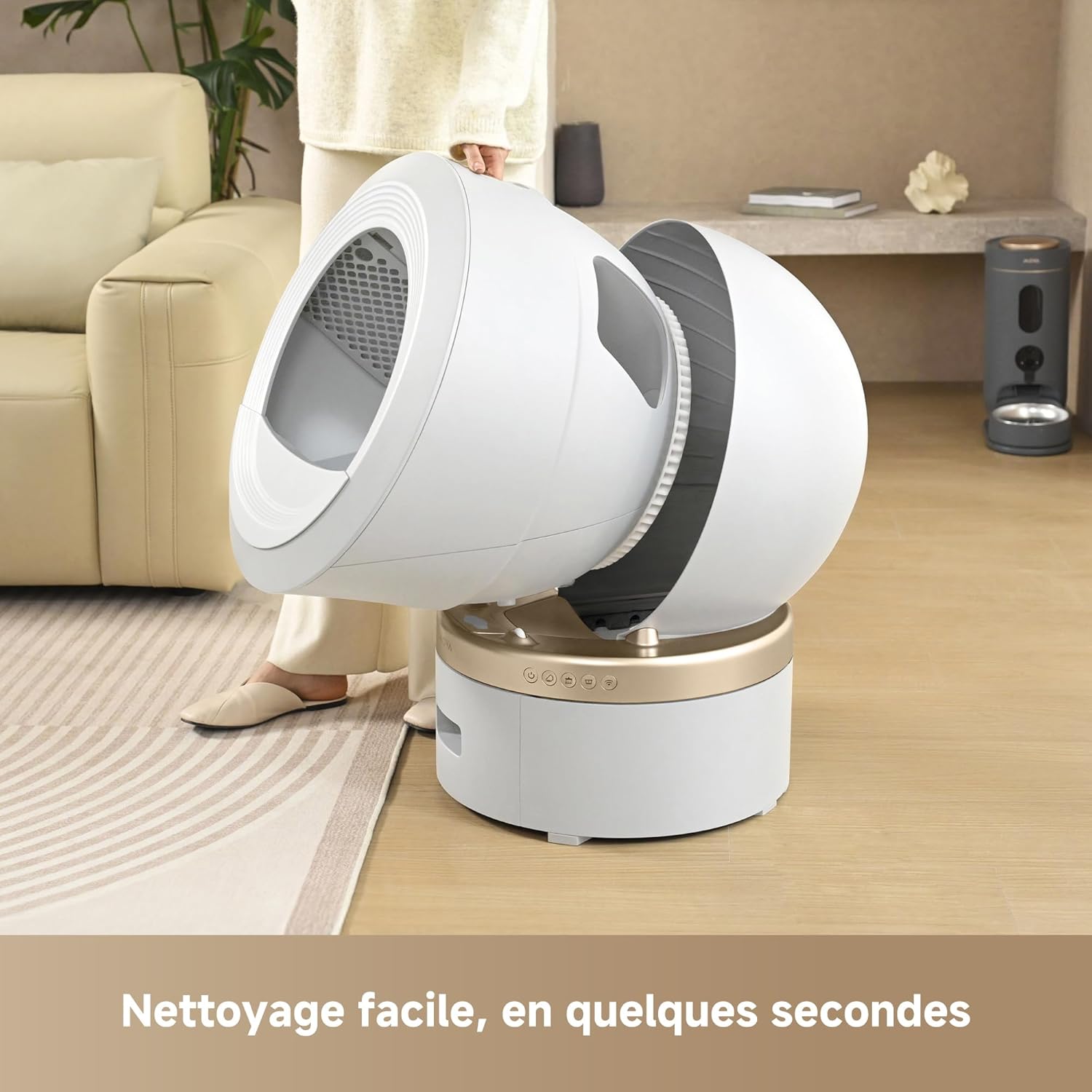
Image: The spherical drum of the MOVA MeowgicPod LR10 Prime being lifted, showing how easily it can be removed for cleaning.
Replacing Filters and Deodorizer
The activated carbon filter and deodorizing liquid should be replaced periodically to maintain optimal odor control. Refer to the app or product packaging for recommended replacement intervals.

Billede: Detaljeret view of the activated carbon filter and the deodorizing spray mechanism, illustrating the dual-compartment odor control system.
Fejlfinding
| Problem | Mulig årsag | Løsning |
|---|---|---|
| Enheden tændes ikke | Strømkabel ikke tilsluttet; problem med stikkontakten | Sørg for, at strømkablet er korrekt tilsluttet. Test stikkontakten med en anden enhed. |
| Automatic cleaning not starting | Cat still inside or near the unit; Sensors obstructed; Cleaning delay set too long | Ensure cat has completely exited. Check sensors for obstructions. Adjust cleaning delay in the app. |
| Lugten fortsætter | Activated carbon filter needs replacement; Deodorizing liquid low or empty; Waste bin full | Replace activated carbon filter. Refill or replace deodorizing liquid. Empty the waste bin. |
| App not connecting to unit | Wi-Fi connectivity issues; Incorrect app settings | Ensure your home Wi-Fi is working. Restart the unit and your router. Re-pair the device in the app. |
| Litter not sifting properly | Litter type incompatible; Litter level too high/low; Drum or sifting grid obstructed | Use clumping litter. Adjust litter level. Clean the drum and sifting grid for any blockages. |
Specifikationer
| Modelnummer | LR10A |
| Produktmål (L x B x H) | 55.2 x 58.3 x 76.4 cm (21.7 x 22.9 x 30.1 tommer) |
| Produktets vægt | 18.11 kg (39.9 lbs) |
| Farve | Hvid |
| Materiale | Plast |
| Kattebakketype | Automatisk selvrensende kattebakke |
| Kapacitet | 110 L (total spherical drum volume) |
| Affaldsbeholderkapacitet | 11 L |
| Støjniveau | Approximately 30.2 dB (during operation) |
| Sikkerhedsfunktioner | 11 sensors (weight, radar, infrared, anti-pinch) |
Garanti og support
The MOVA MeowgicPod LR10 Prime comes with a standard manufacturer's warranty. For detailed warranty information, please refer to the warranty card included in your package or visit the official MOVA webwebsted.
If you encounter any issues or have questions regarding your product, please contact MOVA customer support through the following channels:
- Officiel Webwebsted: Visit MOVA Store on Amazon (til generelle forespørgsler og produktinformation)
- Support i appen: Access support directly through the MOVA application.
- E-mail/Telefon: Se din produktemballage eller den officielle webwebstedet for specifikke kontaktoplysninger.
Please have your model number (LR10A) and purchase information ready when contacting support.