
GOOLOO GT6000 Jump Starter & DS200 OBD2 Scanner User Manual
Model: GT6000 & DS200
1. Introduktion
This manual provides detailed instructions for the safe and effective use of your GOOLOO GT6000 6000A Jump Starter and GOOLOO DEEPSCAN DS200 OBD2 Diagnostic Scanner. Please read this manual thoroughly before operating the devices and retain it for future reference.
The GOOLOO GT6000 is a powerful portable jump starter designed to start vehicles with dead batteries, while also serving as a portable power bank. The GOOLOO DEEPSCAN DS200 is a compact OBD2 scanner that connects wirelessly to your smartphone, providing comprehensive vehicle diagnostics and maintenance functions.

Image 1.1: The GOOLOO GT6000 Jump Starter and GOOLOO DEEPSCAN DS200 OBD2 Scanner.
2. Vigtige sikkerhedsoplysninger
Always observe the following safety precautions when using the GOOLOO GT6000 Jump Starter and DS200 OBD2 Scanner to prevent injury or damage to the devices or your vehicle.
- Læs alle instruktioner før brug.
- Opbevares utilgængeligt for børn.
- Do not expose the devices to rain or extreme temperatures.
- Enhederne må ikke skilles ad eller modificeres.
- Sørg for tilstrækkelig ventilation under brug og opladning.
- Wear eye protection when working with vehicle batteries.
- Undgå kortslutning af jumpstarterens kobling.amps.
- Use the jump starter only for 12V lead-acid batteries.

Image 2.1: The GT6000 Jump Starter features multiple safety protections including over-charge, short-circuit, and reverse-polarity protection.
3. GOOLOO GT6000 Jump Starter
3.1. Produktet er slutview
The GT6000 is a high-capacity jump starter with a 6000A peak current, capable of starting all gas engines and diesel engines up to 12L. It also functions as a portable power bank with 100W bi-directional fast charging.

Image 3.1: Diagram showing the ports and controls of the GT6000 Jump Starter, including the BOOST button, jump cable socket, DC port, USB output ports, and IN/OUT PD100W port.

Image 3.2: The 3.2-inch LED display on the GT6000 shows battery level, charging power, low current mode, 'Ready to Start' status, low temperature reminder, and battery clips reversed warning.
3.2. Charging the GT6000
Before first use, fully charge the GT6000. It supports 100W bi-directional fast charging. A full charge from 0-100% takes approximately 1.4 hours.
- Connect the provided USB-C cable to the IN/OUT PD100W port on the GT6000.
- Connect the other end of the cable to a compatible 100W USB-C power adapter (a 100W car charger is included).
- LED-displayet viser opladningsstatus og batteriprocenttage.

Image 3.3: The GT6000 charging, indicating 100W super fast charging capabilities.
3.3. Operating the Jump Starter
Follow these steps to jump-start a vehicle with a dead battery:
- Indsæt: Insert the smart jumper cable plug into the jump cable socket on the GT6000. Ensure a secure connection.
- Forbinde: Tilslut den røde clamp til den positive (+) pol på bilbatteriet og den sorte terminalamp til den negative (-) terminal. Sørg for, atamps are firmly attached. If the LED display shows "Battery Clips Reversed", recheck the connections.
- Starte: Once the GT6000 display shows "READY", start your car engine. If the engine does not start immediately, wait 20-30 seconds and try again. Do not attempt more than 3 consecutive jump starts.
- Fjerne: Når køretøjet starter, skal du afbryde koblingen.amps from the car battery first, then remove the jumper cable from the GT6000.

Image 3.4: Visual guide for the three steps to jump start your vehicle using the GT6000.
3.4. Brug som powerbank
The GT6000 can charge various electronic devices via its USB output ports and the bi-directional USB-C port.
- Connect your device's charging cable to one of the GT6000's output ports (5V/2.4A, 5V/9V/12V, or IN/OUT PD100W USB-C).
- The GT6000 will automatically begin charging your device.

Image 3.5: The GT6000 functioning as a portable power bank, charging a laptop and smartphone.
3.5. LED-lommelygtefunktioner
The GT6000 includes an integrated LED flashlight with multiple modes:
- Normalt lys: Tryk og hold tænd/sluk-knappen nede i 3 sekunder for at tænde lommelygten.
- Strobe lys: Short press the power button again to switch to strobe mode.
- SOS-signal: Short press the power button a third time to activate the SOS signal mode.
- Sluk: Short press the power button a fourth time or press and hold for 3 seconds to turn off the flashlight.
3.6. GT6000 Specifications
| Feature | Detalje |
|---|---|
| Spidsstrøm | 6000A |
| Motorkompatibilitet | Al benzin, op til 12.0 liter diesel |
| Batterikapacitet | 27000 mAh (99.9Wh) |
| Hurtig opladning | 100W Bi-directional (USB-C) |
| Vise | 3.2-tommer LED |
| Beskyttelser | 10 SuperSafe Protections (Over-Charge, Short-Circuit, Reverse-Polarity, etc.) |
| LED lys | 400 lumen (lommelygte, strobe, SOS) |
| Standby tid | Op til 24 måneder |
4. GOOLOO DEEPSCAN DS200 OBD2 Scanner
4.1. Produktet er slutview
The DS200 is a wireless Bluetooth OBD2 scanner designed for comprehensive vehicle diagnostics. It connects to your smartphone via an app and supports full system diagnostics, bidirectional control, and various maintenance services.
4.2. Setup & App Installation
To begin using your DS200 scanner, you need to download and install the GOOLOO DEEPSCAN app on your smartphone.
- Download app: Søg efter "GOOLOO DEEPSCAN" in the Apple App Store (for iOS devices) or Google Play Store (for Android devices).
- Installer app: Download og installer applikationen.
- Registrer/Log ind: Følg instruktionerne i appen for at oprette en konto eller logge ind, hvis du allerede har en.

Image 4.1: The DS200 scanner and instructions for downloading the GOOLOO DEEPSCAN app from app stores.
4.3. Tilslutning til dit køretøj
The DS200 connects to your vehicle's OBD2 port, typically located under the dashboard on the driver's side.
- Locate your vehicle's 16-pin OBD2 port.
- Plug the DS200 scanner firmly into the OBD2 port. The scanner will power on automatically.
- Turn on your vehicle's ignition (engine off or running, depending on the diagnostic task).
- Open the GOOLOO DEEPSCAN app on your smartphone and follow the prompts to connect to the DS200 via Bluetooth.

Image 4.2: The DS200 scanner connected to a vehicle's OBD2 port, displaying diagnostic information on a smartphone.
4.4. Grundlæggende diagnostiske funktioner
Once connected, the DS200 app provides access to standard OBD2 functions:
- Læs koder: Hent diagnostiske fejlkoder (DTC'er) fra køretøjets motorstyringsenhed (ECU).
- Ryd koder: Slet DTC'er og sluk motorlampen (MIL) efter reparationer.
- Live data: View real-time sensor data, such as engine RPM, vehicle speed, coolant temperature, and fuel system status.
- I/M parathed: Kontroller status for emissionsrelaterede overvågningssystemer for at sikre, at køretøjet er klar til en emissionstest.
- Frys rammedata: View a snapshot of sensor data recorded when an emission-related fault occurred.
- Køretøjsoplysninger: Retrieve vehicle identification number (VIN), calibration ID, and calibration verification numbers (CVN).
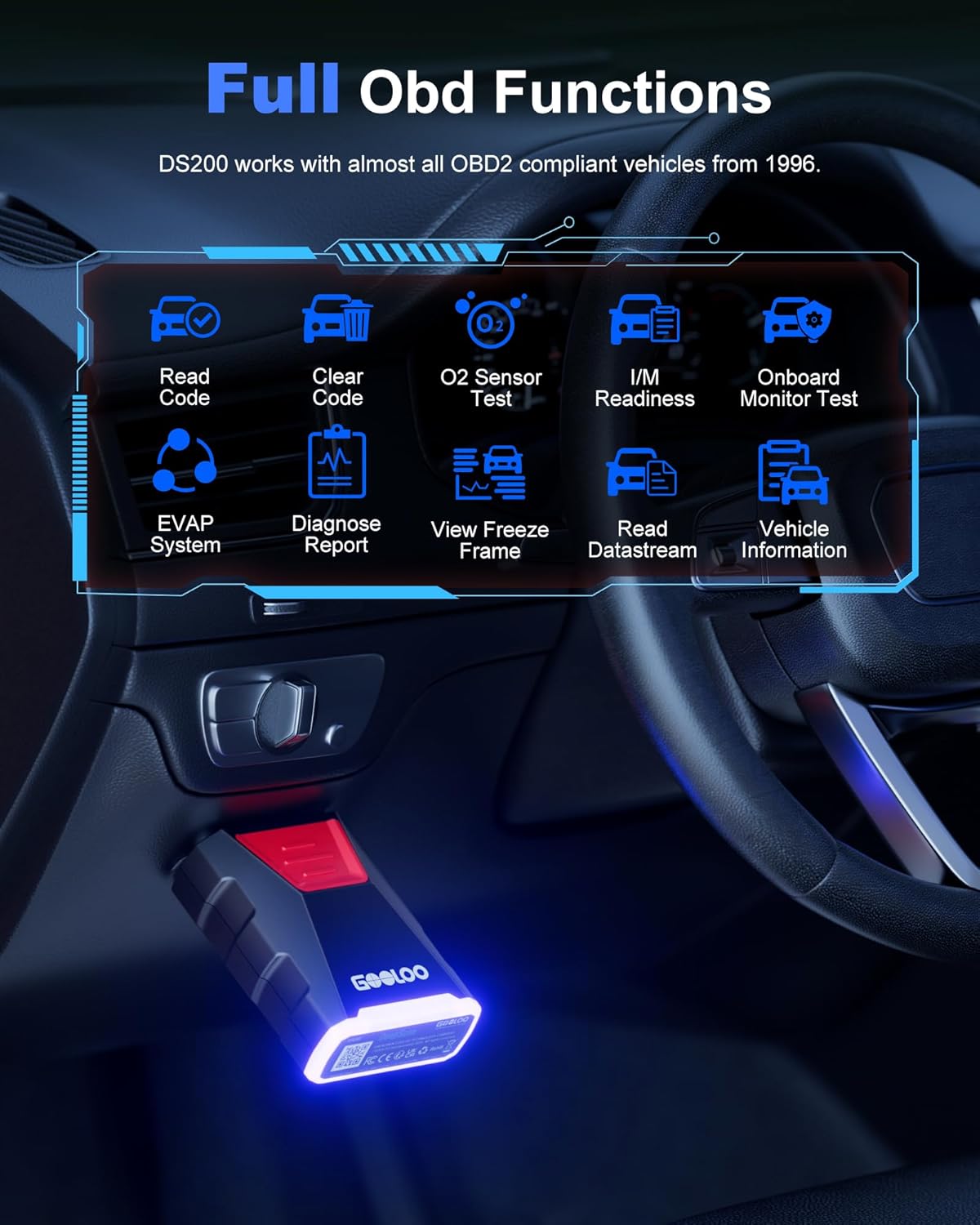
Image 4.3: The DS200 app interface displaying various full OBD functions like Read Code, Clear Code, O2 Sensor Test, and Live Data.
4.5. Avancerede diagnostiske funktioner
The DS200 offers advanced features for in-depth vehicle analysis:
- Fuld systemdiagnostik: Scan all available electronic control units (ECUs) in the vehicle, including Engine, Transmission, ABS, SRS, BCM, etc., to read and clear fault codes.
- Tovejsstyring: Perform active tests to control various vehicle components (e.g., turn on/off wipers, headlights, fuel pump) to verify their functionality.
- Vedligeholdelsestjenester: Access common maintenance functions such as Oil Reset, Throttle Adaptation, EPB Reset, Steering Angle Resets, DPF Regeneration, ABS Bleeding, BMS Reset, and Airbag Reset.
- Vehicle Performance Test: Conduct tests to evaluate vehicle performance metrics like acceleration time, top speed, and engine load.

Image 4.4: The DS200 app interface listing 8 common maintenance services available for various vehicle systems.

Image 4.5: The DS200 app demonstrating bidirectional control, allowing users to troubleshoot faults by controlling components like wipers, mirrors, and headlights.
4.6. DS200 Specifications
| Feature | Detalje |
|---|---|
| Forbindelse | Bluetooth 5.0 |
| Understøttede enheder | iOS- og Android-smartphones/tablets |
| OBD2-protokoller | All standard OBD2 protocols, including FCA & CAN-FD |
| Funktioner | Full System Diagnostics, Bidirectional Control, 8 Maintenance Services, Full OBD Functions, Real-time Data Monitoring, Vehicle Performance Test |
| Køretøjsdækning | Most OBD2 compliant vehicles from 1996 onwards |
5. Pleje og vedligeholdelse
Proper care ensures the longevity and optimal performance of your GOOLOO devices.
- Rensning: Brug en blød, tør klud til at rengøre ydersiden af begge enheder. Brug ikke slibende rengøringsmidler eller opløsningsmidler.
- Opbevaring: Store the devices in a cool, dry place away from direct sunlight and extreme temperatures. For the GT6000, ensure it is charged to at least 50% before long-term storage and recharge every 3-6 months.
- Håndtering: Undgå at tabe enhederne eller udsætte dem for kraftige stød.
- Kabler: Inspect jumper cables and OBD2 connector for any damage before each use. Replace if frayed or damaged.
6. Fejlfinding
6.1. GT6000 Jump Starter Issues
- Enheden tænder ikke: Sørg for, at enheden er opladet. Tryk på tænd/sluk-knappen og hold den nede i et par sekunder.
- Køretøjet starter ikke:
- Tjek, at clamper sikkert forbundet til de korrekte batteripoler.
- Sørg for, at GT6000 har tilstrækkelig opladning.
- If the battery is severely discharged, press the BOOST button on the GT6000 (if available and safe to do so, refer to specific product instructions for boost mode).
- The vehicle battery might be completely dead or damaged and require replacement.
- "Battery Clips Reversed" error: Afbryd clamps and reconnect them to the correct positive (+) and negative (-) terminals.
6.2. DS200 OBD2 Scanner Issues
- Scanneren tænder ikke: Ensure the DS200 is fully plugged into the vehicle's OBD2 port and the vehicle's ignition is on.
- Kan ikke oprette forbindelse via Bluetooth:
- Sørg for, at Bluetooth er aktiveret på din smartphone.
- Restart the GOOLOO DEEPSCAN app.
- Unplug and re-plug the DS200 from the OBD2 port.
- Check if the app requires location permissions, as some Bluetooth functions do.
- No communication with ECU:
- Kontroller, at køretøjets tænding er tændt.
- Ensure the DS200 is securely connected to the OBD2 port.
- Confirm your vehicle is OBD2 compliant (most vehicles from 1996 onwards).
- Try scanning a different vehicle to rule out scanner malfunction.
7. Garanti og kundesupport
GOOLOO products are designed for reliability and performance. For warranty information, technical support, or any questions regarding your GT6000 Jump Starter or DS200 OBD2 Scanner, please refer to the official GOOLOO webhjemmeside eller kontakt deres kundeservice direkte.
Please have your product model number (GT6000, DS200) and purchase information ready when contacting support.