
1. Sikkerhedsoplysninger
Always read and understand all safety warnings and instructions before operating the plasma cutter. Failure to follow these instructions may result in electric shock, fire, serious injury, or death.
- Elektrisk stød: Plasma cutting equipment can cause electric shock. Do not touch live electrical parts. Wear dry insulating gloves and protective clothing.
- Røg og gasser: Fumes and gases produced during cutting can be hazardous to your health. Work in a well-ventilated area. Use an exhaust system if necessary.
- Bue stråler: Arc rays can burn eyes and skin. Wear a welding helmet with appropriate shade, safety glasses, and protective clothing.
- Brand og eksplosion: Sparks and hot metal can cause fire or explosions. Keep flammable materials away from the work area. Have a fire extinguisher readily available.
- Støj: Overdreven støj kan skade hørelsen. Brug høreværn.
2. Produktet er slutview
The Reboot Plasma Cutter 60A, model RBC6000D Max, is a versatile and portable plasma cutting machine designed for various metal cutting applications. It features dual-voltage capability (120V/240V), an IGBT inverter for efficient cutting, and an integrated digital display for real-time monitoring and adjustment of parameters.
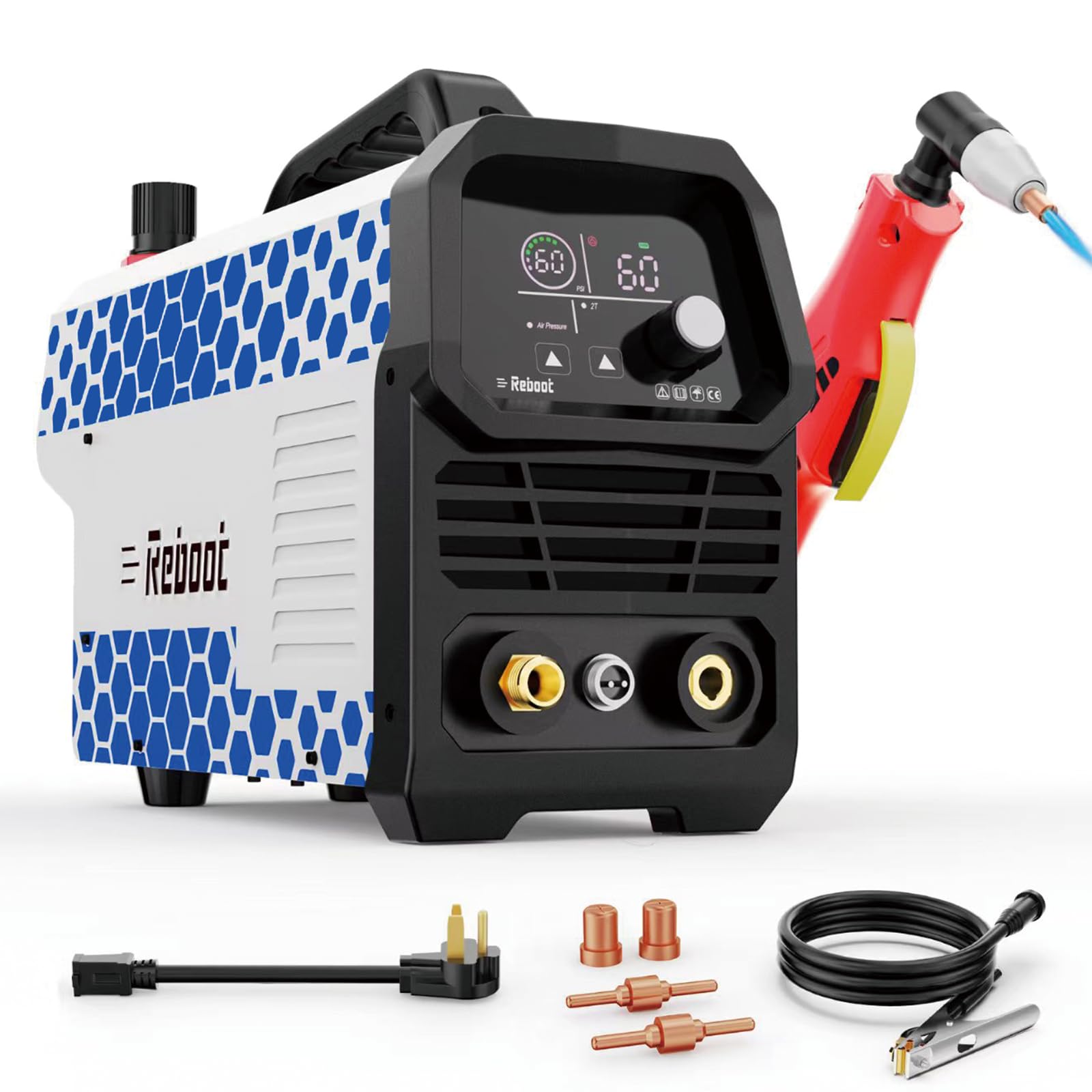
Front view of the Reboot Plasma Cutter 60A, model RBC6000D Max, highlighting its compact design and digital display.
Nøglefunktioner:
- Powerful Cutting Performance: 120/240V dual-voltage design with high-frequency IGBT inverter for cutting various metals. Recommended cutting thickness: 1/2 inch @ 35A (120V, 50PSI) / 5/8 inch @ 60A (240V, 60PSI).
- Unique Chassis Design: Intuitive knob operation paired with a clear control interface layout. Well-organized internal module distribution and rugged construction for long-lasting durability.
- Integrated Digital Display: Features a large digital display showing key parameters (voltage, current, air pressure). Enables real-time monitoring of machine status and easy adjustment of settings.
- 2T/4T Function: 2T mode enables semi-automatic cutting for precise results, while 4T mode provides automatic control to reduce hand fatigue during long continuous cutting sessions.
- Lightweight & Portable: Weighing only 10 lbs, this plasma cutter features an ergonomic handle that balances ease of use and mobility. Perfect for carrying to various job sites to meet diverse working needs.
- Safety Protection: Built-in overheat and overload protection, automatic shutdown in abnormal conditions, ensures operator and equipment safety.
3. Pakkens indhold
Carefully unpack the plasma cutter and all accessories. Ensure all items listed below are present and undamaged. If any items are missing or damaged, contact customer support immediately.
This video demonstrates the unboxing process of the Reboot RBC6000D Max plasma cutter, showing all included components and initial setup steps.

En overview of the accessories included with the RBC6000D Max plasma cutter, such as the torch, ground clamp, power adapter, and consumables.
Inkluderede varer:
- RBC6000D MAX Plasma Cutter Machine
- RB PT-31 Torch
- Jord Clamp
- Strømadapter
- Slange Clamp
- Teflon tape
- Brugermanual
- Electrodes (Consumables)
4. Opsætning
Follow these steps to set up your Reboot Plasma Cutter for operation.
4.1 Komponentidentifikation

Detaljeret view of the plasma cutter's front and rear panels, with numbered labels for LED display, mode button, current control knob, torch switch, cutting torch, earth clamp, power switch, quick air connector, power cable, and cooling fan.
- LED Display: Shows current, voltage, og lufttryk.
- Mode Button: Selects operating modes (e.g., 2T/4T).
- Current Control Knob: Adjusts cutting ampslette.
- Torch Switch: Connects the cutting torch.
- Cutting Torch: The primary tool for plasma cutting.
- Jord Clamp: Connects to the workpiece for grounding.
- Power Switch: Turns the machine on/off.
- Quick Air Connector: Connects to the air compressor.
- Power Cable: Connects to the power supply.
- Cooling Fan: Provides cooling for the internal components.
4.2 Elektrisk tilslutning
- The RBC6000D Max supports both 120V and 240V power inputs. Use the appropriate power adapter for your electrical supply.
- Ensure the power source is capable of providing the necessary amperage (e.g., 35A for 120V, 60A for 240V) to avoid tripping breakers.
- Tilslut strømkablet til maskinen og derefter til en jordforbundet stikkontakt.
4.3 Tilslutning af luftforsyning
- An external air compressor is required (not included).
- Connect the air hose from your compressor to the Quick Air Connector on the rear of the plasma cutter.
- The machine has a pre-installed air regulator. Adjust the air pressure to the recommended PSI for your cutting application (e.g., 50-60 PSI).
4.4 Brænder og jordforbindelseamp Forbindelse
- Connect the cutting torch cable to the designated torch switch port on the front panel.
- Tilslut jorden clamp cable to the designated earth clamp porten på frontpanelet.
- Fastgør jordforbindelsen sikkertamp til emnet, hvilket sikrer god elektrisk kontakt.
5. Betjeningsvejledning
Familiarize yourself with the control panel and operating modes before beginning any cutting tasks.
5.1 Control Panel and Adjustments
The integrated digital display provides real-time feedback on cutting parameters. Use the control knob and buttons to adjust settings.
- Nuværende justering: Rotate the Current Control Knob to set the desired amperage for your cutting task.
- Lufttryk: Monitor the air pressure on the LED display and adjust the external compressor or internal regulator as needed.
- Post Air Time: Adjust the post-air time to ensure proper cooling of the torch after cutting, which extends consumable life.
5.2 2T/4T Function
The 2T/4T function allows for different torch trigger behaviors:

Illustration demonstrating the 2T (semi-automatic) and 4T (full-automatic) functions for plasma cutting, showing their application for quick single cuts versus extended use.
- 2T Mode (Semi-Automatic): The arc starts when the trigger is pressed and stops when released. Ideal for short, precise cuts.
- 4T Mode (Full-Automatic): The arc starts when the trigger is pressed and released, and continues until the trigger is pressed and released again. Suitable for long, continuous cuts to reduce hand fatigue.
5.3 Cutting Performance and Material Compatibility
The RBC6000D Max is designed for efficient cutting of various metals.

Visual representation of the plasma cutter's ability to cut various metals including aluminum, stainless steel, carbon steel, and copper.
- Kompatible materialer: Aluminum, Stainless Steel, Carbon Steel, Copper.
- Recommended Cutting Thickness:
- 1/2 inch @ 35A (120V, 50PSI)
- 5/8 inch @ 60A (240V, 60PSI)
- Maksimal skæretykkelse: The machine can achieve greater penetration, but clean cuts are within the recommended range.

Diagram illustrating the maximum and clean cutting thicknesses achievable with the plasma cutter at 120V/35A and 240V/60A.
Watch the Reboot RBC6000D Max plasma cutter in action, demonstrating its capability to cut through 20mm thick metal with precision.
This video showcases the Reboot RBC6000D Max plasma cutter's performance on 16mm metal and provides a simple wiring diagram for connection.
A demonstration of the Reboot RBC6000D Max plasma cutter achieving clean and crisp cuts on 10mm thick metal.
6. Vedligeholdelse
Regelmæssig vedligeholdelse sikrer din plasmaskærers levetid og optimale ydeevne.
- Forbrugsmateriale udskiftning: Regularly inspect the torch consumables (electrode, nozzle, shield cup) for wear. Replace them when they show signs of damage or degradation to maintain cut quality.
- Vedligeholdelse af luftfilter: Check the air filter on the pre-installed regulator periodically. Clean or replace the filter element if it appears dirty or clogged to ensure a clean air supply to the torch.
- Generel rengøring: Keep the machine clean and free from dust and metal particles. Use compressed air to blow out internal components if necessary, ensuring the machine is unplugged.
- Kabelinspektion: Inspect all cables (power, torch, ground) for cuts, abrasions, or loose connections before each use.
7. Fejlfinding
If you encounter issues with your plasma cutter, refer to the following common troubleshooting steps:
- Ingen strøm: Ensure the power cable is securely connected and the power switch is on. Check the circuit breaker for the power outlet.
- Ingen bue: Bekræft jordcloseamp is securely attached to the workpiece. Check torch consumables for proper installation and wear. Ensure adequate air pressure is supplied.
- Dårlig skærekvalitet: This can be caused by worn consumables, incorrect amperage settings, insufficient air pressure, or improper torch stand-off distance. Adjust settings and replace consumables as needed.
- Overheat/Overload Protection: If the machine shuts down, it may be due to overheating or overload. Allow the machine to cool down. Ensure proper ventilation and avoid exceeding the duty cycle.
For persistent issues, contact Reboot customer support.
8. Specifikationer
Technical specifications for the Reboot Plasma Cutter RBC6000D Max:

A table detailing the technical specifications of the Reboot RBC6000D Max plasma cutter, including voltage, strøm og effektvurderinger.
| Specifikation | Værdi |
|---|---|
| Fabrikant | Genstart |
| Varens vægt | 16.02 pund |
| Pakkedimensioner | 15.75 x 13.46 x 11.73 tommer |
| Varemodelnummer | RBC6000D MAX |
| Strømkilde | AC |
| Voltage | 120/240 volt |
| Batterier påkrævet? | Ingen |
| Dato først tilgængelig | 20. oktober 2025 |
9. Garanti og support
The Reboot Plasma Cutter RBC6000D Max comes with a 1 års garanti fra købsdatoen, dækker fabrikationsfejl og udførelsesfejl.
For technical support, warranty claims, or replacement parts, please contact Reboot customer service through their official webwebstedet eller forhandleren, hvor produktet blev købt. Hav venligst modelnummeret og købsdatoen klar, når du kontakter support.