
1. Introduktion
The ATTACK SHARK R85 HE is a high-performance 75% wired gaming keyboard featuring magnetic switches, designed for precision and responsiveness. This manual provides detailed instructions for setting up, operating, and maintaining your keyboard.

Image 1: ATTACK SHARK R85 HE Magnetic Switch Gaming Keyboard.
Nøglefunktioner:
- Ultra-Low Latency & Unrivaled Precision: Equipped with a high-frequency gaming chip, offering an 8000Hz polling rate and 0.005mm trigger accuracy.
- 16.8 Million Color RGB Lighting & Unique Light Bar: South-facing LEDs provide vibrant, uniform lighting. Features 19 built-in light effects and 6 light bar modes.
- ATTACK SHARK Purple Magnetic Switches: High-performance magnetic switches designed for professional e-sports, offering brighter RGB, improved structural stability, faster rebound, and smoother typing.
- 5-lags lyd DampÅbningssystem: Advanced design with PE foam, IXPE pads, PET acoustic layers, and silicone bottom coating for pure, clear switch acoustics.
- Comprehensive Professional Software: Fully programmable via dedicated software, including Rapid Trigger (RT), Dynamic Keystroke (DKS), Mod-Tap (MT), and Toggle Key (TGL) functions.
- Compact 75% Layout with Aluminum Plate: Optimizes space while retaining F1-F10 keys. Aluminum positioning plate enhances structure and stability.
- Dual-Level Adjustable Support & Durable PBT Keycaps: Adjustable feet for ergonomic comfort. Double-shot PBT keycaps offer durability and resistance to wear.
- Hot-Swappable Magnetic Switches: Easily change or mix high-performance magnetic switches. Each key can be individually adjusted for a personalized actuation point.
2. Pakkens indhold
Kontroller venligst, at alle varer er til stede i pakken:
- 1 x R85 HE Keyboard
- 1 x Keycap aftrækker
- 1 x støvdæksel
- 1 x C01ULTRA Cable
- 1 x brugermanual
- 2 x "ATTACK SHARK" Stickers
- 1 x bånd
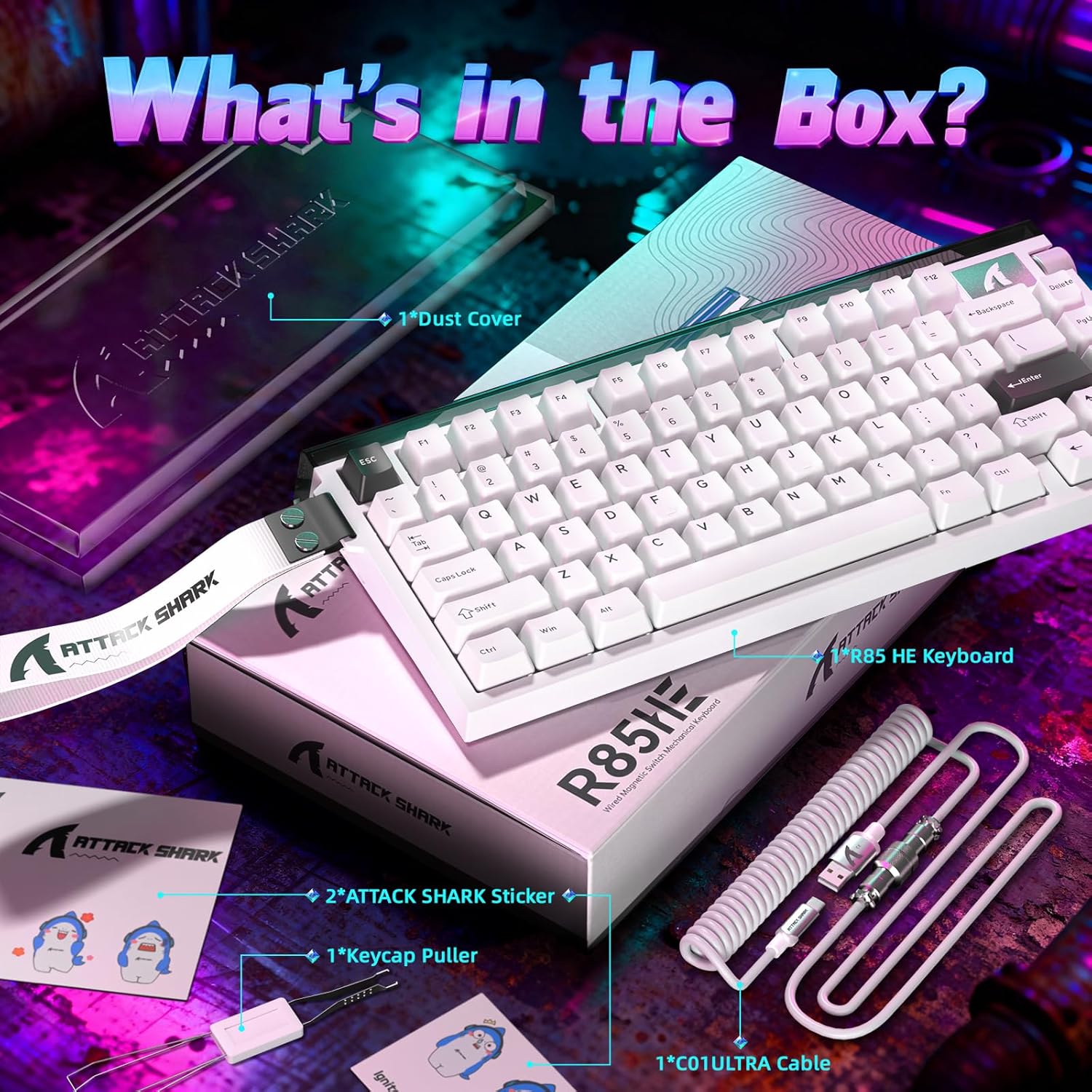
Image 2: All items included in the ATTACK SHARK R85 HE keyboard package.
3. Opsætningsvejledning
Follow these steps to set up your ATTACK SHARK R85 HE keyboard:
- Pak tastaturet ud: Tag forsigtigt tastaturet og alt tilbehør ud af emballagen.
- Tilslut kablet: Insert the USB-C end of the provided C01ULTRA cable into the USB-C port on the keyboard. Connect the other end (USB-A or USB-C, depending on your cable variant) to an available USB port on your computer.
- Første opstart: The keyboard will automatically power on and its RGB lighting will illuminate. Your computer should recognize the device without additional drivers for basic functionality.
- Installer software (valgfrit, men anbefalet): For full customization and advanced features, download the dedicated software from qmk.top.

Image 3: The C01ULTRA cable, featuring 8000 Polling Rate, Colorful LED, and Type-C connectivity.
4. Betjeningsvejledning
Keyboard Layout and Function Keys:
The R85 HE features a 75% QWERTY layout with 79 keys and a scroll wheel. Many functions are accessible via the FN nøgle kombineret med andre nøgler.
Tastaturgenveje:
- FN + \|: Skift lystilstand
- FN + C: Enable/disable case lighting
- FN + ↑: Øg lysstyrken
- FN + ↓: Reducer lysstyrken
- Additional shortcuts can be found in the software.
RGB-lysstyring:
The keyboard offers extensive RGB customization. Use the FN key shortcuts or the dedicated software to adjust lighting effects, colors, and brightness for both the key backlighting and the unique light bar.
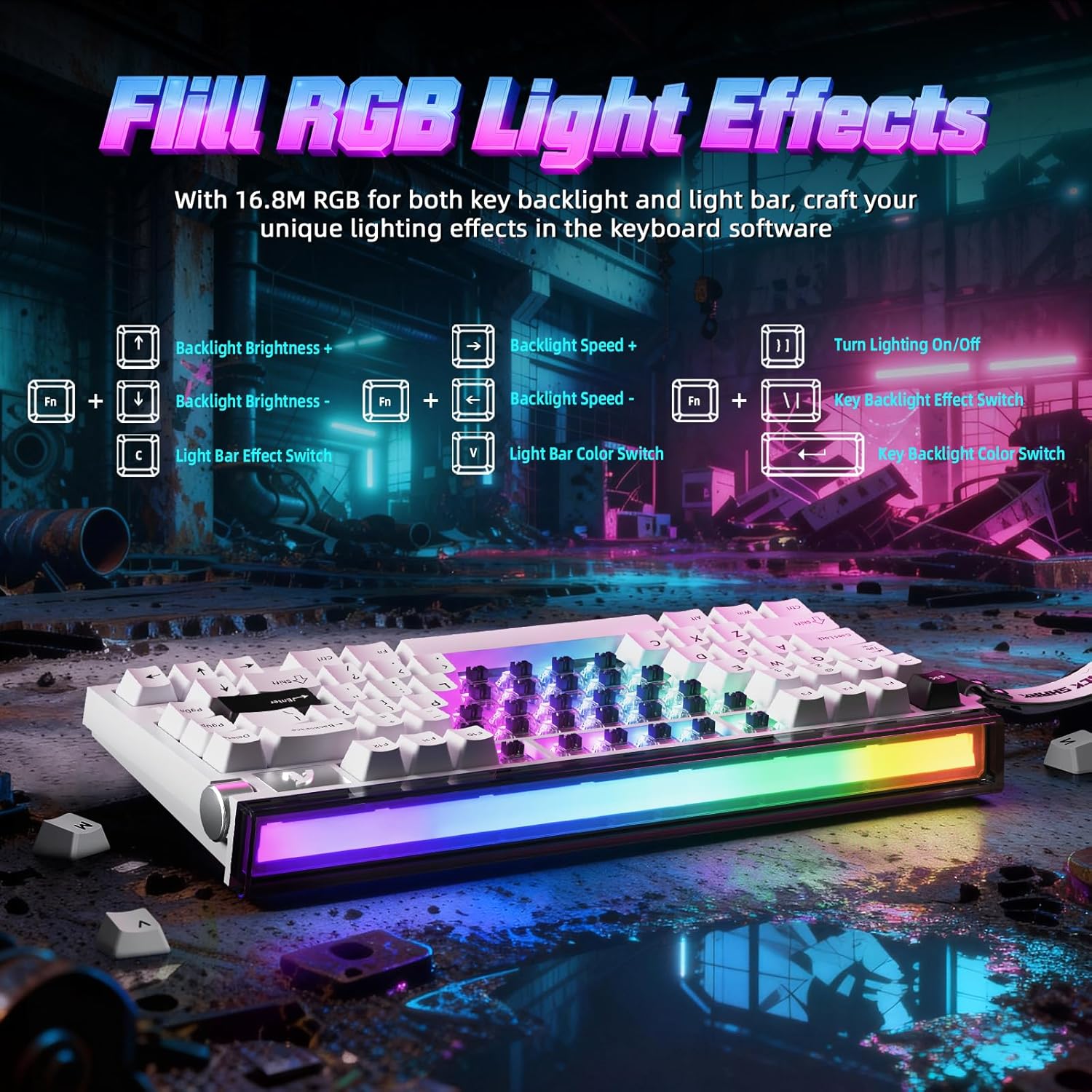
Image 4: FN key combinations for controlling backlight brightness, speed, and color, as well as light bar effects.
Softwaretilpasning:
The ATTACK SHARK R85 HE is fully programmable through its dedicated software, available at qmk.top. The software allows you to:
- Customize individual key functions.
- Juster RGB-lyseffekter og farver.
- Configure advanced gaming features like Rapid Trigger (RT), Dynamic Keystroke (DKS), Mod-Tap (MT), and Toggle Key (TGL).
- Set personalized actuation points for magnetic switches.

Billede 5: Overview of the multi-functional software interface for keyboard customization.
Magnetic Switches and Key Customization:
The R85 HE features ATTACK SHARK Purple Magnetic Switches, which are hot-swappable. This allows for easy replacement or mixing of switches. The software enables precise adjustment of the actuation point for each key, ranging from 0.1mm to 3.3mm, with a sensitivity of 0.005mm.

Billede 6: Detaljeret view of the magnetic switch, showing its components and specifications like start force, end force, sensitivity, and actuation range.
5. Design and Construction
5-lags lyd DampÅbningssystem:
The keyboard incorporates a sophisticated 5-layer sound dampening system to optimize acoustics. This system includes PE foam, IXPE pads, PET acoustic layers, and a silicone bottom coating, ensuring a pure and clear sound profile from the magnetic switches.
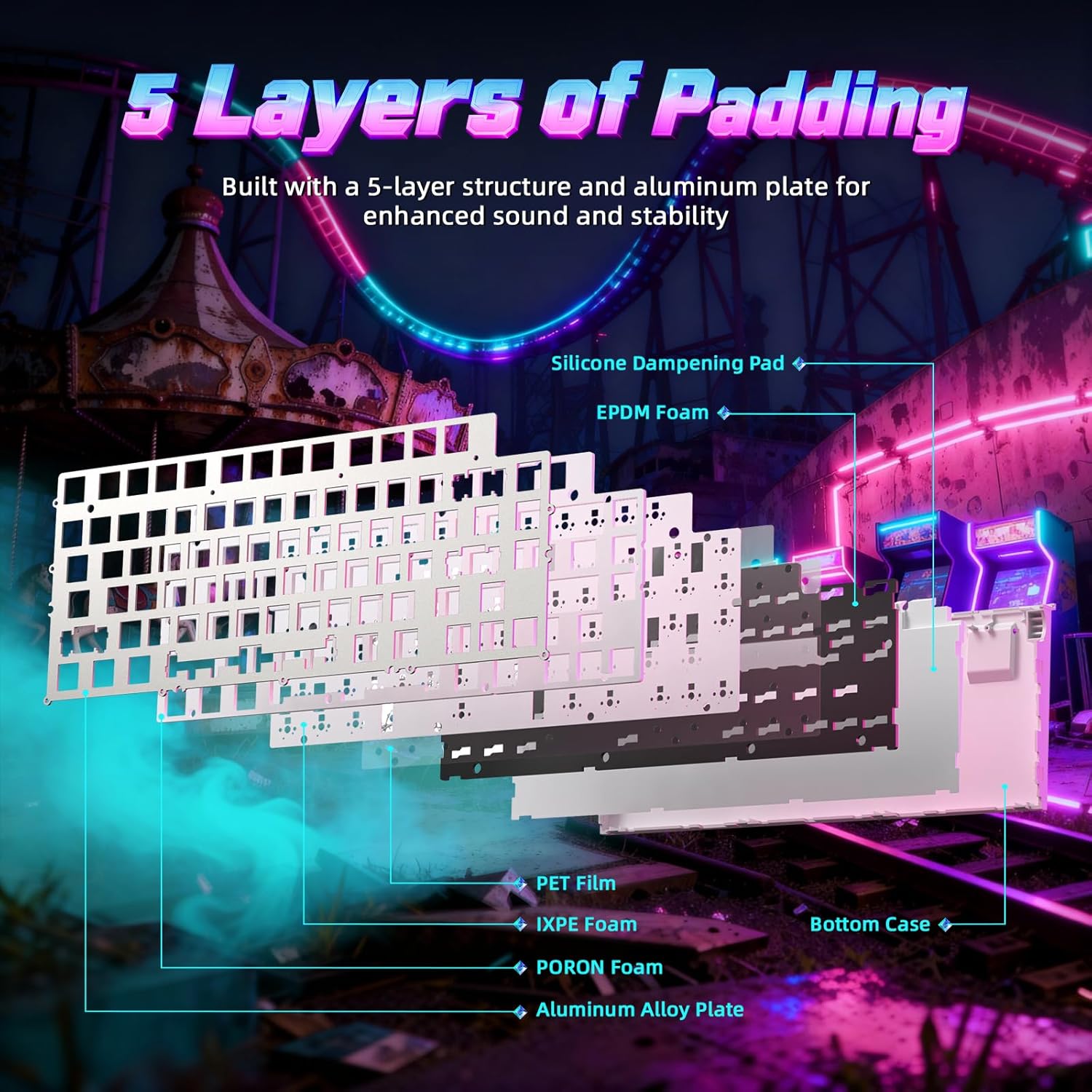
Billede 7: Eksploderet view of the keyboard's internal structure, highlighting the 5 layers of padding for sound dampåbning og stabilitet.
Aluminum Plate and PBT Keycaps:
The R85 HE features an aluminum positioning plate for enhanced structural integrity and stability. The keycaps are made from durable double-shot PBT material, which resists wear and shine over time, providing a consistent typing feel.
Justerbar støtte:
The keyboard includes dual-level adjustable feet, allowing you to set the optimal typing or gaming angle for comfort.
6. Vedligeholdelse
To ensure the longevity and optimal performance of your ATTACK SHARK R85 HE keyboard, follow these maintenance guidelines:
- Rensning: Regularly clean the keyboard with a soft, dry cloth. For dust and debris between keycaps, use compressed air. For stubborn dirt, you may carefully remove keycaps using the provided keycap puller and clean the switches and plate.
- Udskiftning af tastatur og kontakt: The hot-swappable design allows for easy replacement of keycaps and magnetic switches. Use the provided keycap puller and switch puller (if included) to carefully remove and install components. Ensure proper alignment when reinserting switches.
- Kabelpleje: Avoid sharp bends or excessive pulling on the C01ULTRA cable to prevent damage.
7. Fejlfinding
Hvis du støder på problemer med dit tastatur, kan du se følgende almindelige fejlfindingstrin:
- Tastaturet reagerer ikke:
- Sørg for, at USB-C-kablet er korrekt tilsluttet til både tastaturet og din computer.
- Prøv at tilslutte tastaturet til en anden USB-port på din computer.
- Test tastaturet på en anden computer for at udelukke systemspecifikke problemer.
- RGB-belysning virker ikke:
- Check if the lighting is turned off using the FN+C shortcut.
- Adjust brightness using FN+↑/↓.
- Ensure the keyboard software is installed and updated, and check lighting settings within the software.
- Nøgler registreres ikke eller dobbelttastes:
- This can sometimes be resolved by cleaning the switch or replacing the affected magnetic switch.
- Check the actuation point settings in the software; a very low actuation point might cause unintended triggers.
- Software registrerer ikke tastatur:
- Ensure the software is the correct version for your R85 HE model.
- Genstart din computer og softwaren.
- Deaktiver midlertidigt al antivirus- eller firewallsoftware, der muligvis blokerer forbindelsen.
8. Specifikationer
| Feature | Detalje |
|---|---|
| Mærke | ANGREDE HAJ |
| Model | R85 HE |
| Forbindelsesteknologi | USB-C (kablet) |
| Tastaturbeskrivelse | Spil |
| Speciel funktion | Ergonomisk |
| Farve | Starlight White (Blanc étoilé) |
| Understøttelse af tastaturbaggrundsbelysningsfarve | RGB |
| Materiale | Plastic (Internal), Aluminum (Plate) |
| Switch Type | Linear Magnetic Switches |
| Tastaturlayout | QWERTY (79 keys + scroll wheel) |
| Kompatible operativsystemer | Windows, Mac |
| Afstemningsfrekvens | 8000 Hz |
| RT-nøjagtighed | 0.005 mm |
| Aktiveringsområde | 0.1-3.3 mm |
| Keycap materiale | PBT (Double Injection) |
| GTIN | 752010861071 |
9. Garanti og support
Garantioplysninger:
The ATTACK SHARK R85 HE keyboard comes with a one-year warranty against manufacturing defects. Please retain your proof of purchase for warranty claims.
Teknisk support:
For further assistance, software downloads, or advanced configurations, please visit the official software webwebsted: qmk.top.