
1. Introduktion
This manual provides detailed instructions for the installation, operation, and maintenance of your Generic CV920-E42 CV920-F42 Network WiFi Three-in-one Motherboard. This motherboard is designed for 32-55 inch displays, integrating network and WiFi functionalities for a comprehensive solution. Please read this manual thoroughly before use to ensure proper functionality and safety.
Sikkerhedsoplysninger
No specific safety warnings are provided by the manufacturer beyond standard electronic component handling. Always ensure power is disconnected before installation or maintenance. Handle with care to avoid electrostatic discharge. Consult a qualified technician if you are unsure about any installation steps.
2. Pakkens indhold
Kontroller venligst pakkens indhold ved udpakning. Hvis der mangler eller er beskadigede dele, skal du straks kontakte din forhandler.
- Generic CV920-E42 CV920-F42 Motherboard (1 unit)
- Remote Control (1 unit, if applicable)
- WiFi Antenna (1 unit, if applicable)
- Brugervejledning (dette dokument)
3. Produktet er slutview
The Generic CV920-E42 CV920-F42 motherboard is a versatile solution for 32-55 inch displays, offering integrated network and WiFi capabilities. It serves as a central control unit for various display applications.
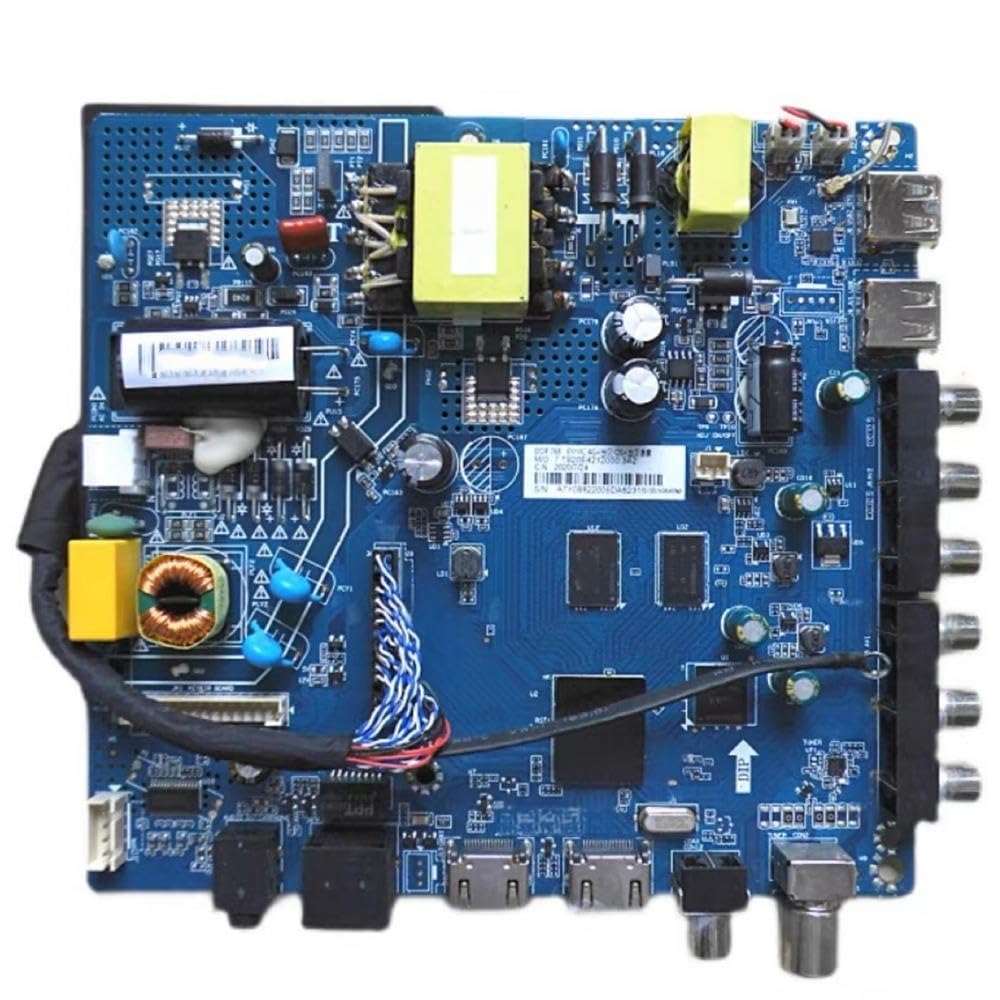
Figur 3.1: Front view of the Generic CV920-E42 CV920-F42 Motherboard. This image displays the main components and connectors of the motherboard, including various ports for input/output and power.
Nøglefunktioner:
- Integrated Network and WiFi functionality
- Designed for 32-55 inch display compatibility
- Three-in-one design for streamlined integration
- Multiple input/output ports for versatile connectivity
4. Opsætning og installation
Follow these steps carefully to install the motherboard. Ensure all power sources are disconnected before beginning installation.
- Prepare the Display: Ensure your 32-55 inch display is powered off and disconnected from the main power supply.
- Access the Display's Internal Compartment: Carefully open the back panel of your display to access the existing motherboard or mounting area. Refer to your display's service manual for specific instructions.
- Monter bundkortet: Align the Generic CV920-E42 CV920-F42 motherboard with the mounting holes in the display's chassis. Secure it using appropriate screws. Do not overtighten.
- Tilslut strømforsyning: Connect the display's internal power supply unit to the designated power input port on the motherboard.
- Connect Display Panel Cables: Attach the LVDS (Low-Voltage Differential Signaling) or other display panel cables from the display panel to the corresponding connectors on the motherboard. Ensure correct orientation.
- Connect Backlight Cables: Connect the backlight power cables from the display's backlight unit to the motherboard's backlight output.
- Connect Input/Output Peripherals:
- HDMI/VGA: Connect external video sources if required.
- USB: Tilslut USB-enheder.
- Ethernet: Til kabelbaseret netværksforbindelse.
- WiFi-antenne: Screw the provided WiFi antenna onto the designated connector for wireless connectivity.
- Close the Display: Once all connections are secure, carefully reattach the back panel of your display.
- Første gang tændt: Connect the display to the main power supply and power it on. The display should boot up.
5. Betjeningsvejledning
Tænd/sluk
- Tænd: Press the power button on your display or the remote control (if applicable).
- Sluk: Press the power button again or use the remote control to put the display into standby mode or power it off completely.
Netværksforbindelse
The motherboard supports both wired Ethernet and wireless WiFi connections.
- Kabelbaseret (Ethernet): Connect an Ethernet cable from your router or network switch to the RJ45 port on the motherboard. The system should automatically detect the connection.
- Trådløst (WiFi):
- Ensure the WiFi antenna is securely attached.
- Navigate to the network settings menu on your display.
- Select "WiFi" and scan for available networks.
- Vælg det ønskede netværk, og indtast adgangskoden, hvis du bliver bedt om det.
- Bekræft forbindelsen.
Valg af inputkilde
Use the "Input" or "Source" button on your remote control or display panel to switch between connected devices (e.g., HDMI, VGA, USB).
6. Vedligeholdelse
Rensning
To ensure optimal performance and longevity, keep the motherboard free from dust and debris. Disconnect power before cleaning.
- Use a soft, dry cloth to gently wipe the surface of the motherboard.
- For hard-to-reach areas, use compressed air to remove dust.
- Do not use liquid cleaners or solvents directly on the motherboard.
Firmware opdateringer
Kontroller jævnligt producentens website for firmware updates. Firmware updates can improve performance, add new features, or fix bugs. Follow the specific instructions provided with the firmware update package carefully.
7. Fejlfinding
If you encounter issues with your motherboard, refer to the following common problems and solutions:
| Problem | Mulig årsag | Løsning |
|---|---|---|
| No power/Display not turning on | Loose power connection, faulty power supply, motherboard issue. |
|
| Ingen skærmudgang | Incorrect input source, loose display panel cable, faulty panel. |
|
| WiFi forbinder ikke | Antenna not connected, incorrect password, network issue. |
|
| System instability/Freezing | Overheating, software issue, faulty component. |
|
8. Specifikationer
The following are the technical specifications for the Generic CV920-E42 CV920-F42 Motherboard:
| Feature | Detalje |
|---|---|
| Modelnumre | CV920-E42, CV920-F42, 3524288508951 |
| Kompatibilitet | 32-55 inch displays |
| Forbindelse | Network (Ethernet), WiFi |
| Type | Three-in-one Motherboard |
| Fabrikant | Generisk |
| Oprindelsesland | Kina |
| Batterier påkrævet | Ingen |
9. Garanti og support
Garantioplysninger
This product is covered by a standard manufacturer's warranty against defects in materials and workmanship. The warranty period typically begins from the date of purchase. Please retain your proof of purchase for warranty claims. For specific warranty terms and conditions, refer to the documentation provided by your retailer or the manufacturer's official webwebsted.
Kundesupport
If you require technical assistance, have questions about installation, or need to report a problem, please contact your retailer or the manufacturer's customer support. Contact information can usually be found on the product packaging or the retailer's webwebsted.
Note: Always provide your product model number (CV920-E42, CV920-F42, 3524288508951) and proof of purchase when contacting support.