
1. Introduktion
This manual provides essential information for the safe and efficient use of your Haier H55C95EUX 55-inch OLED 4K HDR Smart TV. Please read these instructions thoroughly before operating your television and retain them for future reference.
The Haier H55C95EUX features a 55-inch OLED display for deep blacks and vibrant colors, 4K HDR resolution, a 144Hz refresh rate for smooth motion, integrated Harman Kardon sound, and the Google TV operating system for smart functionality and voice control.

Billede 1.1: Overview of Haier C95 Series OLED TV features, highlighting Harman Kardon audio, 144Hz gaming, Dolby Vision IQ, Dolby Atmos, HDR10+, Google TV, and 3GB RAM with 32GB storage.
2. Sikkerhedsoplysninger
Følg altid grundlæggende sikkerhedsforanstaltninger, når du bruger dette fjernsyn, for at mindske risikoen for brand, elektrisk stød og personskade.
- Strømkilde: Tilslut kun tv'et til en AC 220-240V, 50/60Hz strømforsyning.
- Ventilation: Sørg for tilstrækkelig ventilation omkring tv'et. Bloker ikke ventilationsåbningerne.
- Vand og fugt: Udsæt ikke tv'et for regn eller fugt. Placer ikke genstande fyldt med væsker, såsom vaser, oven på tv'et.
- Rensning: Tag stikket til tv'et ud af stikkontakten før rengøring. Brug en blød, tør klud. Brug ikke flydende rengøringsmidler eller sprayrengøringsmidler.
- Montering: If wall-mounting, ensure the wall mount is compatible with the VESA standard (100 x 100 mm) and can support the TV's weight.
- Børn: Supervise children to ensure they do not play with the television.
3. Hvad er der i æsken
Pak forsigtigt kassen ud, og sørg for, at alle genstande er til stede og ubeskadigede.
- Haier H55C95EUX 55-inch OLED 4K HDR Smart TV
- Fjernbetjening
- Brugervejledning (dette dokument)
- Strømkabel
- Komponenter til tv-bord (hvis relevant)
4. Opsætning
4.1 Fysisk installation
Before installation, consider the TV's dimensions to ensure proper placement.

Billede 4.1: Forside view dimensions of the 55-inch Haier TV, indicating a width of 1225mm and a height of 749mm.

Image 4.2: Detailed dimensions of the Haier 55-inch TV, showing measurements with and without the stand.
Montering af stativ
- Placer tv'et med forsiden nedad på en blød, flad overflade for at forhindre, at skærmen beskadiges.
- Fastgør stativets komponenter til de dertil beregnede huller i bunden af tv'et med de medfølgende skruer.
- Sørg for, at stativet er sikkert fastgjort, før du stiller tv'et oprejst.
Vægmontering
If wall-mounting, use a VESA-compatible mount (100 x 100 mm) and follow the mount manufacturer's instructions. Ensure the wall can support the TV's weight.
4.2 Tilslutning af enheder
Dit tv er udstyret med flere porte til tilslutning af eksterne enheder.
- HDMI: Connect Blu-ray players, game consoles, or set-top boxes to the HDMI 2.1 ports for high-quality audio and video.
- USB: Tilslut USB-lagerenheder til medieafspilning.
- Ethernet: For en stabil kablet internetforbindelse.
- Bluetooth: Tilslut trådløse hovedtelefoner eller andre Bluetooth-enheder.
4.3 Første opstart og opsætning
- Tilslut strømkablet til tv'et og en stikkontakt.
- Tryk på tænd/sluk-knappen på fjernbetjeningen eller tv'et.
- Follow the on-screen instructions to complete the initial setup, including language selection, network connection (Wi-Fi or Ethernet), and Google TV account login.
5. Betjening af dit TV
5.1 Fjernbetjening
The included remote control allows you to navigate the TV's features. It may feature a solar cell for eco-friendly charging and USB-C for backup charging.

Image 5.1: The Haier TV remote control, featuring navigation, volume, and app access buttons.
5.2 Google TV-grænseflade
Your TV runs on Google TV, providing access to a wide range of streaming services, apps, and personalized content.

Image 5.2: The Google TV home screen, showcasing various streaming applications and content recommendations.
Stemmekontrol
Use the built-in voice control feature to search for content, launch apps, and control your TV hands-free. Simply say "Hey Google" or press the voice assistant button on your remote.

Image 5.3: Demonstrating voice control functionality with the Haier TV and Google TV.
5.3 Billed- og lydindstillinger
OLED teknologi
The OLED display provides absolute blacks and infinite contrast for a lifelike viewoplevelse.

Image 5.4: Visual representation of OLED technology, showcasing deep blacks and vibrant colors.
Harman Kardon Sound
Experience immersive audio with clear dialogues and cinematic depth, delivered by the integrated Harman Kardon sound system.

Image 5.5: Depiction of the Harman Kardon sound system, emphasizing clear and powerful audio.
Dolby Atmos
Enjoy three-dimensional, immersive sound that moves around you, enhancing your audio experience.
144Hz opdateringsfrekvens
The 144Hz refresh rate ensures smooth and fluid motion, ideal for fast-paced content like gaming and sports.

Image 5.6: Visual comparison illustrating the fluidity of 144Hz motion compared to 60Hz, particularly beneficial for gaming.
6. Vedligeholdelse
6.1 Rengøring af dit TV
- Tag altid stikket ud af tv'et inden rengøring.
- Brug en blød, tør og fnugfri klud til at tørre skærmen og kabinettet af.
- For genstridige mærker, gnid letampRengør kluden med vand eller en specialiseret skærmrens. Spray aldrig rengøringsmiddel direkte på skærmen.
- Undgå at bruge slibende rengøringsmidler, voks eller opløsningsmidler.
6.2 Softwareopdateringer
Your Haier TV may receive software updates to improve performance and add new features. Ensure your TV is connected to the internet to receive these updates automatically or check for them manually through the settings menu.
7. Fejlfinding
Hvis du støder på problemer med dit tv, kan du bruge følgende almindelige løsninger:
| Problem | Mulig løsning |
|---|---|
| Ingen strøm | Check if the power cable is securely connected to the TV and the wall outlet. Ensure the outlet is functioning. Try pressing the power button on the TV itself. |
| Intet billede, men der er lyd | Kontrollér inputkilden. Sørg for, at den tilsluttede enhed er tændt og fungerer korrekt. Prøv et andet HDMI-kabel eller en anden port. |
| Ingen lyd, men billedet er til stede | Check the volume level. Ensure the TV is not muted. Verify audio output settings (e.g., internal speakers, external sound system). Check audio cables if using external speakers. |
| Fjernbetjeningen virker ikke | Check the remote control's battery level. Ensure there are no obstructions between the remote and the TV's IR sensor. If it's a solar remote, ensure it has sufficient light exposure. |
| Problemer med netværksforbindelse | Restart your router and modem. Check Wi-Fi password. If using Ethernet, ensure the cable is connected properly. Try connecting to a different network if available. |
8. Specifikationer
| Feature | Detalje |
|---|---|
| Modelnavn | H55C95EUX |
| Skærmstørrelse | 55 tommer |
| Displayteknologi | OLED |
| Opløsning | 4K (3840 x 2160) |
| Opdateringshastighed | 120 Hz (Motion Enhancement: 144Hz) |
| HDR-format understøttet | Dolby Vision |
| Operativsystem | Google TV |
| Intern opbevaring | 32 GB |
| Lydsystem | Harman Kardon 2.1 Sound System |
| Surround Sound Format | Dolby Atmos |
| Forbindelse | Bluetooth, Ethernet, HDMI (x4), USB (x1) |
| Trådløs teknologi | Bluetooth, WiFi |
| Kontrolmetode | Remote Control, Voice |
| Produktdimensioner (DxBxH) | 29.5P x 122.5l x 76.8H cm (with stand) |
| VESA Monteringsstandard | 100 x 100 mm |
| Energieffektivitetsklasse (SDR) | F (77 kWh/1000t) |
| Energieffektivitetsklasse (HDR) | G (70 kWh/1000t) |
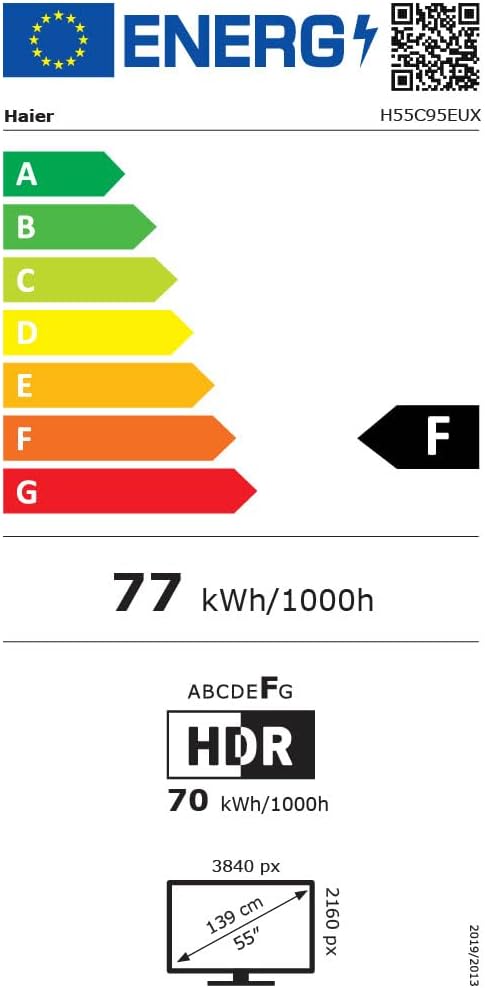
Image 8.1: EU Energy Label for the Haier H55C95EUX TV. For more details, visit the EPREL-database.
9. Garanti og support
Your Haier H55C95EUX television comes with a 2 års producentgarantiGem venligst din købsbevis i tilfælde af garantikrav.
For technical support, service, or further inquiries, please refer to the contact information provided on the official Haier webwebstedet eller dit lokale autoriserede servicecenter.