
1. Introduktion
Thank you for choosing the Donerton Bluetooth 5.4 Wireless Headphones, Model W90. These headphones are designed to provide a high-quality audio experience with advanced features such as Bluetooth 5.4 connectivity, HiFi stereo sound, Environmental Noise Cancelling (ENC) for calls, and IP7 waterproofing. This manual will guide you through the setup, operation, and maintenance of your new headphones to ensure optimal performance and longevity.
2. Sikkerhedsoplysninger
- Do not disassemble or modify the headphones or charging case. This may cause malfunction or damage and will void the warranty.
- Keep the device away from extreme temperatures (hot or cold), humidity, and water, except for the specified IP7 water resistance.
- Undgå langvarig udsættelse for høje lydstyrker for at forhindre høreskader.
- Rengør hovedtelefonerne med en blød, tør klud. Brug ikke skrappe kemikalier eller slibende materialer.
- Opbevares utilgængeligt for børn og kæledyr.
- Bortskaf enheden og dens komponenter på en ansvarlig måde i henhold til lokale bestemmelser.
3. Pakkens indhold
Kontroller venligst pakkens indhold ved åbning for at sikre, at alle varer er til stede:
- Donerton W90 Wireless Headphones (Left and Right earbuds)
- Opladningsetui
- USB opladningskabel
- Brugervejledning (dette dokument)
4. Produktet er slutview
Familiarize yourself with the components of your Donerton W90 Wireless Headphones.
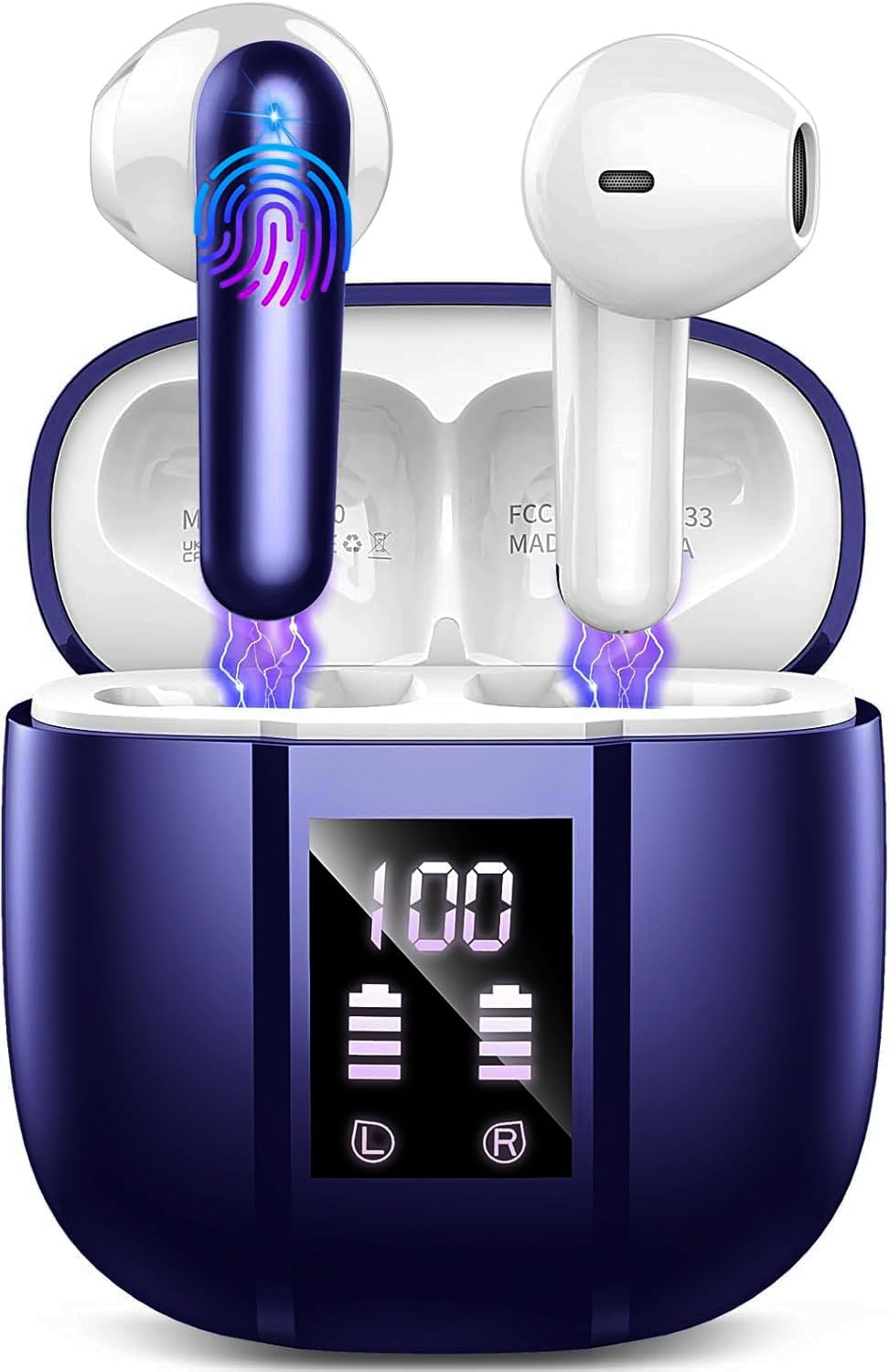
Image: Donerton W90 Wireless Headphones and Charging Case. This image displays the overall design of the earbuds and their charging case.
- høretelefoner Venstre og højre ørepropper med berøringsbetjeningsområder og opladningskontakter.
- Opladningsetui: Houses and charges the earbuds, features an LED display for battery status.
- USB-C opladningsport: Placeret på opladningsetuiet til strømindgang.
- Mikrofoner: Integrated into each earbud for calls and ENC functionality.
5. Opsætning
5.1 Opladning af hovedtelefonerne
Oplad hovedtelefonerne og opladningsetuiet helt inden første brug.
- Place both earbuds into the charging case. Ensure they are correctly seated, and the charging indicators on the case light up.
- Tilslut USB-opladerkablet til opladningsporten på etuiet og til en USB-strømkilde (f.eks. computer, vægadapter).
- The LED display on the charging case will show the battery level. A full charge typically takes about 1.5 hours for the case.
- Når det er fuldt opladet, skal du frakoble ladekablet.
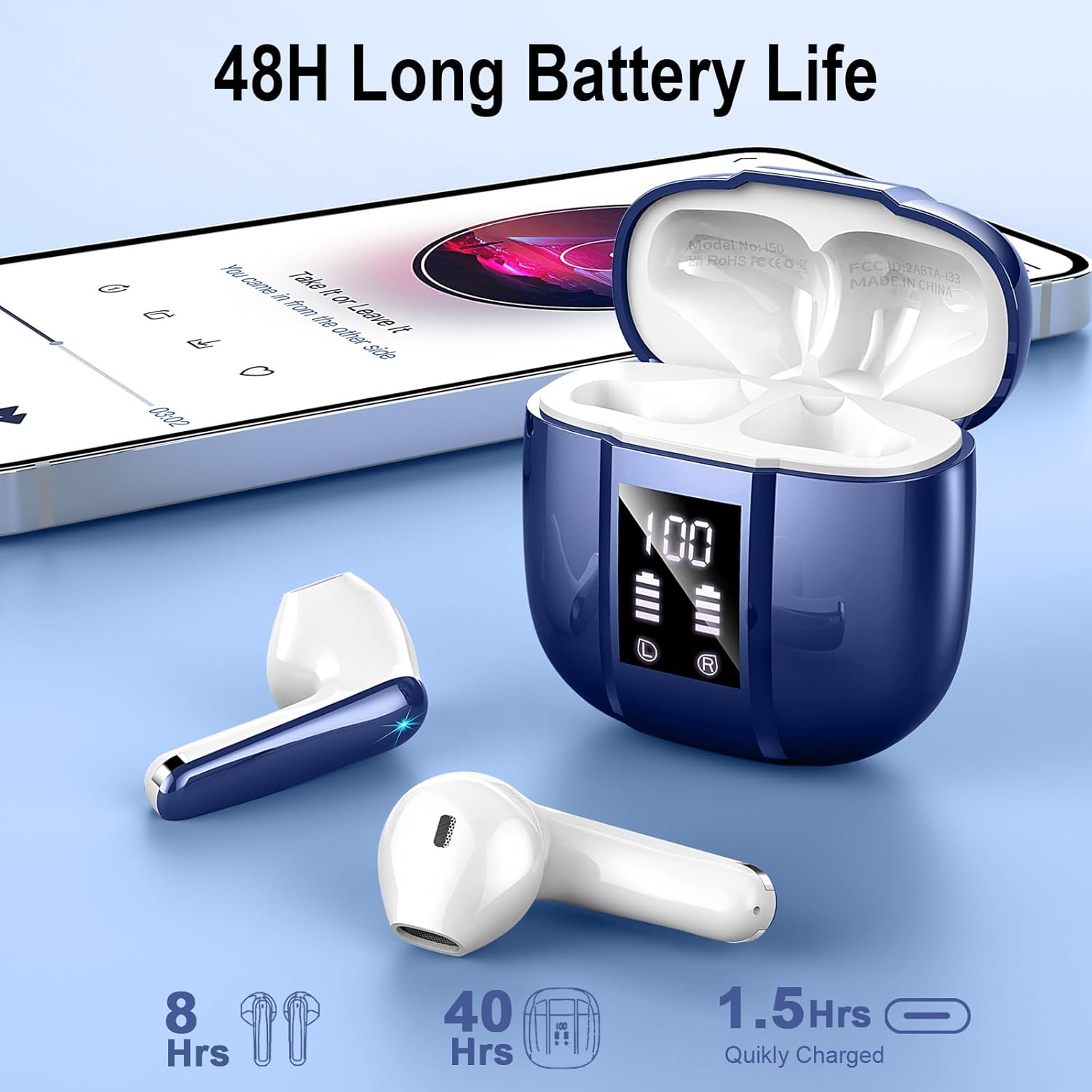
Image: Donerton W90 Charging Case with LED Display. This image illustrates the charging case displaying battery levels for both earbuds and the case itself, indicating a quick charge time of 1.5 hours for the case and up to 8 hours of playback per earbud charge, with an additional 40 hours from the case.
5.2 Indledende parring
Follow these steps to pair your headphones with a Bluetooth-enabled device for the first time:
- Sørg for, at hovedtelefonerne er opladet.
- Åbn opladningsetuiet. Ørepropperne tændes automatisk og går i parringstilstand. Indikatorlamperne på ørepropperne blinker.
- Aktiver Bluetooth på din enhed (smartphone, tablet osv.).
- Søg efter available Bluetooth devices. Select "Donerton W90" from the list.
- Once connected, the earbud indicator lights will turn off or flash slowly, and you will hear a confirmation tone.

Image: Donerton W90 One-Step Pairing and Touch Control. This image demonstrates the simple pairing process by opening the charging case and selecting the device on a smartphone's Bluetooth settings. It also highlights the touch control functions on the earbuds.
5.3 Automatic Re-pairing
After the initial pairing, the headphones will automatically connect to the last paired device when you open the charging case and take them out, provided Bluetooth is enabled on your device and it is within range.
6. Betjeningsvejledning
6.1 Sådan tager du hovedtelefonerne på
For optimal lydkvalitet og komfort skal du sørge for, at ørepropperne sidder korrekt i dine ører.
- Identificér venstre (V) og højre (H) ørepropper.
- Før forsigtigt hver øreprop ind i den tilsvarende øregang.
- Drej øreproppen let, indtil den føles sikker og behagelig.

Image: Donerton W90 Ergonomic Design and Fit. This image highlights the ergonomic design of the earbuds, showing how they fit comfortably and securely in the ear, emphasizing their lightweight nature and portability.
6.2 Tryk på kontrolelementer
The Donerton W90 headphones feature intuitive touch controls on each earbud. The specific functions may vary slightly depending on your device and application.
| Handling | Venstre øretelefon (L) | Højre øretelefon (R) |
|---|---|---|
| Afspil/pause musik | Enkelt tryk | Enkelt tryk |
| Næste spor | Dobbelttryk | Dobbelttryk |
| Forrige spor | Tryk tredobbelt | Tryk tredobbelt |
| Lydstyrke op | Tryk og hold | N/A |
| Lydstyrke ned | N/A | Tryk og hold |
| Besvar/afslut opkald | Enkelt tryk | Enkelt tryk |
| Afvis opkald | Tryk og hold i 2 sekunder | Tryk og hold i 2 sekunder |
| Aktiver Voice Assistant | Firedobbelt hane | Firedobbelt hane |
The headphones feature Environmental Noise Cancelling (ENC) for clear calls. This technology automatically reduces background noise during phone conversations.

Image: Donerton W90 Crystal Clear Call with ENC. This image visually represents the Environmental Noise Cancelling (ENC) feature, showing how background noise is reduced to ensure clear voice transmission during calls.
7. Vedligeholdelse
7.1 Rengøring
- Regularly clean the earbuds and charging case to prevent dirt and earwax buildup.
- Brug en blød, tør og fnugfri klud til at tørre overfladerne af.
- Til genstridigt snavs, let dampen the cloth with water. Do not use alcohol, solvents, or abrasive cleaners.
- Sørg for, at opladningskontakterne på både ørepropperne og etuiet er rene og fri for snavs for at opretholde korrekt opladning.
7.2 Opbevaring
- Når hovedtelefonerne ikke er i brug, skal de opbevares i deres opladningsetui for at beskytte dem og holde dem opladede.
- Opbevar enheden et køligt, tørt sted, væk fra direkte sollys og ekstreme temperaturer.
7.3 Vandtæthed (IP7)
The Donerton W90 headphones are rated IP7 waterproof. This means they are protected against immersion in water up to 1 meter for up to 30 minutes. They are resistant to splashes, sweat, and rainwater.
- Do not intentionally submerge the charging case in water, as it is not waterproof.
- Ensure the earbuds are completely dry before placing them back into the charging case to prevent damage to the charging contacts.
- Water resistance is not a permanent condition and may decrease as a result of normal wear.
8. Fejlfinding
If you encounter issues with your Donerton W90 headphones, refer to the following common problems and solutions:
8.1 Hovedtelefoner parrer ikke
- Sørg for, at Bluetooth er aktiveret: Check that Bluetooth is turned on on your device.
- Re-enter pairing mode: Placer ørepropperne tilbage i opladningsetuiet, luk låget, og åbn det derefter igen for at genstarte parringstilstand.
- Forget device: On your device, go to Bluetooth settings, find "Donerton W90", and select "Forget" or "Unpair". Then, try the pairing process again from step 5.2.
- Oplad hovedtelefoner: Sørg for, at både ørepropperne og opladningsetuiet har tilstrækkelig batterikapacitet.
- Afstand: Make sure the headphones are within the Bluetooth range (up to 15 meters) of your device.
8.2 Ingen lyd eller lav lydstyrke
- Check volume levels: Adjust the volume on both your connected device and using the headphone touch controls.
- Genopret forbindelse: Disconnect and re-connect the headphones to your device.
- Clean earbuds: Ensure there is no earwax or debris blocking the earbud speakers.
- Try another audio source: Test with a different song or application.
8.3 Opladningsproblemer
- Check cable and adapter: Sørg for, at USB-opladerkablet og strømadapteren fungerer korrekt. Prøv et andet kabel eller en anden adapter.
- Clean charging contacts: Wipe the charging contacts on both the earbuds and inside the case with a dry cloth.
- Proper seating: Sørg for, at ørepropperne er placeret korrekt i opladningsetuiet.
8.4 En øreprop virker ikke
- Reparation: Try forgetting the device and re-pairing as described in 8.1.
- Nulstil: Some issues can be resolved by resetting the headphones. Refer to the manufacturer's website or contact support for specific reset instructions if needed.
- Oplade: Sørg for, at begge øretelefoner er opladet.
9. Specifikationer
| Feature | Detalje |
|---|---|
| Model | W90 |
| Bluetooth version | 5.4 |
| Bluetooth-protokoller | HFP, HSP, A2DP, AVRCP |
| Wireless Range | Op til 15 meter (49 fod) |
| Højttaler drivere | 13 mm dynamiske højttalere |
| Støjkontrol | Environmental Noise Cancellation (ENC) with 4 microphones |
| Øreproppernes afspilningstid | 6-8 timer (enkelt opladning) |
| Samlet afspilningstid (med etui) | Op til 45-50 timer |
| Opladningstid (etui) | Cirka 1.5 timer |
| Vandtæt vurdering | IP7 (kun øretelefoner) |
| Earbud vægt | Approximately 3 grams each |
| Materiale | Plast |
| Batteritype | Lithium polymer |
| Kompatibilitet | iOS 9.0+, Android 10.0+, Bluetooth 5.4+ devices |
10. Garanti og support
Donerton products are designed and manufactured to the highest quality standards. For detailed warranty information, please refer to the warranty card included with your purchase or visit the official Donerton webwebsted.
If you experience any issues or have questions regarding your Donerton W90 Wireless Headphones, please contact Donerton customer support through the retailer where you purchased the product or via the contact information provided on the official Donerton webwebsted.