
1. Introduktion
This manual provides essential information for the safe and effective use of your ALITOVE 12V 5A 60W Universal Regulated Switching Power Supply Adapter. Please read these instructions carefully before installation and operation. This power supply is designed to convert AC 110V/220V to DC 12V, suitable for various applications such as LED strip lights, 3D printers, CCTV cameras, and other 12V devices requiring up to 5 Amps.
2. Sikkerhedsoplysninger
- Kun indendørs brug: This power supply is designed for indoor use in dry environments. Do not expose to water, moisture, or high humidity.
- Høj voltage: Enheden indeholder høj voltage components. Do not remove the cover. Servicing should only be performed by qualified personnel.
- Korrekt ventilation: Ensure adequate airflow around the unit. The metal case with ventilation holes is designed for efficient heat dissipation. Do not block these holes.
- Overbelastningsbeskyttelse: The power supply features automatic overload cut-off, over-voltage cut-off, automatic thermal cut-off, and short circuit protection. However, it is recommended to use a power supply with an amperage rating higher than your actual load requirements to ensure longevity and stable operation.
- Ledningsføring: All wiring should be performed by a qualified electrician or knowledgeable individual following local electrical codes. Ensure all connections are secure.
- Fused Power Cord: For added safety, consider using a fused power cord safety switch with the power supply.

Billede: Top-down view of the power supply showing the 'CAUTION! HIGH VOLTAGE' warning label.
3. Produktet er slutview
The ALITOVE 12V 5A Power Supply Adapter is a compact and efficient unit designed for various low-voltage DC applications. It provides a stable 12V DC output with a maximum current of 5 Amps (60 watt).
Nøglefunktioner:
- Input bindtage: AC 110V/220V (selectable, typically auto-sensing or switchable, refer to unit label).
- Udgang Voltage: DC 12V (adjustable by 10%).
- Udgangsstrøm: 5 Amps maksimum.
- Strømudgang: 60 watt.
- Sikkerhedsbeskyttelse: Overbelastning, over-voltage, thermal, and short circuit protection.
- Køling: Fanless design for silent operation, relying on the perforated metal case for heat dissipation.
Komponenter:
- AC Input Terminals (L, N): For connecting the AC power source.
- Ground Terminal (⏚): For connecting to earth ground for safety.
- DC Output Terminals (V-, V+): For connecting to your 12V DC device. V- is negative, V+ is positive.
- Voltage Adjustment Potentiometer (+V ADJ): A small screw-adjustable component to fine-tune the output voltage within a 10% range.
- Indikatorlys: Lyser, når enheden er tændt og i drift.

Billede: Nærbillede view of the terminal block on the power supply, clearly labeling AC input (L, N), Ground, DC output (V-, V+), and the voltage adjustment potentiometer (+V ADJ).
4. Opsætningsvejledning
Follow these steps to safely set up your ALITOVE power supply:
- Montering: Securely mount the power supply in a well-ventilated area using the integrated mounting tabs. Ensure it is away from flammable materials and sources of heat or moisture.
- AC-indgangsforbindelse: Connect your AC power source (110V or 220V) to the 'L' (Live) and 'N' (Neutral) terminals. Use appropriate gauge wiring for your region and load.
- Jordforbindelse: Connect the earth ground wire from your AC source to the terminal marked with the ground symbol (⏚). This is crucial for safety.
- DC-udgangstilslutning: Connect your 12V DC device to the 'V+' (positive) and 'V-' (negative) terminals. Ensure correct polarity to prevent damage to your device.
- Bekræft forbindelser: Double-check all wiring connections for tightness and correct polarity before applying power. Loose connections can cause overheating or malfunction.
- Initial Voltage Check (Optional but Recommended): Before connecting your sensitive device, you may wish to power on the unit and use a multimeter to verify the output voltage at the V+ and V- terminals.
Note: Hvis din enhed har en voltage selector switch (110V/220V), ensure it is set correctly for your local mains voltage before connecting AC power.
5. Betjeningsvejledning
Once properly set up, operating the power supply is straightforward:
- Tænd: Apply AC power to the unit. The indicator light should illuminate, signifying that the power supply is active.
- Voltage Justering: If your application requires a precise 12V output or a slightly different voltage within the 10% adjustment range, use a small screwdriver to carefully turn the potentiometer labeled '+V ADJ'. Turn clockwise to increase voltage, counter-clockwise to decrease. Monitor the output with a multimeter during adjustment.
- Overvågning: The power supply is designed for continuous operation within its specified limits. Ensure the connected load does not exceed 5 Amps eller 60 watt.
- Sluk: Disconnect the AC input power when the unit is not in use or when performing maintenance.

Image: Close-up of the voltage adjustment potentiometer (+V ADJ) on the power supply circuit board.
6. Vedligeholdelse
The ALITOVE power supply requires minimal maintenance:
- Rensning: Rengør enhedens yderside regelmæssigt med en tør, blød klud. Brug ikke flydende rengøringsmidler eller opløsningsmidler.
- Ventilation: Ensure the ventilation holes on the metal casing remain clear of dust and debris to maintain optimal heat dissipation.
- Inspektion: Regularly inspect the wiring for any signs of damage, fraying, or loose connections. Address any issues promptly.
- Ingen dele, der kan serviceres af brugeren: Forsøg ikke at åbne strømforsyningen casing. There are no user-serviceable parts inside, and opening the unit voids the warranty and poses a shock hazard.

Image: Diagram illustrating airflow through the perforated metal casing for varmeafledning.
7. Fejlfinding
Hvis du støder på problemer med din strømforsyning, kan du se følgende almindelige problemer og løsninger:
| Problem | Mulig årsag | Løsning |
|---|---|---|
| No output power / Indicator light off | Ingen AC-indgangsstrøm Loose AC connections Intern fejl | Check AC power source and cable. Verify AC input terminals (L, N) are securely wired. If problem persists, discontinue use and contact support. |
| Forkert output voltage | Voltage adjustment potentiometer misset | Adjust the '+V ADJ' potentiometer with a small screwdriver while monitoring with a multimeter. |
| Power supply shuts down / Overheating | Overbelaste Short circuit in connected device Utilstrækkelig ventilation | Reduce the connected load to below 5 Amps / 60 watt. Check your connected device for short circuits. Ensure ventilation holes are clear and unit is in a well-ventilated area. |
| Ustabil udgang voltage | Løse DC-forbindelser Faulty load Intern fejl | Verify DC output terminals (V-, V+) are securely wired. Test with a different load. If problem persists, discontinue use and contact support. |
If troubleshooting steps do not resolve the issue, please contact ALITOVE customer support or your seller for assistance.
8. Specifikationer
| Mærke | ALITOVE |
| Model | ALT-1205T |
| Input bindtage | AC 110V/220V |
| Udgang Voltage | DC 12V |
| Udgangsstrøm | 5 Amps (maks.) |
| Udgangseffekt | 60 watt |
| Voltage Justeringsområde | ±10 % |
| Frekvens | 50-60 Hz |
| Monteringstype | Overflademontering |
| Certificeringer | CE, FCC, RoHS |
| Dimensioner (L x B x H) | 4.33 cm x 11 cm x 3.07 cm |
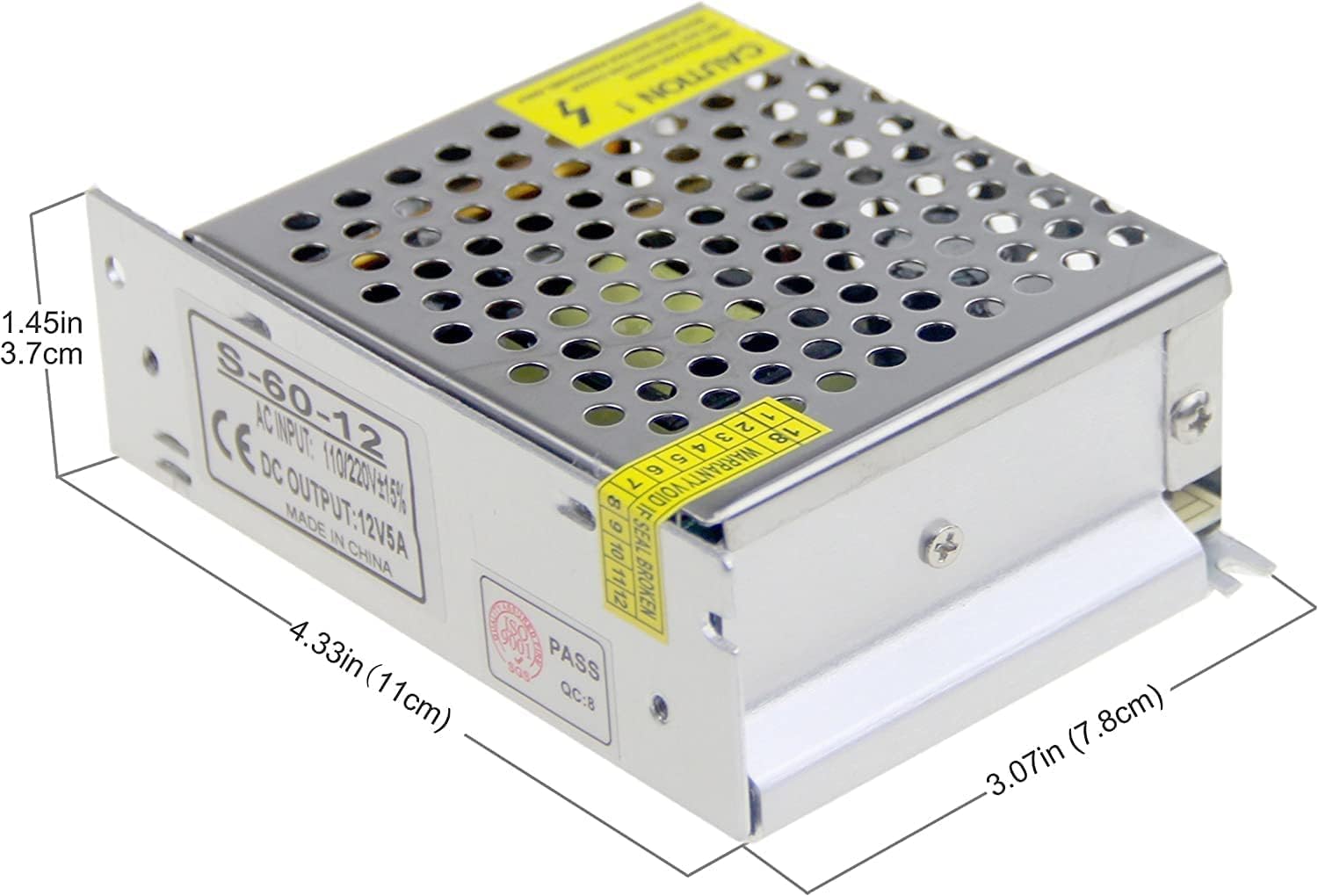
Image: Diagram showing the physical dimensions of the ALITOVE 12V 5A Power Supply.
9. Garanti og support
Garanti:
This ALITOVE power supply comes with a 24 måneders garanti from the date of purchase. This warranty covers manufacturing defects and malfunctions under normal use. It does not cover damage caused by misuse, unauthorized modification, improper installation, or external factors such as power surges or environmental damage.
Kundesupport:
For technical assistance, warranty claims, or any questions regarding your ALITOVE power supply, please contact the seller through your purchase platform or visit the official ALITOVE website for contact information. When contacting support, please have your product model (ALT-1205T) and purchase details ready.


