
1.Overview
The NIIMBOT B1 is a portable Bluetooth thermal label printer designed for various labeling needs in small businesses, offices, homes, and schools. It utilizes direct thermal printing technology, eliminating the need for ink or toner. The device connects to iOS and Android smartphones via Bluetooth, allowing users to design and print labels using the dedicated NIIMBOT app. For PC connectivity, a USB connection and driver download from the official NIIMBOT website are required.
The B1 supports label widths from 20mm to 50mm and comes with a built-in 1500 mAh rechargeable battery, offering extended standby time.
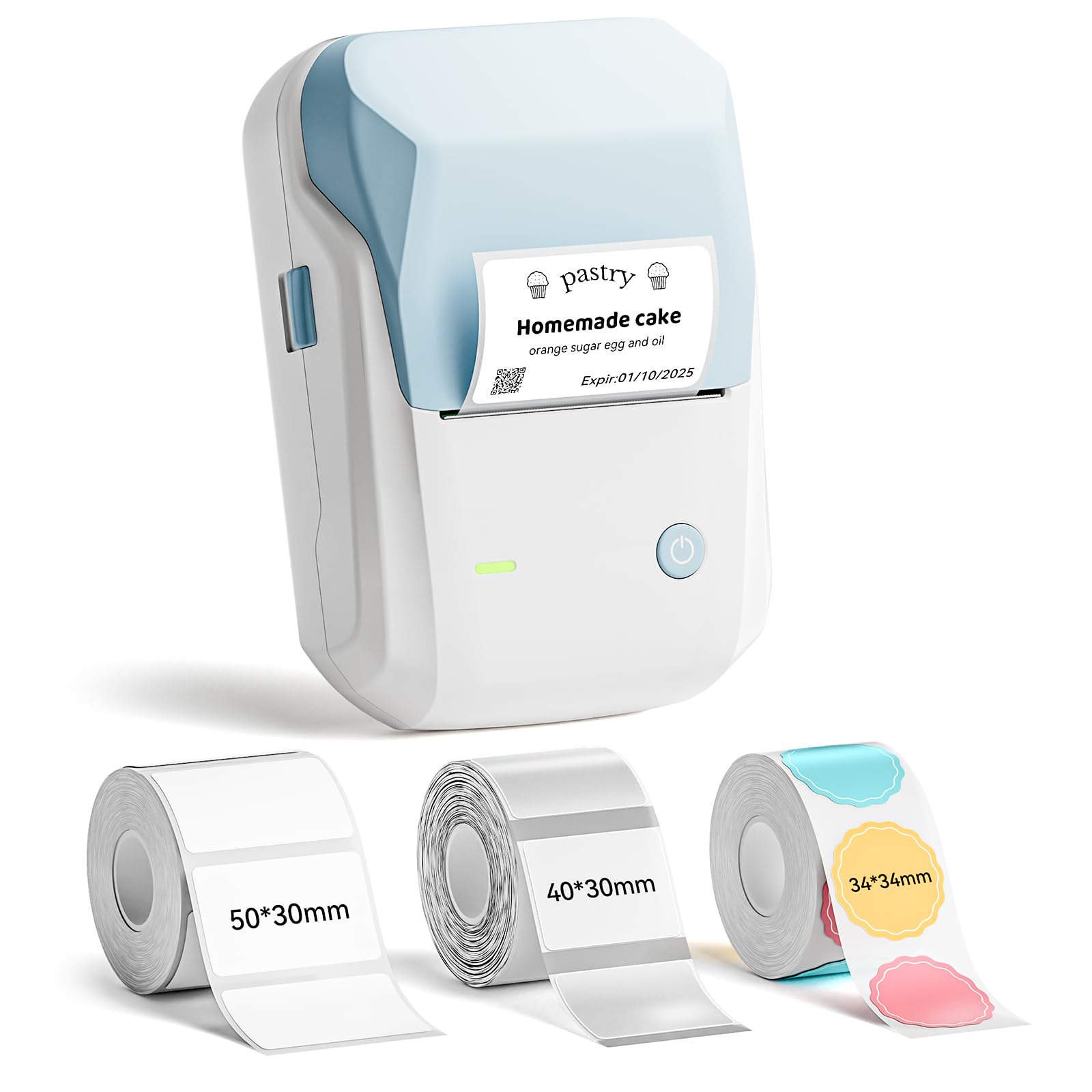
Image: The NIIMBOT B1 Label Maker Machine, a compact light blue and white device.
2. Pakkens indhold
Bekræft at alle varer er til stede i din pakke:
- 1 x NIIMBOT B1 etiketmaskine
- 1 x Type-C kabel
- 1 x brugermanual
- 3 x Roll Label Tape (50x30mm White, 40x30mm Clear, 34x34mm ColorfulB)

Image: Contents of the NIIMBOT B1 package, including the label maker, USB-C cable, manual, and three rolls of label tape.
3. Opsætning
3.1 Opladning af enheden
Before first use, fully charge the NIIMBOT B1 label maker using the provided Type-C cable. Connect the cable to the device and a compatible USB power adapter (not included). The charging indicator light will show the charging status.
3.2 Installation af etiketpapir
- Åbn dækslet til etiketrummet.
- Insert the label roll with the printing surface facing upwards. Ensure the label roll is seated correctly in the compartment.
- Pull a small portion of the label paper out through the printer's exit slot.
- Close the label compartment cover firmly. The printer will automatically detect the label size.

Image: Diagram showing how to insert a label roll into the NIIMBOT B1 printer, highlighting the supported label widths.
3.3 Appinstallation og -forbindelse
- Download the "NIIMBOT" app from the Apple App Store (for iOS devices) or Google Play Store (for Android devices).
- Aktiver Bluetooth på din smartphone.
- Open the NIIMBOT app and follow the on-screen instructions to connect to your B1 label maker via Bluetooth. The device name will typically appear as "B1-XXXX".
- For PC connection via USB, download the necessary driver from the official NIIMBOT webwebsted.

Image: A three-step visual guide demonstrating how to download the NIIMBOT app, connect via Bluetooth, and edit labels.
4. Betjeningsvejledning
4.1 Designing Labels with the App
The NIIMBOT app offers extensive customization options:
- Tekst: Choose from over 10 fonts and multiple languages.
- Grafik: Access over 1500 symbols, 100 borders, icons, and images.
- Data: Generate barcodes, QR codes, and add time/date stamps.
- Skabeloner: Utilize pre-made templates or design your own.

Image: Visual representation of the NIIMBOT app's features, including fonts, symbols, borders, and battery life.
4.2 Udskrivning af etiketter
- After designing your label in the app, tap the "Print" button.
- Adjust print settings such as copies and print density if needed.
- Confirm the print job. The label maker will quickly print your labels.

Image: A NIIMBOT B1 label maker printing various labels for organizing items in a home or office setting.
5. Vedligeholdelse
5.1 Rengøring af printhovedet
For at sikre optimal udskriftskvalitet skal du rengøre printhovedet regelmæssigt. Brug en blød, fnugfri klud, der er let tørret.ampmed isopropylalkohol. Tør forsigtigt printhovedets overflade af. Lad det tørre helt, før du lukker dækslet eller bruger printeren.
5.2 Pleje af batterier
The built-in 1500 mAh rechargeable battery provides up to 100 days of standby time. To prolong battery life, avoid fully discharging the battery frequently and store the device in a cool, dry place when not in use for extended periods.
5.3 Opbevaring af etiketter
NIIMBOT labels are waterproof, oilproof, wipeable, tear-resistant, self-adhesive, abrasion resistant, and BPA-free. Store label rolls in a cool, dry place away from direct sunlight to maintain their quality and adhesive properties.
6. Fejlfinding
| Problem | Mulig årsag | Løsning |
|---|---|---|
| Printeren tænder ikke | Lavt batteri. | Oplad enheden med Type-C-kablet. |
| Kan ikke oprette forbindelse via Bluetooth | Bluetooth is off on the phone; device is out of range; app not installed. | Ensure Bluetooth is enabled. Move closer to the printer. Install the NIIMBOT app. |
| Dårlig printkvalitet | Dirty print head; incorrect print density setting; low battery. | Clean the print head. Adjust print density in the app. Charge the device. |
| Etiketter fremføres ikke korrekt | Label roll incorrectly installed; label jam. | Re-install the label roll, ensuring it's properly seated. Clear any jammed labels. |
7. Specifikationer
- Mærke: NIIMBOT
- Modelnavn: B1
- Forbindelse teknologi: Bluetooth
- Udskrivningsteknologi: Termisk
- Printer output: Monokrom
- Maks. printhastighed sort/hvid: 50 mm/s
- Varens vægt: 0.65 kilo
- Produktdimensioner: 3" D x 3.5" B x 6" H
- Maksimal udskriftsopløsning: 203 DPI
- Supported Label Widths: 20 mm til 50 mm
- Batteri: Indbygget 1500 mAh genopladeligt batteri
- Opladningsport: Type-C
8. Garanti og support
8.1 Garantioplysninger
NIIMBOT B1-etiketprinteren leveres med en 2-års garanti from the date of purchase. This warranty covers manufacturing defects and malfunctions under normal use. It does not cover damage caused by misuse, accidents, unauthorized modifications, or consumables such as label paper.
Gem venligst dit købsbevis for garantikrav.
8.2 Kundesupport
For technical assistance, troubleshooting, or warranty inquiries, please visit the official NIIMBOT website or contact their customer support team. Contact details can typically be found on the product packaging or the official webwebsted.
Online ressourcer: Besøg NIIMBOT-butikken på Amazon