
1. Introduktion
This manual provides detailed instructions for the installation, operation, and maintenance of your Fafeicy Smart Lock. Please read this manual thoroughly before installation and use to ensure proper function and security. This smart lock offers multiple unlocking methods and is designed for various door types, including glass, wooden, and sliding doors.
2. Produktet er slutview
2.1 Komponenter
- Main Lock Body
- Sub Lock Body
- Installation Slabs (2)
- Soft Enamel Cards (2)
- Nøgler (2)
- Brugervejledning (dette dokument)
- Installationsskruer (10)
2.2 Nøglefunktioner
- Flere oplåsningsmetoder: Fingerprint, Password, Swiping Card, Mechanical Key, and Remote Unlocking.
- Virtual Password Technology: Input random numbers before or after your actual password to prevent theft.
- Smart Voice Functionality: Voice navigation for setup and daily use, with integrated doorbell function and security alarms.
- Langvarig batterilevetid: Powered by 4 AA batteries, operating for over 6 months with normal usage. Includes low battery warning.
- Nødstrømforsyning: Type-C interface for temporary power when batteries are depleted.
- Holdbar konstruktion: Made from ABS Plastics and Aluminum Alloy for enhanced security.
- Alsidig installation: Suitable for frameless glass doors, single or double doors, left or right opening doors, and sliding doors.
Billede: Overview of the Fafeicy Smart Lock, showing its main body and sub-body from various angles, highlighting the sleek design and integrated keypad/fingerprint sensor.
3. Specifikationer
| Feature | Detalje |
|---|---|
| Varetype | Glass Door Smart Lock |
| Materiale | ABS Plastics, Aluminum Alloy |
| Oplåsningsmetoder | Fingerprint, Password, Swiping Card, Program, Key |
| Arbejdstemperatur | -25°C til +65°C |
| Korttype | M1, IC |
| Door Crevice Space | Ca. 3-10 mm / 0.12-0.39 tommer |
| Tilpas dørtykkelse | Approx. 8-12mm / 0.31-0.47in (8mm glass doors require an additional thick plate) |
| Batteri | 4 x AA tørbatterier (medfølger ikke) |
| Nødforsyning | TYPE C grænseflade |
| Døråbningsmetode | Push and Pull or Swing Left, Right |
| Anvendelse | Glass Doors, Aluminum Alloy Doors with Frame, Wooden Doors, Sliding Doors, etc. |
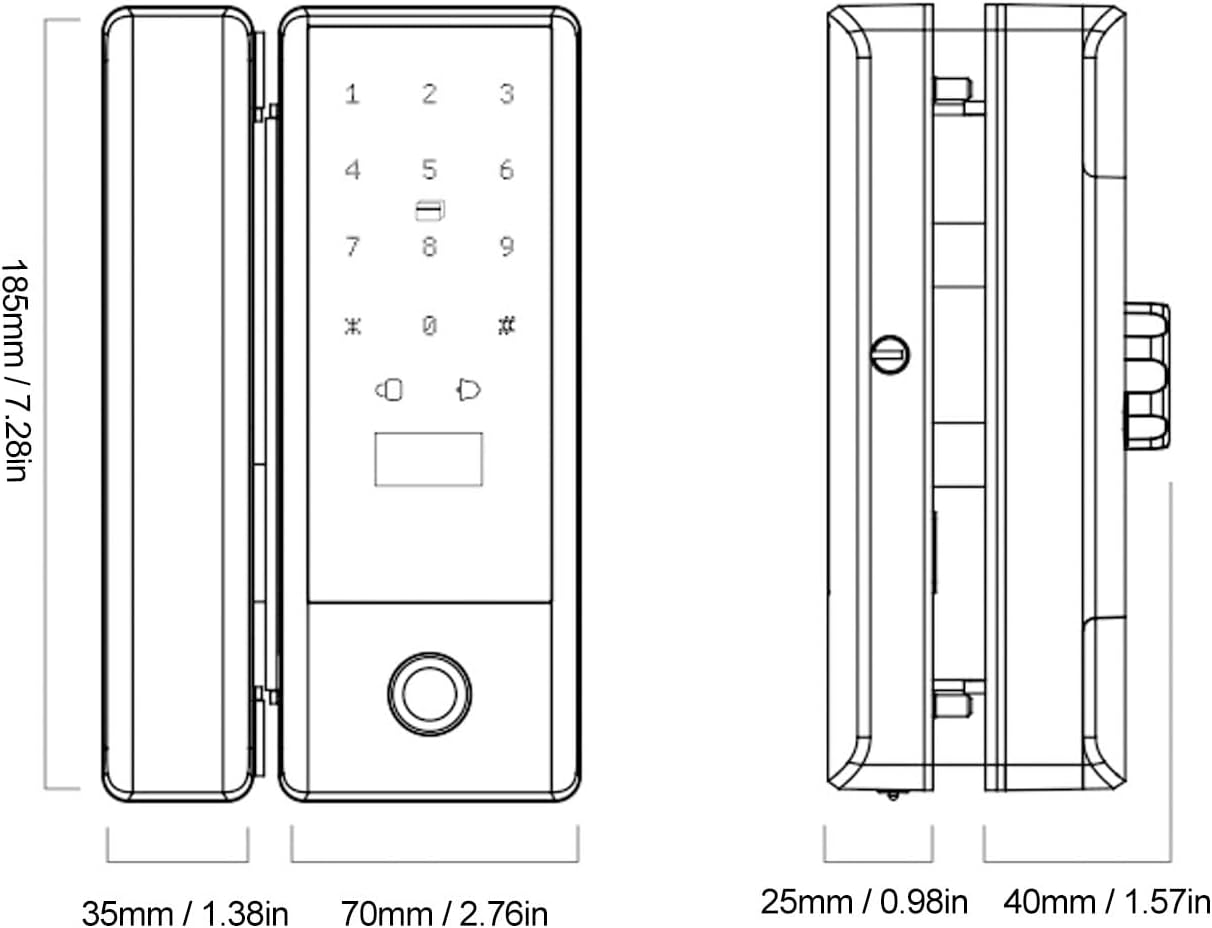
| Dimensioner (L x B x H) | 10.23 x 7.08 x 3.93 tommer (ca.) |
| Modelnummer | Fafeicy4yrap96n2s |

Image: Detailed dimensions of the Fafeicy Smart Lock, showing measurements for height, width, and depth of both the main and sub-lock bodies.
4. Opsætning
4.1 Installation
The Fafeicy Smart Lock is designed for versatile installation on various door types. Ensure your door meets the specified thickness and crevice space requirements.
- Forbered døren: For 8mm glass doors, an additional thick plate is required for proper fitting. For framed double opening glass doors, drilling holes may be necessary, and the metal frame might need to be hollow if its width is more than 50mm.
- Placer låsen: Place the main lock body and sub lock body on the door, ensuring correct alignment for your door type (single opening, double opening, frameless, or framed).
- Sikr låsen: Use the provided installation slabs and screws to firmly attach both lock bodies to the door. Ensure the double hook locking latch engages correctly.
- Test Mechanism: After installation, manually check the locking and unlocking mechanism to ensure smooth operation.

Image: Illustrations demonstrating various installation scenarios for the smart lock, including single opening with glass or wall sides, frameless double opening, and framed double opening glass doors, along with door thickness and seam size requirements.

Billede: Nærbillede view of the double hook locking latch, illustrating its robust design for secure locking and suitability for push-pull, sliding, and partition doors.
4.2 Batteriinstallation
The lock requires 4 AA dry batteries (not included).
- Locate the battery compartment on the interior side of the lock.
- Åbn batterirummets dæksel.
- Indsæt 4 AA-batterier, og sørg for korrekt polaritet (+/-).
- Luk batterirummets dæksel forsvarligt.
4.3 Indledende konfiguration
Upon first power-up, the lock will typically enter an initial setup mode. Follow the voice prompts to set up the administrator fingerprint or password. This administrator account is crucial for adding other users and managing lock settings.
5. Betjening
5.1 Oplåsningsmetoder
- Fingeraftryk: Placer en registreret finger på fingeraftrykssensoren. Låsen låses op, når den er blevet genkendt.
- Adgangskode: Indtast din registrerede adgangskode på tastaturet, efterfulgt af '#'-tasten.
- Swiping Card: Præsenter et registreret IC-kort i kortlæserområdet på låsen.
- Mekanisk nøgle: I tilfælde af nødsituation eller ved afladning af batteriet skal du bruge den medfølgende mekaniske nøgle til at låse døren op.
- Fjernoplåsning: (If applicable and configured) Use the associated remote control or mobile application to unlock.
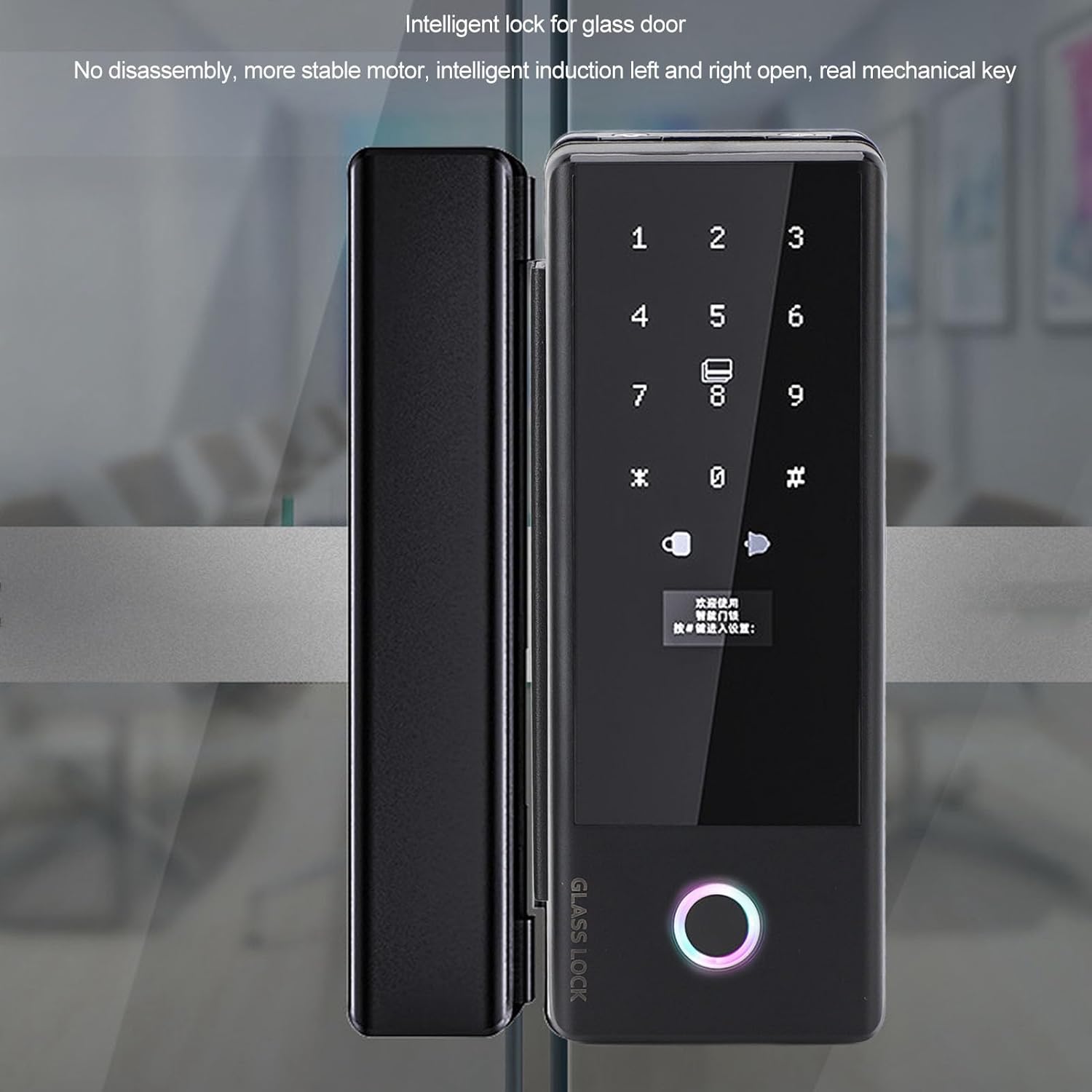
Image: The Fafeicy Smart Lock installed on a glass door, showcasing the illuminated keypad and fingerprint sensor ready for user interaction.
5.2 Virtual Password
To enhance security, the virtual password feature allows you to enter random digits before or after your actual password. For example, if your password is '123456', you can enter '987123456012#' where '987' and '012' are random numbers. The lock will identify the correct password sequence within the longer input.
5.3 Voice Functionality
The lock provides voice guidance for all operations, including setup, adding users, and daily unlocking. It also features a built-in doorbell function and real-voice alarms for security events.
6. Vedligeholdelse
6.1 Udskiftning af batteri
The lock will issue a low battery warning after approximately 200 unlocks when batteries are low. Replace all 4 AA batteries promptly to ensure continuous operation. If batteries are completely depleted, use the Type-C emergency charging port to temporarily power the lock and unlock it, then replace the batteries.
6.2 Rengøring
Wipe the lock's surface with a soft, dry cloth. Avoid using abrasive cleaners, solvents, or harsh chemicals, as these can damage the finish or electronic components.
7. Fejlfinding
- Låsen svarer ikke: Check battery level. If low, replace batteries or use Type-C emergency power.
- Fingeraftryk ikke genkendt: Sørg for, at din finger er ren og tør. Prøv at registrere dit fingeraftryk igen, hvis problemet fortsætter.
- Glemt adgangskode: Use a registered fingerprint, IC card, or mechanical key to unlock. Refer to the full manual (if provided separately) for password reset procedures.
- Stemmemeddelelser er uklare: Check the volume settings if adjustable, or ensure no obstructions are covering the speaker.
- Lock mechanism stuck: Ensure proper installation and alignment. Do not force the lock. If issues persist, contact support.
8. Garantioplysninger
Specific warranty details are typically provided with your purchase documentation. Please refer to the warranty card or contact your retailer for information regarding the warranty period and terms of service for your Fafeicy Smart Lock.
9. Support
For technical assistance, installation queries, or further support, please contact Fafeicy customer service through the retailer where you purchased the product or visit the official Fafeicy webwebsted for kontaktoplysninger.