
1. Introduktion og produktoversigtview
Thank you for choosing the Tristar BW-4791 Wireless Heating Cushion. This manual provides essential information for the safe and efficient use of your new heating cushion. Please read it thoroughly before first use and keep it for future reference.
The Tristar BW-4791 heating cushion offers wireless comfort with its integrated 5,000 mAh power bank, providing up to 2 hours of warmth at the maximum setting. It's designed for both home and on-the-go use, delivering targeted heat and relaxation.
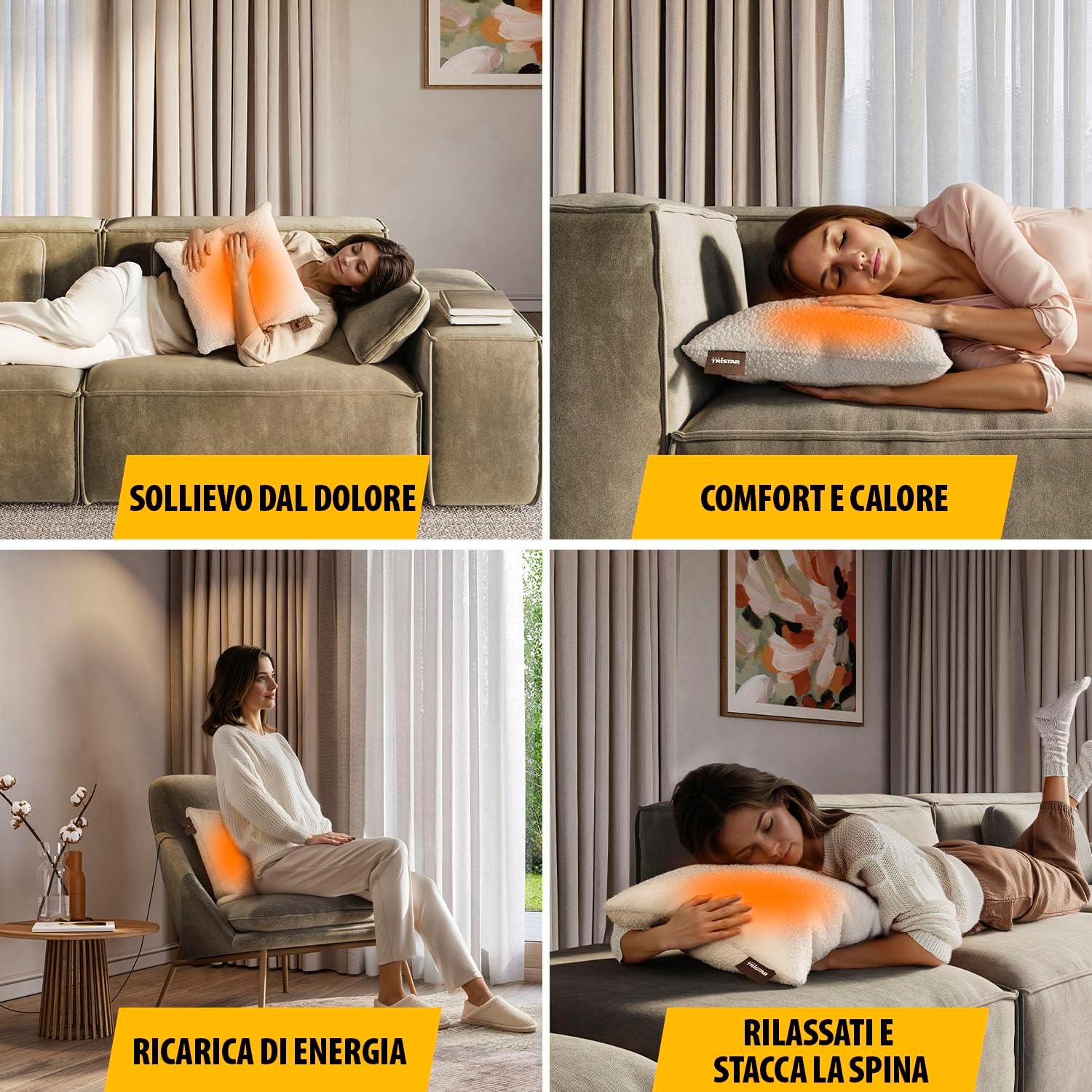
Image: Users enjoying the heating cushion for pain relief, comfort, and relaxation in different environments.
Nøglefunktioner:
- Trådløs drift: Powered by a 5,000 mAh power bank for portable use.
- Hurtig opvarmning: Reaches desired temperature in approximately 10 minutes.
- Justerbar varme: Features 3 customizable heat settings.
- Targeted Warmth: Integrated heating elements provide even heat distribution over a 25 x 25 cm area.
- Komfortabelt design: Soft fabric and generous 45 x 45 cm dimensions for optimal comfort.
- Nem vedligeholdelse: Removable and machine-washable cover.
2. Sikkerhedsadvarsler
For at sikre sikker drift og forhindre personskade eller beskadigelse, bedes du overholde følgende sikkerhedsforanstaltninger:
- Advarsel om høj temperatur: The heating cushion can become very hot. Avoid direct, prolonged skin contact, especially if you have sensitive skin or reduced sensation.
- Overvågning: Do not leave the heating cushion operating unattended.
- Impaired Judgment: Do not use the cushion if you are under the influence of drugs, alcohol, or medication that may impair your judgment or ability to follow instructions.
- Børn og sårbare personer: Dette apparat kan bruges af børn i alderen 8 år og derover og personer med nedsatte fysiske, sensoriske eller mentale evner eller mangel på erfaring og viden, hvis de har fået opsyn eller instruktion i brugen af apparatet på en sikker måde og forstår de involverede farer. . Børn må ikke lege med apparatet. Rengøring og brugervedligeholdelse må ikke udføres af børn uden opsyn.
- Medicinske tilstande: Consult a doctor before use if you have any medical conditions, especially those affecting circulation or skin sensitivity.
- Skade: Do not use the cushion if it is damaged, wet, or if the power bank or cables are faulty.
- Brandfarlige materialer: Do not use near flammable materials or in an oxygen-enriched environment.
- Opbevaring: Opbevares på et tørt sted, når det ikke er i brug.
- Produktemballage: Always refer to the product packaging, labels, and instructions provided directly with the product for the most current safety information.
3. Produktkomponenter
The Tristar BW-4791 Wireless Heating Cushion package includes the following items:
- Tristar Wireless Heating Cushion (45 x 45 cm)
- 5,000 mAh Power Bank
- USB-opladerkabel (20 cm)
- USB Charging Cable (2 m)
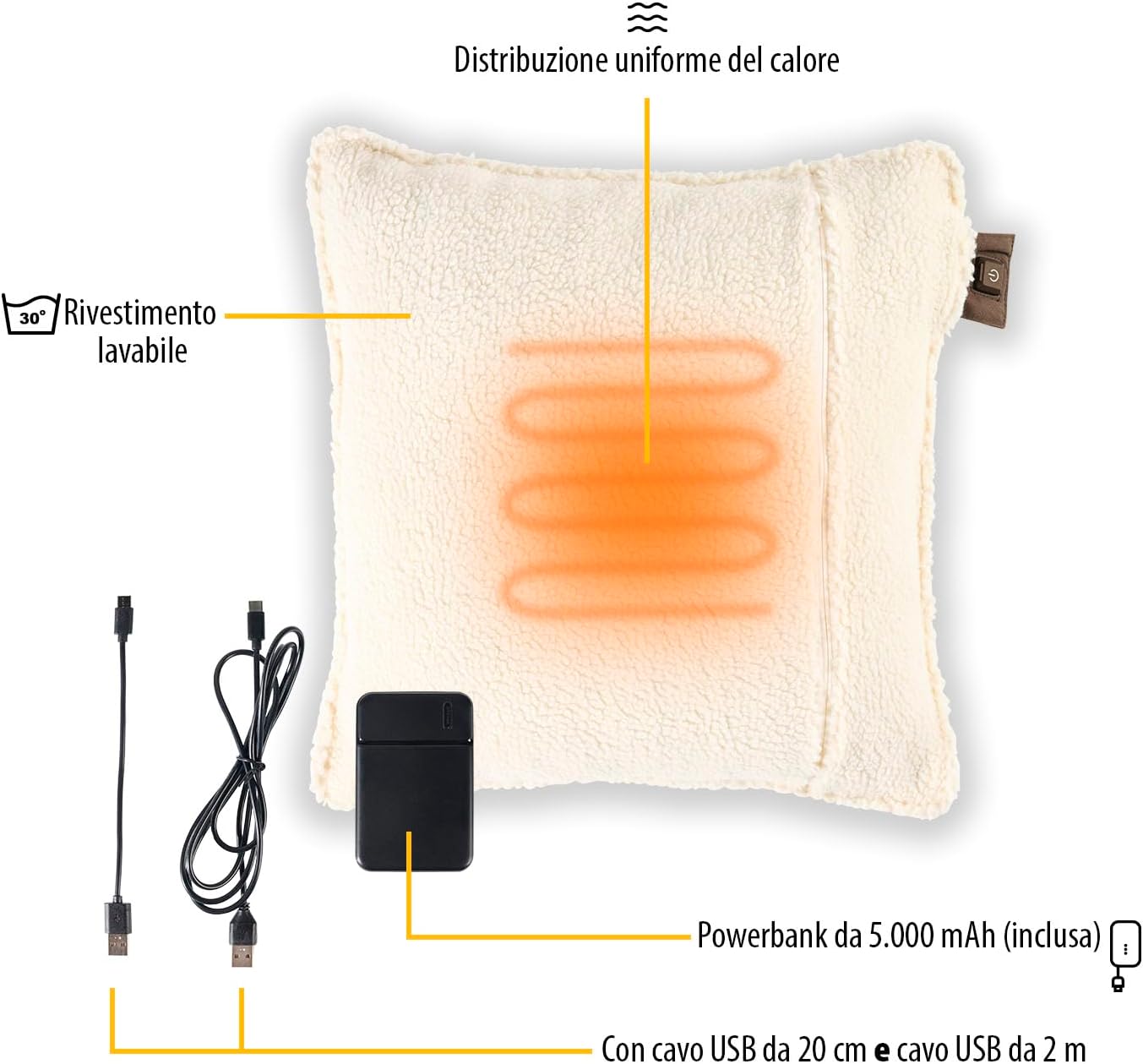
Billede: Eksploderet view of the heating cushion components, including the power bank and charging cables.
4. Opsætning
4.1 Opladning af powerbanken
- Locate the 5,000 mAh power bank and the provided USB charging cables.
- Connect one end of a USB cable to the power bank's input port.
- Connect the other end of the USB cable to a suitable USB power adapter (not included) or a powered USB port (e.g., computer, wall charger).
- The power bank's indicator lights will show the charging status. Charge until fully charged before first use.
4.2 Connecting the Power Bank to the Cushion
- Open the zipper on the heating cushion to access the internal pocket.
- Inside the pocket, you will find a USB connector.
- Connect the fully charged power bank to this USB connector.
- Place the power bank securely inside the pocket and close the zipper.
5. Betjeningsvejledning
The heating cushion features an intuitive control button for easy operation.

Image: Detail of the control button and heat level indicators.
5.1 Tænd/sluk
- To turn on the cushion, press and hold the power button located on the cushion's tag for a few seconds until an indicator light illuminates.
- To turn off the cushion, press and hold the power button again until the indicator light turns off.
5.2 Justering af varmeniveauer
The cushion has 3 adjustable heat settings:
- Lav: Indicated by a specific color (e.g., green or blue light).
- Medium: Indicated by a specific color (e.g., orange light).
- Høj: Indicated by a specific color (e.g., red light).
To cycle through the heat settings, short press the power button while the cushion is on. Each press will change the heat level.
5.3 Automatisk slukning
For safety and energy conservation, the heating cushion is equipped with an automatic shut-off function. It will automatically turn off after a certain period (typically 120 minutes at maximum level) to prevent overheating and conserve battery life. You can restart the cushion by pressing the power button again.
6. Vedligeholdelse
Proper maintenance ensures the longevity and hygiene of your heating cushion.
6.1 Rengøring af dækslet
- Ensure the heating cushion is turned off and disconnected from the power bank.
- Unzip the cover and carefully remove it from the internal heating pad.
- The cover is machine washable. Follow the washing instructions on the care label (typically 30°C).
- Allow the cover to air dry completely before reassembling. Do not tumble dry.
6.2 Cleaning the Heating Pad
The internal heating pad is not washable. If necessary, gently wipe it with a damp cloth and mild detergent. Ensure it is completely dry before reinserting it into the cover or storing.
6.3 Opbevaring
When not in use, store the cushion in a cool, dry place, away from direct sunlight and moisture. Ensure the power bank is disconnected from the cushion for long-term storage.
7. Fejlfinding
If you encounter any issues with your Tristar BW-4791 heating cushion, please refer to the following common problems and solutions:
- Puden varmes ikke:
- Sørg for, at powerbanken er fuldt opladet.
- Verify that the power bank is securely connected to the cushion's internal USB connector.
- Press and hold the power button on the cushion's tag to ensure it is turned on.
- Check if the automatic shut-off has activated. If so, restart the cushion.
- Powerbanken oplader ikke:
- Ensure the USB charging cable is properly connected to both the power bank and the power source.
- Prøv et andet USB-kabel eller strømadapter.
- Ensure the power source (e.g., wall outlet, computer USB port) is active.
- Puden slukker uventet:
- The automatic shut-off feature may have activated. This is normal operation.
- The power bank may be low on charge. Recharge the power bank.
Hvis problemet fortsætter efter at have prøvet disse løsninger, bedes du kontakte kundesupport.
8. Specifikationer
| Feature | Specifikation |
|---|---|
| Modelnummer | BW-4791 |
| Dimensions (Cushion) | 45 x 45 cm |
| Dimensions (Product Package) | 11 x 45 x 45 cm |
| Vægt | 750 gram |
| Power Bank Kapacitet | 5,000 mAh |
| Varmeniveauer | 3 |
| Varmeområde | 25 x 25 cm |
| Maksimal autonomi | Up to 2 hours (at max level) |
| Opvarmningstid | Ca. 10 minutter |
| Material (Internal) | ABS |
| Dækmateriale | Soft fabric (washable) |
| Farve | Beige |
| Speciel funktion | Wireless with Power Bank |
9. Garanti og support
Tristar products are manufactured to high quality standards. In the unlikely event of a defect, please refer to your purchase receipt for warranty information. The warranty period typically covers manufacturing defects from the date of purchase.
For technical support, spare parts, or any questions regarding your Tristar BW-4791 Wireless Heating Cushion, please contact your retailer or visit the official Tristar webhjemmeside for kontaktoplysninger til kundeservice.
Please have your model number (BW-4791) and proof of purchase ready when contacting support.