
Icango caddy G3
Icango caddy G3 Electric Golf Cart Instruction Manual
Model: G3
Brand: Icango caddy
1. Produktet er slutview
The Icango caddy G3 Electric Golf Cart is designed to enhance your golfing experience with its advanced features and user-friendly design. This electric caddy offers multiple control modes, including smart auto-follow, remote control, and manual operation, ensuring convenience on the course. Its compact folding design allows for easy transport and storage, while the long-lasting battery supports extended play.

Figure 1: The G3 Electric Golf Cart on a golf course, highlighting its auto-follow, remote driving, and one-click summon capabilities.
Video 1: En overview of the G3 Electric Golf Cart, demonstrating its key features including quick assembly, battery installation, remote control, and smart follow function.
2. Hvad er der i æsken
Bekræft at alle komponenter er til stede ved udpakning:
- G3 electric golf cart
- Charger and remote for electric golf caddy
- Drikkeholder
- Telefonholder
- Paraplyholder

Figure 2: A visual representation of all items included in the G3 Electric Golf Cart package, such as the cart, remote, charger, and various holders.
3. Opsætning og montering
3.1 Udfoldning af vognen
The G3 Electric Golf Cart features a 3-motion folding design for quick setup and collapse. To unfold, release the folding joints and extend the frame until it locks into place. Ensure all joints are securely fastened before use.

Figure 3: Step-by-step diagram illustrating how to collapse the golf cart by adjusting the yellow circle joints and extending the rear wheels for climbing.
3.2 Batteriinstallation
The battery is designed for quick disassembly and reassembly. Locate the battery compartment, insert the fully charged battery, and secure it in place. Refer to Video 1 for a visual guide on battery installation.
3.3 Attaching the Golf Bag
Place your golf bag onto the cart's support frame. Use the double leather strap carabiner to securely fasten the golf bag to prevent movement during operation. Refer to Video 1 for a visual guide on attaching the golf bag.
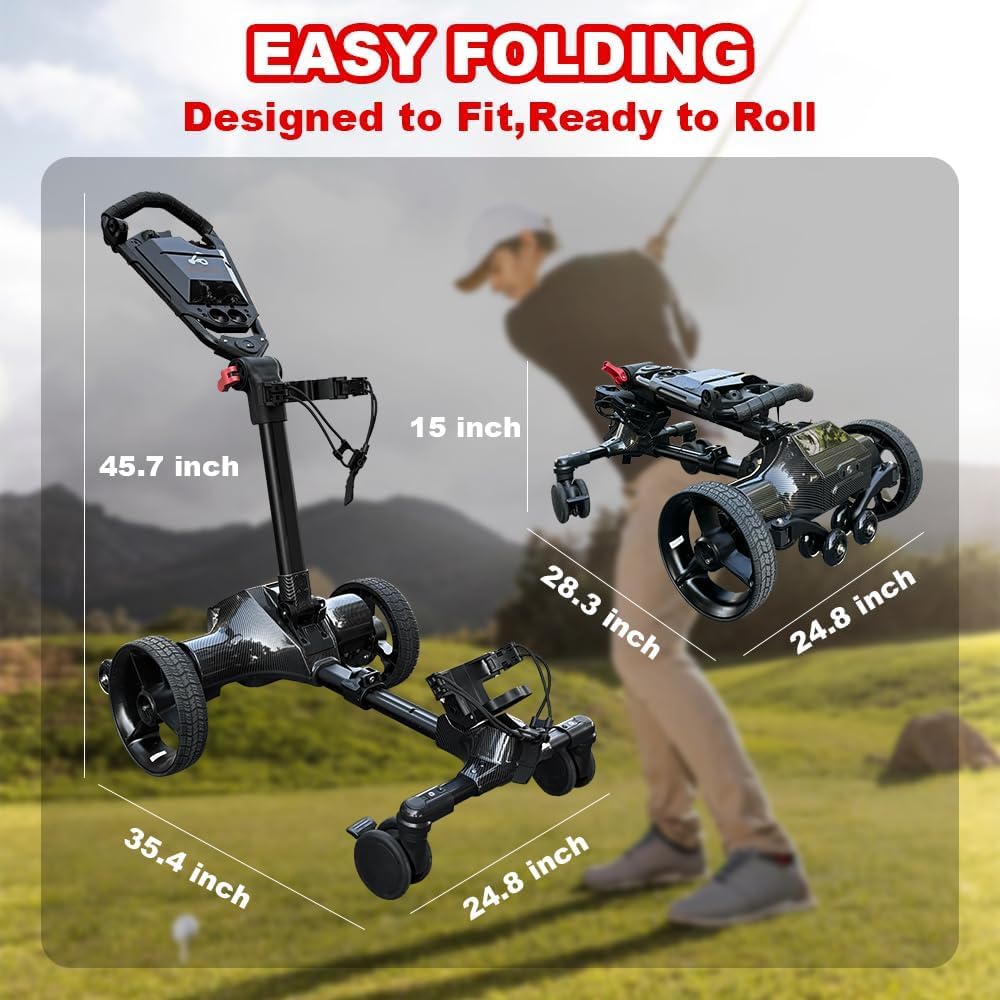
Figure 4: The G3 Electric Golf Cart shown with its dimensions in both the unfolded and easily folded configurations, emphasizing its compact design.
4. Betjeningsvejledning
4.1 Smart Auto-Follow Mode
Activate the smart auto-follow system to have the caddy automatically follow your movements. This mode frees your hands, allowing you to focus on your game. The caddy maintains a constant distance from you, adapting to various terrains.

Figure 5: A golfer walking on the course with the electric golf cart automatically following behind, demonstrating the smart auto-follow feature.
Video 2: Demonstrates the electric golf cart's auto-follow function, showing it moving autonomously behind a golfer on the course.
4.2 Multi-Mode Control (Remote/APP/Manual)
The G3 caddy offers versatile control options:
- Fjernbetjening: Use the portable remote to summon the cart, execute turns, or park it at a designated spot.
- Smartphone app: Connect via the dedicated app for advanced control, including adjusting direction, speed, and monitoring battery levels.
- Manuel tilstand: For short distances or specific maneuvers, you can push the cart manually using the ergonomic U-shaped handle.

Figure 6: An illustration of the multiple control modes available for the electric golf cart, including manual, auto-follow, remote control, and one-click recall.
Video 3: Showcases the various control methods for the Icango Electric Golf Cart, including remote control, app control, and its ability to navigate different terrains and inclines.
4.3 Fartpilot
Utilize the cruise control feature to set a constant speed, allowing the cart to glide smoothly at a steady pace. This is particularly useful on flat fairways, conserving energy and reducing manual effort.
4.4 Anti-Tipping Wheels
The G3 is equipped with anti-tipping wheels to ensure stability, especially when navigating inclines or uneven terrain. These wheels provide additional support, preventing the cart from tipping over.

Figur 7: En detaljeret view of the anti-tipping wheels, designed to provide stability and prevent the golf cart from overturning on uneven ground or inclines.
4.5 App-forbindelse
Download the dedicated smartphone application to personalize your golf cart settings. The app allows you to adjust various parameters, view operational data, and enhance your overall experience.

Figure 8: A smartphone displaying the personalized app connection interface, allowing users to adjust settings, view battery level, and track mileage for the electric golf caddy.
5. Vedligeholdelse
To ensure the longevity and optimal performance of your G3 Electric Golf Cart, regular maintenance is recommended:
- Keep the cart clean by wiping it down after each use.
- Regularly check all moving parts and fasteners for tightness.
- Store the battery in a cool, dry place and ensure it is charged according to the manufacturer's guidelines.
- Inspect tires for wear and tear and maintain appropriate pressure.
6. Fejlfinding
If you encounter any issues with your G3 Electric Golf Cart, consider the following common solutions:
- Cart not responding: Ensure the battery is fully charged and correctly installed. Check if the remote control is paired and has sufficient power.
- Uregelmæssig bevægelse: Verify that the terrain is suitable for operation. If using auto-follow, ensure no obstructions are interfering with the sensors.
- Reduceret batterilevetid: Confirm the battery is fully charged before use. Extreme temperatures can affect battery performance.
Ved vedvarende problemer bedes du kontakte kundesupport.
7. Specifikationer
| Feature | Detalje |
|---|---|
| Emne Pakke Dimensioner L x B x H | 30 x 23.6 x 13.8 tommer |
| Pakkevægt | 48 pund |
| Mærkenavn | Icango caddy |
| Modelnavn | G3 |
| Farve | Black electric golf cart |
| Materiale | Aluminium |
| Foreslåede brugere | mænd |
| Fabrikant | NERCH |
| Inkluderede komponenter | Charger and remote for electric golf caddy, G3 electric golf cart, drink holder, phone holder, umbrella holder |

Figure 9: The G3 Electric Golf Cart in its compact, folded state, easily fitting into the trunk of a car for convenient transportation.
8. Garanti og support
8.1 Garantioplysninger
The Icango caddy G3 Electric Golf Cart comes with a 1-year warranty. Please retain your proof of purchase for warranty claims.
8.2 Kundesupport
For technical assistance, warranty inquiries, or any other support needs, please contact Icango customer service. Refer to the contact information provided with your product packaging or visit the official Icango caddy store on Amazon.
Ask a question about this manual
Ask about setup, troubleshooting, compatibility, parts, safety, or missing instructions. Manuals+ will review the question and use this page’s manual context to help answer it.