
1. Introduktion
The AJAZZ AKP03 Macro Keypad Stream Controller is a versatile device designed to enhance productivity and streamline workflows for gamers, streamers, and professionals. Featuring six programmable keys with LCD displays, three physical knobs, and three toggle switches, it offers extensive customization options for various tasks.
This manual provides detailed instructions for setting up, operating, and maintaining your AKP03 device, ensuring optimal performance and user experience.
2. Produktfunktioner
- Six Programmable Macro Keys: Customizable LCD displays for single or continuous actions.
- Three Physical Knobs: For precise control over various functions.
- Three Toggle Switches: Yderligere kontrolmuligheder.
- Betjening med ét klik: Instant execution of macro commands, text input, application launches, and media control.
- Intuitive Driver Software: Drag-and-drop functionality for easy key assignment and property configuration.
- Bred kompatibilitet: Seamless integration with platforms like Streamlabs, Twitch, YouTube, and various software applications on Windows and Mac.
- Removable 40° Stand: Provides an ergonomic viewing angle and stable placement.

Figur 2.1: Overview of the AJAZZ AKP03 Macro Keypad, highlighting its programmable buttons, toggle switches, and scroll wheels.
3. Pakkens indhold
Bekræft at alle varer er til stede i din pakke:
- AJAZZ AKP03 Macro Keypad Stream Controller
- USB-C til USB-A-kabel
- Removable 40° Stand
- Brugervejledning (dette dokument)
4. Opsætning
4.1 Fysisk forbindelse
- Attach the removable 40° stand to the bottom of the AKP03 for an ergonomic angle, if desired.
- Connect the provided USB-C cable to the USB-C port on the AKP03.
- Tilslut USB-A-enden af kablet til en ledig USB-port på din computer (pc eller Mac).
- Enheden tændes automatisk.

Figure 4.1: Attaching the removable 40° stand to the AKP03.
4.2 Softwareinstallation
To unlock the full customization capabilities of your AKP03, you must install the dedicated driver software.
- Åbn din web browser and navigate to the official AJAZZ webwebsted: www.a-jazz.com.
- Locate the 'Driver Download' section.
- Søg efter 'AKP03' or browse for the corresponding driver for your model.
- Download the driver software compatible with your operating system (Windows or macOS).
- Kør installationsprogrammet, og følg vejledningen på skærmen for at fuldføre installationen.
- Genstart din computer, hvis du bliver bedt om det.
Video 4.1: Demonstrates the software installation process and initial setup for the AJAZZ Macro Keypad.
5. Betjeningsvejledning
5.1 Customizing Keys and Knobs
The AKP03's driver software provides a user-friendly interface for customization:
- Launch the 'Stream Dock AJAZZ' software from your desktop or applications folder.
- The software will display a visual representation of your AKP03.
- To assign an action, drag and drop a desired function (e.g., launch application, media control, macro command) from the software's library onto one of the six programmable keys.
- For knobs, select the knob in the software and assign functions such as volume control, scrolling, or zooming.
- You can configure properties for each assigned action, including specific file stier, web URLs, or macro sequences.
- The LCD displays on the keys will update to show the assigned icon or text.
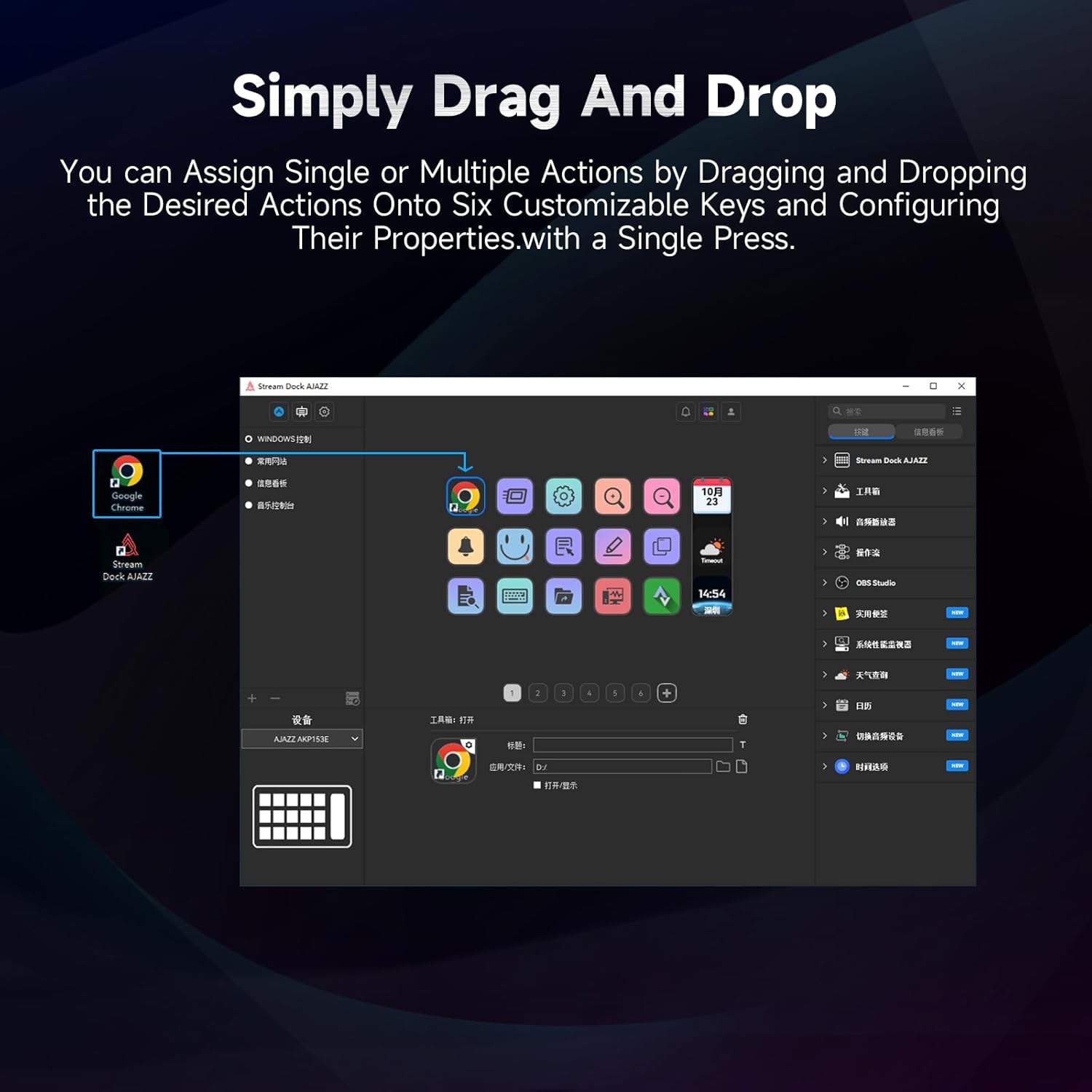
Figure 5.1: Customizing keys using the drag-and-drop interface in the AJAZZ software.
Video 5.1: Demonstration of assigning actions to keys for launching web pages and software with a single click.
5.2 Using Profiles and Pages
The software supports multiple profiles and pages, allowing you to switch between different sets of key assignments for various applications or tasks.
- Opret ny profiles for specific games, editing software, or streaming setups.
- Inden for hver profile, you can create multiple pages of key assignments, accessible by navigating through the device's buttons or software interface.
- The AKP03 automatically switches to the relevant profile when a linked application is in focus.
Video 5.2: Illustrates the multi-functional capabilities and profile switching of the AKP03 for various tasks.
6. Vedligeholdelse
To ensure the longevity and optimal performance of your AJAZZ AKP03, follow these maintenance guidelines:
- Rensning: Use a soft, dry cloth to wipe the surface of the device. Avoid abrasive cleaners or solvents.
- Opbevaring: Opbevar enheden et køligt, tørt sted væk fra direkte sollys og ekstreme temperaturer.
- Kabelpleje: Undgå at bøje eller vride USB-kablet for meget for at forhindre skader.
- Softwareopdateringer: Tjek AJAZZ regelmæssigt webwebsted for software- og firmwareopdateringer for at sikre kompatibilitet og adgang til nye funktioner.
7. Fejlfinding
If you encounter issues with your AKP03, refer to the following common troubleshooting steps:
- Enhed ikke genkendt:
- Ensure the USB cable is securely connected to both the AKP03 and your computer.
- Prøv at tilslutte til en anden USB-port.
- Genstart din computer.
- Verify that the driver software is correctly installed and up to date.
- Taster reagerer ikke:
- Check the software to ensure keys are properly assigned and the correct profile er aktiv.
- Sørg for, at driversoftwaren kører i baggrunden.
- Softwareproblemer:
- Geninstaller driversoftwaren.
- Check for software updates on the AJAZZ webwebsted.
8. Specifikationer
| Feature | Detalje |
|---|---|
| Mærke | AJAZZ |
| Modelnavn | AKP03 |
| Kompatible enheder | PC, bærbar |
| Controller type | Tastatur |
| Forbindelsesteknologi | USB-C |
| Knap Antal | 6 Programmable Keys (with LCD displays), 3 Physical Knobs, 3 Toggle Switches |
| Varens vægt | 0.32 kilo |
| Varedimensioner (L x B x H) | 5 x 3 x 2 tommer |
| Strømkilde | Elektrisk med ledning |
9. Garanti og support
9.1 Garantioplysninger
The AJAZZ AKP03 Macro Keypad Stream Controller comes with a 1 års begrænset garanti fra købsdatoen. Denne garanti dækker fabrikationsfejl og funktionsfejl ved normal brug. Den dækker ikke skader forårsaget af misbrug, ulykker, uautoriserede ændringer eller forkert installation.
Gem venligst dit købsbevis for garantikrav.
9.2 Kundesupport
For technical assistance, troubleshooting, or warranty inquiries, please contact AJAZZ customer support:
- Webwebsted: www.a-jazz.com (Refer to the 'Support' or 'Contact Us' section)
- E-mail: [Insert Customer Support Email, if available]
- Telefon: [Insert Customer Support Phone Number, if available]
Vores supportteam er tilgængeligt for at hjælpe dig med eventuelle spørgsmål eller bekymringer vedrørende dit produkt.