
1. Introduktion
Thank you for choosing the REOLINK Argus Track 4K Dual-Lens Solar Security Camera. This manual provides essential information for setting up, operating, and maintaining your camera to ensure optimal performance and security. The Argus Track camera offers advanced features including 4K dual-lens video, auto-zoom tracking, smart AI detection, color night vision, and is powered by a 6W solar panel for continuous operation without subscriptions.
2. Pakkens indhold
Bekræft at alle komponenter er til stede i din pakke:
- REOLINK Argus Track-kamera
- 6W solpanel
- Monteringsskruesæt
- USB kabel
- Instruktionsmanual (dette dokument)
3. Produktet er slutview
The REOLINK Argus Track is a versatile 4K dual-lens security camera designed for both indoor and outdoor use. It features a wide-angle lens and a zoom lens, enabling comprehensive coverage and detailed close-ups. The camera is powered by a solar panel, ensuring continuous operation.
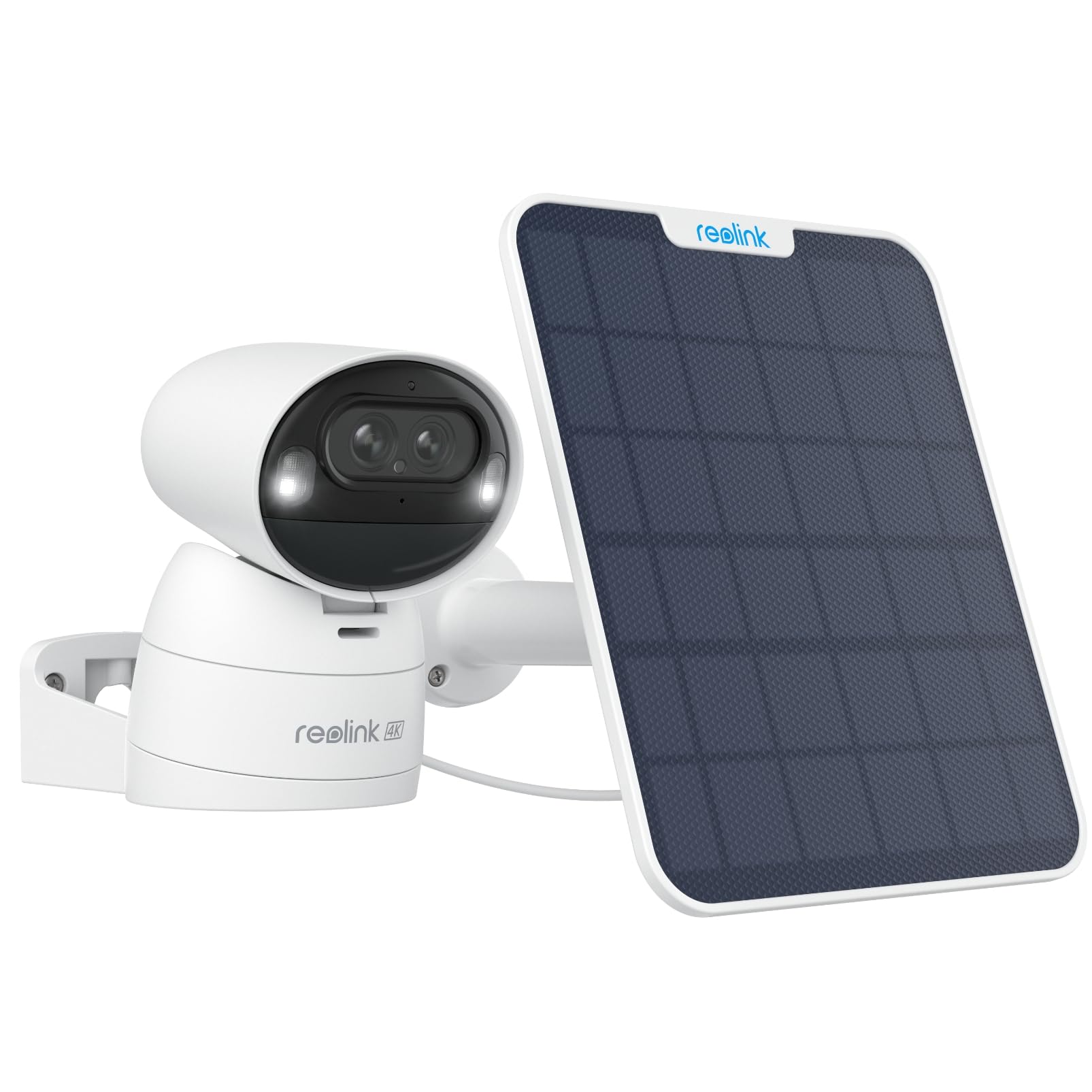
Billede: Forside view of the REOLINK Argus Track 4K Dual-Lens Solar Security Camera with its accompanying solar panel.
Video: En overview of the Reolink Argus Track camera and solar panel, highlighting its key features and design.
Kamerakomponenter
- Dobbelte linser: One wide-angle 4K lens and one 2MP zoom lens for hybrid zoom and auto-tracking.
- Bevægelsessensor: Detects movement for smart alerts.
- Mikrofon og højttaler: Til tovejs audiokommunikation.
- Spotlights: Enable color night vision.
- USB-C-port: For charging and connecting the solar panel.
- MicroSD -kortplads: For local storage (supports up to 128GB, card not included).
- Nulstil knap: For at gendanne fabriksindstillingerne.
- Power knap: For at tænde/slukke kameraet.

Image: The back of the REOLINK Argus Track camera, displaying the QR code for setup, serial number (S/N: WLBE246A000484), power button, and USB-C port. The QR code is used for initial setup with the Reolink app.
4. Opsætning
4.1 Første aktivering af kamera
- Oplad kameraet: Before initial use, fully charge the camera using the provided USB cable or by connecting it to the solar panel under direct sunlight.
- Indsæt MicroSD-kort (valgfrit): If local storage is desired, open the protective cover on the camera's underside and insert a microSD card (up to 128GB, not included) into the designated slot.
- Tænd: Press and hold the power button located under the protective cover to turn on the camera. You will hear a startup chime.
4.2 Appinstallation og -konfiguration
- Download Reolink App: Download and install the "Reolink" app from your smartphone's app store (iOS or Android).
- Tilføj enhed: Open the Reolink app, tap the "+" icon in the top right corner, and scan the QR code located on the back of your camera.
- Netværks forbindelse: Follow the in-app instructions to connect the camera to your 2.4GHz or 5GHz Wi-Fi network. Ensure your Wi-Fi signal is strong at the camera's intended installation location.
- Set Up Password: Opret en stærk adgangskode til dit kamera.
- Levende View: Når du er forbundet, kan du få adgang til live-udsendelserne view af dit kamera.
4.3 Montering af kamera og solpanel
The camera can be mounted indoors or outdoors. Choose a location with optimal Wi-Fi signal and direct sunlight exposure for the solar panel.
- Vælg placering: Identify a suitable mounting spot for the camera and the solar panel. The solar panel should receive several hours of direct sunlight daily.
- Installer mount: Use the provided mounting screws to securely attach the camera mount to a wall or ceiling.
- Tilslut kamera: Secure the camera to the installed mount. The camera's image can be flipped in the app if mounted upside down.
- Installer solpanel: Mount the 6W solar panel in a location that maximizes sun exposure. Connect the solar panel cable to the camera's USB-C port. The long cable allows for flexible placement.

Image: The REOLINK Argus Track camera installed on an outdoor wall, connected to its solar panel for continuous power.

Billede: Eksamples of flexible installation for the REOLINK Argus Track camera, showing it mounted on a wall, under an eave, and on a pole with the solar panel.
5. Betjeningsvejledning
5.1 Live View og afspilning
Få adgang til live video-feed og optaget footage through the Reolink app or client software on your smartphone or computer.
- Levende View: Åbn appen, og vælg dit kamera for at view realtidsfeedet.
- Afspilning: Navigate to the playback section to review recorded events stored on the microSD card.

Image: The Reolink app interface displayed on a smartphone, tablet, and computer, demonstrating multi-platform access to the camera feed.
5.2 Panorering, vipning og zoom (PTZ)-kontrol
Remotely control the camera's viewing angle and zoom level via the app.
- Panorering/vip: Use the directional controls in the app to rotate the camera horizontally (pan up to 355°) and vertically (tilt up to 50°).
- Zoom: Utilize the digital zoom function or rely on the camera's 6x hybrid zoom for detailed views.
- Forudindstillede punkter: Set up to 32 preset viewing points for quick navigation to specific areas.

Image: The REOLINK Argus Track camera illustrating its pan and tilt capabilities, along with the concept of setting up to 32 preset points for monitoring key areas.
5.3 Auto-Tracking and Auto-Zoom
The camera can automatically track detected objects and zoom in for clarity.
- Enable Auto Tracking: In the app settings, navigate to "Detection Alarm" and enable "Auto Tracking."
- Set Tracking Type: Choose to track "Person," "Vehicle," or both.
- Detektionszone: Define specific areas for motion detection to minimize false alarms.
- Følsomhed: Adjust sensitivity levels for person and vehicle detection.
Video: A demonstration of how to set up auto-tracking in the Reolink app, showing the steps to enable the feature and select tracking types for persons and vehicles.

Image: The REOLINK Argus Track camera demonstrating its auto-tracking and auto-zoom capabilities, showing a wide view og en zoomet ind view af et køretøj.
6. Funktioner
6.1 4K Dual-Lens, Dual-View & 6X Hybrid Zoom
Experience superior clarity with 4K resolution from the wide-angle lens, complemented by a dedicated 2MP lens for sharp, zoomed-in views. The 6x hybrid zoom ensures no detail is missed, whether near or far.

Billede: Et nærbillede view of the REOLINK Argus Track camera's dual lenses, highlighting the 4K wide-angle lens and the auto-tracking zoom lens.
6.2 100% Wireless & 6W Solar Panel
Enjoy complete freedom from wires with battery power and a robust 6W solar panel for continuous charging. The camera supports 2.4/5GHz Wi-Fi, offering flexible installation anywhere.

Image: The REOLINK 6W solar panel connected to the camera, illustrating its efficient charging capability under sunlight.
6.3 Smart AI-detektion
Advanced AI technology accurately identifies people, vehicles, and animals, sending instant alerts to your smartphone and significantly reducing false alarms.

Image: The REOLINK Argus Track camera demonstrating its smart AI detection, highlighting the recognition of a person, a vehicle, and an animal within the camera's view.
6.4 4K Color Night Vision & Remote Pan/Tilt
Capture vivid, detailed footage day and night with 4K color night vision, enhanced by motion-activated spotlights. Remotely pan and tilt the camera to monitor larger areas and track movement effectively.

Image: A comparison showing the REOLINK Argus Track camera's color night vision with spotlights activated, providing clear and detailed footage under dårlige lysforhold.
6.5 Local Storage & No Subscription
Store your footage locally on a microSD card (up to 128GB) without any monthly fees. Your data remains private and accessible directly from the camera.

Image: An illustration representing the local storage capability of the REOLINK camera via an SD card, emphasizing no monthly fees or hub requirements.
6.6 Smart Home-integration
The REOLINK Argus Track camera is compatible with smart home ecosystems like Amazon Alexa and Google Assistant, allowing for convenient voice control and integration into your smart home routines.

Image: The REOLINK camera integrated with a smart home display, showing compatibility with Google Assistant for hands-free control.
7. Vedligeholdelse
- Rene linser: Rengør kameralinserne regelmæssigt med en blød, tør klud for at sikre en klar billedkvalitet.
- Tjek solpanel: Ensure the solar panel is free from dirt, dust, or obstructions to maintain optimal charging efficiency.
- Firmwareopdateringer: Check the Reolink app periodically for firmware updates to ensure your camera has the latest features and security enhancements.
- Batteriets sundhed: Monitor battery levels in the app. If the camera is not charging effectively, check the solar panel's placement and cleanliness.
8. Fejlfinding
| Problem | Løsning |
|---|---|
| Kameraet tænder ikke. | Ensure the camera is fully charged. Press and hold the power button for a few seconds. |
| Kan ikke oprette forbindelse til Wi-Fi. | Verify Wi-Fi password. Ensure the camera is within range of your router. Try resetting the camera and re-pairing. The camera supports both 2.4GHz and 5GHz Wi-Fi. |
| Dårlig billedkvalitet. | Clean the camera lenses. Ensure sufficient lighting. Check network connection stability. |
| Auto-tracking not working correctly. | Ensure auto-tracking is enabled in the app settings. Adjust detection zones and sensitivity. Ensure there are no obstructions in the camera's view. Note that tracking performance might vary in very low light conditions with spotlights. |
| Solpanelet oplader ikke. | Ensure the solar panel is installed in direct sunlight and free from obstructions. Check the connection cable between the solar panel and the camera. |
| Frequent "device disconnected" messages. | Check your Wi-Fi signal strength at the camera's location. Restart your router and the camera. Ensure the Reolink app is updated to the latest version. |
9. Specifikationer
| Feature | Detalje |
|---|---|
| Modelnavn | Argus spor |
| Video opløsning | 4K (8 MP) |
| Forbindelse | Wireless (2.4GHz/5GHz Wi-Fi) |
| Strømkilde | Solar Powered / Battery Powered (5V, 6W) |
| Særlige funktioner | 4K Dual-Lens, Auto-Zoom Tracking, Color Night Vision, PTZ Technology, Smart AI Detection (Person, Vehicle, Animal) |
| Pan/tilt rækkevidde | 355° Pan, 50° Tilt |
| Optisk zoom | 6x hybridzoom |
| Night Vision Range | Up to 33 feet (with spotlights) |
| Lokal opbevaring | MicroSD-kort (op til 128 GB) |
| Vandmodstand | IP65 Vejrbestandig |
| Dimensioner | 3.33 x 3.3 x 4.64 tommer |
| Kompatible enheder | Smartphone (iOS/Android), Amazon Alexa, Google Assistant |
10. Garanti og support
REOLINK products typically come with a limited warranty. For specific warranty details, please refer to the warranty card included in your package or visit the official REOLINK website. For technical support, product registration, or further assistance, please contact REOLINK customer service or visit their support portal.
- Officiel Webwebsted: www.reolink.com
- Støtte: Se kontaktoplysningerne på den officielle webwebsted for supportmuligheder.