
1. Introduktion
This manual provides detailed instructions for the safe and effective use of your Moukey MPS5 Portable Karaoke Machine. Please read this manual thoroughly before operating the device and retain it for future reference. The MPS5 is a versatile portable speaker system designed for various audio playback needs, including karaoke, music streaming, and public address, featuring wireless microphones and multiple connectivity options.
2. Hvad er der i æsken
Carefully unpack all items from the box. Ensure all components listed below are present and in good condition.
- Moukey MPS5 Portable Karaoke Machine (1 unit)
- Trådløse mikrofoner (2 enheder)
- USB-opladningskabel (1 enhed)
- 3.5mm AUX Cable (1 unit)
- Shoulder Strap (1 unit)
- Brugervejledning (1 enhed)
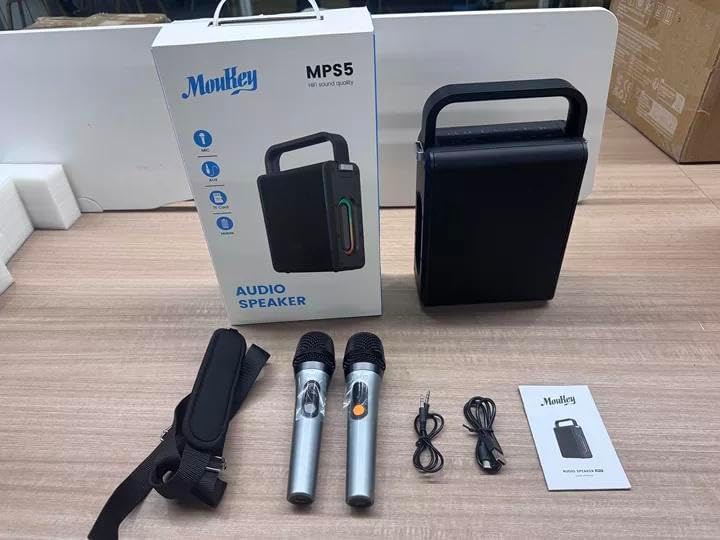
Image: All components included in the Moukey MPS5 package.
3. Produktet er slutview
The Moukey MPS5 is a compact yet powerful portable karaoke machine. It features a robust design with integrated LED lighting on the sides, enhancing the user experience. A sturdy handle and an included shoulder strap provide convenient portability.
Billede: Forside view of the Moukey MPS5 speaker.

Billede: Side view of the Moukey MPS5, showing the LED lighting.
4. Nøglefunktioner
- Excellent Sound Output: The MPS5 delivers 200W peak power (RMS 60W) through a 4-inch woofer and two 2-inch tweeters, providing full-range stereo sound with enhanced bass.
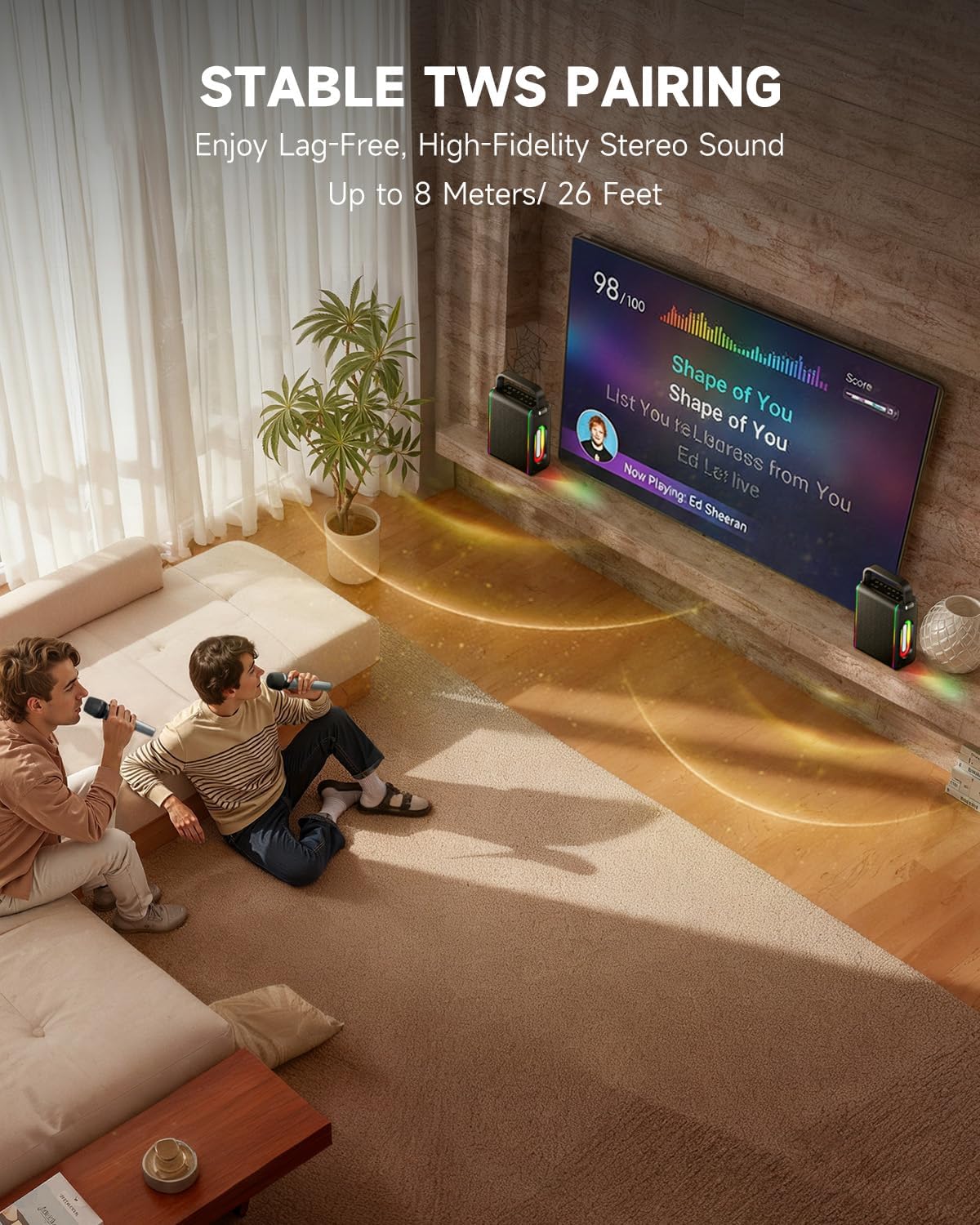
- Kraftfuld funktionalitet: Supports Bluetooth 5.3 for wireless connection to various devices. Also includes Micro TF card, Flash USB, MP3, and AUX IN playback options. Features stable TWS (True Wireless Stereo) pairing for connecting two MPS5 units for a wider stereo soundstage.
- Ultralang batterilevetid: The rechargeable battery provides up to 8 hours of continuous music playback on a 2-hour charge, suitable for extended use indoors or outdoors.
- Let og bærbart design: Weighing only 2kg, the MPS5 is designed for easy transport. It can be carried by hand using the integrated handle or with the included shoulder strap.
- To trådløse mikrofoner: Includes two 2.4Ghz rechargeable microphones with a connection range of up to 60 feet and up to 8 hours of use time per charge (2-3 hours charging time). Features one-tap connectivity for effortless pairing.

Image: Internal speaker components of the MPS5.

Image: MPS5 connected to multiple devices via Bluetooth.

Image: Battery life and charging details for the MPS5.

Image: Demonstrating the portability of the MPS5 with hand and shoulder strap options.

Image: The two wireless microphones for the MPS5.
5. Opsætning
5.1 Opladning af højttaler og mikrofoner
Before first use, fully charge the MPS5 speaker and both wireless microphones.
- Højttaler: Connect the provided USB Type-C cable to the charging port on the speaker and to a compatible USB power adapter (not included). The charging indicator light will show charging status. A full charge takes approximately 2 hours.
- Mikrofoner: Each microphone has a charging port. Connect them to a USB power source using the provided USB cable. Charging time for microphones is 2-3 hours.
5.2 Tænd/sluk
- To power on the speaker, press and hold the power button (U) on the top panel for 2 seconds.
- To power off, press and hold the power button (U) igen i 2 sekunder.
5.3 Bluetooth -parring
- Ensure the MPS5 speaker is powered on and in Bluetooth mode (indicated by a blue LED). If not, press the 'M' (Mode) button to switch to Bluetooth mode.
- Aktiver Bluetooth på din mobilenhed (smartphone, tablet osv.) og søg efter tilgængelige enheder.
- Select 'Moukey MPS5' from the list of devices to pair. A voice prompt will confirm successful connection.
5.4 TWS (ægte trådløs stereo) parring
To achieve stereo sound, you can pair two Moukey MPS5 speakers together.
- Ensure both MPS5 speakers are powered on and in Bluetooth mode, but not connected to any other device.
- On one of the speakers, double-press the 'M' (Mode) button. The speaker will enter TWS pairing mode.
- De to højttalere opretter automatisk forbindelse til hinanden. En stemmemeddelelse bekræfter den vellykkede TWS-parring.
- Once TWS is established, connect your mobile device to one of the MPS5 speakers via Bluetooth as described in section 5.3. Both speakers will then play audio in stereo.
Video: En hurtig gennemgangview of the MPS5 Karaoke Machine, demonstrating TWS pairing and other features.
6. Betjeningsvejledning
6.1 kontroller overview
The top panel of the MPS5 speaker features several buttons for controlling playback, volume, and microphone settings.
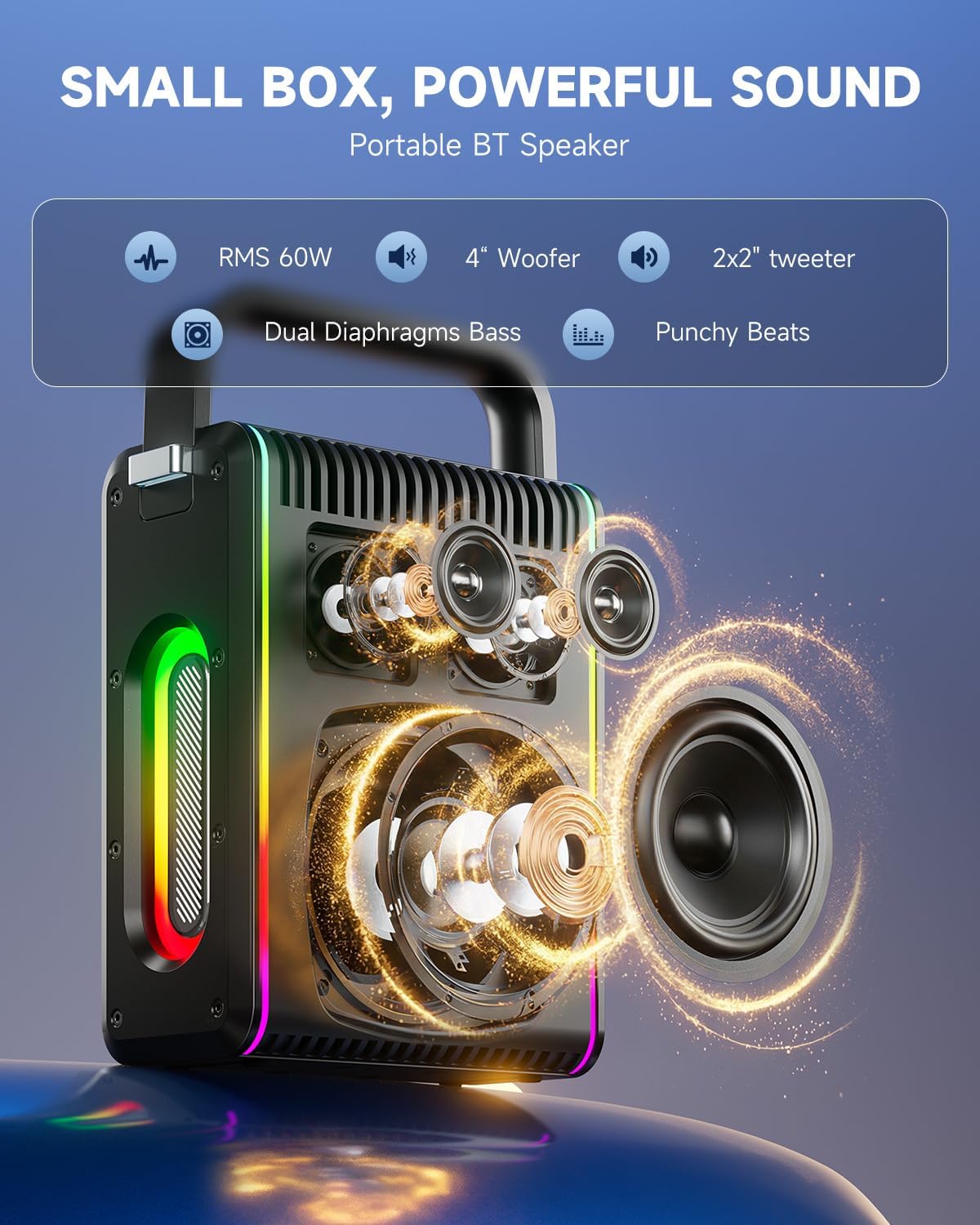
Image: Top control panel of the MPS5.
- Tænd/sluk-knap (U): Tryk og hold i 2 sekunder for at tænde/slukke.
- Tilstandsknap (M): Short press to cycle through input modes (Bluetooth, AUX, USB, TF Card). Double-press to initiate TWS pairing.
- Microphone Volume (Mic - / Mic +): Justerer lydstyrken på de tilsluttede mikrofoner.
- Echo Adjustment (R- / R+): Justerer ekkoeffekten for mikrofonerne.
- Afspil/pause (▶): Afspiller eller sætter det aktuelle nummer på pause.
- Lydstyrke ned (-): Decreases the main speaker volume.
- Lydstyrke op (+): Increases the main speaker volume.
- EQ A/E: Short press to switch between EQ modes. Long press to toggle between original sound and accompaniment elimination.
6.2 Brug af mikrofon
The MPS5 comes with two wireless microphones for karaoke and vocal performances.
- Tænd/sluk: Tryk og hold tænd/sluk-knappen på mikrofonen nede for at tænde eller slukke den.
- Parring: The microphones are pre-paired with the speaker. If re-pairing is needed, ensure the speaker is on, then power on the microphone. They should connect automatically.
- Microphone Disconnect/Reconnect: Press the dedicated microphone button on the speaker's control panel to quickly disconnect or reconnect the microphones.
6.3 Lydinputtilstande
In addition to Bluetooth, the MPS5 supports several wired and local storage input options.

Image: Input ports on the MPS5 speaker.
- AUX-indgang: Connect an external audio device using the 3.5mm AUX cable. Select AUX mode using the 'M' button.
- USB-afspilning: Indsæt et USB-flashdrev med MP3-lyd files i USB-porten. Højttaleren skifter automatisk til USB-tilstand og begynder afspilning.
- TF-kortafspilning: Insert a Micro TF card containing MP3 audio files i TF-kortstikket. Højttaleren skifter automatisk til TF-korttilstand og begynder afspilning.
6.4 LED belysning
The MPS5 features dynamic LED lighting on its sides. Use the dedicated LED button (if available, or refer to the 'M' button for light control if combined) to cycle through different light modes or turn them off.
7. Vedligeholdelse
- Rensning: Brug en blød, tør klud til at rengøre højttalerens yderside. Brug ikke flydende rengøringsmidler eller slibende materialer.
- Opbevaring: Opbevar enheden et køligt, tørt sted væk fra direkte sollys og ekstreme temperaturer.
- Batteripleje: For at forlænge batteriets levetid bør du undgå at aflade batteriet helt ofte. Oplad enheden regelmæssigt, selvom den ikke er i brug i længere perioder.
8. Fejlfinding
If you encounter issues with your Moukey MPS5, refer to the following common problems and solutions:
| Problem | Mulig årsag | Løsning |
|---|---|---|
| Ingen strøm | Batteriet er afladet. | Oplad højttaleren med det medfølgende USB Type-C-kabel. |
| Ingen lyd fra højttaleren | Volume is too low or muted. Incorrect input mode selected. | Increase volume using the '+' button. Press 'M' to cycle through input modes. |
| Bluetooth-parring mislykkedes | Speaker is not in pairing mode. Device is too far. | Ensure speaker is in Bluetooth mode. Move device closer to speaker. Try restarting both devices. |
| Mikrofon virker ikke | Microphone is off or uncharged. Microphone is disconnected. | Ensure microphone is charged and powered on. Press the microphone button on the speaker to reconnect. |
| TWS-parring mislykkedes | Speakers are already connected to another device. | Sørg for, at ingen af højttalerne er tilsluttet nogen anden Bluetooth-enhed, før du starter TWS-parring. |
9. Specifikationer
- Mærke: Moukey
- Modelnummer: Mps5
- Output Wattage: 200 watt (peak)
- Forbindelse teknologi: Bluetooth 5.3
- Lydindgang: Bluetooth, TF card, USB, MP3, AUX, Wired microphones
- Antal kanaler: 2
- Strømkilde: Batteridrevet
- Connector Type: USB Type C
- Emnemål (L x B x H): 2.36 x 6.3 x 12.2 tommer
- Varens vægt: Cirka 2 kg
- Kompatible enheder: Smartphone, Tablet, Laptop, MP3 Player, Microphone
- Farve: Sort med sølvdetaljer
10. Garanti og support
The Moukey MPS5 Portable Karaoke Machine comes with a 1-års garanti fra købsdatoen. Denne garanti dækker fabrikationsfejl og udførelse under normal brug. Gem venligst din købsbevis i tilfælde af garantikrav.
For technical support, troubleshooting assistance, or warranty inquiries, please contact Moukey customer service through the retailer where the product was purchased or visit the official Moukey webwebsted for kontaktoplysninger.