
1.Overview
The NBD K200 is a compact digital camera designed for capturing high-quality photos and videos. It features a 64MP photo resolution, 4K video recording capabilities, 16X digital zoom, and autofocus. Its lightweight design and user-friendly interface make it suitable for various users, including beginners and travelers.

Billede: Overview of the NBD K200 camera highlighting its 64MP, 4K, Beauty Mode, Backlight Portrait, Auto Focus, 16X Zoom, Smart Stabilization, and Built-in Filters features.
Pakkens indhold
Sørg for at alle varer er til stede i pakken:
- NBD K200 Digital Camera Body
- 64GB TF Card (MicroSD Card)
- USB-C kabel
- Halsrem
- Brugervejledning (dette dokument)

Image: The NBD K200 camera, USB cable, card reader, 64GB memory card, lens cleaning cloth, and camera wrist strap, presented as a complete kit.
2. Opsætning
2.1 Opladning af batteriet
Before first use, fully charge the camera battery. The camera uses a Lithium Ion battery.
- Sæt batteriet i kameraets batterirum.
- Connect the camera to a power source using the provided USB-C cable.
- The charging indicator light will show the charging status. A full charge typically allows for over 300 photos.

Image: The NBD K200 camera connected via USB-C cable to a power bank, illustrating the charging process and highlighting its powerful battery life for approximately 300 photos per charge.
2.2 Isætning af hukommelseskortet
The camera supports microSD cards. A 64GB TF card is included.
- Find hukommelseskortåbningen på kameraet.
- Insert the TF card into the slot with the gold contacts facing the correct direction until it clicks into place.
- For at fjerne det, tryk forsigtigt på kortet, indtil det springer ud.
3. Betjening af kameraet
3.1 Tænd/sluk
Tryk på tænd/sluk-knappen og hold den nede for at tænde eller slukke kameraet.
3.2 Grundlæggende kontroller
The camera features a Multi-Functional Roller Button for simplified operation.
- Rulleknap: Used for one-touch mode switching and precise zoom adjustment. Roll left to zoom out, roll right to zoom in.
- Udløserknap: Tryk for at tage et billede eller starte/stoppe videooptagelse.
- Mode knap: Cycles through different shooting modes.
- Flash knap: Activates the built-in flash.
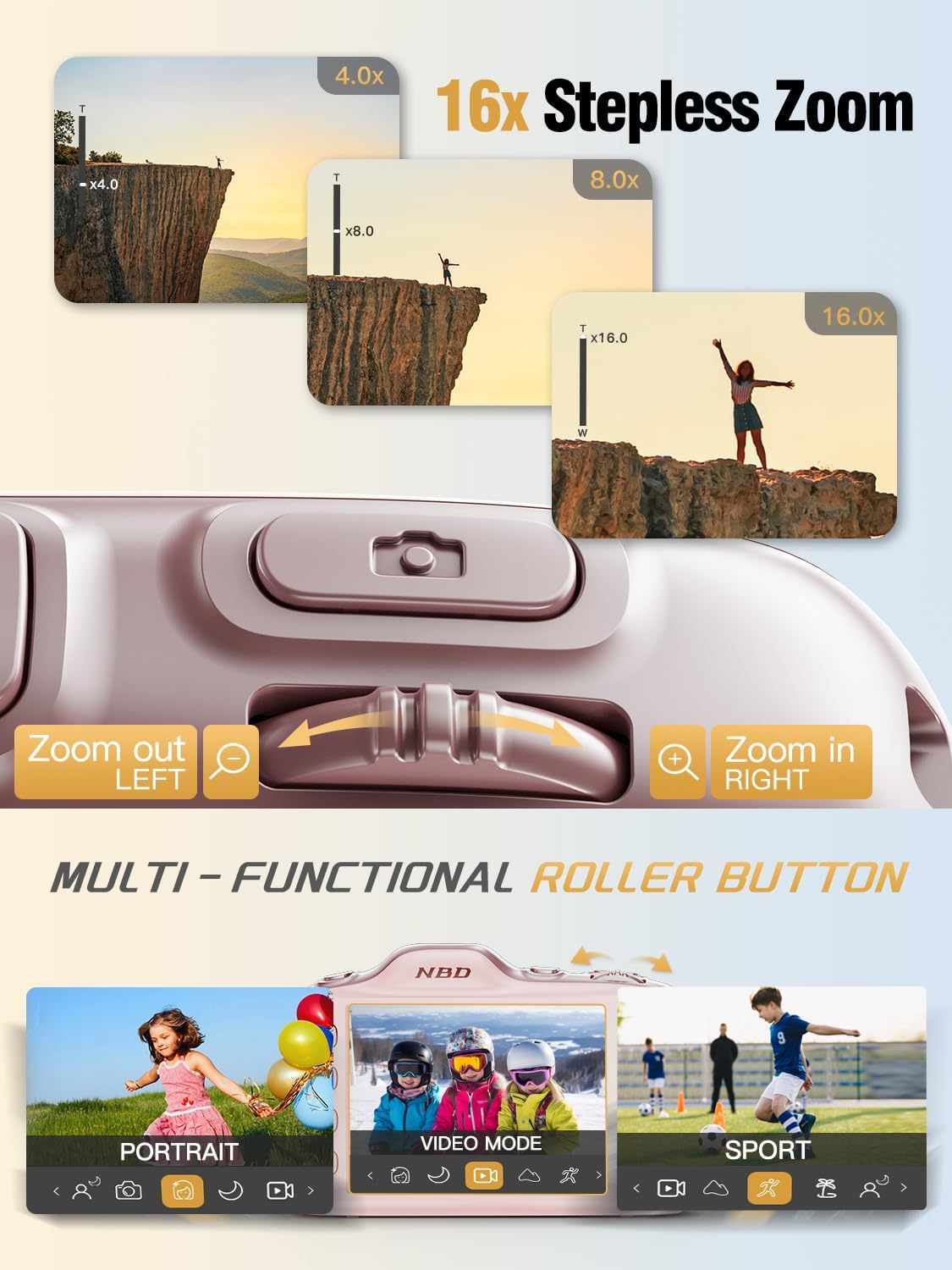
Image: Close-up of the NBD K200 camera's top, highlighting the 16x stepless zoom roller button for zooming in and out, and the mode switch for selecting different shooting modes like Portrait, Video, and Sport.
3.3 Optagelse af billeder
The camera features autofocus for clear images.
- Point the camera at your subject. The autofocus system will automatically detect and focus.
- Use the roller button to adjust the 16X digital zoom as needed.
- Press the shutter button fully to capture the photo.

Image: A woman holding the NBD K200 camera, with the screen displaying an autofocus frame around a subject's face, illustrating the camera's auto-focus capability for effortless portrait photography.
3.4 Optagelse af videoer
The camera supports 4K video recording at various frame rates (24, 30, 60 FPS).
- Switch to video mode using the mode button or roller.
- Tryk på udløserknappen for at starte optagelsen. En rød indikator vil typisk vises på skærmen.
- Tryk på udløserknappen igen for at stoppe optagelsen.

Image: A young girl running through a field with balloons, illustrating the NBD K200 camera's 4K 30FPS cinema capture capability for smooth, ultra HD video recording.
3.5 Shooting Modes and Features
The NBD K200 offers several modes and features to enhance your photography.
- Skønhedstilstand: Enhances facial features for portraits and selfies.
- Nattilstand: Optimizes settings for low-light conditions, smoothing grain and balancing tones.
- Portrættilstand: Designed for capturing natural radiance in subjects, balancing tones and softening light.
- Sportstilstand: Ideal for capturing fast-moving subjects with anti-shake stabilization.
- Burst-tilstand: Captures multiple photos in quick succession (up to 10FPS) for action shots.
- Indbyggede filtre: Apply various creative filters like Vintage, Cool Tone, Warm Tone, Sepia, Sketch, and Japan Style.
- Selvudløser: Options for 3, 5, 7, or 10-second delays for group shots or selfies.

Image: A circular diagram illustrating the NBD K200 camera's various shooting modes, including Photo, Video, Night Mode, Portrait Mode, Burst Mode, and Beauty Mode, with example images for each.

Billede: Eksamples of built-in filters available on the NBD K200 camera, including Vintage, Cool Tone, Warm Tone, Sepia, Sketch, and Japan Style, demonstrating how they alter image ambiance.
3.6 Overførsel Files
Transfer photos and videos to a computer or smartphone using the USB-C cable.
- Connect the camera to your device using the USB-C cable.
- The camera will appear as a removable storage device.
- Træk og slip files til din ønskede placering.
4. Vedligeholdelse
4.1 Pleje af batterier
- Oplad batteriet helt inden længere tids opbevaring.
- Undgå at udsætte batteriet for ekstreme temperaturer.
- Brug kun de medfølgende eller godkendte opladningskabler og adaptere.
4.2 Rengøring af kameraet
- Brug en blød, fnugfri klud til at rengøre kamerahuset.
- Brug en specialklud og -opløsning til rengøring af linsen. Undgå at berøre linsen direkte.
- Brug ikke skrappe kemikalier eller slibende materialer.
4.3 Opbevaring
- Opbevar kameraet et køligt og tørt sted, væk fra direkte sollys.
- If storing for a long period, remove the battery.
- Keep the camera in its protective case or a soft pouch to prevent scratches.
5. Fejlfinding
Hvis du støder på problemer, kan du bruge følgende almindelige løsninger:
| Problem | Mulig løsning |
|---|---|
| Kameraet tændes ikke | Sørg for, at batteriet er opladet og isat korrekt. |
| Kan ikke tage billeder/videoer | Check if the memory card is inserted and has sufficient space. Ensure the camera is not in playback mode. |
| Billeder er slørede | Ensure autofocus is engaged. Check for smudges on the lens. Hold the camera steady or use anti-shake feature. |
| Kameraet genkendes ikke af computeren | Ensure the USB-C cable is securely connected. Try a different USB port or cable. |
| Flash virker ikke | Ensure the flash is enabled in the camera settings or via the dedicated flash button. |
6. Specifikationer
Detailed technical specifications for the NBD K200 Digital Camera:
| Feature | Detalje |
|---|---|
| Mærke | NBD |
| Modelnavn | K200 |
| Effektiv stillopløsning | 64 MP |
| Video opløsning | 4K (2160p) |
| Billedhastighed | 24, 30, 60 FPS |
| Zoom | 16X digital zoom |
| Autofokus | Ja (Kontrastdetektion) |
| Billedstabilisering | Anti-shake |
| Fotosensorteknologi | CMOS (1/2.4-inch) |
| Blænde | F1.8 |
| Minimum lukkerhastighed | 1/4000 sekunder |
| Display Type | LCD (2.8 Inches, Color Screen) |
| Lagermedier | microSD (up to 64GB included) |
| File Format (Photo) | JPEG (Fine Quality) |
| File Format (video) | MOV |
| Batteritype | Lithium Ion |
| Forbindelse | USB-C |
| Varens vægt | 0.26 kilogram (ca. 121 g) |
| Vandmodstandsniveau | Ikke vandafvisende |
7. Garanti og support
For warranty information and technical support, please refer to the contact details provided with your purchase or visit the official NBD webwebsted. Gem din købsbevis til garantikrav.