
TAMPROAD Q66
TAMPROAD Q66 Bluetooth Speaker Instruction Manual
Model: Q66
Indledning
This manual provides essential information for the safe and efficient operation of your TAMPROAD Q66 Bluetooth Speaker. Please read it thoroughly before using the product and retain it for future reference.
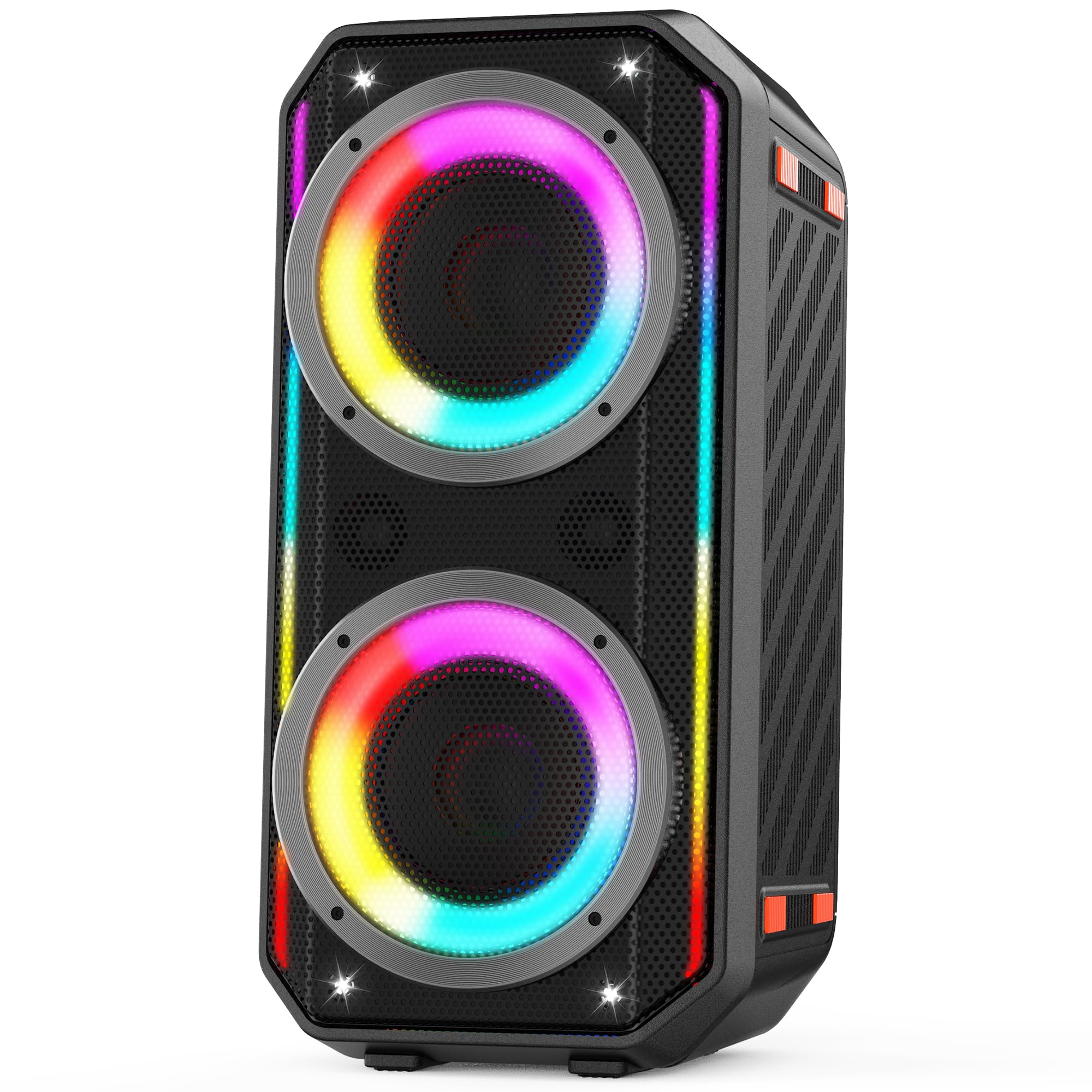
Image: The TAMPROAD Q66 Bluetooth Speaker, a portable unit with integrated LED lights.
Sikkerhedsoplysninger
- Udsæt ikke højttaleren for vand eller overdreven fugt.
- Undgå ekstreme temperaturer.
- Do not disassemble or attempt to repair the speaker yourself. Refer to qualified service personnel.
- Holdes væk fra børn og kæledyr.
- Brug kun det medfølgende strømkabel til opladning.
- Sørg for tilstrækkelig ventilation under drift.
Hvad er der i æsken
Kontroller, at alle genstande er til stede ved udpakning:
- 1 x TAMPROAD Q66 Bluetooth Speaker
- 1 x US standard AC Power Cable
- 1 x AUX-kabel
- 1 x Brugermanual (dette dokument)

Image: The TAMPROAD Q66 speaker, AC power cable, AUX cable, and user manual as packaged.
Produkt overviewBetjeningselementer og porte
Familiarize yourself with the speaker's control panel and connection ports.

Billede: Detaljeret view af T'etAMPROAD Q66 control panel, showing buttons for volume, mode, TWS, EQ, LED lights, and various input ports.
Kontrolpanelets funktioner:
- Power knap: Press and hold to power on/off. Short press to display remaining battery power.
- BT / AUX Mode: Switches between Bluetooth and AUX input modes.
- TWS knap: Starter ægte trådløs stereoparring.
- Afspil/pause knap: Afspiller eller sætter lydafspilning på pause.
- Forrige/Næste knapper: Springer til det forrige eller næste spor.
- Musik bind: Justerer den primære musiklydstyrke.
- LED lys knap: Cycles through LED light modes or turns lights off.
- Forudindstillet EQ: Skifter gennem equalizer-forudindstillinger.
- MIC Vocal: Adjusts microphone vocal effects.
- Tone +/-: Adjusts tone for microphone input.
- MIC PRI: Mikrofonprioritetsfunktion.
- REC Stop & Play: Controls recording to USB.
- Ekko/rumklang: Adjusts echo/reverb for microphone/guitar.
- MIC/Guitar Vol: Adjusts volume for microphone and guitar inputs.
Indgangsporte:
- AUX-indgang: Til tilslutning af eksterne lydenheder via et 3.5 mm lydkabel.
- USB-indgang: For playing music from a USB drive (supports Micro SD cards with adapter).
- MIC input: Til tilslutning af mikrofon.
- Guitar input: Til tilslutning af en guitar.
Opsætning
1. Opladning af højttaleren
Before first use, fully charge the speaker. Connect the provided AC power cable to the speaker's power input and then to a standard wall outlet (110-240V). The charging indicator will show the charging status. A full charge provides up to 10 hours of playback.

Image: The TAMPROAD Q66 speaker being powered by an AC plug, illustrating continuous power supply.
2. Tænd/sluk
Tryk og hold på Power knap on the control panel for approximately 3 seconds to turn the speaker on or off.
3. Bluetooth-parring
- Tænd højttaleren. Den vil automatisk gå i Bluetooth-parringstilstand, hvilket indikeres af en blinkende Bluetooth-indikatorlampe.
- Aktiver Bluetooth på din enhed (smartphone, tablet osv.) og søg efter tilgængelige enheder.
- Select "TAMPROAD Q66" from the list of devices.
- Once connected, the Bluetooth indicator light will stop flashing and remain solid.
4. Ægte trådløs stereo (TWS) parring
To achieve a stereo sound experience, you can pair two TAMPROAD Q66 speakers together.
- Ensure both Q66 speakers are powered on and in Bluetooth mode, but not connected to any other device.
- On one of the speakers, short press the TWS knap. The speaker will emit a sound indicating it's searching for another speaker.
- De to højttalere vil automatisk oprette forbindelse til hinanden. En bekræftelseslyd vil indikere vellykket TWS-parring.
- Once paired, connect your device to one of the speakers via Bluetooth as described in step 3. Both speakers will now play audio in stereo.

Image: Two TAMPROAD Q66 speakers positioned on either side of a television, demonstrating a TWS setup for enhanced audio.
5. Tilslutning via AUX-indgang
Use the provided 3.5mm AUX cable to connect an external audio device (e.g., MP3 player, computer) to the speaker's AUX-indgang port. The speaker will automatically switch to AUX mode, or you can manually select it using the BT / AUX Mode knap.
6. Afspilning fra USB-drev
Indsæt et USB-drev, der indeholder lyd files ind i USB-indgang port. The speaker will automatically detect the USB drive and begin playback. (Note: Supports Micro SD cards with an appropriate adapter).

Image: The side panel of the TAMPROAD Q66 speaker highlighting its multiple connectivity options: Bluetooth 5.0, USB Drive, Microphone Input, Guitar Input, and AUX Input.
7. Microphone and Guitar Input
Tilslut en mikrofon til MIC-indgang or a guitar to the Guitar input. Adjust their respective volumes using the MIC/Guitar Vol knob. You can also fine-tune the sound with Tone +/-, MIC Vocal, og Echo/Reverb kontroller.
Betjeningsvejledning
1. Afspilning af lyd
- Lydstyrkekontrol: Drej på Musik Vol knob to increase or decrease the main audio volume.
- Afspil/pause: Tryk på Afspil/pause knap for at starte eller stoppe afspilning.
- Spornavigation: Brug Tidligere og Næste knapper til at springe spor over.
2. LED-lystilstande
Højttaleren har dynamiske LED-lys. Tryk på LED lys knap to cycle through various lighting effects. Press and hold the button to turn the lights off.

Image: The TAMPROAD Q66 speaker showcasing different vibrant LED light modes, which pulse and flash with music.
Video: A demonstration of the TAMPROAD Q66 speaker's dynamic LED light show and sound quality, titled "Big, Bold Sound Anywhere You Want."
Video: En brugerview showcasing the TAMPROAD Q66 speaker's features and sound, titled "Worth the money!"
3. EQ Presets
Tryk på Forudindstillet EQ button to cycle through different equalizer settings, optimizing the sound for various music genres or listening preferences.
Opretholdelse
- Rensning: Brug en blød, tør klud til at rengøre højttalerens yderside. Brug ikke slibende rengøringsmidler eller opløsningsmidler.
- Opbevaring: Opbevar højttaleren et køligt, tørt sted væk fra direkte sollys og ekstreme temperaturer, når den ikke er i brug.
- Batteripleje: For optimal battery life, avoid fully discharging the battery frequently. Charge the speaker regularly, even if not in constant use.
Fejlfinding
| Problem | Mulig årsag | Løsning |
|---|---|---|
| Højttaleren tænder ikke. | Lavt batteri eller strømkabel ikke tilsluttet. | Charge the speaker using the provided AC power cable. Ensure the power button is pressed and held for 3 seconds. |
| Kan ikke parres via Bluetooth. | Højttaleren er ikke i parringstilstand, eller enhedens Bluetooth er slået fra. | Ensure the speaker is in Bluetooth mode (flashing indicator). Turn off and on your device's Bluetooth. Move device closer to speaker. |
| Ingen lyd. | Volume too low, incorrect input mode, or faulty cable. | Increase speaker and device volume. Check if the correct input mode (Bluetooth, AUX, USB) is selected. Ensure cables are securely connected. |
| TWS-parring mislykkes. | Højttalerne er for langt fra hinanden eller allerede tilsluttet en anden enhed. | Sørg for, at begge højttalere er i umiddelbar nærhed og ikke er forbundet til nogen anden Bluetooth-enhed, før du starter TWS-parring. |
Specifikationer
| Feature | Detalje |
|---|---|
| Modelnavn | Q66 |
| Højttaler type | Bærbar højttaler |
| Højttaler Maksimal udgangseffekt | 300 watt (peak) |
| Bashøjttaler diameter | 2 x 5.25 tommer |
| Diskantstørrelse | 2 x 2.0 tommer |
| Frekvensrespons | 45 Hz (low frequency extension) |
| Forbindelsesteknologi | Bluetooth 5.0, AUX, USB |
| Input bindtage | 110-240V (AC) |
| Strømkilde | Elektrisk med ledning, batteridrevet |
| Batterikapacitet | 11.1V, 83Wh (up to 10 hours playback) |
| Produktdimensioner | 10" D x 10" B x 22" H |
| Varens vægt | 15 pund |
| Kontrolmetode | Tryk knap |
| Indendørs/Udendørs brug | Indendørs, Udendørs |
Garanti og support
Den TAMPROAD Q66 Bluetooth Speaker comes with a 12 måneders garantiservice. For any product-related inquiries, technical assistance, or warranty claims, please contact TAMPROAD customer service. Refer to the contact information provided on the product packaging or the official TAMPVEJ webwebsted for supportdetaljer.