
1. Introduktion
The Aideepen USB Cable Test Board is a versatile and reliable tool designed to quickly and accurately assess the connection status and functionality of various USB cables. Its intuitive design, featuring 24 LED indicators, allows users to easily identify issues such as open circuits, short circuits, or incorrect wiring in their cables. This device is essential for anyone managing a collection of USB cables, helping to sort functional cables from faulty ones.
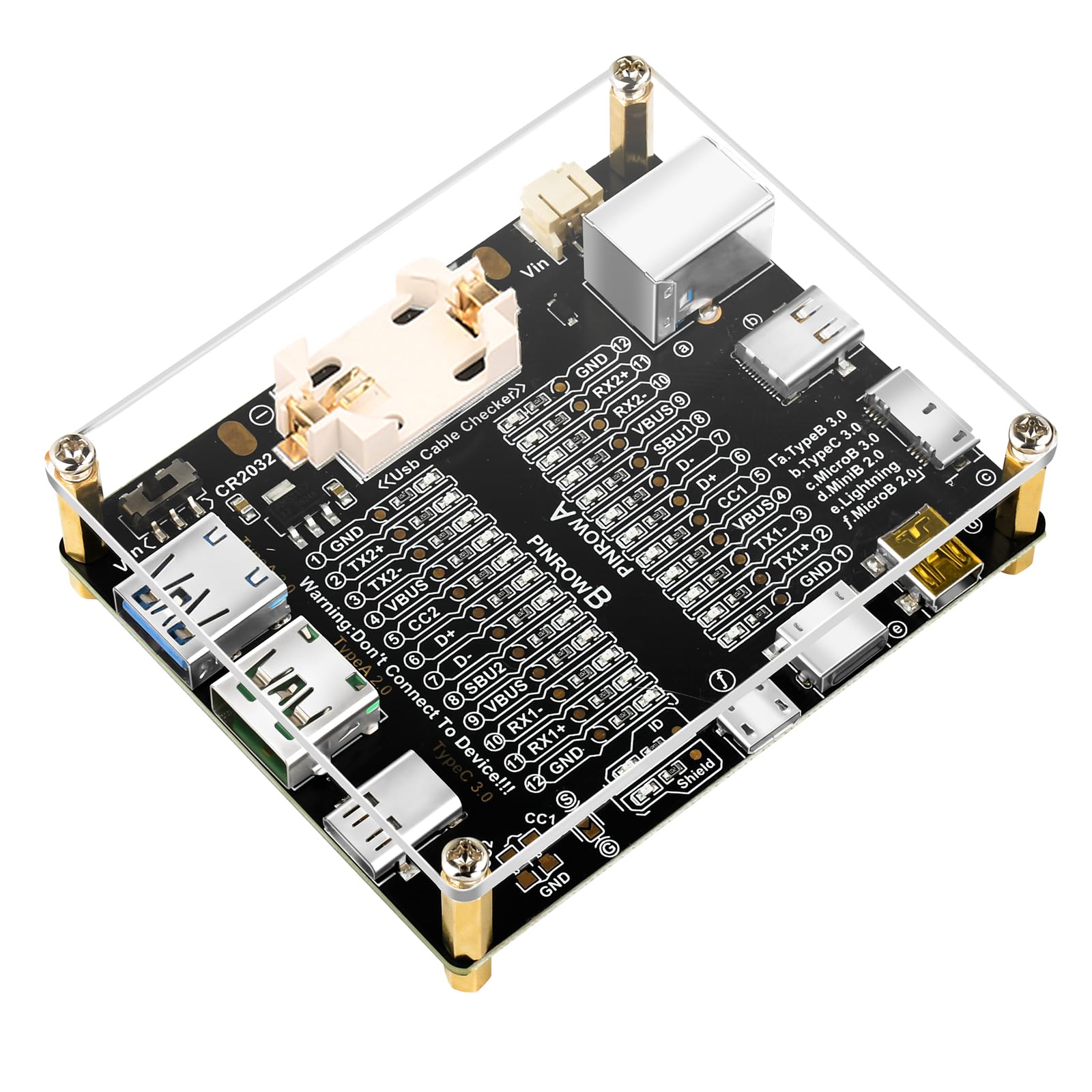
Figure 1: Aideepen USB Cable Test Board
2. Nøglefunktioner
- Intuitive LED-indikatorer: Equipped with 24 LED indicators that visually represent the connection status of each pin, providing clear and immediate feedback.
- Broad Cable Compatibility: Supports testing for a wide range of USB cable types, including TypeB 3.0, TypeB 2.0, TypeC 3.0/3.1/3.2, MicroB 3.0, MicroB 2.0, MiniB 2.0, and Lightning.
- Dobbelt strømindstillinger: Can be powered by a CR2032 button battery (not included) or an external DC3-12V power source (Vin), offering flexibility in usage.
- Omvendt forbindelsesbeskyttelse: The external power input (Vin) includes protection against reverse polarity connections.
- Enkel betjening: Designed for ease of use, requiring only the insertion of the cable ends into the appropriate connectors to initiate testing.
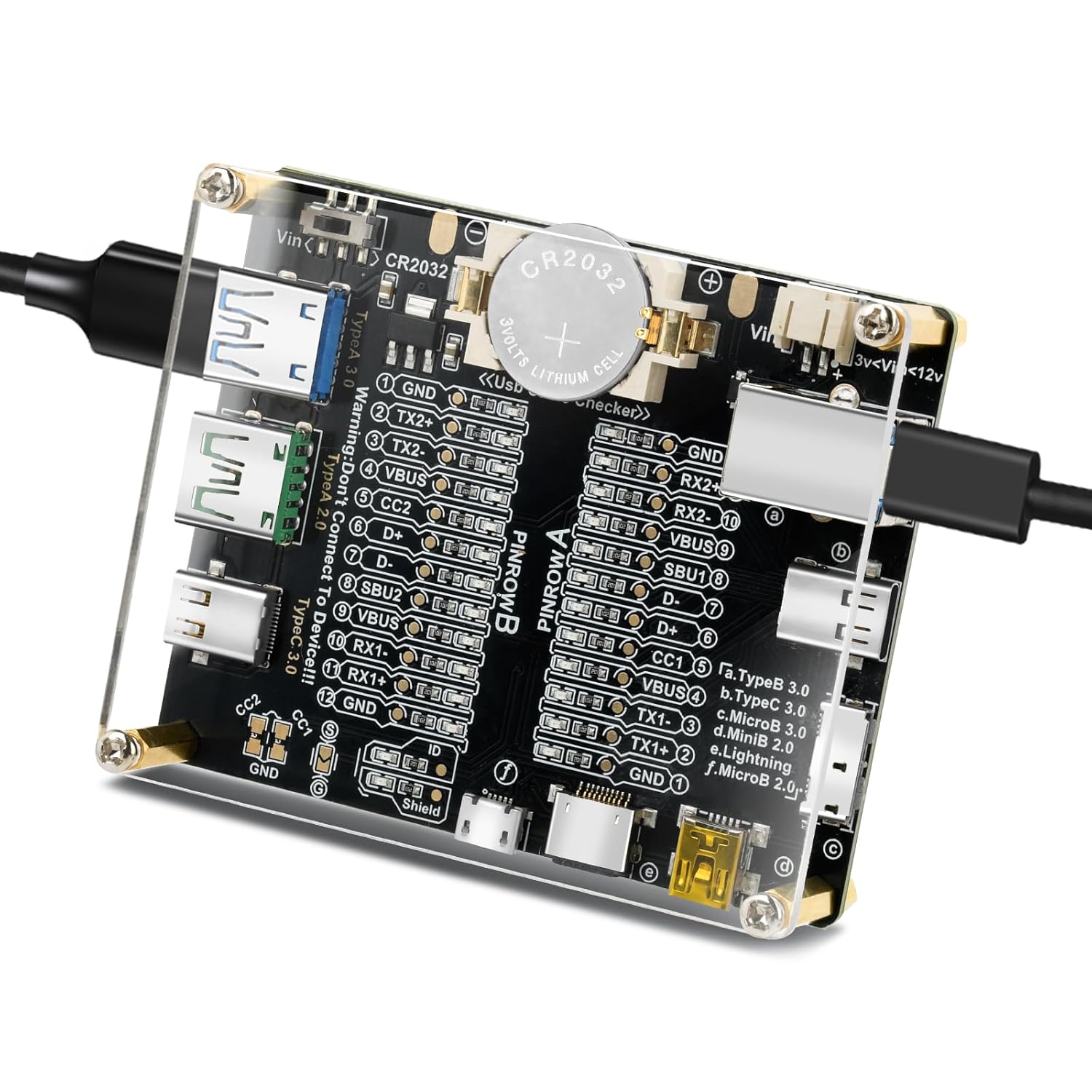
Figure 2: Supported Cable Types
3. Inkluderede komponenter
The package includes the Aideepen USB Cable Test Board. Please note that a CR2032 button battery is not included and must be purchased separately.
4. Opsætning
4.1 Strømforsyning til enheden
The USB Cable Test Board can be powered using one of two methods:
- CR2032 Button Battery: Insert a CR2032 button battery into the designated battery holder on the board. Ensure the positive (+) terminal of the battery aligns with the positive contact on the holder.
- External DC Power (Vin): Connect an external DC power supply (3-12V) to the 'Vin' input port. This port provides reverse connection protection.

Figure 3: Power Options and Dimensions
4.2 Batteriinstallation
To install the CR2032 battery:
- Locate the battery holder on the test board.
- Slide the battery cover to the right (towards the CR2032 battery side) to remove it.
- Insert the CR2032 button battery, ensuring the positive (+) pole aligns with the safety lock's positive contact.
- Gently press the battery downwards to secure it in place.
- Replace the battery cover by sliding it back into position.

Figur 4: Batteriinstallationstrin
5. Betjening
5.1 Testing a USB Cable
To test a USB cable:
- Ensure the test board is powered on (either via CR2032 battery or external Vin).
- Connect both ends of the USB cable you wish to test into the corresponding ports on the test board. For example, if testing a USB-C to USB-A cable, connect the USB-C end to a Type-C port and the USB-A end to a Type-A port.
- Observe the LED indicators. The LEDs corresponding to the functional pins will light up.
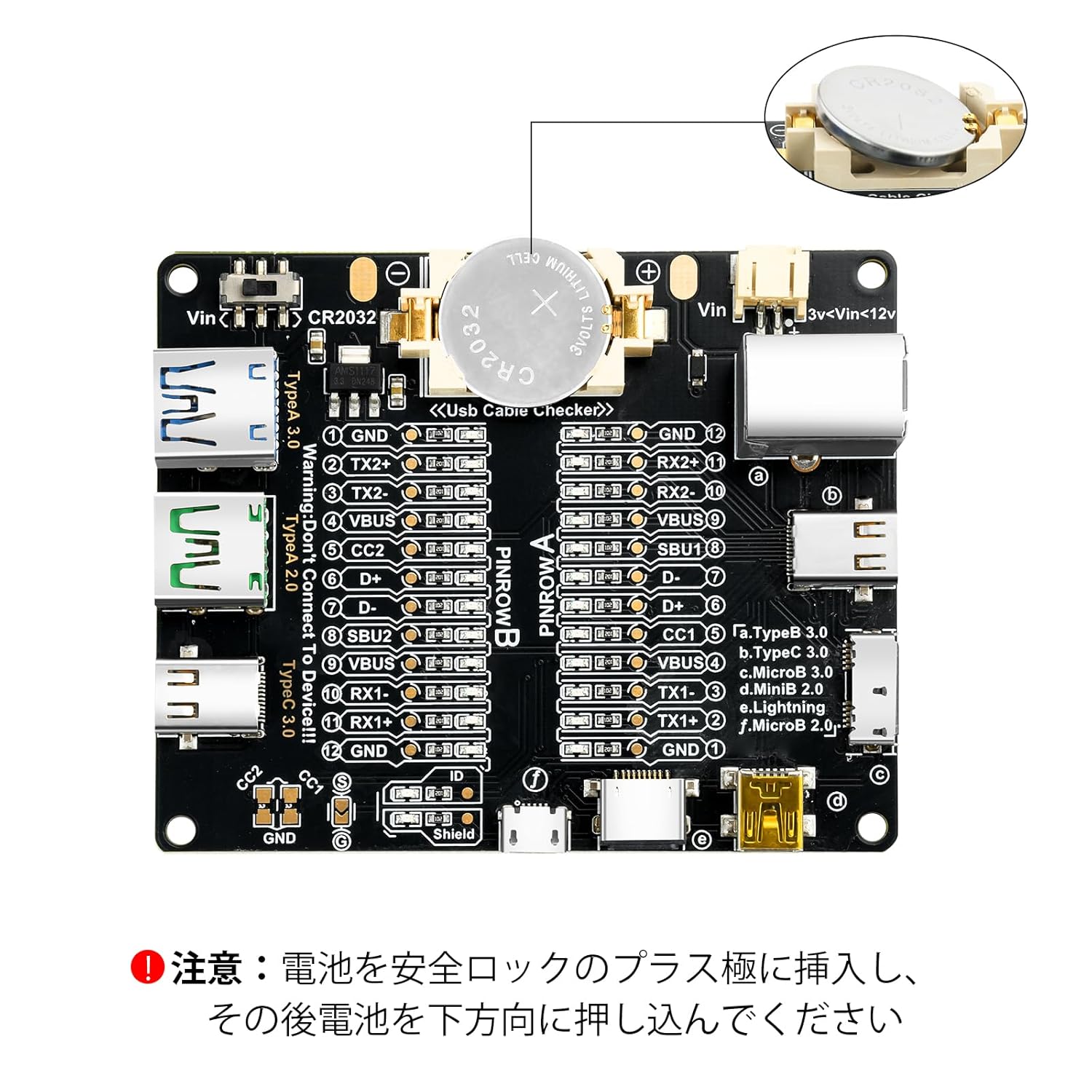
Figure 5: Testing a USB-C Cable
5.2 Fortolkning af LED-indikatorer
The 24 LED indicators provide visual feedback on the cable's internal wiring. Each LED corresponds to a specific pin or function within the USB cable. By observing which LEDs illuminate, you can determine the cable's capabilities and identify any faults.
- GND and VBUS Lamps Lit: If only the GND (Ground) and VBUS (Voltage Bus) lamps are lit, it indicates that the USB cable primarily supports charging functionality.
- GND, VBUS, D+, D- Lamps Lit: If GND, VBUS, D+ (Data Positive), and D- (Data Negative) lamps are lit, the USB cable supports both charging and data transfer.
- Alle Lamps Lit (excluding D+ and D- if applicable): If all relevant lamps are lit (e.g., GND, TX2+, TX2-, VBUS, CC2, D+, D-, SBU2, RX1+, RX1-, GND), it indicates that the USB cable supports charging, high-speed data transfer (e.g., USB 3.0/3.1/3.2), audio/video transmission, and other advanced functionalities.

Figure 6: Interpreting LEDs for Charging-Only Cable

Figure 7: Interpreting LEDs for Full Functionality Cable
5.3 Pinout-diagram
For detailed understanding of each pin's function, refer to the pinout diagram below. This diagram maps the LED indicators to their corresponding pins and functions for both Pinrow A and Pinrow B.

Figure 8: USB Data Cable Test Board Pinout Diagram
5.4 Produktvideoer
Video 1: This video demonstrates the physical appearance and handling of the Aideepen USB Cable Test Board, showcasing dens kompakte størrelse og forskellige porte.
Video 2: This video provides a quick demonstration of how to use the simple USB cable checker, showing the connection process and LED indicator response.
6. Specifikationer
| Feature | Detalje |
|---|---|
| Mærke | Hjælp |
| Farve | Sort |
| Minimum drift Voltage | 3 volt (DC) |
| Inkluderede komponenter | USB Data Cable Test Board |
| Oprindelsesland | Kina |
| ASIN | B0FRMTP81P |
7. Fejlfinding
- No LEDs light up when a cable is connected:
- Ensure the device is properly powered. If using a CR2032 battery, check if it is inserted correctly with the positive (+) terminal facing up and securely in place. Replace the battery if it is depleted.
- If using external power, verify that the DC3-12V power supply is connected to the 'Vin' port and is functioning correctly.
- Confirm that both ends of the USB cable are fully inserted into the correct ports on the test board.
- LEDs show unexpected results:
- Refer to the "Interpreting LED Indicators" section (5.2) and the "Pinout Diagram" (Figure 8) for a detailed explanation of each LED's function.
- Ensure the cable being tested is compatible with the ports used on the test board.
- Test with a known good cable to verify the tester's functionality.
8. Vedligeholdelse
To ensure the longevity and optimal performance of your Aideepen USB Cable Test Board:
- Hold enheden ren og fri for støv og snavs. Brug en blød, tør klud til rengøring.
- Undgå at udsætte enheden for ekstreme temperaturer, fugt eller direkte sollys.
- When not in use for extended periods, remove the CR2032 battery to prevent leakage.
- Handle the board with care to prevent damage to the connectors or electronic components.
9. Support
For further assistance, technical support, or warranty information, please refer to the seller's contact details on the platform where the product was purchased. Keep your purchase receipt or order number handy for faster service.