
Indledning
Thank you for choosing the Homtronics 25L/Day Dehumidifier. This appliance is designed to effectively remove excess moisture from your indoor environment, creating a more comfortable and healthier living space. Please read this manual thoroughly before operating the unit to ensure safe and optimal performance. Keep this manual for future reference.
This dehumidifier is capable of extracting up to 25 liters of moisture per day under conditions of 90% humidity and 35°C. It is suitable for various spaces including rooms, offices, bathrooms, closets, bedrooms, and basements.

Sikkerhedsinstruktioner
For at forhindre skade på brugeren eller andre samt materielle skader skal følgende instruktioner følges. Forkert betjening på grund af ignorering af instruktioner kan forårsage personskade eller beskadigelse.
- Placer altid enheden på en stabil, plan overflade.
- Betjen ikke enheden med en beskadiget strømledning eller stik.
- Sørg for, at strømforsyningen matcher voltagsom angivet på enhedens typeskilt.
- Keep the unit at least 20 cm (8 inches) away from walls or other objects to ensure proper airflow.
- Stik ikke fingre eller fremmedlegemer ind i luftindtaget eller -udtaget.
- Tag stikket ud af enheden, før du rengør eller udfører vedligeholdelse.
- Brug ikke enheden i områder, hvor der opbevares brandfarlige gasser eller væsker.
- Dette apparat er ikke beregnet til brug af personer (inklusive børn) med nedsatte fysiske, sensoriske eller mentale evner, eller mangel på erfaring og viden, medmindre de har fået opsyn eller instruktion i brugen af apparatet af en person, der er ansvarlig for deres sikkerhed.
- Børn skal være under opsyn for at sikre, at de ikke leger med apparatet.
Produkt overview
Familiarize yourself with the components and control panel of your Homtronics dehumidifier.
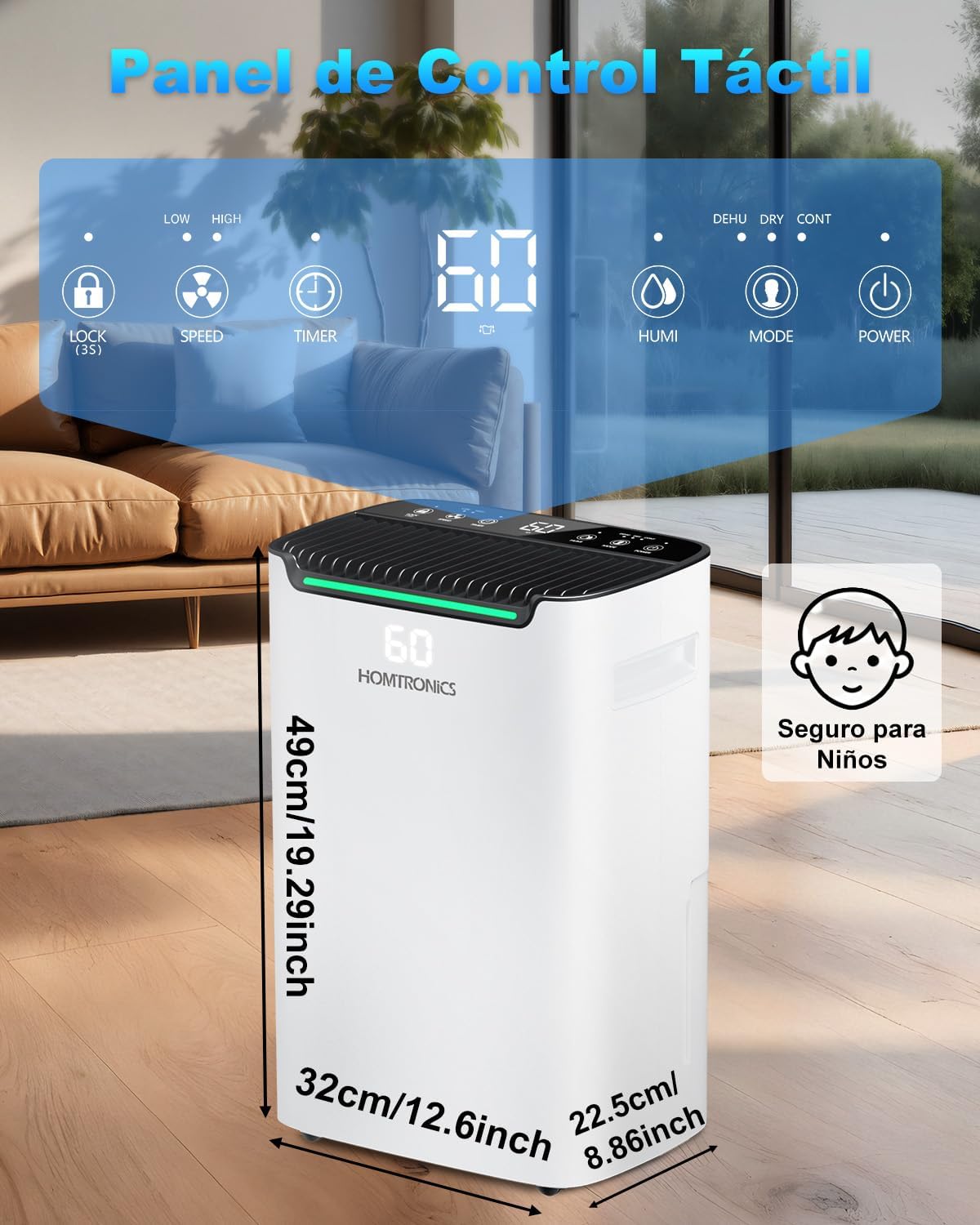
Kontrolpanelets funktioner:
- Børnelås (LÅS): Press and hold to activate/deactivate. Prevents accidental changes to settings.
- Fan Speed (SPEED): Adjusts fan speed between low and high.
- Timer (TIMER): Indstiller timeren for automatisk sluk fra 1 til 24 timer.
- Humidity Setting (HUMI): Adjusts the desired humidity level (30%-80%).
- Tilstand (MODE): Selects between Normal, Clothes Drying, and Continuous dehumidification modes.
- Power (POWER): Tænder eller slukker for enheden.
Opsætning
1. Placering
Place the dehumidifier in a location where it can operate most effectively. Ensure there is adequate space around the unit for proper air circulation. The unit is equipped with 360° swivel wheels and a recessed side handle for easy transport.

2. Dræningsmuligheder
Din affugter tilbyder to metoder til vanddræning:
- Vandtank: The unit collects water in its internal 2.5-liter water tank. When the tank is full, the unit will automatically shut off and an indicator will alert you to empty it.
- Kontinuerlig dræning: For extended operation without needing to empty the tank, connect the included 2-meter drain hose to the continuous drainage port. Route the hose to a suitable drain point, ensuring it is sloped downwards for gravity drainage.

Betjeningsvejledning
1. Tænd/sluk
Plug the unit into a grounded electrical outlet. Press the Magt knappen for at tænde eller slukke for affugteren.
2. Indstilling af ønsket luftfugtighed
Tryk på HUMI button to adjust the desired humidity level. The humidity can be set between 30% and 80% Relative Humidity (RH) in 5% increments. The unit will operate until the set humidity level is reached, then cycle on and off to maintain it.

3. Dehumidification Modes
Tryk på MODE knap til at gennemgå de tilgængelige tilstande:
- Normal Dehumidification Mode: Adjust the desired humidity level between 30% and 80% RH. The unit will maintain this level.
- Tørretilstand for tøj: Accelerates the drying of clothes indoors by continuously running the fan and compressor at high power.
- Kontinuerlig tilstand: The unit operates continuously regardless of the ambient humidity level, ideal for very damp miljøer.

4. Blæserhastighed
Tryk på HASTIGHED button to select between low and high fan speeds. Higher fan speed results in faster dehumidification but may produce more noise.
5. Timer funktion
Tryk på TIMER button to set an automatic shut-off time. You can set the timer from 1 to 24 hours. The unit will turn off automatically after the set time has elapsed.

6. Børnesikring
To prevent children from accidentally changing settings, press and hold the LÅSE button for 3 seconds to activate or deactivate the child lock function. When activated, the control panel buttons will be unresponsive.
7. How to Use Video
Watch this video for a visual guide on how to use the dehumidifier and its functions.
Video: A demonstration of the dehumidifier's functions and how to operate it.
Opretholdelse
1. Tømning af vandtanken
When the water tank is full, the unit will stop operating and an indicator light will illuminate. Carefully remove the water tank from the unit and empty the collected water. Reinsert the tank firmly until it clicks into place.
2. Rengøring af luftfilteret
The air filter should be cleaned regularly (every two weeks or more often depending on usage) to ensure efficient operation. A dirty filter can reduce airflow and dehumidification performance.
- Sluk for enheden, og tag stikket ud af stikkontakten.
- Find og fjern luftfilteret (se produktdiagrammet for den nøjagtige placering).
- Rengør filteret med varmt sæbevand, eller brug en støvsuger til at fjerne støv.
- Skyl filteret grundigt, og lad det lufttørre helt, før du sætter det tilbage i enheden.
3. Opbevaring
Hvis enheden ikke skal bruges i en længere periode:
- Empty the water tank and ensure it is clean and dry.
- Rengør luftfilteret.
- Opbevar enheden et køligt, tørt sted, væk fra direkte sollys og ekstreme temperaturer.
Fejlfinding
| Problem | Mulig årsag | Løsning |
|---|---|---|
| Enheden tænder ikke. | No power supply; Power cord not plugged in; Water tank full or not properly inserted. | Kontroller strømtilslutningen; sørg for, at tanken er tom og korrekt monteret. |
| Intet vand opsamlet. | Ambient humidity too low; Temperature too low; Air filter clogged; Unit in fan-only mode. | Check humidity settings; Clean air filter; Ensure unit is in a dehumidification mode. |
| Enheden er støjende. | Unit not on a level surface; Air filter clogged; Fan speed set to high. | Place on a level surface; Clean air filter; Reduce fan speed. |
| Børnesikringen er aktiv. | Child Lock function is engaged. | Press and hold the LOCK button for 3 seconds to deactivate. |
Hvis problemet fortsætter efter at have prøvet ovenstående løsninger, bedes du kontakte kundesupport.
Specifikationer
- Modelnavn: KDM06-N
- Mærke: Homtronics
- Farve: Hvid
- Affugtningskapacitet: 25 Liters/day (at 90% RH, 35°C)
- Vandtankvolumen: 2.5 liter
- Afløbsmuligheder: 2.5L Tank, Continuous Drain Hose (2m included)
- Særlige funktioner: Child Lock, Continuous Drainage, LED Power Indicator, Silent Operation, 24H Timer
- Driftstilstande: Normal, Clothes Drying, Continuous
- Fugtighedsindstillingsområde: 30% - 80% RF
- Blæserhastigheder: 2
- Dimensioner (D x B x H): 37 cm x 26 cm x 50 cm
- Materiale: Acrylonitril Butadien Styren (ABS)
- Kølemiddel: R290
- Oprindelsesland: Kina
Garanti og support
For warranty information and customer support, please refer to the warranty card included with your product or visit the official Homtronics webwebsted. Gem din købskvittering som købsbevis i tilfælde af garantikrav.
Typical warranty periods for home improvement products like this dehumidifier often range from 1 to 2 years for parts and labor, with some components like the compressor potentially having a longer warranty (e.g., 6 years). Please consult your specific warranty documentation for precise details.
If you encounter any issues not covered in the troubleshooting section, or require further assistance, please contact Homtronics customer service through their official channels.