
Indledning
This manual provides comprehensive instructions for the installation, operation, and maintenance of your Fenvi FU-AX900BT Wi-Fi 6 USB Adapter with Bluetooth 5.2. Please read this manual carefully before using the device to ensure proper functionality and to maximize its performance. The FU-AX900BT is designed to provide high-speed Wi-Fi 6 (802.11ax) connectivity and Bluetooth 5.2 capabilities to your desktop or laptop computer.

Billede 1: Fenvi FU-AX900BT Wi-Fi 6 USB Adapter. This image shows the compact USB adapter with its high-gain external antenna attached, ready for connection to a computer's USB port.
Pakkens indhold
Bekræft at alle varer er til stede i pakken:
- Fenvi FU-AX900BT Wireless USB Adapter
- Instruktionsmanual (dette dokument)
Nøglefunktioner
The Fenvi FU-AX900BT offers the following key features:
- High-Gain ekstern antenne: Provides stronger signal reception and extended range, beneficial for systems located further from the router or in environments with obstacles.
- 2-in-1 Combo: Integrates both Wi-Fi 6 (802.11ax) AX900 and Bluetooth 5.2 connectivity.
- Dual-Band-hastigheder: Supports up to 600 Mbps on the 5 GHz band and 287 Mbps on the 2.4 GHz band for efficient data transfer.
- MU-MIMO og OFDMA: Enhances network efficiency and performance, especially in busy network environments with multiple devices.
- WPA3-sikkerhed: Provides advanced encryption for secure wireless connections.
- USB 3.0-interface: Ensures high throughput for optimal Wi-Fi and Bluetooth performance.
- Bred kompatibilitet: Kompatibel med operativsystemerne Windows 11 og Windows 10.

Billede 2: Overview of Fenvi FU-AX900BT features. This graphic highlights Wi-Fi 6 (802.11ax) upgrade, dual-band speeds (900 Mbps total), high-gain antenna, 3-year warranty, Bluetooth 5.3 (note: product description states 5.2), WPA3 security, and OFDMA technology.

Billede 3: Wi-Fi 6 Performance with OFDMA and MU-MIMO. This illustration compares Wi-Fi 5 and Wi-Fi 6 data transmission, showing how OFDMA and MU-MIMO improve efficiency by allowing multiple devices to communicate simultaneously without waiting.
Systemkrav
- Operativsystem: Windows 11 or Windows 10 (64-bit recommended).
- USB-port: Available USB 3.0 port (backward compatible with USB 2.0, but USB 3.0 is recommended for optimal performance).
- Processor: Intel Core i3 / AMD Ryzen 3 or higher recommended.
- VÆDDER: 4 GB eller mere.
Opsætningsinstruktioner
1. Fysisk installation
- Pak adapteren ud: Carefully remove the Fenvi FU-AX900BT USB adapter from its packaging.
- Identify a USB 3.0 Port: Locate an available USB 3.0 port on your desktop or laptop computer. USB 3.0 ports are typically blue internally or marked with a "SS" (SuperSpeed) symbol.
- Indsæt adapteren: Gently insert the FU-AX900BT adapter into the chosen USB 3.0 port. Ensure it is fully seated.
- Juster antennen: Position the high-gain external antenna for optimal signal reception. The antenna can typically be rotated 180 degrees and tilted 90 degrees to find the best orientation.

Billede 4: Antenna Benefits and Adjustment. This image illustrates the benefits of the external antenna, including stronger signal, wider coverage, faster data transfer, and better penetration, along with showing its multi-directional adjustment capabilities (180° rotation, 90° tilt).
2. Driver installation
For Windows 11/10, the operating system may automatically detect and install the necessary drivers. If automatic installation does not occur or if you experience issues, manual driver installation is required.
- Tjek Enhedshåndtering:
- Right-click on the Start button and select "Device Manager".
- Look for "Network adapters" and "Bluetooth" sections. If you see an unrecognized device or a device with a yellow exclamation mark, drivers need to be installed.
- Download drivere: Visit the official Fenvi support website (refer to the product packaging or Fenvi's main webwebsted for det præcise URL) and download the latest drivers for the FU-AX900BT model.
- Installer drivere:
- Extract the downloaded driver file (if it's a compressed archive).
- Run the setup executable (e.g., "setup.exe" or "install.exe") and follow the on-screen instructions.
- Genstart din computer, hvis du bliver bedt om det.
- Bekræft installationen: After restarting, check Device Manager again. The Fenvi FU-AX900BT should now appear correctly under "Network adapters" and "Bluetooth".
Betjeningsvejledning
1. Tilslutning til Wi-Fi
- Adgangsnetværksindstillinger: Click on the Wi-Fi icon in the system tray (usually in the bottom-right corner of your screen).
- Vælg dit netværk: A list of available Wi-Fi networks will appear. Select your desired network (SSID).
- Indtast adgangskode: If prompted, enter the Wi-Fi password (security key) for your network.
- Forbinde: Klik på "Opret forbindelse". Din computer skulle nu være forbundet til Wi-Fi-netværket.
2. Parring af Bluetooth-enheder
The FU-AX900BT supports Bluetooth 5.2, allowing you to connect various Bluetooth peripherals.
- Aktiver Bluetooth:
- Gå til Indstillinger > Bluetooth og enheder (Windows 11) eller Indstillinger > Enheder > Bluetooth og andre enheder (Windows 10).
- Sørg for, at Bluetooth er slået til.
- Put Device in Pairing Mode: Refer to your Bluetooth device's manual to put it into pairing mode. This usually involves holding a button until an indicator light flashes.
- Tilføj enhed:
- In Windows Bluetooth settings, click "Add device" or "Add Bluetooth or other device".
- Vælg "Bluetooth" fra mulighederne.
- Your computer will scan for nearby Bluetooth devices. Select your device from the list.
- Fuld parring: Follow any on-screen prompts or enter a PIN if required by your device. Once paired, the device will appear in your list of connected Bluetooth devices.

Billede 5: Bluetooth 5.3 Connectivity. This graphic illustrates the Fenvi adapter connecting to various Bluetooth devices such as headphones, mobile phones, gaming consoles, and wireless mice, highlighting improved connection stability over longer distances.
Opretholdelse
- Hold rent: Rengør adapteren regelmæssigt med en blød, tør klud. Undgå at bruge flydende rengøringsmidler eller opløsningsmidler.
- Undgå forhindringer: Ensure the antenna is not obstructed by other objects to maintain optimal signal strength.
- Fast forbindelse: Ensure the adapter is always firmly seated in the USB port.
- Softwareopdateringer: Regularly check the Fenvi official webwebsted for opdaterede drivere for at sikre kompatibilitet og forbedret ydeevne.
Fejlfinding
| Problem | Mulig løsning |
|---|---|
| No Wi-Fi connection or slow speeds. |
|
| Bluetooth devices cannot pair or connect. |
|
| Adapter not recognized by the computer. |
|
Specifikationer
| Model | FU-AX900BT |
| Mærke | Fenvi |
| Wi-Fi-standard | IEEE 802.11ax (Wi-Fi 6) |
| Bluetooth version | 5.2 |
| Interface | USB 3.0 |
| Dataoverførselshastighed (Wi-Fi) | Op til 600 Mbps (5 GHz), op til 287 Mbps (2.4 GHz) |
| Sikkerhed | WPA3 |
| Funktioner | MU-MIMO, OFDMA, High-Gain External Antenna |
| OS kompatibilitet | Windows 11, Windows 10 |
| Produktdimensioner | 10 x 2 x 2 cm |
| Varens vægt | 60 g |
| Oprindelsesland | Kina |
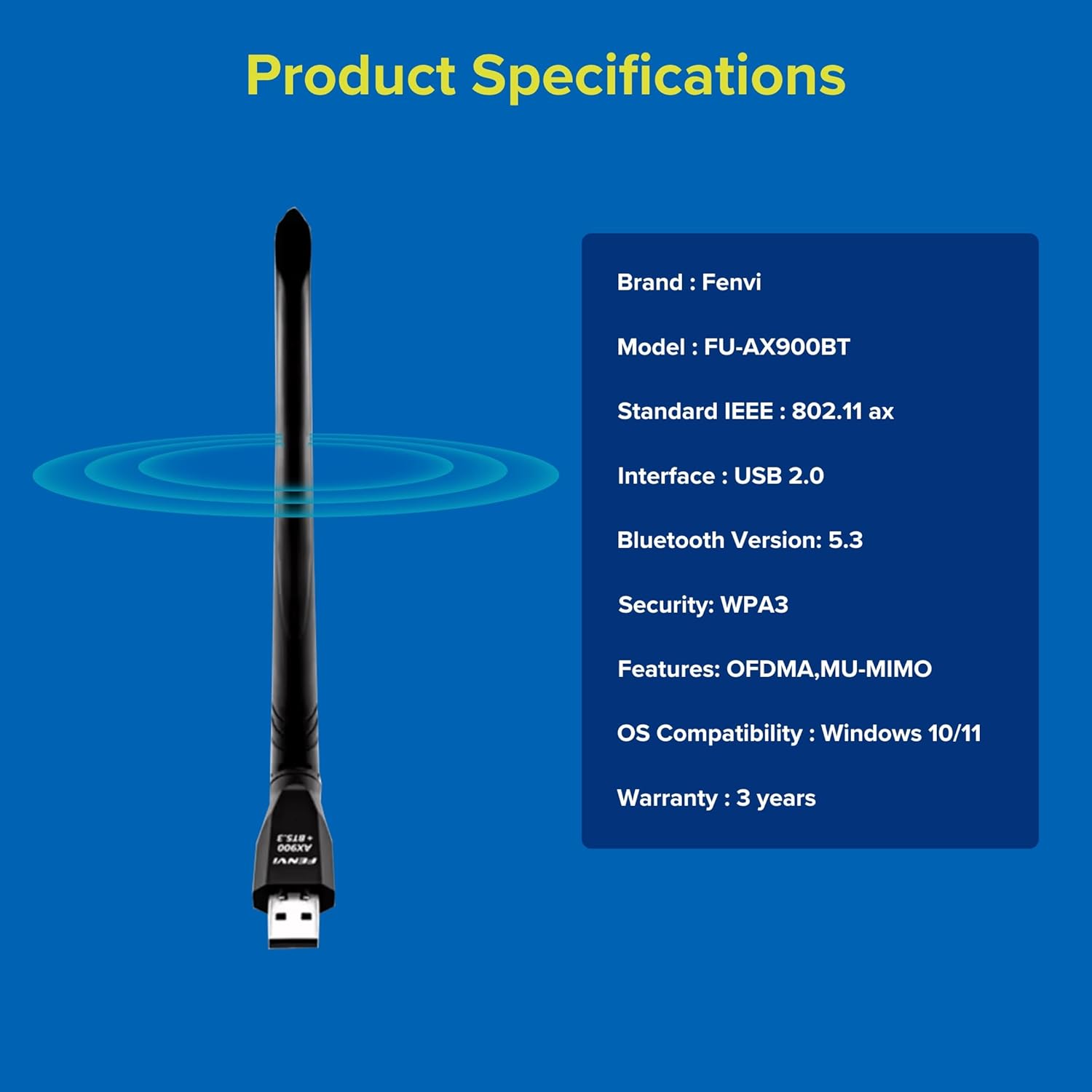
Billede 6: Fenvi FU-AX900BT Product Specifications. This graphic summarizes key specifications such as brand, model, Wi-Fi standard, interface, Bluetooth version, security, features, OS compatibility, and warranty.
Garanti og support
The Fenvi FU-AX900BT comes with a 3-Year India Warranty. For technical support, warranty claims, or further assistance, please contact Fenvi customer support through their official webwebstedet eller forhandleren, hvor produktet blev købt.
Gem venligst din købskvittering som købsbevis af garantiårsager.