
1. Introduktion
Thank you for choosing the TESSAN Small Flat Plug Power Strip. This device is designed to provide convenient power access for multiple electronic devices simultaneously, featuring a compact design, multiple outlets, and a retractable USB-C cable. Please read this manual carefully before use to ensure safe and optimal operation.
2. Nøglefunktioner
- 7-in-1 Power Solution: Equipped with 3 standard AC outlets, 2 USB-A ports, 1 USB-C port, and 1 retractable USB-C cable, allowing up to 7 devices to be charged concurrently.
- Ultra-Thin Flat Plug & Cord: Features a 0.35-inch flat head plug and a 5-foot ultra-thin extension cord, designed to fit in tight spaces behind furniture and maintain a neat appearance. The 45-degree angled plug prevents blocking adjacent outlets.
- 20W USB-C hurtigopladning: The retractable USB-C cable supports PD20W for rapid phone charging. The USB-A ports provide up to 2.4A (12W Max), and the fixed USB-C port provides up to 3A (15W Max).
- Godkendt af krydstogtskib: This power strip is designed without surge protection, making it compliant with cruise ship regulations.
- Monterbart design: Includes a mounting hole for secure installation on walls, workbenches, or under counters. Four rubber feet on the base prevent slipping.
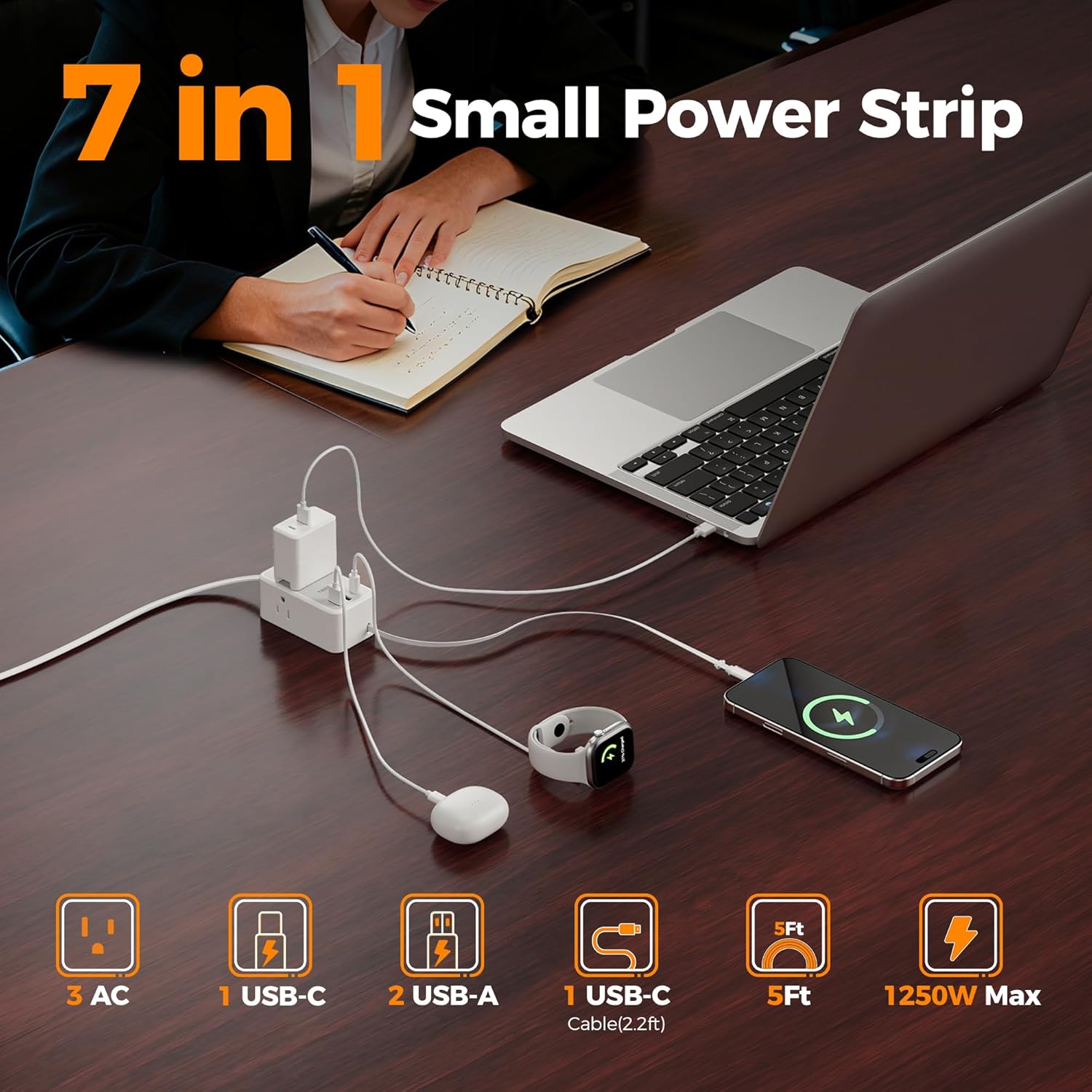
Figur 1: Overview of the 7-in-1 TESSAN Power Strip.

Figure 2: The power strip efficiently charging various devices simultaneously.
3. Sikkerhedsinstruktioner
- Do not exceed the maximum power rating of 1250W (10A, 125V).
- This device is for indoor use only. Avoid exposure to moisture or wet conditions.
- Do not disassemble or modify the power strip.
- Opbevares utilgængeligt for børn.
- Sørg for, at stikket er sat helt ind i stikkontakten.
- Do not use with appliances that require more power than the unit can provide.
- This power strip does not offer surge protection.
4. Pakkens indhold
- TESSAN Small Flat Plug Power Strip (Model: TS-PS10US00)
- Brugermanual
5. Opsætningsvejledning
- Pakker ud: Tag forsigtigt strømskinnen ud af emballagen.
- Tilslut: Insert the flat plug of the power strip into a standard 3-prong wall outlet. The ultra-thin design allows it to fit behind furniture.
- Bekræft strøm: A small LED indicator light on the power strip will illuminate, confirming that the unit is receiving power and is ready for use.
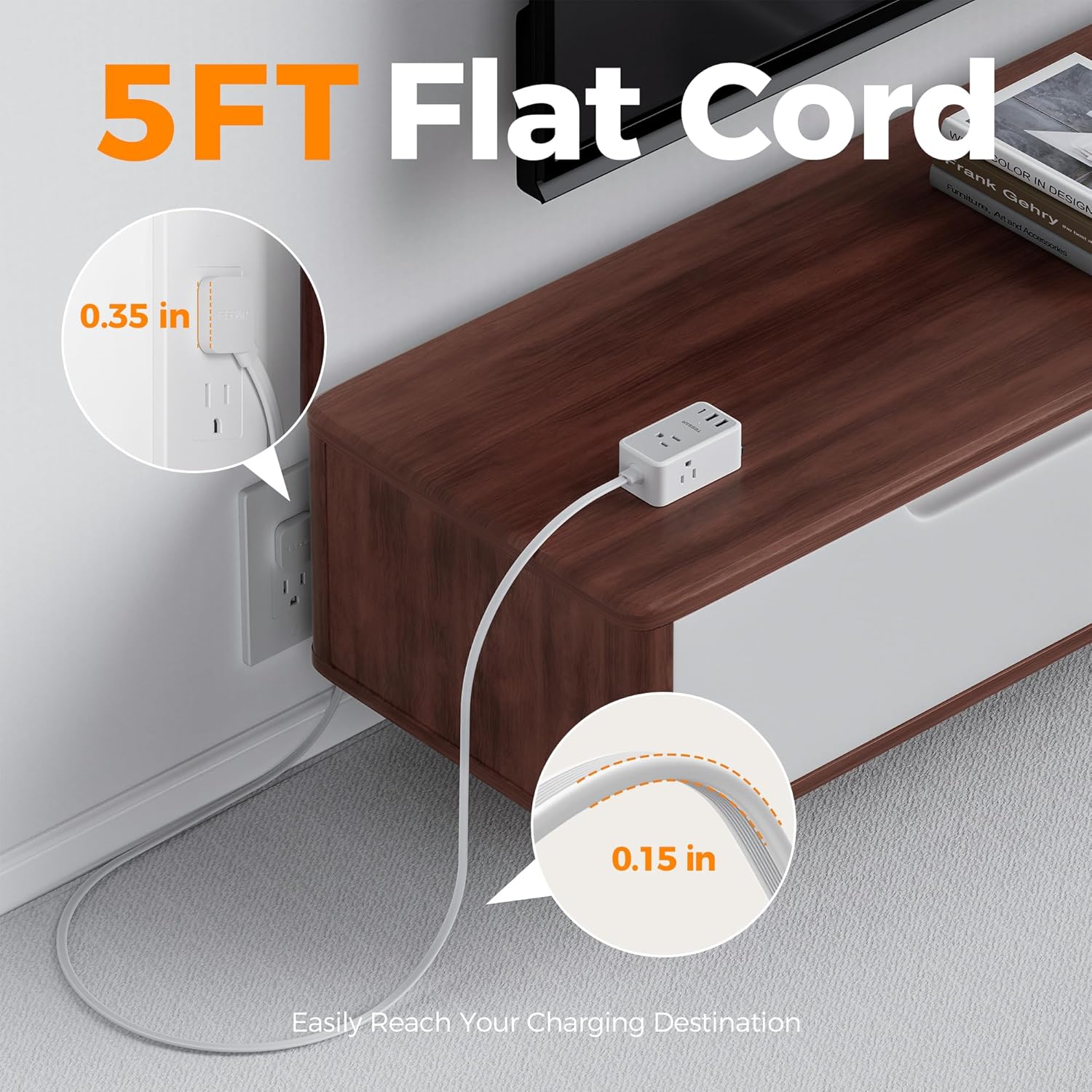
Figure 3: The 5-foot flat cord and plug designed to fit discreetly behind furniture.

Figur 4: Den ultratynde profile of the extension cord.

Figure 5: The 45-degree angled flat plug design.
Video 1: Demonstration of how the flat plug and thin cord can easily fit behind furniture like dressers, beds, and couches.
6. Betjeningsvejledning
- Brug af AC-stikkontakter: Plug your devices directly into any of the 3 AC outlets. Ensure the device's power requirements do not exceed the power strip's maximum rating.
- Brug af USB-porte:
- USB-A porte: Connect your USB-A compatible devices to the two USB-A ports for charging. Each port provides up to 2.4A.
- USB-C-port: Connect your USB-C compatible devices to the dedicated USB-C port for charging. This port provides up to 3A.
- Udtrækkeligt USB-C-kabel:
- At forlænge: Gently pull the retractable USB-C cable to the desired length. It will lock in place. The cable extends up to 2.2 feet (70cm).
- For at trække tilbage: Gently pull the cable slightly beyond its current length (no more than half an inch), then release it. The cable will automatically retract into the unit.
- Opladning af flere enheder: The power strip is designed to charge multiple devices simultaneously. The total power output for all ports combined should not exceed 1250W.
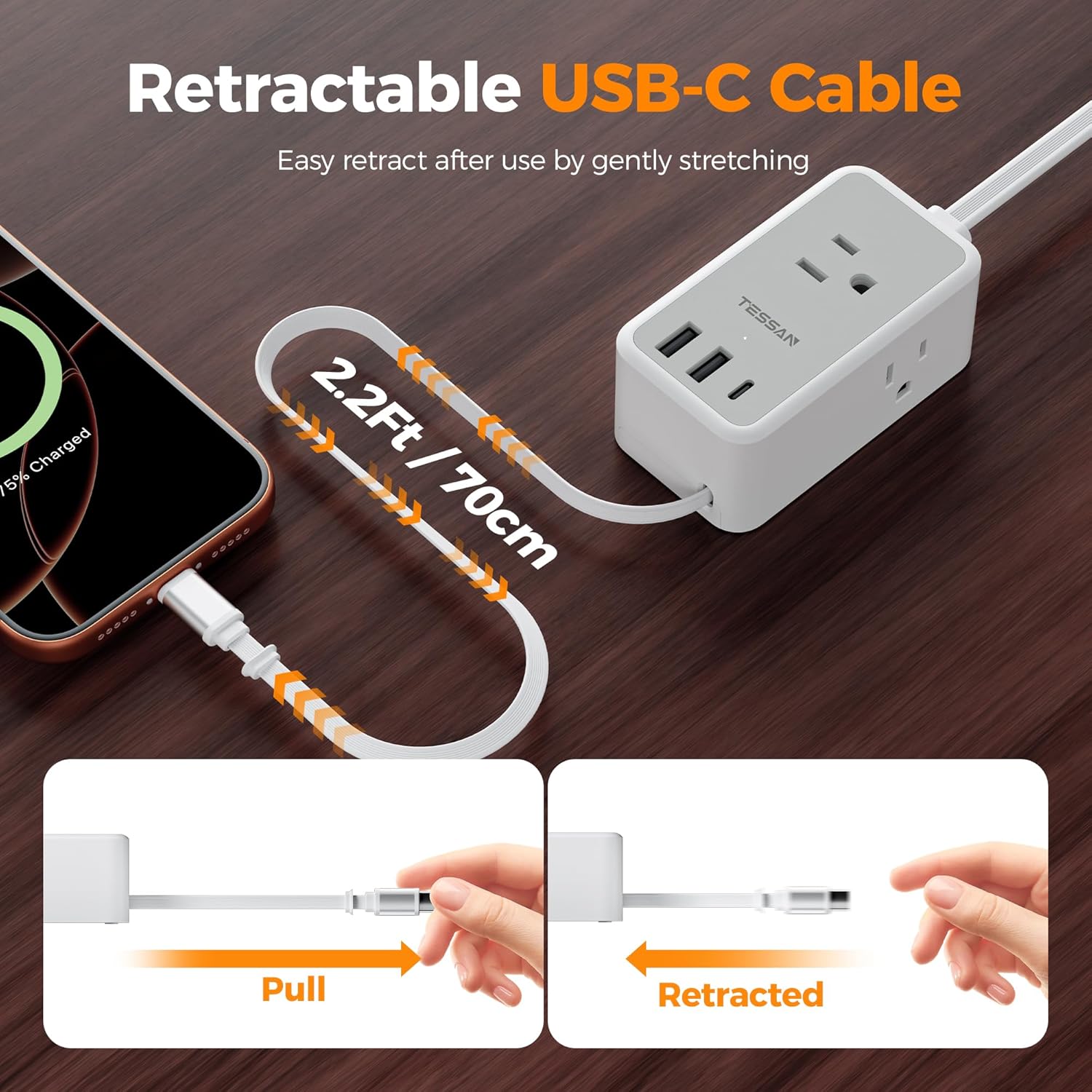
Figure 6: The retractable USB-C cable in use, showing extension and retraction steps.

Figure 7: Visual instructions for operating the retractable USB-C cable.

Figure 8: USB-C PD 20W fast charging capabilities.
Video 2: A demonstration of the TESSAN power strip's slim design and multiple charging options in action.
7. Vedligeholdelse
- Rensning: Tag stikket ud af stikkontakten før rengøring. Brug en tør, blød klud til at tørre overfladen af. Brug ikke flydende rengøringsmidler eller spray.
- Opbevaring: When not in use, store the power strip in a cool, dry place away from direct sunlight and moisture. Ensure the retractable cable is fully retracted.
8. Fejlfinding
- Ingen strømindikator:
- Sørg for, at strømskinnen er tilsluttet en funktionel stikkontakt.
- Kontroller, om selve stikkontakten fungerer ved at tilslutte en anden enhed.
- Enheden oplades ikke:
- Verify that the power strip is receiving power (LED indicator is on).
- Ensure your device's charging cable is properly connected to both the power strip and your device.
- Check if the device's power requirements exceed the power strip's capacity or the individual port's output.
- For the retractable USB-C cable, ensure it is fully extended and locked before connecting your device. If issues persist, try retracting and re-extending the cable.
- Retractable Cable Not Working Properly:
- If the cable does not extend, gently pull it out slowly.
- If the cable does not retract, gently pull it out slightly further (about half an inch) and then release it to trigger the retraction mechanism. Avoid forcing the cable.
9. Specifikationer
| Feature | Specifikation |
|---|---|
| Mærke | THESSAN |
| Modelnummer | TS-PS10US00 |
| Farve | Grå |
| Samlet antal AC-udtag | 3 |
| USB-A porte | 2 (2.4A Max per port) |
| USB-C-port | 1 (3A Max) |
| Udtrækkeligt USB-C-kabel | 1 (2.2ft / 70cm, PD20W) |
| Voltage | 125 volt |
| Maksimal strøm | 10 Amps |
| Maksimal effekt | 1250W |
| Stiktype | Type A (Flat Plug, 45-degree angle) |
| Ledningslængde | 5 fod |
| Emnedimensioner (L x B) | 3.74 cm L x 2.08 cm B |
| Særlige funktioner | Cruise Ship Approved, Retractable Cord, Mountable |
| Kompatible enheder | Laptop, Small Appliance, Smartphone, Tablet |
10. Garanti og support
TESSAN products are designed for reliability and performance. For warranty information, technical support, or customer service inquiries, please refer to the contact details provided on the product packaging or visit the official TESSAN webwebsted. Gem venligst din købskvittering til garantikrav.


