
1. Produktet er slutview
The darkFlash DB330M MESH is a Micro-ATX PC case designed for high heat dissipation and optimal airflow. It features a full mesh front panel and comes with three pre-installed PWM ARGB fans to ensure efficient cooling and dynamic lighting effects. This case supports various components, offering a user-friendly experience for PC builders.
2. Nøglefunktioner
- High Airflow Mesh Front Panel: Provides superior intake and lower temperatures compared to panoramic cases.
- Pre-installed 3x DR08 PWM ARGB Fans: Ensures powerful cooling and vibrant RGB effects right out of the box.
- Vertical Airflow Cooling: Two fan positions above the power supply direct airflow to the graphics card for improved cooling.
- Gennemtænkt design: Includes magnetic dust filters on the top and panel to keep components clean.
- Nem installation: User-friendly design facilitates hassle-free cable management and component access.
3. Specifikationer
| Feature | Detalje |
|---|---|
| Mærke | mørkFlash |
| Modelnavn | DB330 MESH |
| Bundkort kompatibilitet | Mikro ATX |
| Sagstype | Midi-tårnet |
| Farve | Sort |
| Materiale | Plastik, hærdet glas |
| Produktmål (D x B x H) | 8.58 cm x 13.11 cm x 15.75 cm |
| Strømforsyningsmonteringstype | Bundmontering |
| Afkølingsmetode | Luft, vand |
| Samlede USB 3.0-porte | 1 |
| Særlige funktioner | Indbygget ventilator, støvfilter, RGB-belysning |
| Internal Bays Quantity | 3 |
| Max GPU-længde | 305 mm |
| Max CPU kølerhøjde | 180 mm |
| Radiatorstøtte | Up to 240mm on top |
4. Opsætning og installation
This section provides a general guide for installing components into your darkFlash DB330M MESH PC case. Always refer to your component manuals for specific installation instructions.
4.1 Forberedelse af sagen
Before installing components, ensure the case is placed on a stable, flat surface. Remove the side panels and any protective films.

Figure 4.1: The darkFlash DB330M MESH PC Case with side panels and front mesh removed, illustrating the ease of access for component installation.
4.2 Component Compatibility and Placement
- Bundkort: Supports Micro ATX and ITX motherboards. Install the motherboard onto the standoffs provided.
- Grafikkort: Maximum length of 305mm. Ensure your GPU fits within this specification.
- CPU køler: Maksimal højde på 180 mm for luftkølere.
- Strømforsyning (PSU): Supports standard size PSUs with a maximum length of 180mm, mounted at the bottom.
- Radiator: Up to 240mm AIO liquid cooling systems can be installed on the top panel.
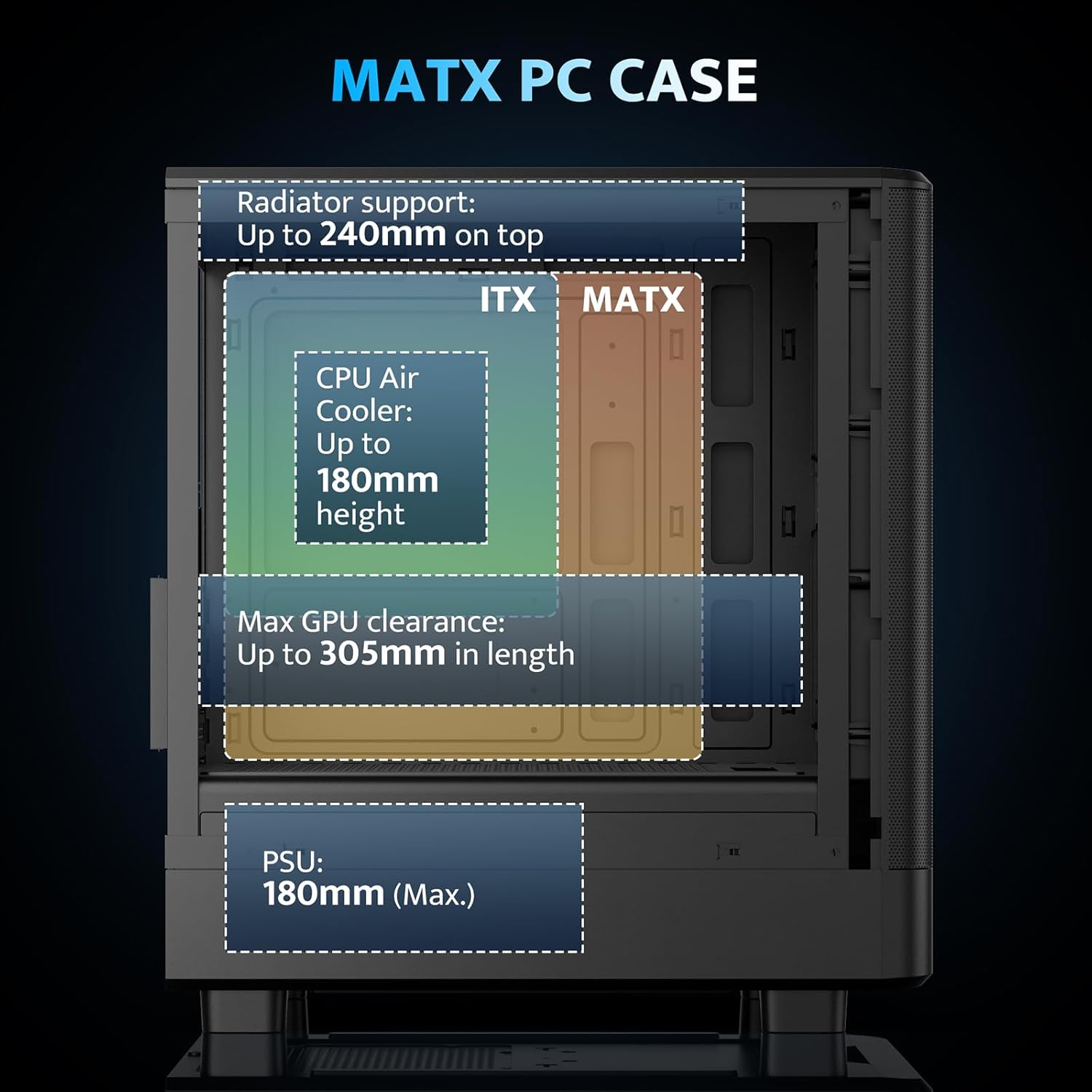
Figure 4.2: Internal layout and maximum dimensions for motherboard (ITX, MATX), CPU air cooler, GPU, and PSU.
4.3 Ventilatorkonfiguration
The case comes with three pre-installed 120mm PWM ARGB fans. Two are located at the front for intake, and one at the rear for exhaust. Additional fan positions are available at the top (up to 2x 120mm/140mm) and bottom (up to 2x 120mm) for enhanced cooling.

Figure 4.3: Illustration of the pre-installed 120mm PWM ARGB fans and their placement within the case.

Figure 4.4: Optimized airflow channels demonstrating natural vertical air ducts for efficient heat dissipation.
5. Betjeningsvejledning
5.1 I/O Panel Functions
Frontpanelet med I/O giver nem adgang til vigtige porte og kontroller:
- Power knap: For at tænde eller slukke systemet.
- HD Audio Ports: Til tilslutning af hovedtelefoner og mikrofoner.
- USB 2.0-porte: Til tilslutning af periferiudstyr.
- USB 3.0-port: Til højhastigheds dataoverførsel.
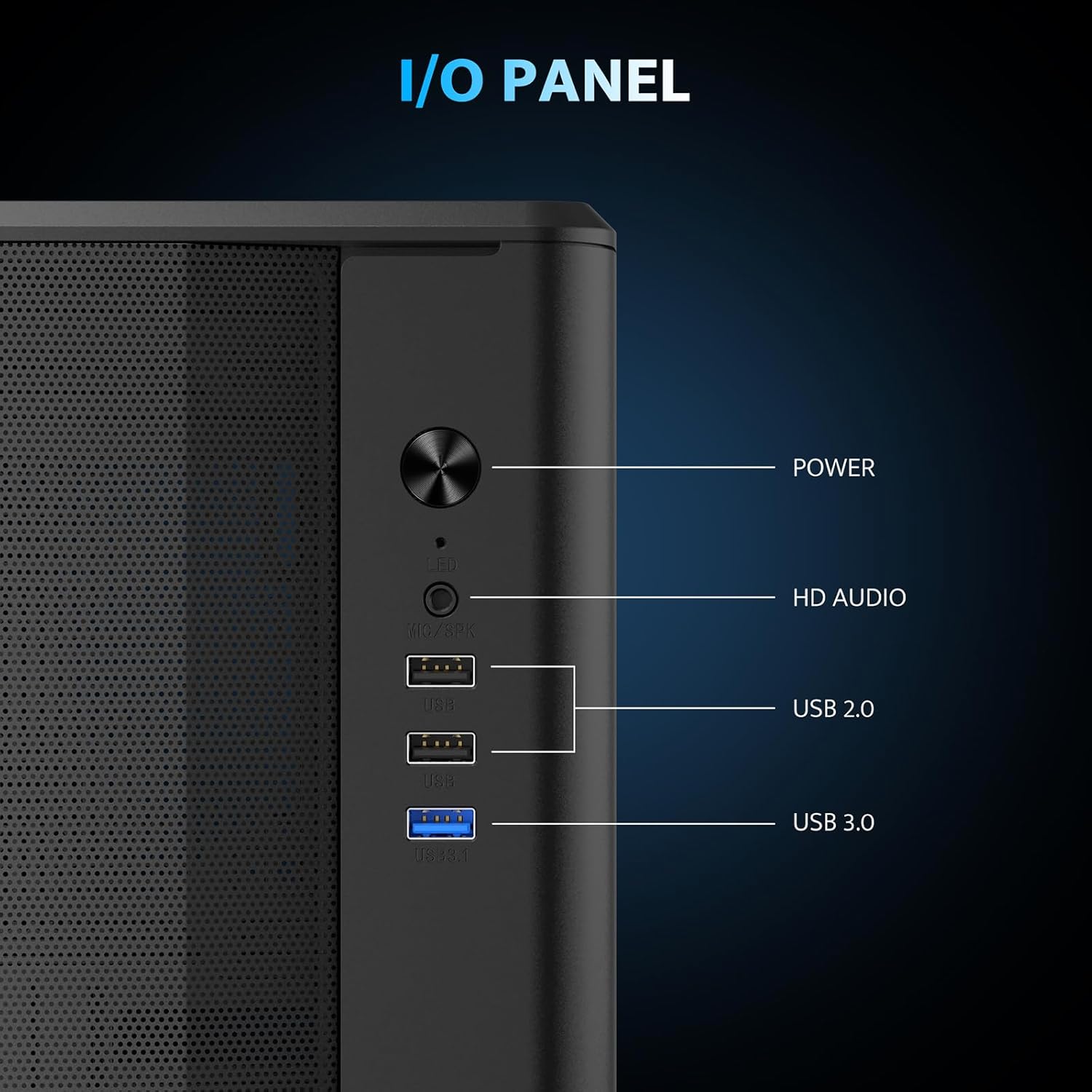
Figur 5.1: Detaljeret view of the I/O panel and its functionalities.
5.2 ARGB-blæserstyring
The pre-installed fans are PWM ARGB fans. Their lighting effects can be controlled via your motherboard's ARGB software if your motherboard supports it. Please note that an ARGB Hub Controller is not included with the case.
6. Vedligeholdelse
6.1 Rengøring af støvfilter
The darkFlash DB330M MESH PC case is equipped with magnetic dust filters on the top and a panel dust filter to prevent dust accumulation. Regularly clean these filters to maintain optimal airflow and cooling performance.
- To clean the top dust filter, gently lift and detach the magnetic filter.
- Use a soft brush or compressed air to remove accumulated dust.
- Reattach the filter once clean.

Figure 6.1: Top panel with magnetic dust filter and large cooling holes for AIO support.

Figure 6.2: High-airflow dustproof mesh front panel, which also acts as a dust filter.
6.2 Generel rengøring
Use a soft, dry cloth to wipe down the exterior of the case. Avoid using harsh chemicals or abrasive materials that could damage the finish.
7. Fejlfinding
Hvis du støder på problemer med din pc, kan du overveje følgende generelle fejlfindingstrin:
- Ingen strøm: Sørg for, at alle strømkabler (strømforsyning til væg, strømforsyning til bundkort, CPU, GPU) er korrekt tilsluttet. Kontroller tænd/sluk-knappens forbindelse til bundkortet.
- Ventilatorer drejer ikke/ingen RGB: Verify fan power connections to the motherboard or fan controller. Check ARGB connections for lighting issues. Ensure your motherboard's BIOS/UEFI settings or software are configured correctly for fan control and RGB.
- Overophedning: Confirm all fans are spinning in the correct direction for optimal airflow. Ensure dust filters are clean and not obstructing airflow. Check CPU cooler and GPU cooler installations.
- USB-porte virker ikke: Kontroller USB-headerforbindelserne fra det forreste I/O-panel til bundkortet.
For more specific issues, consult the manuals for your individual components (motherboard, GPU, PSU, etc.) or seek assistance from a qualified technician.
8. Garanti og support
The darkFlash DB330M MESH PC Case comes with a 1 års garanti. For warranty claims or technical support, please contact darkFlash customer service through their official webwebstedet eller forhandleren, hvor produktet blev købt. Gem din købsbevis for at validere garantien.