
Indledning
The Rapoo M308 is a versatile multi-mode wireless mouse designed for efficiency and comfort. It features an ambidextrous design, allowing comfortable use for both right-handed and left-handed individuals. With its dual connectivity options, Bluetooth 5.0 and 2.4 GHz wireless, you can seamlessly connect to up to three devices and switch between them with ease. The mouse is engineered for long-lasting performance, offering a battery life of up to 12 months.
Pakkens indhold
- Rapoo M308 Multi-mode Wireless Mouse
- USB-modtager (gemt inde i musen)
- 2 AA batterier
- Quick Start Guide (denne manual)
Produkt overview
Familiarize yourself with the components of your Rapoo M308 mouse.
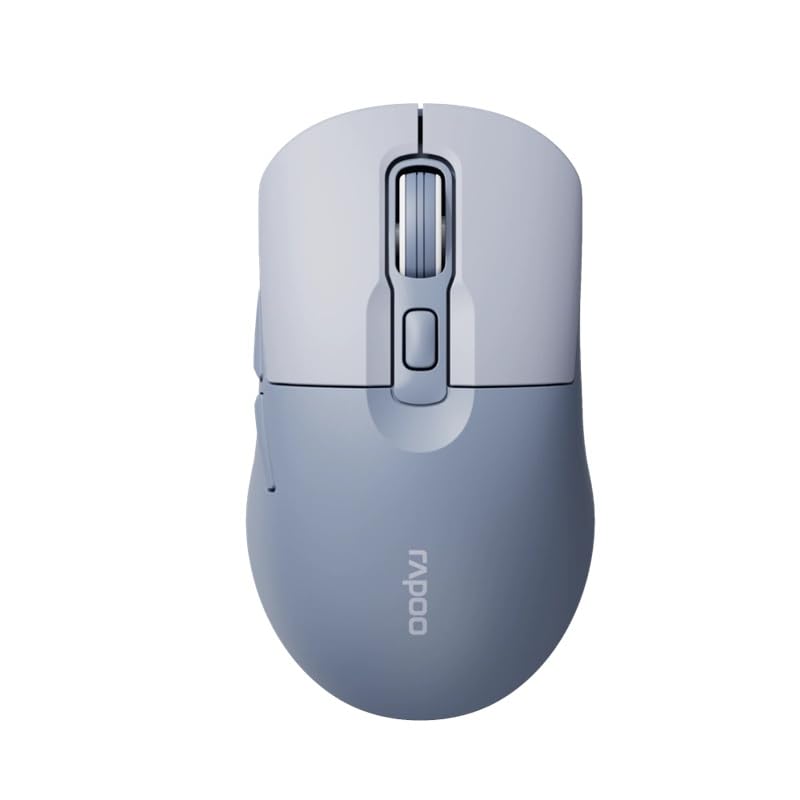
Image: The Rapoo M308 Multi-mode Wireless Mouse in blue, showcasing its ergonomic, ambidextrous design with a scroll wheel and multiple buttons.
- Venstre knap: Standard venstreklikfunktion.
- Højre knap: Standard højreklikfunktion.
- Scrollhjul: Til scrollning og mellemklikfunktion.
- DPI knap: Justerer markørfølsomheden (DPI).
- Mode Switch Button/Indicator: Switches between connected devices (2.4G, Bluetooth 1, Bluetooth 2) and indicates current mode.
- Sideknapper: Forward/Backward navigation (programmable).
- Batterirum: Located on the underside, holds 2 AA batteries.
- USB-modtagerstik: Located inside the battery compartment for storage.
Opsætning
1. Batteriinstallation
- Åbn batteridækslet på undersiden af musen.
- Isæt de to AA-batterier, og sørg for at polerne vender korrekt (+/-).
- Luk batterirummets dæksel.
2. Forbindelse via 2.4 GHz trådløs
- Remove the USB receiver from its storage slot inside the battery compartment.
- Sæt USB-modtageren i en ledig USB-port på din computer.
- Turn on the mouse. The mouse should automatically connect to your computer. The mode indicator light will show a steady green light for a few seconds.
3. Tilslutning via Bluetooth
The M308 mouse supports two Bluetooth connections (BT1 and BT2).
- Tænd for musen.
- Press the mode switch button to select either Bluetooth 1 (blue light flashes slowly) or Bluetooth 2 (blue light flashes slowly).
- Press and hold the mode switch button for 3 seconds until the blue light starts flashing rapidly. This indicates the mouse is in pairing mode.
- Gå til Bluetooth-indstillingerne på din computer eller enhed, og søg efter nye enheder.
- Select "Rapoo M308" from the list of available devices to pair.
- Once paired, the blue light will become steady for a few seconds and then turn off.
Betjeningsvejledning
Skift mellem enheder
The Rapoo M308 allows you to connect to up to three devices (one 2.4G wireless and two Bluetooth devices) and switch between them.
- Briefly press the mode switch button to cycle through the connected devices: 2.4G (green light), Bluetooth 1 (blue light), Bluetooth 2 (blue light).
- The indicator light will briefly illuminate in the corresponding color to confirm the selected mode.
DPI justering
Press the DPI button (usually located behind the scroll wheel) to cycle through different DPI settings. This changes the cursor speed and sensitivity. The indicator light may flash to show the current DPI level (e.g., one flash for low DPI, two for medium, etc.).
Opretholdelse
- Rensning: Brug en blød, tør klud til at rengøre musen. Ved genstridigt snavs, brug en let tør klud.amp En klud kan bruges, men sørg for, at der ikke trænger fugt ind i enheden.
- Udskiftning af batteri: When the mouse performance degrades or the indicator light signals low battery, replace the two AA batteries following the installation steps.
- Opbevaring: Når musen ikke er i brug i længere tid, skal den slukkes for at spare på batteriet. Opbevar USB-modtageren inde i musen for at forhindre tab.
Fejlfinding
- Musen svarer ikke:
- Kontroller om musen er tændt.
- Sørg for, at batterierne er korrekt installeret og ikke er afladede. Udskift dem om nødvendigt.
- For 2.4G-forbindelse skal du sørge for, at USB-modtageren er korrekt tilsluttet en fungerende USB-port. Prøv en anden USB-port.
- For Bluetooth connection, ensure the mouse is in the correct Bluetooth mode (BT1 or BT2) and successfully paired with your device. Re-pair if needed.
- Markørbevægelsen er uregelmæssig eller langsom:
- Rengør den optiske sensor på undersiden af musen.
- Sørg for at bruge musen på en passende overflade (ikke-reflekterende, ikke-gennemsigtig).
- Juster DPI-indstillingen ved hjælp af DPI-knappen.
- Kan ikke skifte mellem enheder:
- Ensure all devices are properly connected (2.4G receiver plugged in, Bluetooth devices paired).
- Briefly press the mode switch button to cycle through modes. A long press will initiate Bluetooth pairing mode.
Specifikationer
| Mærkenavn | Rapoo |
| Model | M308 |
| Forbindelsesteknologi | Bluetooth 5.0, 2.4 GHz Radio Frequency |
| Særlige funktioner | Letvægts |
| Bevægelsesdetektion | Optisk |
| Knap Antal | 4 |
| Håndorientering | Ambidekstrøs |
| Anbefalede anvendelser | Kontor |
| Kompatible enheder | Personlig computer, bærbar computer |
| Varens vægt | 50 gram |
| Operativsystem | Linux, Mac, Windows |
| Batterilevetid | 12 måneder |
| Antal batterier | 2 AA (inkluderet) |
| Strømkilde | Batteridrevet |
| Minimum OS påkrævet | Mac OS 14 Sonoma, Windows 11 |
| Materiale | Plast |
| Oprindelsesland | Kina |
| Inkluderede komponenter | Mus |
Garanti og support
The Rapoo M308 Multi-mode Wireless Mouse comes with a 2 års garanti fra købsdatoen. Denne garanti dækker fabrikationsfejl og funktionsfejl under normal brug.
For technical support, warranty claims, or further assistance, please refer to the contact information provided on the Rapoo official website or your local distributor's support channels. Please retain your proof of purchase for warranty validation.