
Indledning
This instruction manual provides detailed information for the safe and effective use of your NBD S205D 8K 64MP Digital Camera. Please read this manual thoroughly before operating the device and retain it for future reference. The NBD S205D is designed for high-quality photo and video capture, featuring 8K video recording, a 64MP sensor, autofocus, 16x digital zoom, and Wi-Fi connectivity.
Sikkerhedsoplysninger
- Udsæt ikke kameraet for vand eller overdreven fugt.
- Undgå at tabe kameraet eller udsætte det for hårde stød.
- Hold kameraet væk fra stærke magnetfelter.
- Forsøg ikke at skille kameraet ad eller ændre det. Dette vil ugyldiggøre garantien.
- Use only NBD-approved accessories and power adapters.
- Opbevar kameraet på et køligt, tørt sted, når det ikke er i brug.
- Opbevares utilgængeligt for børn.
Pakkens indhold
Bekræft at alle varer er til stede i din pakke:
- NBD S205D Digital Camera
- 2 x Lithium-ion Batteries (2000 mAh each)
- 64 GB Micro SD-kort
- USB opladningskabel
- Brugervejledning (dette dokument)
- Kamerarem
- Microphone (if included in kit)
Produkt overview
Gør dig bekendt med kameraets komponenter.
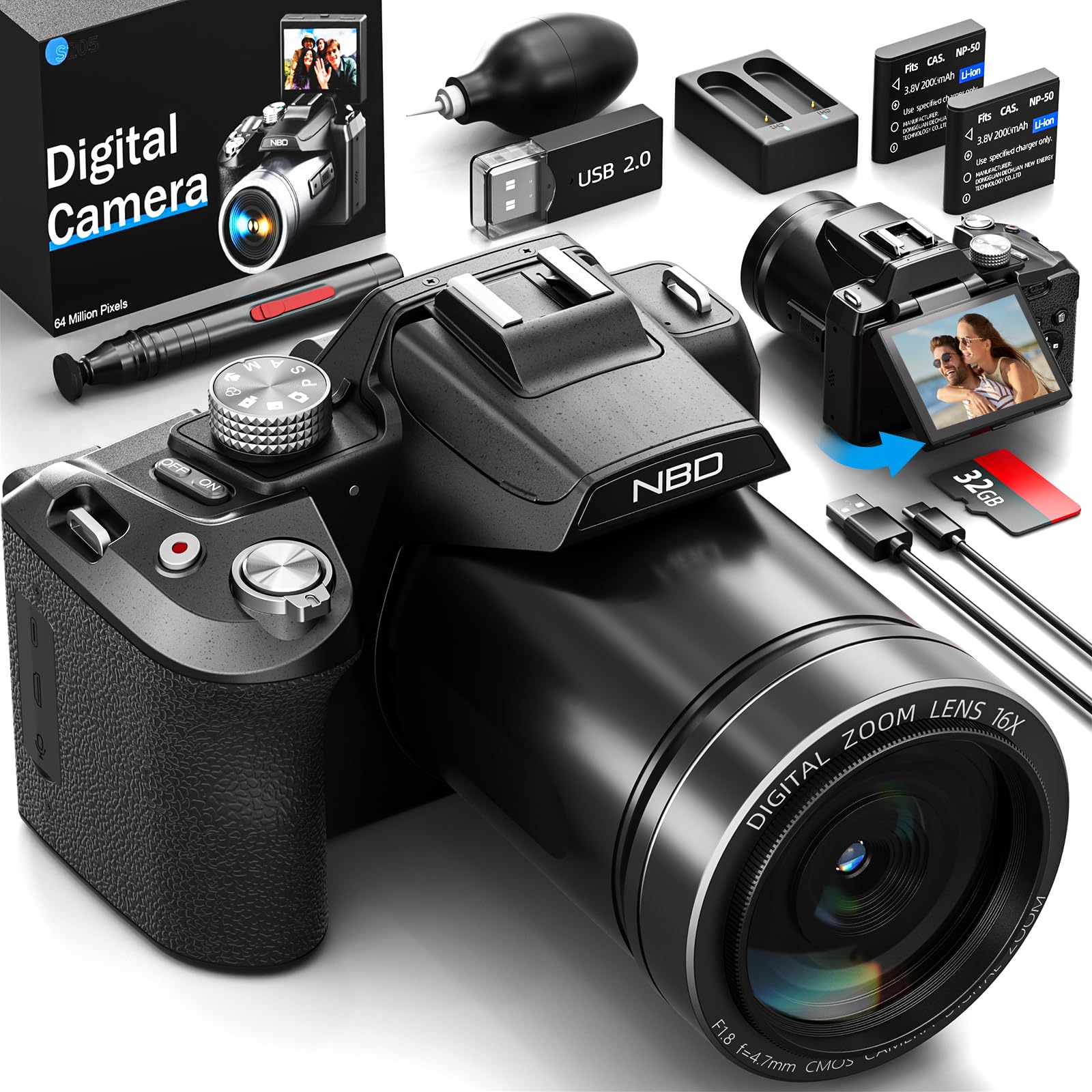
Billede: Forside view of the NBD S205D Digital Camera, showing the lens, flash, and the 3-inch 180-degree rotatable screen in an open position. The camera body is deep black.
Nøglekomponenter:
- Linse: Captures images and videos. Features F1.8 night vision.
- Blitz: Giver belysning under forhold med svagt lys.
- 3" 180° Rotatable Screen: For framing shots, reviewing content, and vlogging.
- Power knap: Tænder/slukker kameraet.
- Udløserknap: Press halfway to focus, fully to capture a photo.
- Funktionsvælger: Selects shooting modes (e.g., Photo, Video, Playback).
- Zoom-greb: Controls digital zoom (up to 16x).
- Navigationsknapper: Til menunavigation og justering af indstillinger.
- Mikrofonindgang: Til tilslutning af ekstern mikrofon.
- USB-port: Til opladning og dataoverførsel.
- SD-kortplads: Til isætning af Micro SD-kort.
- Batterirum: Houses the Lithium-ion batteries.
Opsætning
1. Opladning af batterierne
- Åbn batterirummets dæksel.
- Insert the two provided Lithium-ion batteries, ensuring correct polarity.
- Luk batterirummets dæksel.
- Connect the camera to a power source using the USB charging cable. The charging indicator will illuminate.
- Charge until the indicator light changes or turns off, indicating a full charge.
2. Indsættelse af Micro SD-kortet
- Find SD-kortstikket på siden af kameraet.
- Insert the 64GB Micro SD card with the gold contacts facing down, until it clicks into place.
- For at fjerne det skal du forsigtigt trykke på kortet, indtil det springer ud.
- Note: Ensure the camera is powered off before inserting or removing the SD card to prevent data corruption.
3. Første opstart
- Tryk og hold tænd/sluk-knappen nede, indtil skærmen lyser.
- Følg vejledningen på skærmen for at indstille sprog, dato og klokkeslæt.
Betjeningsvejledning
1. Tage billeder
- Turn the Mode Dial to Fototilstand.
- Frame your shot using the rotatable screen.
- Press the Shutter button halfway down to activate autofocus. The focus frame will turn green when focused.
- Tryk udløserknappen helt ned for at tage billedet.
- Use the Zoom Lever to adjust the 16x digital zoom.
2. Optagelse af videoer
- Turn the Mode Dial to Videotilstand.
- Press the Shutter button to start recording. A red indicator will appear on the screen.
- Tryk på udløserknappen igen for at stoppe optagelsen.
- The camera supports resolutions up to 8K/30FPS and 4K/60FPS. Adjust video resolution in the camera settings menu.
3. Afspilningstilstand
- Turn the Mode Dial to Afspilningstilstand.
- Use the Navigation buttons to browse through your photos and videos.
- Tryk på OK/Enter-knappen for at view et billede eller afspil en video.
4. Wi-Fi-forbindelse
- Enable Wi-Fi in the camera's settings menu.
- Download the NBD camera app on your smartphone or tablet.
- Connect your smart device to the camera's Wi-Fi network (SSID and password displayed on camera screen).
- Use the app to remotely control the camera, transfer files, and share content.
5. Night Vision (F1.8 Lens)
The camera's F1.8 lens is designed to capture significantly more light in low-light conditions, enhancing image clarity and detail without requiring additional settings. Simply use the camera as normal in dim environments.
Opretholdelse
- Rengøring af linsen: Use a soft, lint-free cloth specifically designed for camera lenses. Do not use abrasive materials or harsh chemicals.
- Rengøring af skærmen: Wipe the screen gently with a microfiber cloth.
- Kropsrensning: Brug en blød, tør klud til at tørre kamerahuset af. Ved genstridigt snavs, tør letampen klud med vand.
- Opbevaring: When not in use for extended periods, remove the batteries and store the camera in a dry, dust-free environment.
- Batteripleje: Recharge batteries regularly, even if not fully depleted, to maintain battery health.
Fejlfinding
| Problem | Mulig årsag | Løsning |
|---|---|---|
| Kameraet tænder ikke. | Batteriet er afladet eller isat forkert. | Oplad batterierne helt. Sørg for, at batterierne er isat med den rigtige polaritet. |
| Kan ikke tage billeder/videoer. | SD-kortet er fuldt, låst eller ikke isat. | Insert a formatted SD card. Check if the SD card's write-protect switch is off. Delete unnecessary fileeller udskift kortet. |
| Billeder er slørede. | Lens is dirty, camera shake, or focus issue. | Rengør objektivet. Hold kameraet stabilt, eller brug et stativ. Sørg for, at autofokus låses, før du optager. |
| Wi-Fi-forbindelsen mislykkes. | Incorrect password, camera Wi-Fi not enabled, or app issue. | Verify Wi-Fi is enabled on the camera. Re-enter password. Restart camera and smart device. Reinstall the app if necessary. |
| Kort batterilevetid. | Frequent use of flash, Wi-Fi, or high-resolution recording. | Reduce use of power-intensive features. Carry spare charged batteries. |
Specifikationer
| Modelnummer | NBD-EU-S205D (S205D) |
| Sensor Technology | CMOS, 1/2-inch |
| Maksimal billedopløsning | 64 Megapixels (via interpolation) |
| Videooptagelsesopløsning | 8K/30FPS, 5K, 4K/60FPS, 2K, 1080P, 720P |
| Lensåbning | F1.8 (Night Vision) |
| Zoom type | 16x digital zoom |
| Vise | 3-inch 180° Rotatable OLED Screen (360 x 640 resolution) |
| Fokus Type | Automatisk, manuel |
| Billedstabilisering | Digital |
| Forbindelse | Wi-Fi, USB |
| Lagermedier | Micro SD Card (up to 128GB, 64GB included) |
| File Formater | MP4 (Video), JPEG (Photo) |
| Batteritype | Lithium-ion (2 x 2000 mAh included) |
| Dimensioner (L x B x H) | 12.7 x 12.5 x 8.5 cm |
| Vægt | Ca. 500 g |
| Farve | Dyb sort |
Garanti og support
The NBD S205D Digital Camera comes with a livstidsgaranti, covering manufacturing defects and malfunctions under normal use. For warranty claims or technical assistance, please contact NBD customer support.
NBD offers Kundesupport døgnet rundt to assist you with any questions or issues you may encounter. Please refer to the contact information provided on the NBD official website or your product packaging for support channels.
Note: Garantien dækker ikke skader forårsaget af misbrug, ulykker, uautoriserede reparationer eller normal slitage.


