
1. Produktet er slutview
The HEIBAS G7 Bluetooth Headset is designed for clear communication and audio playback, featuring advanced Bluetooth 6.0 connectivity, active and environmental noise cancellation, and a long-lasting battery. Its ergonomic design ensures a comfortable and secure fit for extended use.

Billede: Overview of the HEIBAS G7 Bluetooth Headset highlighting Bluetooth 6.0 features.
2. Pakkens indhold
Tjek venligst pakken for følgende varer:
- HEIBAS G7 Bluetooth Headset x 1
- Ear tips (S/M/L) x 3 pairs (6 pieces total)
- Type-C ladekabel x 1
- Brugsanvisning x 1

Image: Diagram showing the headset, charging case, ear tips, and charging cable included in the package.
3. Opsætning og parring
3.1 Indledende opladning
Before first use, fully charge the headset and its charging case using the provided Type-C cable. The LED display on the charging case indicates the battery level.

Image: The charging case with an LED display showing battery percentage, der angiver opladningsstatus.
3.2 Parring med en enhed
- Sørg for, at headsettet er opladet.
- Åbn opladningsetuiet. Headsettet går automatisk i parringstilstand.
- Aktiver Bluetooth på din smartphone, tablet eller pc, og søg efter tilgængelige enheder.
- Select "G7" from the list of devices to connect.
- Når headsettet er tilsluttet, er det klar til brug.
The headset supports automatic connection to previously paired devices when taken out of the case.

Image: The headset and charging case next to a smartphone, illustrating automatic connection upon removal from the case.
4. Bære headsettet
The G7 headset features an adjustable design for a secure and comfortable fit on either ear.
4.1 Justering af pasformen
- The ear hook can be rotated 180° and 360° to fit various ear shapes.
- The head part can rotate 45° left or right, allowing use on either the left or right ear.
- Choose the appropriate ear tip size (S, M, L) for optimal comfort and sound quality.

Image: Diagrams illustrating the 180°, 360°, and 45° adjustment capabilities of the headset for a customized fit.
4.2 Bæremetode
- Rotate the ear hook 90 degrees to the left (for right ear use, rotate 90 degrees to the right).
- Rotate the ear hook 90 degrees upwards.
- Rotate the earphone head and adjust its position to fit your ear shape.
Image: Step-by-step guide on how to wear the headset, including selecting the correct ear tip size (S, M, L).
5. Betjeningselementer og funktioner
The G7 headset features physical buttons for intuitive control of various functions.

Image: Diagram showing the physical buttons on the headset and their corresponding functions, including power, volume, play/pause, call control, mute, and Siri activation.
5.1 Grundlæggende betjening
- Tænd/sluk: Tryk og hold hovedknappen nede i 3 sekunder.
- Afspil/pause: Tryk enkelt gang på hovedknappen.
- Lydstyrke op/ned: Press the volume buttons (indicated by +/-).
- Næste / forrige nummer: Press and hold the volume buttons for 2 seconds.
5.2 Opkaldshåndtering
- Besvar/afslut opkald: Tryk enkelt gang på hovedknappen.
- Afvis opkald: Tryk og hold hovedknappen nede i 2 sekunder.
- Slå lyden fra/til: During a call, press the dedicated mute button (located on the side of the headset).
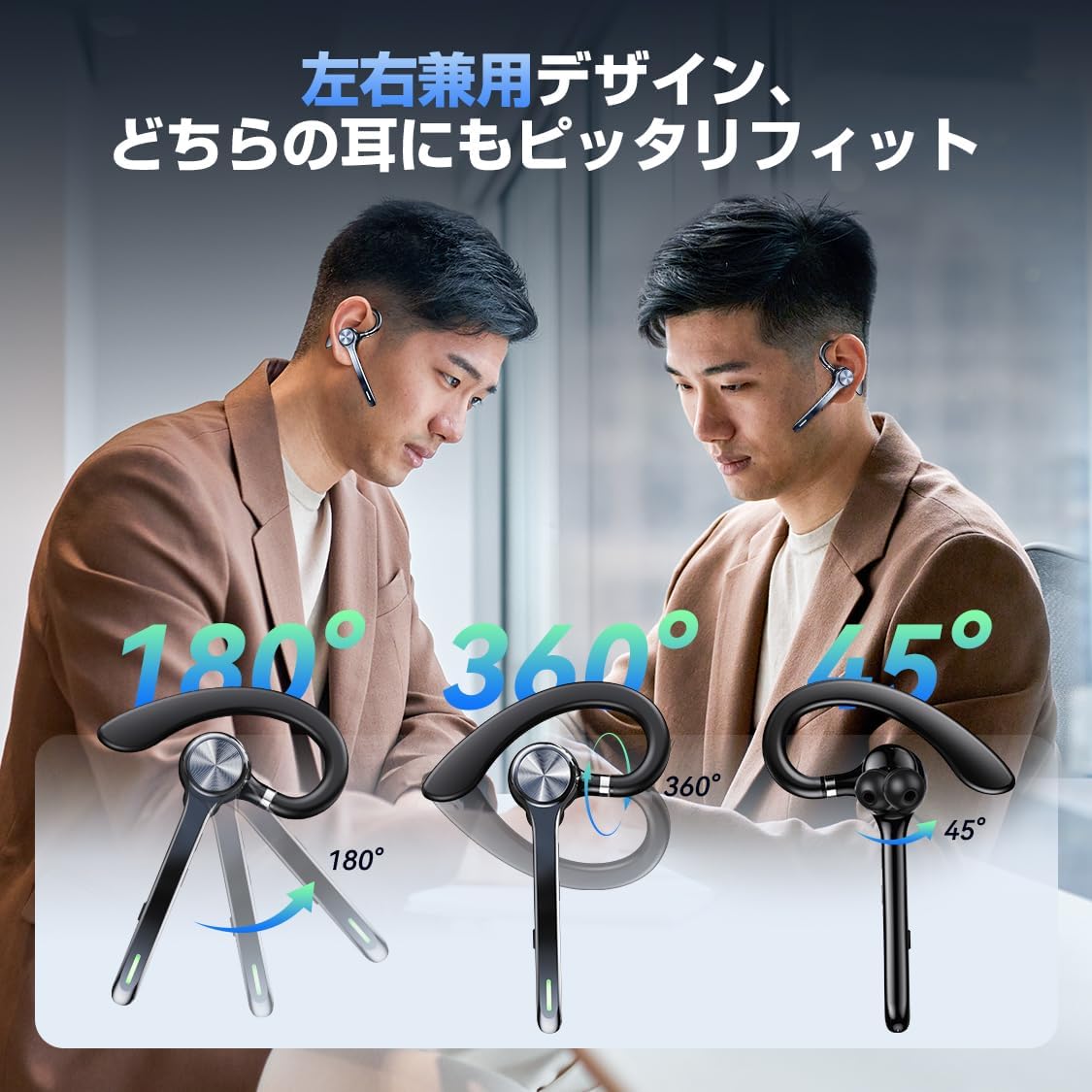
Image: A person using the headset during a call, demonstrating the mute function.
5.3 Stemmeassistent (Siri)
- Aktiver Siri: Dobbelttryk på hovedknappen.
6. Avancerede funktioner
6.1 Multipunktforbindelse
The G7 headset supports simultaneous connection to two devices (e.g., a smartphone and a PC). This allows for seamless switching between music playback on one device and calls on another.

Image: The headset connected to both a smartphone and a laptop, demonstrating the multipoint connection feature.
6.2 Støjreduktion (ANC & ENC)
- Aktiv støjreduktion (ANC): Reduces low-frequency ambient noise during music playback (e.g., train sounds, air conditioner hum).
- Environmental Noise Cancellation (ENC): Suppresses background noise during calls, ensuring your voice is transmitted clearly to the other party.

Image: Diagram illustrating the effect of ANC and ENC on sound, showing noise reduction before and after cancellation.
7. Batteri og opladning
The G7 headset offers extended battery life for prolonged use.
- Headset Playback Time: Cirka 21-23 timer på en enkelt opladning.
- Total Playback Time (with charging case): Op til 108 timer.
- Opladningsæskekapacitet: 500 mAh.
- Opladningsgrænseflade: Type-C.
- Opladningstid: Cirka 2-2.5 timer for fuld opladning.

Image: Visual representation of the headset's battery life, including single playback time, total time with the charging case, and standby time.
8. Specifikationer
| Modelnavn | G7 |
| Mærke | HEIBAS (Origin qilin) |
| Forbindelsesteknologi | Trådløs (Bluetooth 6.0) |
| Hovedtelefonens formfaktor | Bluetooth Headset (Single Ear) |
| Støjreduktion | ANC + ENC Dual Noise Cancellation |
| Batterilevetid (headset) | 21-23 timer |
| Samlet batterilevetid (med etui) | Op til 108 timer |
| Opladningsetui Kapacitet | 500mAh |
| Opladningsgrænseflade | Type-C |
| Vægt | Approx. 12g (headset) |
| Vandmodstand | Waterproof (level not specified, generally splash-proof) |
| Kompatible enheder | Smartphones, tablets, bærbare computere |
| Inkluderede komponenter | Bluetooth Headset, Ear tips, Cable, Instruction Manual |
9. Fejlfinding
9.1 Kan ikke tænde
- Sørg for, at headsettet er fuldt opladet.
- Tryk og hold tænd / sluk-knappen nede i mindst 3 sekunder.
9.2 Kan ikke parres
- Sørg for, at headsettet er i parringstilstand (normalt angivet med en blinkende LED-lampe).
- Deaktiver og genaktiver Bluetooth på din enhed.
- Sørg for, at headsettet er inden for 10 meter fra din enhed.
- Forget "G7" from your device's Bluetooth list and try pairing again.
9.3 Dårlig lydkvalitet eller afbrydelser
- Sørg for, at headsettet er fuldt opladet.
- Reduce the distance between the headset and your device.
- Avoid obstacles (walls, large electronic devices) between the headset and your device.
- Tjek for interferens fra andre trådløse enheder.
9.4 Problemer med mikrofonen
- Ensure the microphone is not muted during a call.
- Kontrollér din enheds lydindstillinger for at sikre, at headsettet er valgt som input/output-enhed.
10. Vedligeholdelse
- Rengør headsettet regelmæssigt med en blød, tør klud.
- Avoid exposing the headset to extreme temperatures, humidity, or corrosive liquids.
- Opbevar headsettet i opladningsetuiet, når det ikke er i brug, for at beskytte det og holde det opladet.
- Forsøg ikke selv at skille headsettet ad eller reparere det. Kontakt kundesupport, hvis der opstår problemer.
11. Garanti og support
For warranty information or technical support, please refer to the contact details provided on the product packaging or the official HEIBAS webwebsted. Gem din købskvittering for garantikrav.
12. Produktvideo
Video: En kort optaktview demonstrating key features of the HEIBAS G7 Bluetooth Headset, including its design, charging, and controls.