
Indledning
This manual provides essential information for the setup, operation, maintenance, and troubleshooting of your AWOW Mini PC, Model BA7. Please read these instructions carefully before using the device.

Billede: Overview of the AWOW BA7 Mini PC, highlighting its compact design and key features.
Pakkens indhold
Bekræft at alle varer er til stede i pakken:
- AWOW BA7 Mini PC
- Strømadapter
- Monteringsskruer
- VESA monteringsbeslag
- HDMI kabel
- Brugervejledning (dette dokument)

Image: Illustration of the AWOW BA7 Mini PC and its included accessories: power adapter, screws, VESA mount, HDMI cable, and user manual.
Opsætningsinstruktioner
- Tilslut ydre enheder: Tilslut dit tastatur, din mus og din skærm(e) til de relevante porte på mini-pc'en.
Billede: Forside view of the Mini PC showing the Power Button, Type-C port, USB 3.2 ports, and 3.5mm Audio Jack.

Billede: Bagside view of the Mini PC showing the DC IN, DP1.2, HDMI2.0, USB 2.0 ports, and RJ45 LAN port.
- Strømtilslutning: Tilslut strømadapteren til DC IN-porten på mini-pc'en, og sæt derefter adapteren i en stikkontakt.
- Tænd: Tryk på tænd/sluk-knappen på forsiden af Mini PC'en. Systemet starter op.
- Indledende opsætning: Følg instruktionerne på skærmen for at fuldføre den første opsætning af Windows 11 Pro, inklusive sprog, region, netværksforbindelse og oprettelse af brugerkonto.
- Netværks forbindelse:
- wired: Connect an Ethernet cable to the RJ45 LAN port for a stable wired connection.
- Trådløs: During Windows setup or via Windows settings, connect to your Wi-Fi network using the built-in WiFi 6.
Betjeningsvejledning
Grundlæggende betjening
- Tænd/sluk: Press the power button to turn on the PC. To shut down, use the Windows Start menu options (Shut down, Restart, Sleep). A short press on the power button can put the PC to sleep. A long press (approx. 5 seconds) will force a shutdown.
- Display output: The Mini PC supports up to three 4K displays simultaneously via DP, HDMI, and USB-C. Connect your monitors and configure display settings in Windows.

Image: A user working with a triple monitor setup, demonstrating the Mini PC's multi-display capability.
- USB-forbindelse: Utilize the USB 2.0 and USB 3.0 ports for connecting external devices such as external hard drives, USB flash drives, printers, and other peripherals. The Type-C port also supports data transfer and display output.
- Lyd: Tilslut hovedtelefoner eller højttalere til 3.5 mm lydstikket.
Avanceret brug
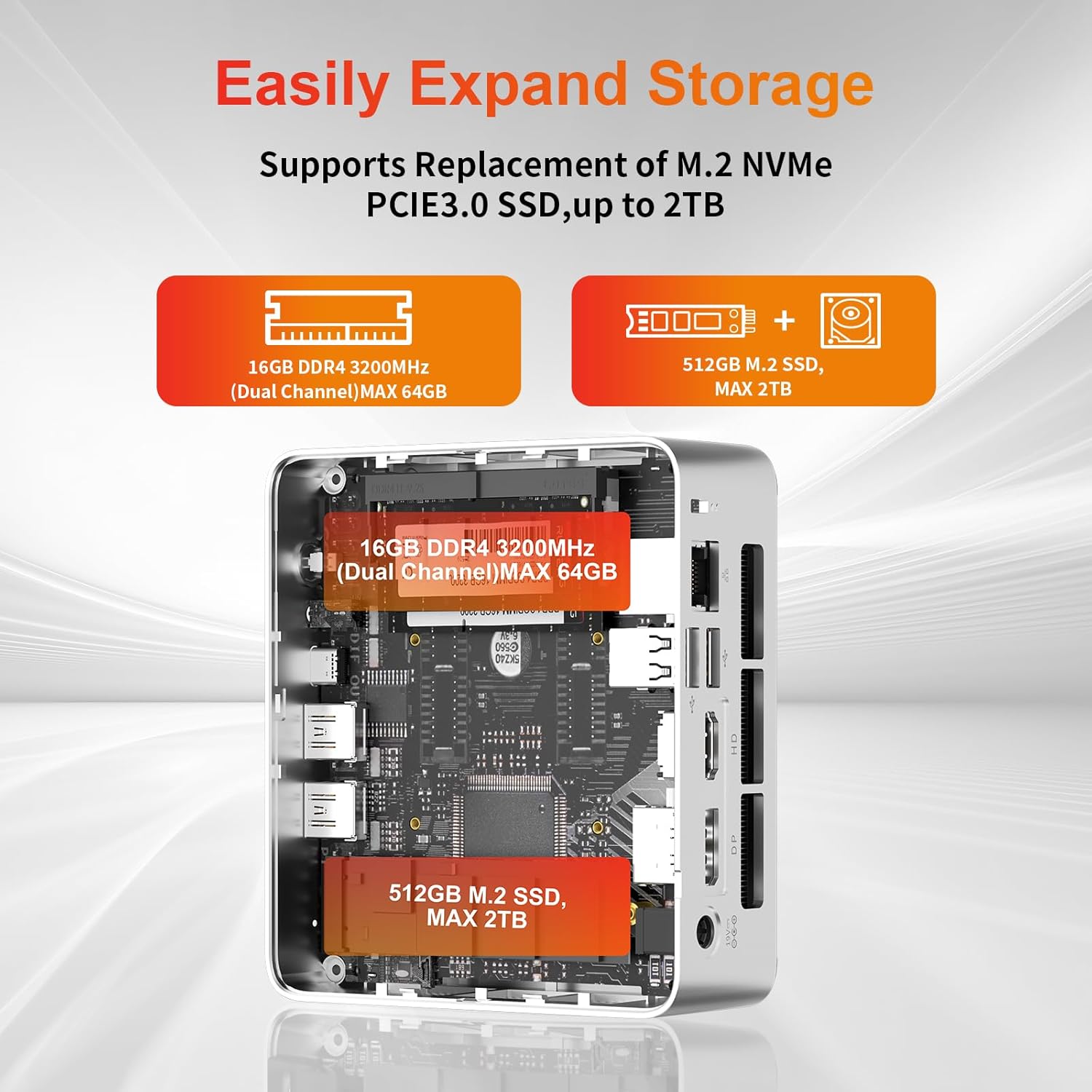
- Udvidelse af opbevaring: The Mini PC supports replacement of the M.2 NVMe PCIe 3.0 SSD up to 2TB. It also supports memory expansion up to 64GB DDR4.

Image: Diagram illustrating the internal components and options for expanding storage (M.2 SSD up to 2TB) and RAM (DDR4 up to 64GB).
- VESA montering: Use the included VESA mount bracket to attach the Mini PC to the back of a compatible monitor or to a wall mount, saving desk space.
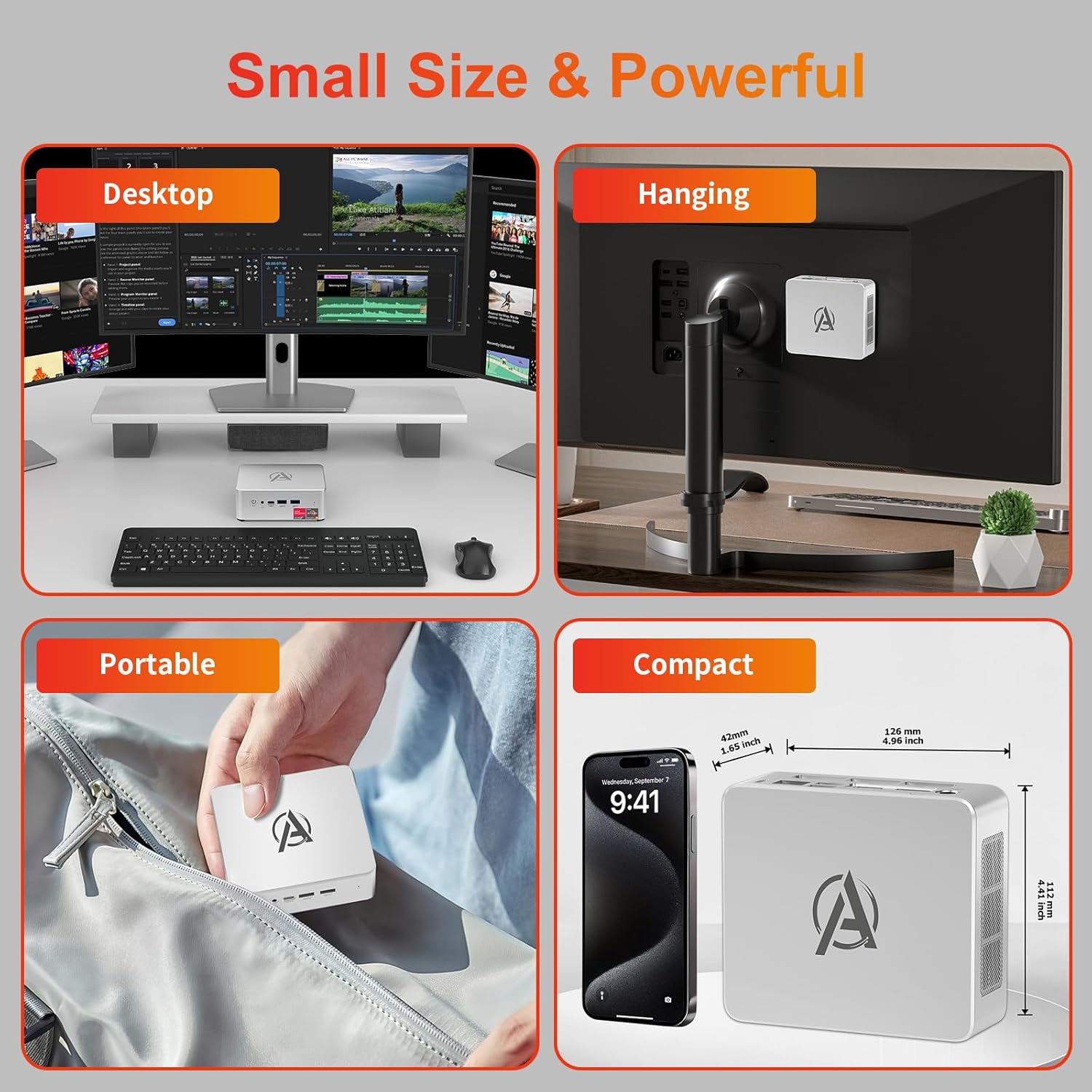
Image: Various usage scenarios for the Mini PC, including desktop, VESA-mounted behind a monitor, portable, and compact size comparison.
Opretholdelse
- Rensning: Use a soft, dry cloth to clean the exterior of the Mini PC. Do not use liquid cleaners or aerosols. Ensure ventilation openings are free from dust.
- Softwareopdateringer: Søg regelmæssigt efter og installer Windows-opdateringer og driveropdateringer for at sikre optimal ydeevne og sikkerhed.
- Varmestyring: Ensure the Mini PC is placed in a well-ventilated area. Avoid blocking the air vents. The intelligent cooling system is designed for low noise and efficient heat dissipation.

Image: Diagram illustrating the internal cooling fan and heat sink, showing airflow for efficient heat dissipation.
- Lagerstyring: Ryd jævnligt op med unødvendige ting files and applications to maintain system performance.
Fejlfinding
- Ingen strøm:
- Kontroller, om strømadapteren er korrekt tilsluttet både Mini PC'en og stikkontakten.
- Sørg for, at stikkontakten fungerer.
- Prøv en anden stikkontakt.
- Ingen visning:
- Verify that the HDMI/DP/USB-C cable is securely connected to both the Mini PC and the monitor.
- Sørg for, at skærmen er tændt og indstillet til den korrekte inputkilde.
- Prøv et andet skærmkabel eller en anden skærm, hvis det er muligt.
- Langsom ydeevne:
- Luk unødvendige programmer, der kører i baggrunden.
- Søg efter og installer eventuelle ventende Windows-opdateringer eller driveropdateringer.
- Sørg for, at der er tilstrækkelig ledig plads på SSD'en.
- Overvåg CPU- og RAM-forbrug i Jobliste for at identificere ressourcekrævende processer.
- Problemer med netværksforbindelse:
- For wired connections, ensure the Ethernet cable is properly connected and the router is working.
- For Wi-Fi, check if the Wi-Fi adapter is enabled and connected to the correct network. Restart your router/modem.
- System fryser/nedbryder:
- Genstart mini-pc'en.
- Sørg for, at systemet ikke overopheder (kontroller ventilationen).
- Run a system diagnostic or check Windows Event Viewer for error messages.
Specifikationer
| Model | AWOW BA7 Mini PC |
| Processor | AMD Ryzen 5 7430U (6 kerner, 12 tråde, op til 4.3 GHz) |
| Grafik | Integreret AMD Radeon-grafik |
| VÆDDER | 16 GB DDR4 (kan udvides op til 64 GB) |
| Opbevaring | 512GB PCIe 3.0 M.2 SSD (Expandable up to 2TB) |
| Operativsystem | Windows 11 Pro |
| Video output | DP1.2 (4K@60Hz), HDMI2.0 (4K@60Hz), USB-C (4K@60Hz) - Supports Triple Display |
| Forbindelse | WiFi 6, Bluetooth 5.2, 1000Mbps RJ45 LAN |
| Havne | 2x USB 3.2, 2x USB 2.0, 1x Type-C (Full Function), 1x DP1.2, 1x HDMI2.0, 1x RJ45 LAN, 1x 3.5mm Audio Jack, 1x DC IN |
| Dimensioner | 126 mm x 112 mm x 42 mm (ca. 4.96 x 4.41 x 1.65 tommer) |
| Vægt | 398g (kun enhed) Image: The Mini PC with its dimensions (126mm x 112mm x 42mm) and weight (398g) labeled. |
Garanti og support
AWOW provides comprehensive support for its products.
- Garanti: This product includes a 12-month service period from the date of purchase, covering manufacturing defects.
- Teknisk support: Lifetime technical support is available for all AWOW products.
- Kontakte: For technical assistance, warranty claims, or any product-related inquiries, please visit the official AWOW webwebsted eller kontakt deres kundeservice.

Image: AWOW brand message emphasizing fulfillment, lifetime technical support, and 12-month service.