
1. Introduktion
This manual provides detailed instructions for the proper setup, operation, and maintenance of your plplaaoo U20 Wired Barcode Scanner. Please read this manual thoroughly before using the device to ensure optimal performance and longevity. The U20 scanner is designed for efficient 1D and 2D barcode recognition in various environments, including retail, logistics, and inventory management.

Figure 1: plplaaoo U20 Barcode Scanner in a typical application setting.
2. Produktet er slutview
2.1 Nøglefunktioner
- Alsidig anvendelse: Suitable for shopping malls, supermarkets, pharmacies, hospitals, restaurants, and clothing stores.
- High Precision Scanning: Equipped with a red light scanning head, boasting an accuracy of 5 mil. Decodes fuzzy, twisted, screen, and reflective barcodes.
- Fast Decoding: High-performance decoder chip for rapid and accurate recognition of 1D and 2D barcodes.
- Ergonomisk design: Comfortable grip for extended use, reducing hand fatigue.
- Kompakt og bærbar: Lightweight design for easy carrying and use in various locations.
2.2 Komponenter
The plplaaoo U20 Wired Barcode Scanner package includes:
- 1 x plplaaoo U20 Wired Barcode Scanner Unit
- 1 x USB-forbindelseskabel
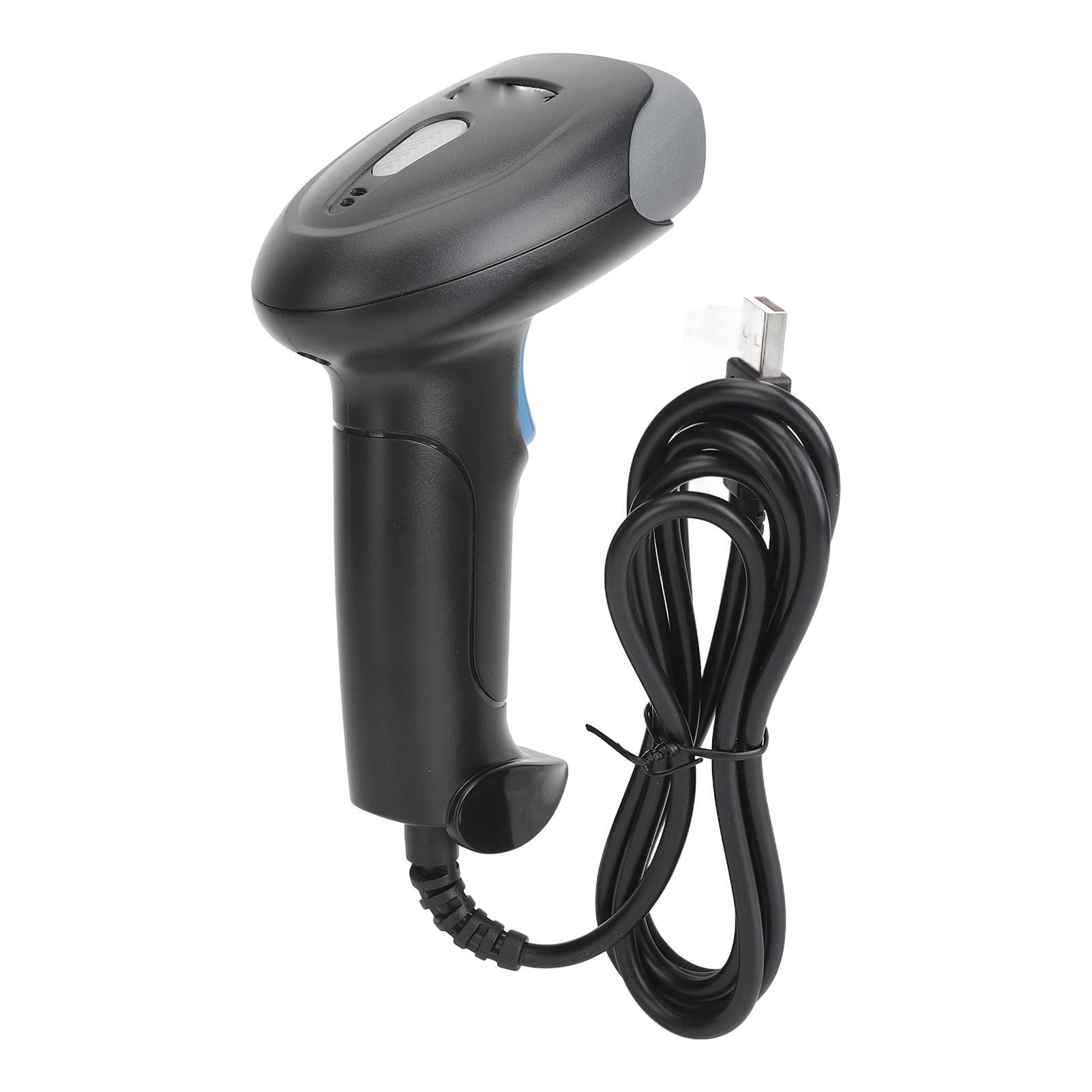
Figur 2: Forside view of the scanner, highlighting the red scanning light.

Figur 3: Side view of the scanner, showing the integrated USB cable.
3. Opsætning
Follow these steps to set up your plplaaoo U20 barcode scanner:
- Tilslut USB-kablet: Plug the USB connector of the scanner's cable into an available USB port on your computer or host device.
- Driver installation: The scanner is typically plug-and-play and does not require manual driver installation. Your operating system should automatically detect and install the necessary drivers.
- Bekræftelse: Once connected, the scanner will emit a short beep, indicating it is ready for use.
4. Betjeningsvejledning
To operate the plplaaoo U20 barcode scanner:
- Tænd: The scanner powers on automatically when connected to a USB port.
- Scanning a Barcode:
- Hold scanneren med scanningsvinduet vendt mod stregkoden.
- Press and hold the trigger button. A red scanning light will emit from the scanning window.
- Aim the red light beam across the entire barcode.
- Once successfully scanned, the scanner will emit a beep (Buzzer Alert) and the data will be transmitted to your host device.
- Automatisk dvale: The scanner features an automatic sleep function to conserve energy during periods of inactivity. It will reactivate upon pressing the trigger or detecting movement.

Figure 4: Demonstrating the scanning process on a digital barcode.

Figure 5: Visual representation of Buzzer Alert and Automatic Sleep features.
5. Vedligeholdelse
Korrekt vedligeholdelse sikrer scannerens levetid og optimale ydeevne.
- Rensning: Brug en blød, ren klud letampened with water or a mild cleaning solution to wipe the exterior of the scanner. Do not use abrasive cleaners or solvents. Ensure the scanning window is kept clean and free of dust or smudges for accurate reading.
- Opbevaring: Opbevar scanneren et køligt, tørt sted væk fra direkte sollys og ekstreme temperaturer.
- Kabelpleje: Undgå at bøje eller vride USB-kablet for meget for at forhindre indvendig skade.
6. Fejlfinding
Hvis du støder på problemer med din scanner, kan du se følgende almindelige problemer og løsninger:
| Problem | Mulig årsag | Løsning |
|---|---|---|
| Scanneren tænder ikke. | USB-kablet er ikke korrekt tilsluttet, eller USB-porten er defekt. | Ensure the USB cable is securely plugged into both the scanner and the host device. Try a different USB port. |
| Scanneren læser ikke stregkoder. | Stregkoden er beskadiget, scanningsvinduet er snavset, forkert sigtning eller stregkodetype, der ikke understøttes. | Clean the scanning window. Ensure the barcode is clear and undamaged. Aim the red light directly across the entire barcode. Verify the barcode type is supported (refer to Specifications). |
| Incorrect data is transmitted. | Partial scan or incorrect symbology settings. | Ensure a complete scan of the barcode. If issues persist, consult the manufacturer's website for advanced configuration guides. |
Hvis problemet fortsætter efter at have forsøgt disse løsninger, bedes du kontakte kundesupport.
7. Specifikationer
Detailed technical specifications for the plplaaoo U20 Wired Barcode Scanner:
- Model: U20
- Materiale: ABS
- Scanningsnøjagtighed: 5 MIL
- Decode Types (1D): EAN13, EAN 8, UPC A, UPC E0, UPC E1, Code128, Code39, Code93, Interleaved 2 of 5, Industrial 25, CodeBar, RSS 14, RSS Ltd, RSS Exp, Standard 2 of 5, for Plessey, for ChinaPost 25, for GS1 Composite, etc.
- Decode Types (2D): QR Code, PDF417, for Han Xin, Micro PDF417, Micro QRCode, MaxiCode, for Aztec Code, Code16K, etc.
- Varens vægt: 8.9 ounce (ca. 252 gram)
- Pakkedimensioner: 7.87 x 4.33 x 3.15 tommer (ca. 20 x 11 x 8 cm)
8. Garanti og support
For warranty information and customer support, please refer to the documentation provided with your purchase or contact the seller directly. You may also visit the official plplaaoo webwebstedet for yderligere assistance og produktinformation.
Fabrikant: plplaaoo