
Tiksounds Smart Watch
Tiksounds Smart Watch User Manual
Model: Smart Watch
Indledning
This manual provides detailed instructions for the setup, operation, and maintenance of your Tiksounds Smart Watch. Please read this manual thoroughly to ensure proper use and to maximize the features of your device.

Image: The Tiksounds Smart Watch, showcasing its main display with time, date, health metrics, and an incoming call interface.
Opsætningsvejledning
1. Opladning af enheden
Before initial use, fully charge your smart watch. Connect the provided charging cable to the watch's charging port and a USB power adapter. A full charge typically takes approximately 3.5 hours. The watch offers up to 20 days of typical usage and up to 85 days of standby time on a single charge.

Image: The smart watch being charged, highlighting its 1000mAh battery capacity and impressive battery life.
2. App Installation
To unlock all features and synchronize data, download and install the "FitCloudPro" application on your smartphone. The app is compatible with smartphones running Bluetooth 4.0, Android 7.0, iOS 9.0, or later versions.
3. Enhedsparring
- Sørg for, at Bluetooth er aktiveret på din smartphone.
- Open the "FitCloudPro" app.
- Follow the in-app instructions to search for and connect to your Tiksounds Smart Watch.
- Bekræft parringsanmodningen på både din smartphone og smarturet.
Betjeningsvejledning
Grundlæggende navigation
The smart watch features a 1.83-inch HD touchscreen for intuitive navigation. Swipe left, right, up, or down to access different functions and menus. Tap to select items.
Bluetooth Calls and Message Notifications
After successful pairing, you can make and answer calls directly from your watch using its built-in microphone. To receive message notifications from various applications, enable message reception within the "FitCloudPro" app settings. Notifications will be pushed to your watch with customizable vibration alerts.

Image: The smart watch demonstrating its Bluetooth calling capability and integration with popular messaging applications.
Customizing Watch Dials
Personalize your watch face by choosing from over 200 available screens within the "FitCloudPro" app. You can also create unique custom dials using your own photos.

Image: A selection of customizable watch faces available for the 1.83-inch HD touchscreen, including options for personal photos.
Sundhedssporing
The watch features a built-in optical sensor for continuous 24/7 monitoring of your stress levels, heart rate, and sleep quality. All data is synchronized with the "FitCloudPro" app, allowing you to view long-term health trends and receive personalized insights to support a healthier lifestyle.

Image: The smart watch and its companion app illustrating comprehensive health monitoring capabilities, including sleep, heart rate, blood oxygen, and blood pressure tracking.
Sportstilstande
The fitness tracker supports over 112 professional sport modes, covering a wide range of indoor and outdoor activities such as running, cycling, and soccer. High-precision sensors accurately track steps, distance, calories burned, and workout duration, helping you analyze performance and optimize training plans.

Image: The smart watch in use during a surfing activity, demonstrating its IP68 waterproof rating and multi-sport tracking features.
Yderligere funktioner
Your smart watch includes various practical functions to enhance daily convenience:
- Alarm: Indstil alarmer direkte fra uret eller appen.
- Stopur og timer: Til præcis tidtagning under aktiviteter.
- Phone Locator: Helps find your paired smartphone.
- Kamerastyring: Fjernstyr din smartphones kamera.
- Musik kontrol: Administrer musikafspilning på din smartphone.
- Vejrvisning: Få vejropdateringer i realtid.
- Åndedrætstræning: Guidede åndedrætsøvelser til afslapning.
- Kvinders sundhed: Tracking features specific to women's health.
- Stemmeassistent: Få adgang til din smartphones stemmeassistent.
- Sedentary Notification: Reminders to move after periods of inactivity.

Billede: En overview of the multi-functional capabilities of the smart watch, including various utility and health features.
Opretholdelse
Vandtæthed (IP68)
The Tiksounds Smart Watch is IP68 rated for water resistance. This means it is resistant to sweat, rain, and can be worn while washing hands or face. It is not recommended for swimming, showering with hot water, or diving. Prolonged exposure to water or high-pressure water jets should be avoided.
Rensning
To clean your smart watch, gently wipe the screen and strap with a soft, damp klud. Undgå at bruge skrappe kemikalier eller slibende materialer, da disse kan beskadige enheden. Sørg for, at opladningskontakterne er rene og tørre, før du oplader.
Fejlfinding
- Uret tænder ikke: Sørg for, at uret er fuldt opladet. Tilslut det til opladeren i mindst 30 minutter.
- Kan ikke parres med smartphone:
- Tjek om Bluetooth er aktiveret på din smartphone.
- Ensure the "FitCloudPro" app is installed and running.
- Sørg for, at uret er inden for din telefons Bluetooth-rækkevidde.
- Genstart både dit ur og din smartphone, og prøv derefter at parre igen.
- Ikke modtaget meddelelse:
- Verify that message reception is enabled in the "FitCloudPro" app settings.
- Tjek din smartphones notifikationsindstillinger for at sikre, at appen har tilladelse til at sende notifikationer.
- Sørg for, at uret er forbundet via Bluetooth.
- Unøjagtige sundhedsdata: Ensure the watch is worn snugly on your wrist, about one finger's width from your wrist bone. Avoid excessive movement during measurements.
Specifikationer
| Feature | Detalje |
|---|---|
| Model | Smart Watch |
| Skærmstørrelse | 1.83 tommer |
| Operativsystem | Android Wear 1.0 (Compatibility) |
| Forbindelsesteknologi | Bluetooth 4.0 |
| Batterikapacitet | 1000 mioamp Timer |
| Battericellesammensætning | Lithium Ion |
| Vandmodstandsvurdering | IP68 |
| Hukommelseslagringskapacitet | 1 GB |
| Speciel funktion | Activity Tracker, Heart Rate Monitor, Sleep Monitor, Call Function, Message Notifications |
| Form | Rektangulær |
| GPS | Ingen GPS |
| Strap Width Compatibility | 22 mm |
| Kompatibilitet med håndledsstørrelse | 6.5 til 9.5 tommer |
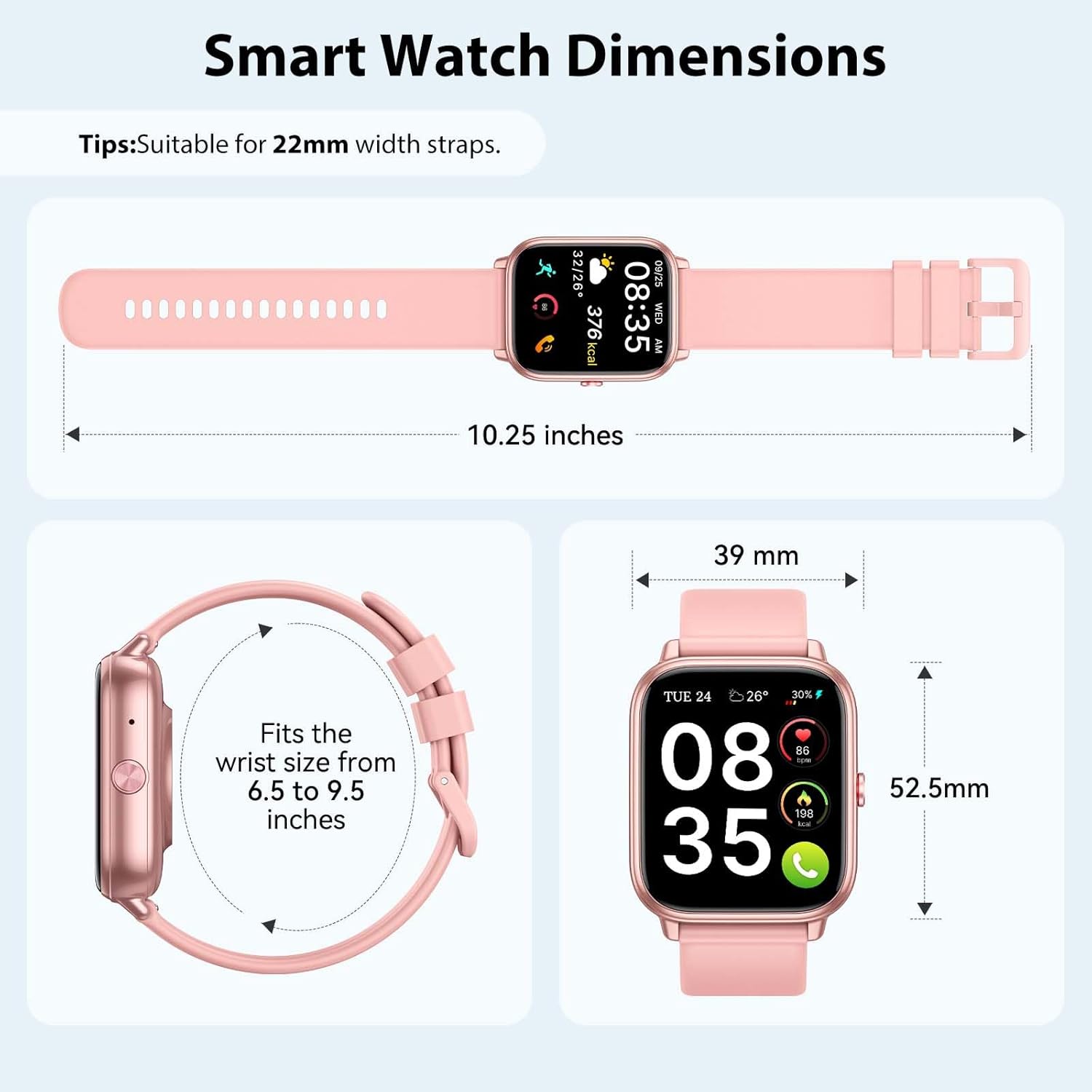
Image: Detailed dimensions of the smart watch, indicating strap width compatibility and suitable wrist sizes.
Garanti og support
For warranty information, technical support, or customer service inquiries, please refer to the official Tiksounds website or contact their customer support directly. Details are typically provided with your product packaging or on the manufacturer's official online resources.