
1. Introduktion
Thank you for choosing the New Bee Bluetooth Headset M54. This single-ear headset is designed for clear communication and comfortable wear, featuring advanced ENC environmental noise cancellation and CVC8.0 technology for superior call quality. With its long battery life and multi-device connectivity, it is an ideal companion for commuting, driving, office work, and business chats. Please read this manual carefully before use to ensure proper operation and to maximize your experience.
2. Pakkens indhold
Kontroller venligst pakkens indhold for at sikre, at alle varer er til stede:
- Bluetooth Headset x1
- Type-C ladekabel x1
- Eartips (S/M/L sizes) x3 pairs
- Oplader x1
- Brugsanvisning x1
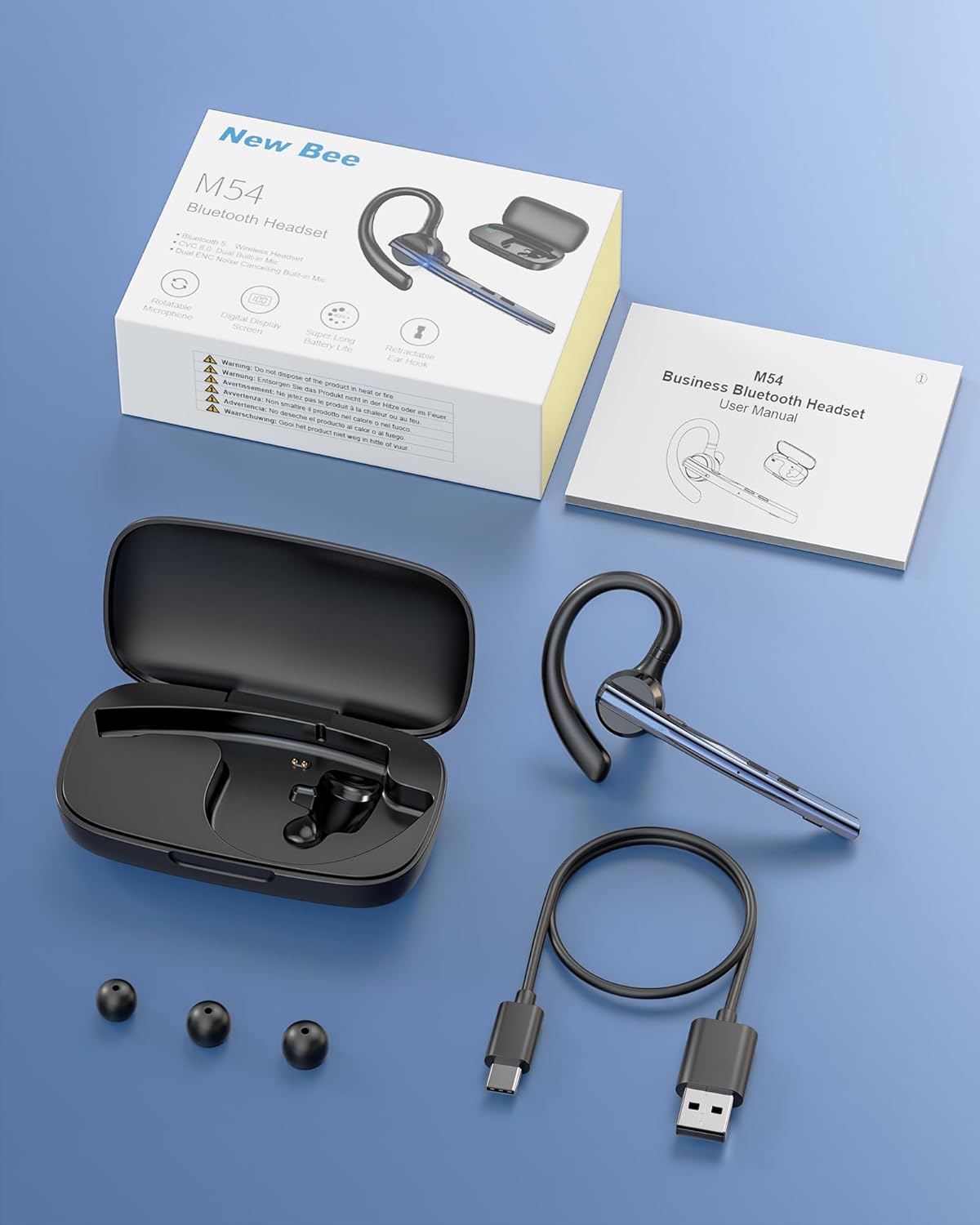
Image: Contents of the New Bee M54 Bluetooth Headset package.
3. Produktfunktioner
ENC Dual Microphone for Clear Calls
The headset features a dual microphone array with ENC (Environmental Noise Cancellation) and CVC8.0 technology. The main microphone accurately captures your voice, while the sub-microphone collects ambient noise. The main control chip processes this information to enhance call effects by effectively canceling environmental noise and echoes. Enjoy HIFI sound quality and 360° surround sound for an immersive audio experience.

Image: Man using the headset in a car, highlighting ENC noise cancellation for clear calls.
Flexible Rotation & Comfortable Fit
An innovative balanced ear hook design prevents the headset from falling off and evenly distributes its weight for comfortable wear. The pivot points use elastic soft rubber material, combined with an in-ear design, ensuring comfort even during prolonged use. The microphone arm can rotate 270°, the ear hook rotates 180°, and the earcup front can move 30° left/right. Three sizes of eartips (S/M/L) are included for a customized fit.

Image: Woman wearing the headset, showcasing its lightweight and adjustable features.
Ultralang batterilevetid
Equipped with a large-capacity charging case and a low-power consumption chip, the headset offers extended usage times. Enjoy up to 15 hours of music playback, 12 hours of talk time, and an impressive 6 months of standby time. The charging case provides 2-3 full charges for the headset, extending the total operating time to approximately 60 hours.

Image: Headset charging in its case, illustrating battery life and charging options.
Bluetooth 5.1 & Strong Compatibility
Featuring the latest QCC3020/Bluetooth 5.1 chip, the headset ensures low power consumption, fast transmission speed, and a stable, smooth signal. It offers a reliable connection distance of up to 15 meters, making it compatible with a wide range of devices including smartphones, tablets, laptops, and PCs.

Image: Man using the headset outdoors, showing the 15m Bluetooth range.
Multi-functional & Easy Operation
The headset includes a multi-function button and an independent mute button for convenient control. One-touch mic off protects your privacy. Double-click the mute button to activate your voice assistant. It supports simultaneous connection to two devices, allowing seamless switching between music and call functions. The unique ear hook design is freely extendable to fit various ear shapes, accommodating more users. It is suitable for diverse environments such as office work, driving, phone conferences, and delivery services.

Image: Headset connected to multiple devices, demonstrating dual device connectivity.
4. Opsætning
4.1 Charging the Headset and Charging Case
Oplad headsettet og opladningsetuiet helt inden første brug.
- Opladning af headsettet: Place the headset into the charging case. Ensure the charging contacts align. The indicator light on the headset will show charging status.
- Opladning af etuiet: Connect the provided Type-C USB cable to the charging port on the case and plug the other end into a USB power adapter (not included). The digital display on the case will show the battery percentage.
- A full charge for the headset takes approximately 1.5 hours. The charging case can fully charge the headset 2-3 times.
4.2 Tænd/sluk
- Tænd: Press and hold the Multi-function Button for 3 seconds until the indicator light flashes blue.
- Sluk: Press and hold the Multi-function Button for 5 seconds until the indicator light flashes red and then turns off.
4.3 Bluetooth -parring
- Sørg for, at headsettet er slukket.
- Press and hold the Multi-function Button for approximately 5-7 seconds until the indicator light flashes red and blue alternately, indicating pairing mode.
- Aktiver Bluetooth på din enhed (smartphone, tablet, pc), og søg efter tilgængelige enheder.
- Select "M54" from the list of found devices.
- Once connected, the headset indicator light will flash blue slowly.
4.4 Sådan bærer du headsettet
The M54 headset is designed for comfortable and secure wear on either ear.
- Choose the Right Eartip: Select the S, M, or L eartip that best fits your ear canal for optimal sound and comfort.
- Adjust the Ear Hook: Place the ear hook over your ear. The ear hook can rotate 180° to fit both left and right ears.
- Placer mikrofonen: Rotate the microphone arm up to 270° to position it towards your mouth for clear voice pickup. The earcup front can also be adjusted 30° left or right for fine-tuning.
- Ensure a snug fit without discomfort. An improper fit may affect call quality.

Image: Instructions for selecting eartips and wearing the headset.
5. Betjeningsvejledning
5.1 Knapfunktioner ovenforview

Image: Detailed diagram of headset buttons and their functions.
5.2 Opkaldshåndtering
- Besvar/afslut opkald: Single click the Multi-function Button.
- Afvis opkald: Tryk og hold multifunktionsknappen nede i 2 sekunder.
- Genopkald sidste nummer: Double click the Multi-function Button.
- Slå mikrofon til/fra: Single click the Mute Button.
5.3 Musikafspilning
- Afspil/pause: Single click the Multi-function Button.
- Næste nummer: Tryk og hold lydstyrke op-knappen nede i 3 sekunder.
- Forrige nummer: Tryk og hold lydstyrke ned-knappen nede i 3 sekunder.
5.4 Lydstyrkekontrol
- Lydstyrke op: Klik én gang på knappen Lydstyrke op.
- Skrue ned for lyden: Klik én gang på knappen Lydstyrke ned.
5.5 Stemmeassistent (SIRI)
- Aktiver stemmeassistent: Double click the Mute Button.
5.6 Flerpunktsforbindelse
The M54 headset can connect to two Bluetooth devices simultaneously.
- Par headsettet med den første enhed som beskrevet i afsnit 4.3.
- Deaktiver Bluetooth på den første enhed. Headsettet vil gå i parringstilstand igen.
- Par headsettet med den anden enhed.
- Enable Bluetooth on the first device. The headset should automatically connect to both devices.
- You can now seamlessly switch between audio and calls from either connected device.
6. Vedligeholdelse
Korrekt vedligeholdelse sikrer dit headsets lange levetid og optimale ydeevne.
- Rensning: Use a soft, dry cloth to clean the headset and charging case. Do not use harsh chemicals or abrasive materials. Regularly clean the eartips and charging contacts to prevent debris buildup.
- Opbevaring: Store the headset in its charging case when not in use to protect it from dust and damage. Avoid storing in extreme temperatures or high humidity.
- Batteripleje: To preserve battery life, avoid fully discharging the battery frequently. Charge the headset regularly, even if not used for extended periods.
- Vandeksponering: Headsettet er ikke vandtæt. Undgå udsættelse for vand, regn eller overdreven fugt.
7. Fejlfinding
Hvis du støder på problemer, henvises der til følgende almindelige problemer og løsninger:
| Problem | Mulig årsag | Løsning |
|---|---|---|
| Kan ikke tænde | Lavt batteri | Oplad headsettet og opladningsetuiet helt. |
| Kan ikke parres med enheden | Headsettet er ikke i parringstilstand; Bluetooth er slået fra på enheden; Enheden er for langt væk. | Ensure headset is in pairing mode (flashing red/blue). Turn on Bluetooth on your device. Move device closer to headset (within 15m). Try restarting both devices. |
| Ingen lyd eller lav lydstyrke | Volume too low; Headset not connected; Incorrect audio output selected. | Increase volume on both headset and connected device. Reconnect the headset. Check audio output settings on your device. |
| Dårlig opkaldskvalitet | Weak signal; Microphone obstructed; Improper fit. | Move closer to the connected device. Ensure microphone is clear and positioned correctly. Adjust headset fit and eartip size. |
| Headsettet afbrydes ofte | Uden for rækkevidde; Interferens; Lavt batteri. | Stay within 15m of the connected device. Avoid strong electromagnetic interference. Charge the headset. |
Hvis problemet fortsætter efter at have prøvet disse løsninger, bedes du kontakte kundesupport.
8. Specifikationer
| Mærke | Ny bi |
| Model | M54 |
| Farve | Blå |
| Bluetooth version | 5.1 (QCC3020 Chip) |
| Støjkontrol | ENC Environmental Noise Cancellation, CVC8.0 Echo Cancellation |
| Transmissionsafstand | Op til 15 meter |
| Musik afspilningstid | Ca. 15 timer |
| Taletid | Ca. 12 timer |
| Standby tid | Ca. 6 måneder |
| Total Operating Time (with case) | Ca. 60 timer |
| Opladningstid | Approx. 1.5 hours (headset) |
| Vægt | Ca. 14.2 g |
| Oprindelse | Kina |
9. Garanti og support
9.1 Garantioplysninger
The New Bee Bluetooth Headset M54 comes with a 1 års producentgaranti fra købsdatoen. Denne garanti dækker fabrikationsfejl og funktionsfejl ved normal brug. Den dækker ikke skader forårsaget af misbrug, ulykker, uautoriserede ændringer eller normal slitage.
9.2 Kundesupport
If you have any questions, require technical assistance, or need to claim warranty service, please contact New Bee customer support through the retailer where you purchased the product or visit the official New Bee website for contact information. Please have your purchase receipt and product model number (M54) ready when contacting support.